
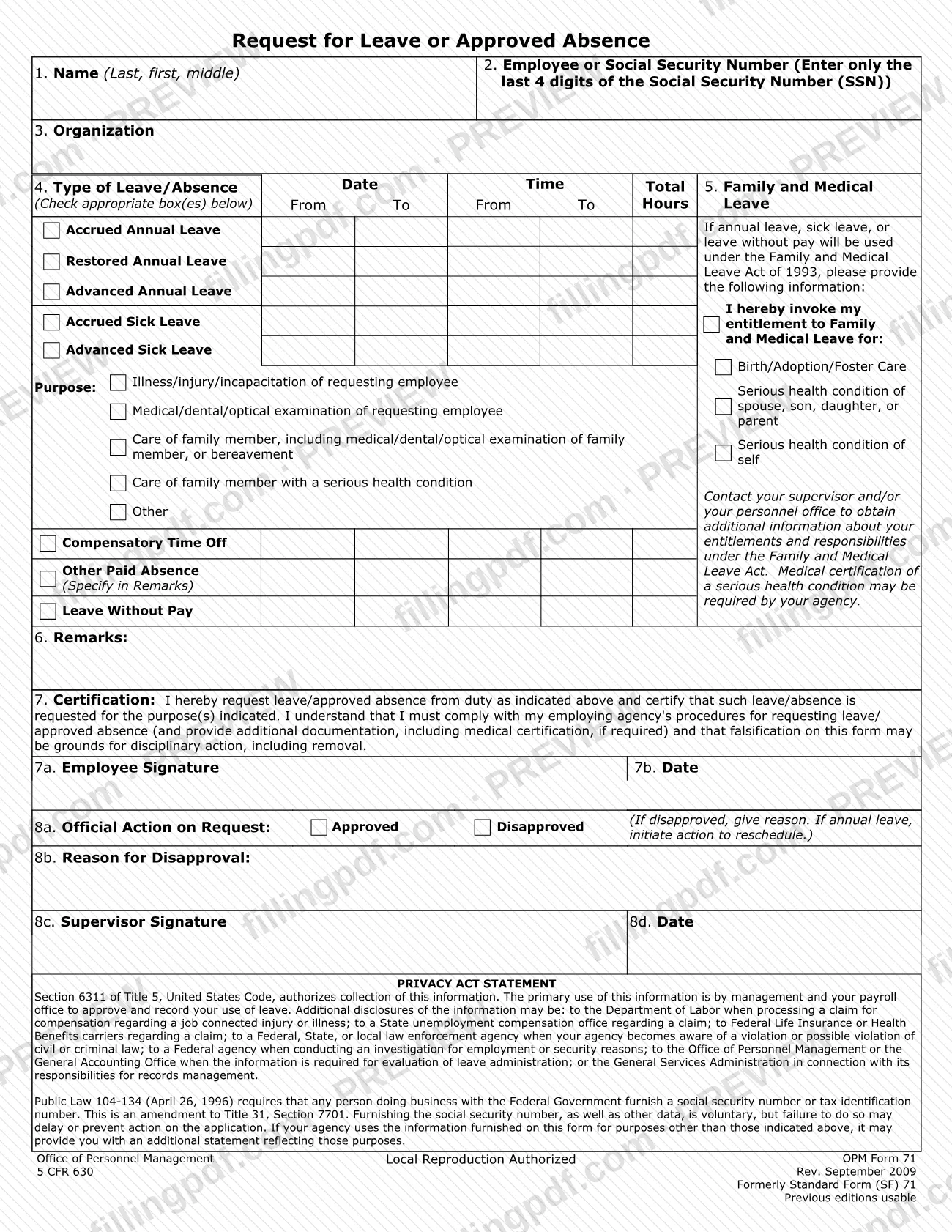
OPM 71, Request for Leave or Approved Absence, is the Office of Personnel Management (OPM) form an employee uses to ask a supervisor for annual leave, sick leave, compensatory time off, leave without pay or another approved absence. It was formerly Standard Form (SF) 71 and is issued under 5 CFR 630. On FillingPDF you can fill out the form online and download or print the completed PDF; the official PDF is published by OPM, and your employing agency decides how the request is handled.
Last updated
What is OPM 71?
OPM Form 71, Request for Leave or Approved Absence, is the Office of Personnel Management form on which an employee requests leave or an approved absence from duty and a supervisor records the decision. It carries the reference 5 CFR 630 and was formerly Standard Form (SF) 71.
The form has two halves. The employee completes items 1 through 7: name, employee number or the last 4 digits of the Social Security number (SSN), organization, the type of leave or absence with dates, times and total hours, an optional Family and Medical Leave block, remarks, and a signed certification. The supervisor completes item 8, the official action on the request, by marking Approved or Disapproved, giving a reason for disapproval and signing.
Item 4 lists the types of leave and absence: accrued, restored or advanced annual leave; accrued or advanced sick leave; compensatory time off; other paid absence (specified in Remarks); and leave without pay. Sick leave is tied to a stated purpose, such as illness or injury of the employee, a medical, dental or optical examination, or care of a family member.
The Privacy Act statement on the form cites Section 6311 of Title 5, United States Code, as the authority for collecting the information, which management and the payroll office use to approve and record leave. The form prints "Local Reproduction Authorized" and "Previous editions usable."
Who needs to file OPM 71?
An employee who wants leave or an approved absence from duty uses OPM 71 to make the request, when the employing agency uses this form for leave requests. The certification in item 7 says the employee must comply with the employing agency's procedures for requesting leave or approved absence, so your agency's rules decide when the form is required.
Specific groups the form addresses:
- Employees requesting annual leave, sick leave, compensatory time off, other paid absence or leave without pay.
- Employees who will use annual leave, sick leave or leave without pay under the Family and Medical Leave Act of 1993; they complete item 5 and mark the reason: birth, adoption or foster care, a serious health condition of a spouse, son, daughter or parent, or their own serious health condition.
- Supervisors, who complete item 8 by approving or disapproving the request, giving a reason if disapproved, and signing.
The form does not say that anyone other than the employee may sign item 7. It asks only for the last 4 digits of the SSN in item 2, not the full number. For questions about your Family and Medical Leave entitlements and responsibilities, the form tells you to contact your supervisor or personnel office.
When to file OPM 71
Complete OPM 71 when you need to request leave or an approved absence from duty. The form sets no deadline of its own: it says you must comply with your employing agency's procedures for requesting leave or approved absence, so any advance-notice rule comes from your agency.
If you plan to use annual leave, sick leave or leave without pay under the Family and Medical Leave Act of 1993, fill in item 5 on the same request. Your agency may require additional documentation, including medical certification of a serious health condition, and the form tells you to contact your supervisor or personnel office for details.
If the supervisor disapproves a request for annual leave, item 8a says action should be started to reschedule it, and the reason for disapproval goes in item 8b.
Documents you need
- Additional documentation your employing agency requires with a leave request, including medical certification of a serious health condition when the agency asks for it.
How to fill out OPM 71
Enter your name
In item 1, write your name in the order the form shows: last, first, middle.
Give your employee number or SSN digits
In item 2, enter your employee number or only the last 4 digits of your Social Security number (SSN).
Enter your organization
In item 3, write the organization where you work.
Check the type of leave
In item 4, check each box that applies: accrued, restored or advanced annual leave, accrued or advanced sick leave, compensatory time off, other paid absence or leave without pay. For sick leave, also check the purpose that fits, such as illness, injury or incapacitation, an examination, or care of a family member.
Enter dates, times and total hours
Next to each type of leave you check in item 4, fill in the dates (From, To), the times (From, To) and the total hours requested.
Complete the Family and Medical Leave block
If you will use annual leave, sick leave or leave without pay under the Family and Medical Leave Act of 1993, complete item 5 and mark the entitlement you invoke: birth, adoption or foster care; serious health condition of a spouse, son, daughter or parent; or your own serious health condition.
Add remarks
In item 6, Remarks, explain anything the request needs, and specify the absence if you checked Other Paid Absence.
Sign and date the certification
Read the item 7 certification, then sign in item 7a and enter the date in item 7b.
Leave the official action to your supervisor
Items 8a through 8d are for the supervisor: Approved or Disapproved, the reason for disapproval, signature and date.
Review and download the completed PDF
Check names, dates, hours and checked boxes, then download or print the completed PDF from FillingPDF and pass it to your supervisor following your agency's procedures.
How to submit OPM 71
OPM 71 is not sent to OPM. The certification in item 7 says you must follow your employing agency's procedures for requesting leave or approved absence, and the form prints no mailing address, portal or e-mail channel of its own.
- To your supervisor: sign and date items 7a and 7b, then give the form to the supervisor who completes item 8, Official Action on Request (approved or disapproved, reason for disapproval, signature and date).
- Through your agency's process: use whatever channel your agency sets for leave requests. The Privacy Act statement says management and your payroll office use the information to approve and record your use of leave.
- Additional documentation: attach any documentation your agency asks for, including medical certification, if required.
Ask your supervisor or personnel office which channel your agency uses. FillingPDF lets you fill out and download the PDF; submission follows your agency's channels described above.
Common mistakes to avoid
- Entering your full Social Security number in item 2; the form asks only for the last 4 digits if you use the SSN instead of an employee number.
- Requesting leave under the Family and Medical Leave Act of 1993 without completing item 5 and marking the reason that applies.
- Marking Other Paid Absence without specifying the absence in item 6, Remarks, as the form directs.
- Submitting the form without signing and dating items 7a and 7b, so the certification is incomplete.
- Giving inaccurate information; item 7 warns that falsification on the form may be grounds for disciplinary action, including removal.
- Ignoring your agency's leave procedures and any medical certification it requires; item 7 says you must comply with them.
- Completing item 8 yourself; the official action, reason for disapproval, supervisor signature and date are for the supervisor.
- Leaving the reason for disapproval blank when a request is disapproved; item 8a says to give one.
Frequently asked questions
What is OPM 71 used for?
OPM 71 is the Request for Leave or Approved Absence. An employee uses it to ask for annual leave, sick leave, compensatory time off, other paid absence or leave without pay, and a supervisor records approval or disapproval in item 8.
Is OPM 71 the same as SF 71?
OPM 71 was formerly Standard Form (SF) 71. The form is marked "Formerly Standard Form (SF) 71" and "Previous editions usable," and the revision printed on this version is Rev. September 2009.
Can I fill out OPM 71 online?
Yes. You can fill out the fillable PDF online on FillingPDF and download or print it. FillingPDF is an independent service and does not submit the form; you give it to your supervisor following your agency's procedures.
Do I have to enter my full Social Security number on OPM 71?
No. Item 2 asks for your employee number or only the last 4 digits of your SSN. The Privacy Act statement adds that furnishing the SSN and other data is voluntary, but failure to do so may delay or prevent action.
How do I request Family and Medical Leave on OPM 71?
Complete item 5 when you use annual leave, sick leave or leave without pay under the Family and Medical Leave Act of 1993, and mark the reason. Your agency may require medical certification; contact your supervisor or personnel office.
Who signs OPM 71?
You sign and date items 7a and 7b to certify the request. Your supervisor signs and dates items 8c and 8d after marking the request Approved or Disapproved in item 8a.
What happens if my OPM 71 request is disapproved?
The supervisor marks Disapproved in item 8a and gives the reason in item 8b. If the request was for annual leave, the form says to initiate action to reschedule it.
Where do I send OPM 71?
The form names no address or portal. Item 7 says to follow your employing agency's procedures for requesting leave, so give the completed form to your supervisor or the office your agency designates.
Ready to fill out OPM 71?
Fill out OPM 71 now