
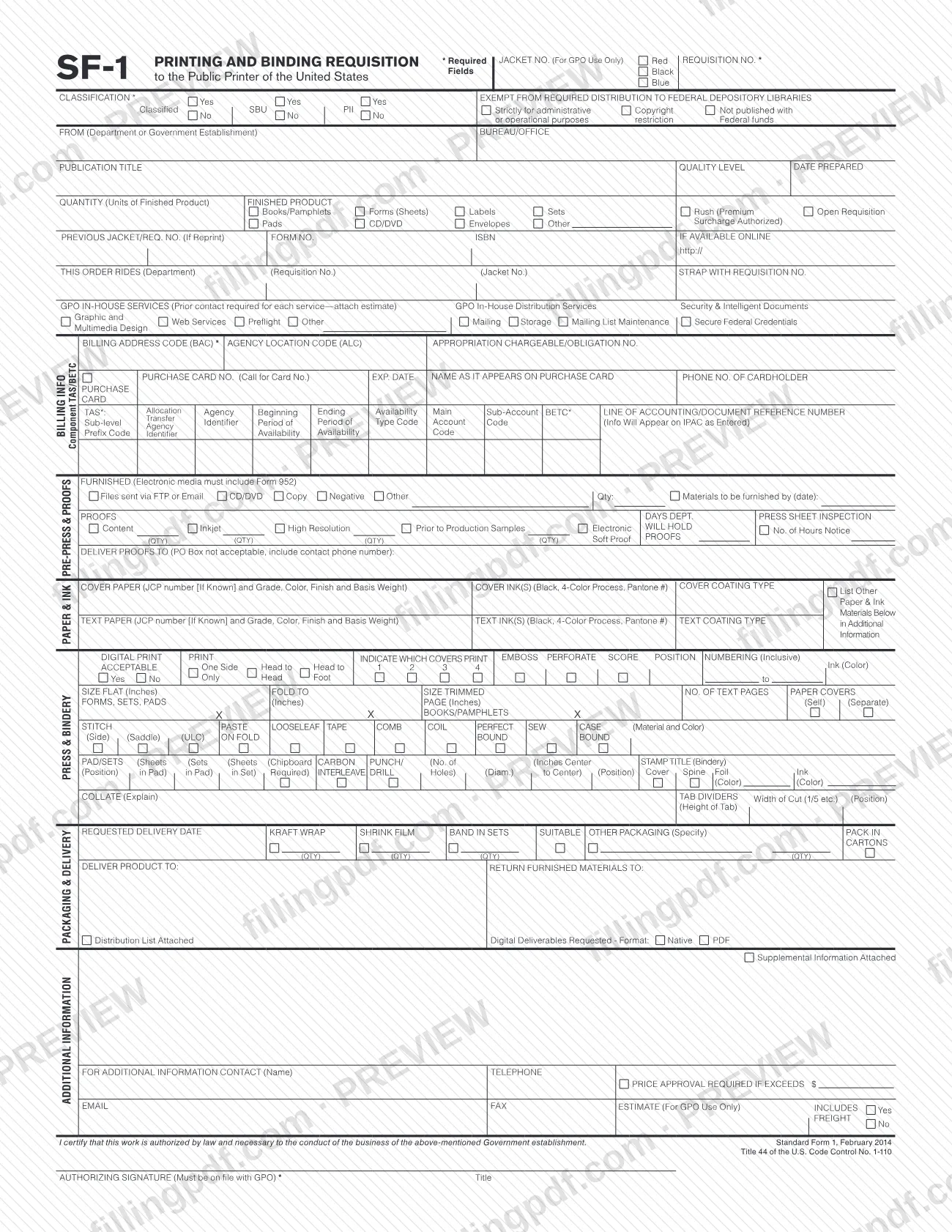
The SF1 is Standard Form 1, the Printing and Binding Requisition to the Public Printer of the United States, a form published on the GSA forms site and issued under Title 44 of the U.S. Code. A Government department or establishment uses it to describe a printing and binding job: the product, paper and ink, bindery, packaging, delivery and billing. On this page you can fill out SF-1 online on FillingPDF and download or print the completed PDF; the original PDF is published by GSA at gsa.gov.
Last updated
What is SF 1?
Standard Form 1 (SF-1), Printing and Binding Requisition to the Public Printer of the United States, is the form a Government department or establishment completes to order printing and binding work, specifying the product, materials, finishing, delivery and how the job will be paid for.
The form is printed as Standard Form 1, February 2014, under Title 44 of the U.S. Code, Control No. 1-110. Its certification states that the work is authorized by law and necessary to the conduct of the business of the Government establishment named on the form.
Page 1 is organized in blocks: identification and classification of the job, the finished product and quantity, GPO in-house services, billing information (including a purchase card section and Treasury Account Symbol and Business Event Type Code entries), furnished materials, pre-press and proofs, paper and ink, press and bindery, and packaging and delivery. Page 2 is a Supplemental Instructions page that repeats the requisition number, title, billing address code and an additional information area.
Some boxes are for GPO only: the Jacket No. and the Estimate block are marked "For GPO Use Only". Electronic media sent with a job must include Form 952, and a job that uses GPO in-house services needs an estimate attached.
Who needs to file SF 1?
The SF-1 is for a Government department or establishment that needs printing or binding work done through the Public Printer of the United States. The form asks for the department or establishment and the bureau or office, so it is completed on behalf of the organization ordering the work.
- The person who signs under AUTHORIZING SIGNATURE certifies that the work is authorized by law and necessary to the business of the establishment. The form says this signature must be on file with GPO.
- Offices ordering GPO in-house services (such as design, preflight, mailing, storage or secure credentials) complete the in-house services block and must contact GPO first for each service.
- Offices paying with a purchase card complete the purchase card block; others give the billing address code, agency location code and accounting information.
The form gives no instructions for individuals or private businesses and sets no further eligibility rules. For questions about who may order, contact GPO or your own agency.
When to file SF 1
Complete an SF-1 when your department or establishment needs a printing or binding job placed with the Public Printer. The form prints no filing deadline of its own.
Timing appears inside the job itself. Enter the REQUESTED DELIVERY DATE under Packaging & Delivery, and the date by which you will furnish materials if you supply any. The finished-product block has a Rush (Premium Surcharge Authorized) box for jobs that need faster handling, and the proof section asks for the number of days proofs may be held and the hours of notice for a press sheet inspection. Plan these dates before you complete the form.
Documents you need
- Form 952, only when electronic media (files sent by FTP or email, CD/DVD) is furnished for the job; the form states electronic media must include it.
- An estimate for each GPO in-house service you request, attached to the requisition; the form says prior contact is required for each service.
- A distribution list, only if you tick Distribution List Attached for the delivery.
- Supplemental information, only if you tick Supplemental Information Attached; page 2 of the form provides space for additional information.
How to fill out SF 1
Identify the job and classification
Enter the REQUISITION NO. (required) and choose the CLASSIFICATION options. Leave JACKET NO. blank, since it is for GPO use only, and answer the Yes/No box on exemption from required distribution to Federal Depository Libraries.
Enter agency and publication details
Fill in FROM (Department or Government Establishment), BUREAU/OFFICE, PUBLICATION TITLE, QUALITY LEVEL and DATE PREPARED.
Describe quantity and finished product
Enter the QUANTITY (Units of Finished Product) and tick the finished product type, such as Books/Pamphlets, Forms (Sheets), Labels, Sets, Pads, CD/DVD, Envelopes or Other. Tick Rush or Open Requisition if they apply.
Add reprint and reference data
If this is a reprint, give the PREVIOUS JACKET/REQ. NO. Add the FORM NO., ISBN and the online address if available, and complete the THIS ORDER RIDES and STRAP WITH REQUISITION NO. lines when they apply.
Select GPO in-house services
Tick any in-house service you need, such as Graphic and Multimedia Design, Preflight, Mailing, Storage or Secure Federal Credentials. Contact GPO first for each service and attach the estimate.
Complete the billing information
Enter the BILLING ADDRESS CODE (BAC) (required) and, as applicable, the Agency Location Code and appropriation or obligation number. Complete the TAS and BETC entries and the line of accounting, or the purchase card block if paying by card.
Specify furnished materials and proofs
Under Furnished, mark how materials will be supplied and the date they will be furnished; electronic media must include Form 952. In the proofs section give quantities, hold days and the DELIVER PROOFS TO address, with a phone number and no PO Box.
List paper and ink
Enter the cover paper, cover ink(s) and coating, then the text paper, text ink(s) and coating. Put any other materials in Additional Information.
Set press and bindery requirements
Give the flat and trimmed sizes, number of text pages and the binding method, along with any numbering, collating, punching, tabs or stamping that applies.
Enter packaging and delivery
Enter the REQUESTED DELIVERY DATE, packaging options, DELIVER PRODUCT TO and RETURN FURNISHED MATERIALS TO. Tick the distribution list, digital deliverables or supplemental information boxes if you attach them.
Add contact and price approval
Fill in ADDITIONAL INFORMATION, the contact name, telephone, email and fax, and the PRICE APPROVAL REQUIRED IF EXCEEDS $ line and freight choice if you use them. Leave the estimate block to GPO.
Sign, review and download
Add the AUTHORIZING SIGNATURE and title; the signature must be on file with GPO. Check every asterisked field, then download or print the completed PDF from FillingPDF.
How to submit SF 1
The SF-1 form does not print a mailing address, portal or appointment rule. It is addressed "to the Public Printer of the United States", and several boxes are for GPO use, so the requisition goes to GPO through the channel your agency and GPO use for printing orders; confirm that channel with GPO before you send it.
What the package needs, according to the form:
- Signature: the authorizing signature must be on file with GPO.
- Form 952: electronic media furnished for the job must include Form 952.
- Estimate: GPO in-house services require prior contact for each service, and an estimate must be attached.
- Attachments: tick Distribution List Attached or Supplemental Information Attached when you include them. Use page 2 for extra detail.
- Proofs: give a delivery address and contact phone number; a PO Box is not acceptable.
FillingPDF lets you fill out and download the PDF; submission follows the agency's own channels.
Common mistakes to avoid
- Leaving an asterisked field blank: Requisition No., Classification, Billing Address Code (BAC), TAS, BETC and the Authorizing Signature are marked as required.
- Writing in the JACKET NO. or the ESTIMATE block, which the form marks as for GPO use only.
- Sending electronic media without Form 952, which the form says must accompany it.
- Requesting GPO in-house services without prior contact and an attached estimate for each service.
- Giving a PO Box as the address for DELIVER PROOFS TO; the form says a PO Box is not acceptable and a contact phone number must be included.
- Submitting the requisition with an authorizing signature that is not on file with GPO.
- Ticking Distribution List Attached or Supplemental Information Attached and then not including those pages.
- Overlooking the Classification and federal depository library exemption boxes, which are Yes/No choices.
Frequently asked questions
What is the SF1 form?
The SF1 is Standard Form 1, the Printing and Binding Requisition to the Public Printer of the United States. A Government department or establishment completes it to order a printing or binding job, giving the product, materials, delivery and billing details.
Who signs the SF-1?
The authorizing signature at the bottom certifies that the work is authorized by law and necessary to the business of the Government establishment. The form states that this signature must be on file with GPO, and it also asks for the signer's title.
Can I fill out SF-1 online?
Yes. You can fill out the fillable PDF online on FillingPDF and download or print it. FillingPDF is an independent service and does not send the requisition to GPO; it reaches the agency only through the channels you and GPO use for printing orders.
Which fields on the SF-1 are required?
The form marks with an asterisk the Requisition No., Classification, Billing Address Code (BAC), TAS, BETC and the Authorizing Signature. The Jacket No. and the Estimate block are for GPO use only and are left blank.
Do I need Form 952 with the SF-1?
Only when you furnish electronic media for the job. The form states that electronic media must include Form 952, whether the files are sent by FTP or email or on a CD/DVD.
Can I send proofs to a PO Box?
No. The DELIVER PROOFS TO line says a PO Box is not acceptable and asks you to include a contact phone number, so give a street delivery address.
Do GPO in-house services need anything extra?
Yes. The form says prior contact is required for each GPO in-house service and that you must attach an estimate. The services listed include design, preflight, mailing, storage, list maintenance and secure federal credentials.
Where do I send the SF-1?
The form is addressed to the Public Printer of the United States but prints no mailing address or portal. Confirm the submission channel with GPO before sending, and make sure your authorizing signature is already on file with GPO.
Ready to fill out SF 1?
Fill out SF 1 now