
The SF 180 form, Standard Form 180, Request Pertaining to Military Records, is the form prescribed by the National Archives and Records Administration (NARA) for requesting information from military records, such as a DD Form 214, the Official Military Personnel File (OMPF) or medical records. Veterans, service members, next of kin and other authorized requesters use it, and the mailing address depends on the branch and the date of separation. On this page you can fill out the form online on FillingPDF and download or print the completed PDF; the form and its instructions are published by NARA.
Last updated
What is SF 180?
Standard Form 180, Request Pertaining to Military Records (SF 180), is the form used to request information from military records. The identifying details it collects let the records custodian locate an individual's record of military service.
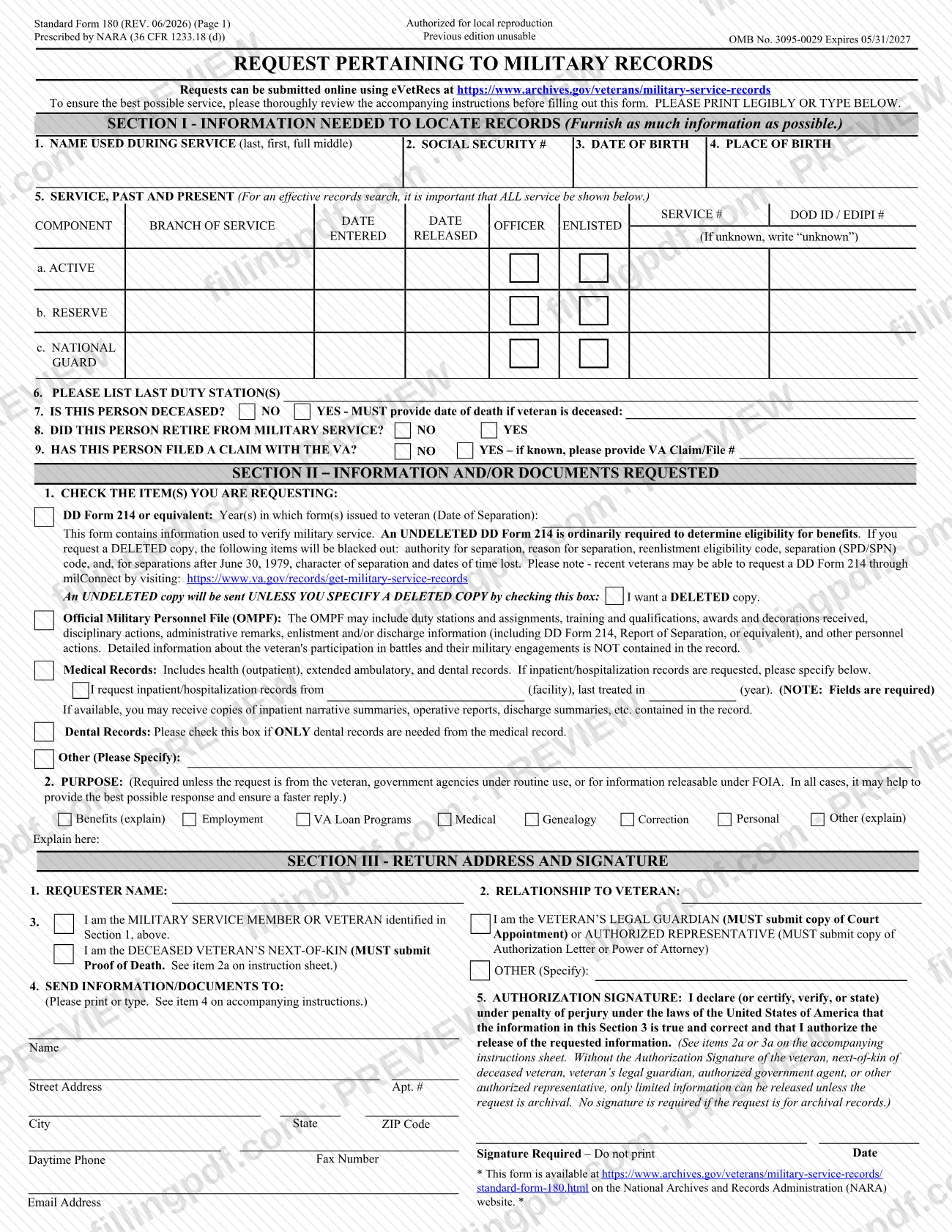
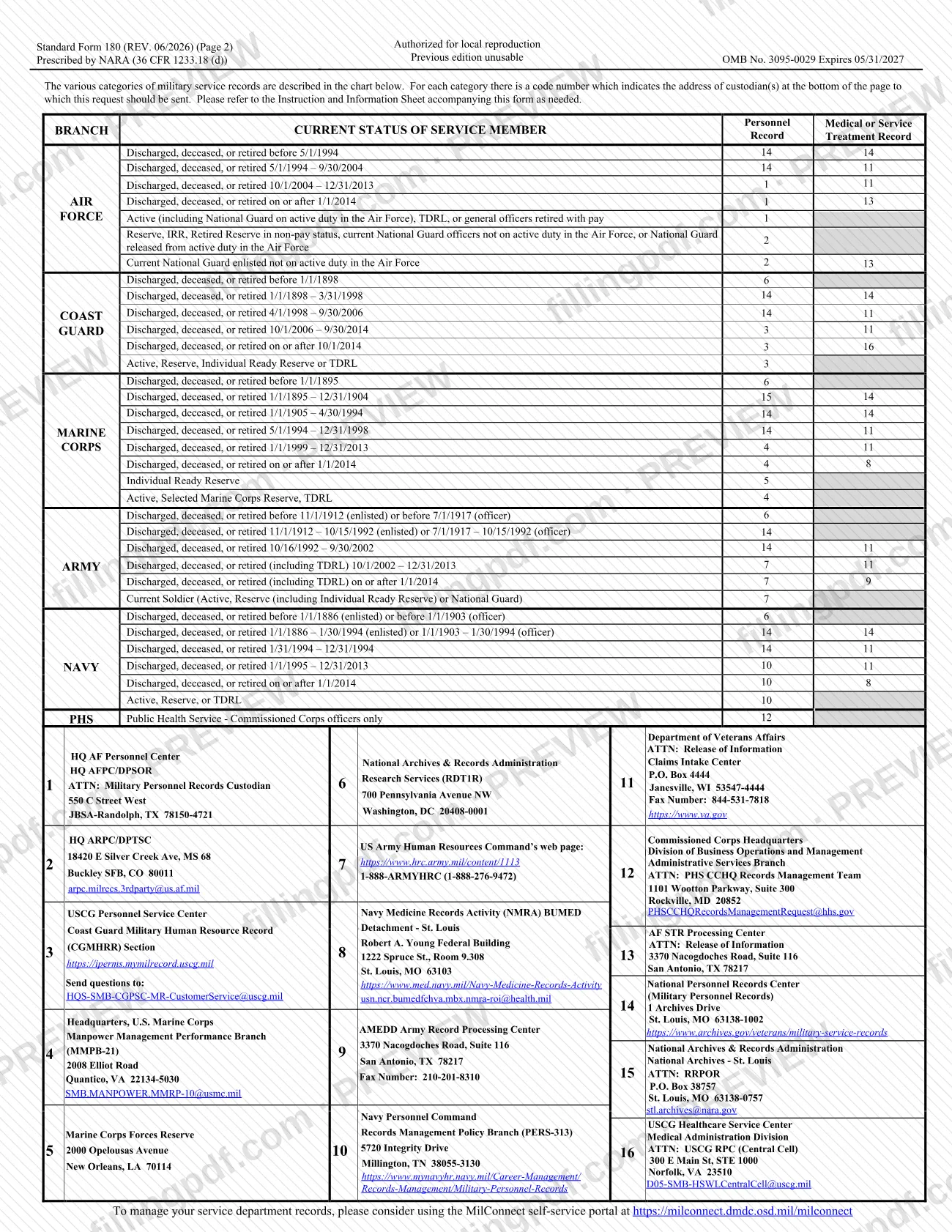
The form has three sections: Section I, information needed to locate records; Section II, information and/or documents requested; and Section III, return address and signature. Page 2 holds a chart of record categories by branch and status, with a code number for each custodian's address. The form is prescribed by NARA (36 CFR 1233.18 (d)) and carries OMB No. 3095-0029.
What you can request in Section II:
- DD Form 214 or equivalent, which verifies military service. An undeleted copy is sent unless you check the box for a deleted copy.
- Official Military Personnel File (OMPF), which may include duty stations, training, awards, disciplinary actions and discharge information. It does not contain detailed information about battles and engagements.
- Medical records, meaning health (outpatient), extended ambulatory and dental records, with a separate line for inpatient or hospitalization records and a box for dental records only.
- Other items, which you specify.
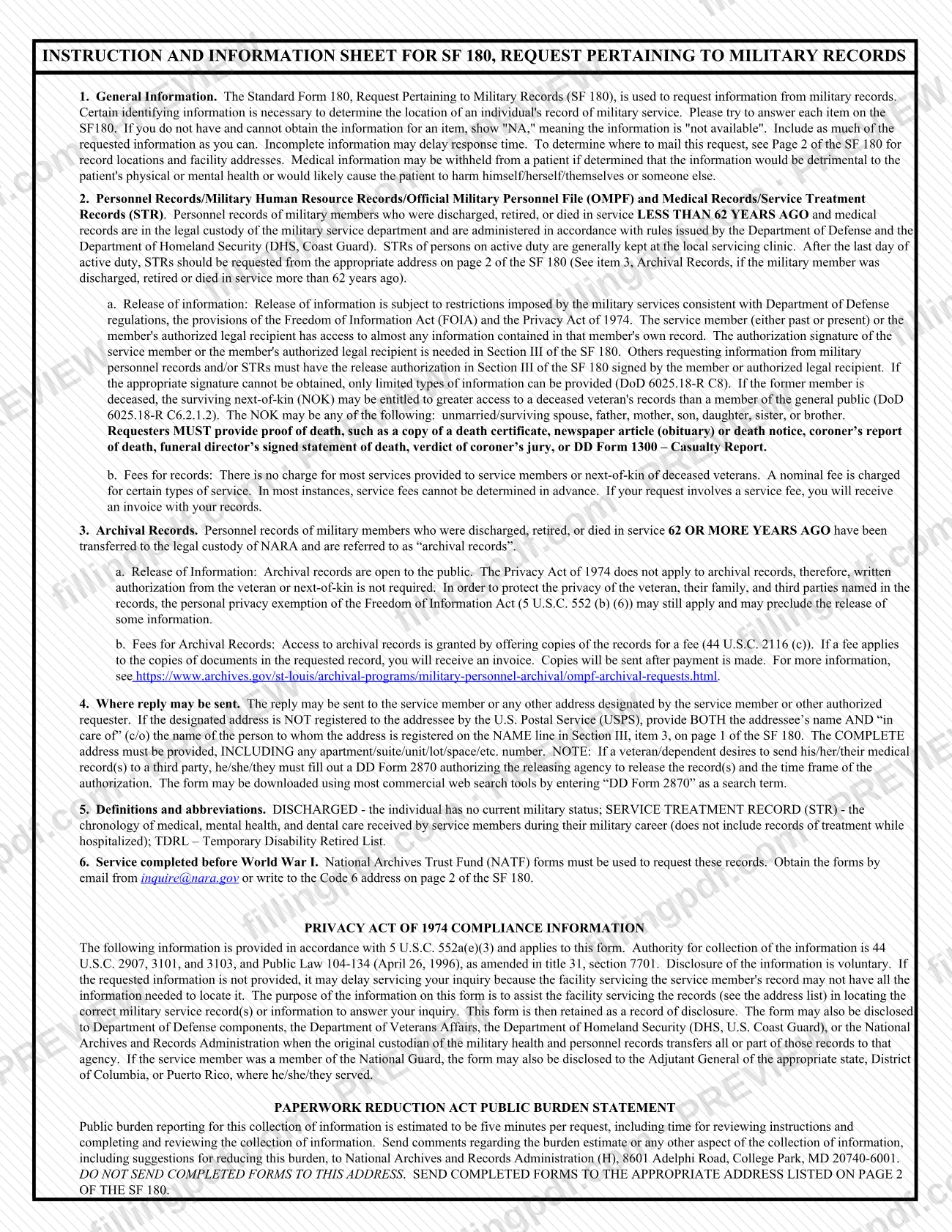
Records of members discharged, retired or died in service less than 62 years ago stay with the military service department. Records at 62 years or more are archival records in NARA's custody. Service completed before World War I is handled differently: the instructions say National Archives Trust Fund (NATF) forms must be used.
Who needs to file SF 180?
The service member or veteran, past or present, and the member's authorized legal recipient use the SF 180 to request information from the member's own record. Others may also request information, but the release authorization in Section III must then be signed by the member or the authorized legal recipient. If the right signature cannot be obtained, only limited types of information can be provided.
- Next of kin of a deceased veteran may be entitled to greater access than the general public. Next of kin means the unmarried or surviving spouse, father, mother, son, daughter, sister or brother, and the request must include proof of death.
- A veteran's legal guardian submits a copy of the court appointment.
- An authorized representative submits an authorization letter or power of attorney.
- Anyone requesting archival records (separation, retirement or death 62 or more years ago) needs no written authorization from the veteran or next of kin, because the Privacy Act of 1974 does not apply to archival records. Some information may still be withheld under the Freedom of Information Act personal privacy exemption.
Medical information may be withheld from a patient if it would be detrimental to the patient's health or could lead to harm. A veteran who wants medical records sent to a third party must complete DD Form 2870.
When to file SF 180
The SF 180 is filed whenever you need information or documents from a military record; no deadline is printed on it. Which custodian receives it depends on how long ago the member was discharged, retired or died in service: less than 62 years ago, the record is with the military service department; 62 or more years ago, it is an archival record in NARA's custody.
Incomplete information may delay the response, so complete as many items as you can before sending. The instructions estimate five minutes per request for reviewing instructions and completing the form. Recent veterans may be able to request a DD Form 214 through milConnect, according to a note printed in Section II; the form links to https://www.va.gov/records/get-military-service-records for that option.
Documents you need
- Proof of death, when you request records as the deceased veteran's next of kin: a death certificate, newspaper obituary or death notice, coroner's report, funeral director's signed statement of death, verdict of coroner's jury, or DD Form 1300 – Casualty Report.
- A copy of the court appointment, when you request records as the veteran's legal guardian.
- An authorization letter or power of attorney, when you request records as the veteran's authorized representative.
- DD Form 2870, when a veteran or dependent wants medical records sent to a third party; it authorizes the releasing agency to release them and sets the time frame of the authorization.
How to fill out SF 180
Review the instructions and choose a channel
Read the instruction and information sheet first and print legibly or type. The form notes that you can also submit online through eVetRecs.
Enter name and identifying details
Section I, items 1 to 4: the name used during service (last, first, full middle), Social Security number, date of birth and place of birth. Write "NA" for any item you do not have and cannot obtain.
List all periods of service
Item 5: enter the service number and DoD ID / EDIPI number, then for the Active, Reserve and National Guard rows the branch of service, date entered, date released and whether officer or enlisted. Write "unknown" where a date is unknown.
Complete duty stations and status questions
Item 6: last duty station(s). Item 7: check deceased or not, and give the date of death if yes. Item 8: retired or not. Item 9: VA claim filed or not, with the VA Claim/File number if known.
Check the records you are requesting
Section II, item 1: check DD Form 214 (with the year(s) of separation, and the deleted-copy box only if you want one), OMPF, Medical Records, Dental Records only, or Other. For inpatient records, enter the facility and the year last treated.
State the purpose of the request
Item 2: check Benefits, Employment, VA Loan Programs, Medical, Genealogy, Correction, Personal or Other, and explain where the form asks. Purpose is required unless the request is from the veteran, government agencies under routine use, or for information releasable under FOIA.
Identify the requester and relationship
Section III, items 1 to 3: enter the requester name and relationship to the veteran, then check one box: the service member or veteran, the deceased veteran's next of kin, legal guardian, authorized representative or Other (specify).
Enter the return address
Item 4: name and complete street address with any apartment or unit number, city, state and ZIP code. If the address is not registered to the addressee, add "c/o" the registered person's name on the NAME line.
Sign, date and add contact details
Item 5: sign the authorization (do not print your name) and enter the date; no signature is required for archival records. Add daytime phone, fax number and email address if you wish.
Review, download and assemble the package
Check every item, then download or print the completed PDF from FillingPDF. Attach any required proof of death, court appointment or authorization, and send it as described under How to submit.
How to submit SF 180
You can submit an SF 180 request online through eVetRecs or by mail to the custodian whose address matches your record category.
- Online: the form states that requests can be submitted online using eVetRecs at https://www.archives.gov/veterans/military-service-records.
- By mail: find the branch and the member's status or separation date in the chart on page 2 of the SF 180. The chart gives a code number for the personnel record and another for the medical or service treatment record; mail the completed form to the address listed for that code. For example, Code 14 is the National Personnel Records Center (Military Personnel Records), 1 Archives Drive, St. Louis, MO 63138-1002, and Code 11 is the Department of Veterans Affairs, Claims Intake Center, P.O. Box 4444, Janesville, WI 53547-4444.
Do not send completed forms to the National Archives and Records Administration (H), 8601 Adelphi Road, College Park, MD 20740-6001; that address is only for comments on the burden estimate.
Include the proof or court documents your Section III box requires. Most services for service members and next of kin of deceased veterans carry no charge, but a nominal fee applies to certain services; if one applies, you receive an invoice with your records, and for archival copies the copies are sent after payment. FillingPDF lets you fill out and download the PDF; submission follows the channels above.
Common mistakes to avoid
- Mailing the completed form to the NARA (H) address in College Park, MD, which is for burden-estimate comments only, instead of the custodian address for your record code on page 2.
- Leaving an item blank instead of writing "NA" when the information is not available and cannot be obtained; incomplete information can delay the response.
- Listing only some periods of service in Section I, item 5, when the form asks that ALL service be shown for an effective search.
- Requesting records of a deceased veteran without giving the date of death in item 7 or without attaching proof of death as next of kin.
- Printing the name on the Section III signature line instead of signing it; the line is marked "Signature Required – Do not print", and without it only limited information can be released unless the request is archival.
- Sending an address not registered to the addressee without adding "c/o" the registered person's name on the NAME line, or leaving out the apartment, suite or unit number.
- Requesting inpatient or hospitalization records without entering the facility and the year last treated; both fields are required.
- Expecting a deleted DD Form 214 without checking the box: an undeleted copy is sent unless you check I want a DELETED copy.
Frequently asked questions
What is the SF 180 form used for?
The SF 180 form, Request Pertaining to Military Records, is used to request information from military records, such as a DD Form 214, the Official Military Personnel File (OMPF) or medical records. NARA prescribes it, and the custodian that receives it depends on branch and separation date.
Where do I send the SF 180?
Mail it to the address for your record's code number in the chart on page 2 of the form, or submit online through eVetRecs at archives.gov/veterans/military-service-records. Do not send it to the NARA (H) address in College Park, MD, which is only for comments on the burden estimate.
Do I need a signature on the SF 180?
Yes, for non-archival records: item 5 of Section III needs the signature of the veteran, next of kin, legal guardian or authorized representative. Without it only limited information can be released. No signature is required for archival records, those 62 or more years old.
Can I request a deceased veteran's records with an SF 180?
Yes. Next of kin (unmarried or surviving spouse, father, mother, son, daughter, sister or brother) may be entitled to greater access, but you must give the date of death and provide proof of death, such as a death certificate, obituary, or DD Form 1300.
Is there a fee for requesting military records?
Most services for service members and next of kin of deceased veterans are free, but a nominal fee applies to certain services. Fees usually cannot be determined in advance; you receive an invoice with your records, and archival copies are sent after payment.
What counts as an archival military record?
Records of members discharged, retired or died in service 62 or more years ago are archival records in NARA's custody. They are open to the public and need no written authorization, though the FOIA personal privacy exemption may still limit some information.
What if the service was before World War I?
The SF 180 instructions say National Archives Trust Fund (NATF) forms must be used for service completed before World War I. Request them by email from [email protected] or write to the Code 6 address on page 2 of the SF 180.
Can I fill out the SF 180 online and submit it on FillingPDF?
You can fill out the PDF online on FillingPDF and download or print it. FillingPDF is independent of NARA and does not submit the request; you mail it to the custodian address or use eVetRecs on the NARA website.
Ready to fill out SF 180?
Fill out SF 180 now