
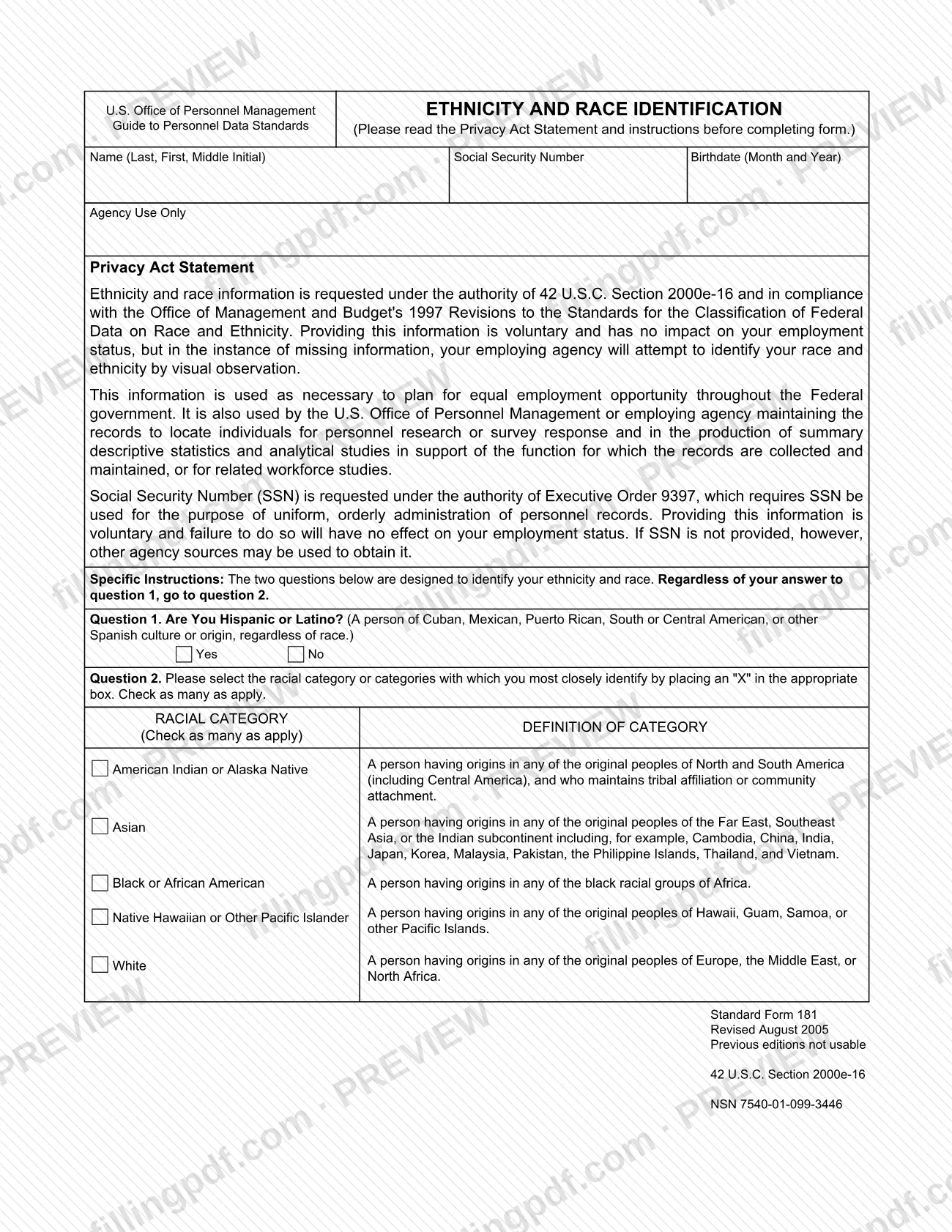
The SF 181 form, Ethnicity and Race Identification, is a Standard Form of the U.S. Office of Personnel Management (OPM) that collects a person's ethnicity and race for federal personnel records. It has two questions: whether you are Hispanic or Latino, and which racial categories you most closely identify with. On FillingPDF you can fill out the form online and download or print the completed PDF. The form itself is published as a PDF on the GSA forms site, and your employing agency maintains the information it collects.
Last updated
What is SF 181?
Standard Form 181, Ethnicity and Race Identification, is the U.S. Office of Personnel Management (OPM) form on which a person answers two questions about ethnicity and race for federal personnel records. It carries the subtitle Guide to Personnel Data Standards.
The form asks for your name (Last, First, Middle Initial), Social Security Number (SSN) and birthdate (month and year). Question 1 asks whether you are Hispanic or Latino. Question 2 asks you to mark, with an "X", the racial categories you most closely identify with, and you may check as many as apply. The form prints a definition beside each of the five categories: American Indian or Alaska Native, Asian, Black or African American, Native Hawaiian or Other Pacific Islander, and White.
The Privacy Act Statement on the form says the information is requested under 42 U.S.C. Section 2000e-16 and in line with the Office of Management and Budget's 1997 Revisions to the Standards for the Classification of Federal Data on Race and Ethnicity. It is used to plan for equal employment opportunity throughout the Federal government, to locate individuals for personnel research or survey response, and to produce summary statistics and workforce studies.
The form is marked Revised August 2005, with the note "Previous editions not usable", and carries NSN 7540-01-099-3446. An "Agency Use Only" box is reserved for the agency.
Who needs to file SF 181?
The form is addressed to a person whose employing agency keeps federal personnel records and wants that person's ethnicity and race on file. Its Privacy Act Statement refers throughout to "your employing agency" and to your employment status.
Providing the information is voluntary and has no impact on your employment status. If information is missing, your employing agency will attempt to identify your race and ethnicity by visual observation. The SSN is also voluntary: leaving it out has no effect on your employment status, but if it is not provided, other agency sources may be used to obtain it.
Everyone who completes the form answers both questions. The instructions say that, regardless of your answer to question 1, you go to question 2. The form does not describe a representative or another person completing it on someone's behalf.
How to fill out SF 181
Read the Privacy Act Statement
Read the Privacy Act Statement and the specific instructions printed on the form before you answer. They explain that providing the information is voluntary.
Enter your name
Write your name in the order the form asks: Last, First, Middle Initial.
Enter your Social Security Number
Enter your SSN in the Social Security Number box. The form says providing it is voluntary and that other agency sources may be used if it is not provided.
Enter your birthdate
In the Birthdate box, enter the month and year only, as the form requests.
Answer question 1
Mark Yes or No for whether you are Hispanic or Latino. The form defines this as a person of Cuban, Mexican, Puerto Rican, South or Central American, or other Spanish culture or origin, regardless of race.
Answer question 2
Place an "X" in the box for each racial category you most closely identify with, and check as many as apply. Answer question 2 whatever you answered to question 1.
Check the category definitions
Compare your choices with the definition printed beside each category: American Indian or Alaska Native, Asian, Black or African American, Native Hawaiian or Other Pacific Islander, and White.
Review and download the completed PDF
Check your name, SSN, birthdate and both answers, and leave the Agency Use Only box blank. Download or print the completed PDF from FillingPDF and return it as your employing agency directs.
How to submit SF 181
The form prints no mailing address, portal, e-mail address or appointment rule of its own, so it lists no submission channel. Its Privacy Act Statement refers to your employing agency, which maintains the records the form feeds, and the "Agency Use Only" box is reserved for that agency. Return the completed form in the way your employing agency tells you to. OPM or the employing agency that maintains the records uses the information. Leave the "Agency Use Only" area blank. FillingPDF lets you fill out and download the PDF; submission follows the channels your agency uses, not this site.
Common mistakes to avoid
- Skipping question 2 after answering question 1: the instructions say to go to question 2 regardless of your answer to question 1.
- Checking only one racial category when more than one applies; question 2 says to check as many as apply.
- Treating Hispanic or Latino as a racial category in question 2; question 1 asks about it separately, regardless of race.
- Entering a full birth date when the form asks for the birthdate as month and year only.
- Writing in the Agency Use Only box, which is reserved for the agency.
- Using a copy of an older edition; the form states that previous editions are not usable.
- Leaving the form blank on the assumption that nothing will be recorded: the agency will attempt to identify your race and ethnicity by visual observation.
Frequently asked questions
What is the SF 181 form?
The SF 181 form is Standard Form 181, Ethnicity and Race Identification, issued by the U.S. Office of Personnel Management (OPM). It asks whether you are Hispanic or Latino and which racial categories you identify with, for use in federal personnel records.
Is it mandatory to fill out the SF 181?
No. The form's Privacy Act Statement says providing the information is voluntary and has no impact on your employment status. If information is missing, your employing agency will attempt to identify your race and ethnicity by visual observation.
Do I answer question 2 if I answer No to Hispanic or Latino?
Yes. The instructions say that, regardless of your answer to question 1, you go to question 2 and select the racial categories you most closely identify with, placing an "X" in each box that applies.
Can I select more than one race on the SF 181?
Yes. Question 2 says to check as many racial categories as apply. The form lists five: American Indian or Alaska Native, Asian, Black or African American, Native Hawaiian or Other Pacific Islander, and White.
Do I have to give my Social Security Number on the SF 181?
No. The form says the SSN is requested under Executive Order 9397 and that providing it is voluntary, with no effect on your employment status. If you leave it out, other agency sources may be used to obtain it.
What is the SF 181 information used for?
The Privacy Act Statement says it is used to plan for equal employment opportunity throughout the Federal government. OPM or the employing agency also uses it to locate individuals for personnel research or surveys and to produce summary statistics and workforce studies.
Where do I send the SF 181 after filling it out?
The form lists no address or portal. It refers to your employing agency, which maintains the records, so return it the way your agency instructs. The Agency Use Only box is for the agency to complete.
Can I fill out the SF 181 online on FillingPDF?
Yes. You can fill out the PDF online on FillingPDF and download or print it. FillingPDF is an independent service and does not submit the form to OPM or to any agency; you return it through your employing agency's channels.
Ready to fill out SF 181?
Fill out SF 181 now