
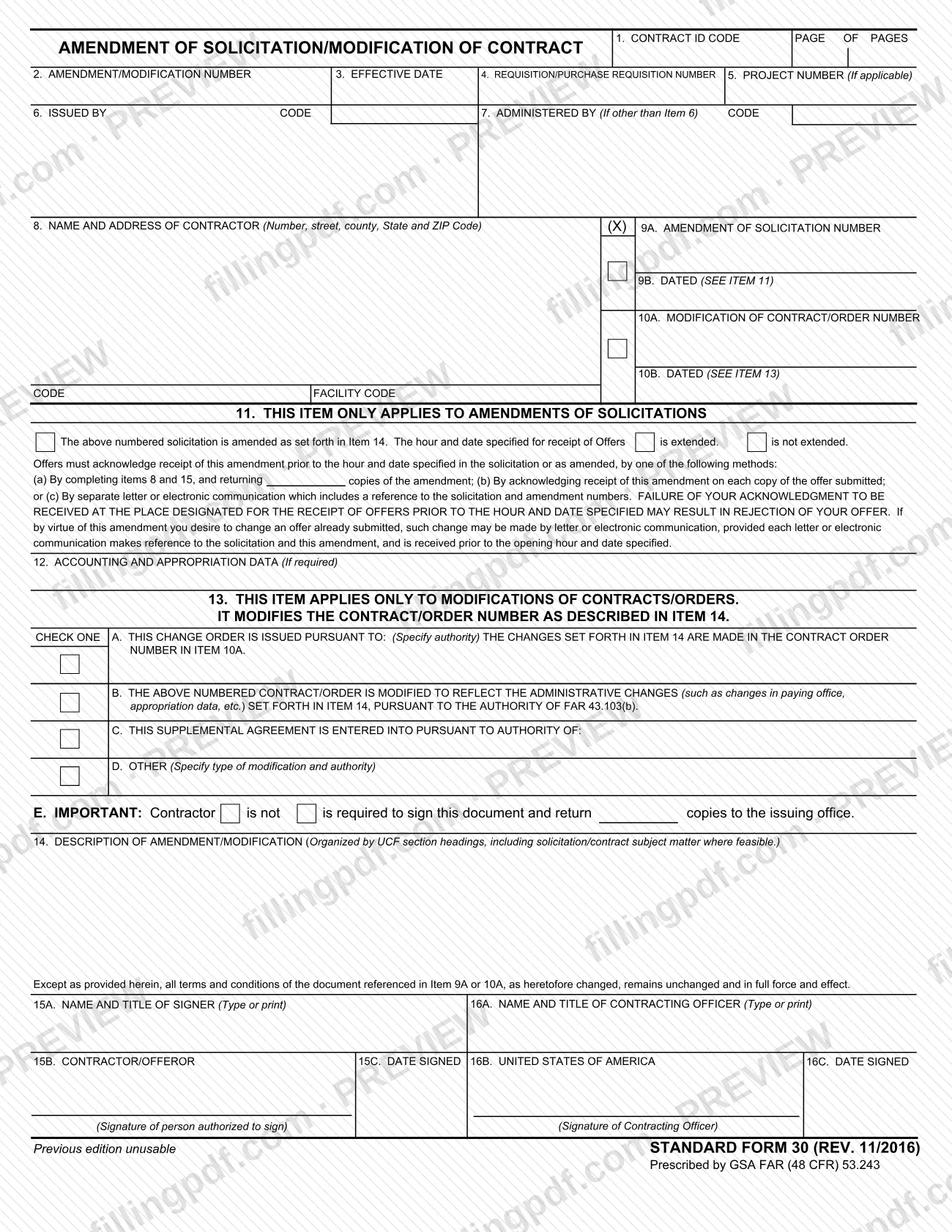
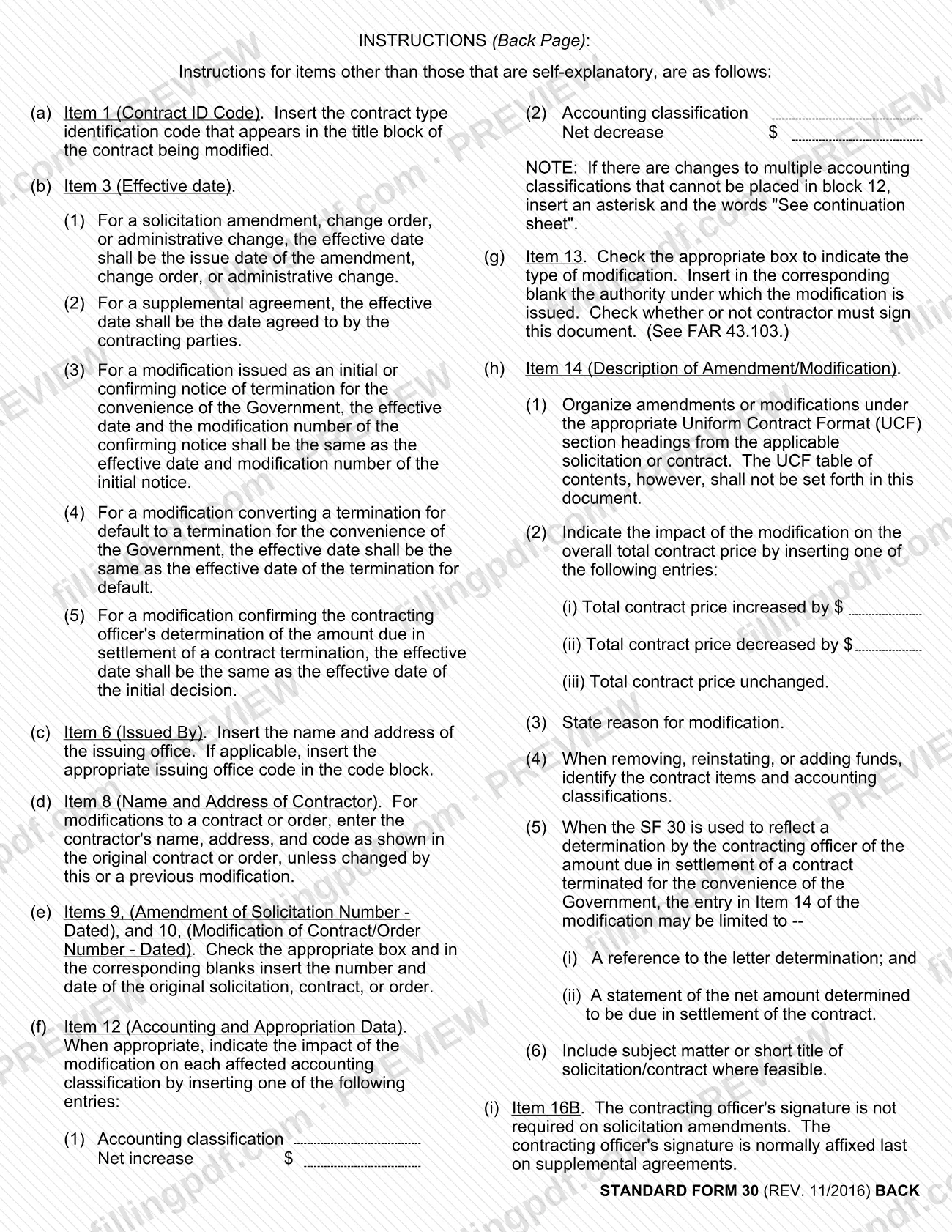
SF30 is Standard Form 30 (SF 30), Amendment of Solicitation/Modification of Contract, a form prescribed by GSA under FAR (48 CFR) 53.243. A contracting office uses it either to change a solicitation before offers are received or to modify an existing contract or order. On FillingPDF you can fill out the SF 30 online and download or print the completed PDF. The blank form, revision REV. 11/2016, is published by GSA at the official link on this page.
Last updated
What is SF 30?
Standard Form 30, Amendment of Solicitation/Modification of Contract, is the standard form a contracting office uses to amend a solicitation or to modify a contract or order, with the change described in Item 14 and the document identified by its amendment or modification number.
The form has two halves that never apply at the same time. Item 11 applies only to amendments of solicitations: it states whether the hour and date for receipt of offers is extended or not extended, and it explains how offerors acknowledge the amendment. Item 13 applies only to modifications of contracts/orders: you check one box (A through D) to show the type of modification and the authority under which it is issued, and Item 13E states whether the contractor is or is not required to sign and return copies to the issuing office.
The printed form says the standard form was prescribed by GSA under FAR (48 CFR) 53.243 and that the previous edition is unusable. Its revision line reads STANDARD FORM 30 (REV. 11/2016). A back page gives instructions for the items that are not self-explanatory, including the effective-date rules for Item 3, the entries for Item 12, and how to describe the change and its effect on total contract price in Item 14.
Item 14 also carries a fixed statement: except as provided in the document, all terms and conditions of the document referenced in Item 9A or 10A, as heretofore changed, remain unchanged and in full force and effect.
Who needs to file SF 30?
The form is completed by the contracting office that issues it. That office appears in Item 6 (Issued By), with Item 7 used for an administering office if it is not the one in Item 6, and a contracting officer's name and title go in Item 16A.
Other people who deal with the form:
- Offerors, when the SF 30 amends a solicitation. They must acknowledge receipt of the amendment before the hour and date specified in the solicitation or as amended, using one of the methods printed in Item 11.
- Contractors, when the SF 30 modifies a contract or order. Item 13E states whether the contractor is or is not required to sign and return copies to the issuing office. Where signature is required, the signer's name and title go in Item 15A and the person authorized to sign signs in Item 15B.
Use the Item 9 side of the form for a solicitation amendment and the Item 10 side for a contract or order modification. The back-page instructions say the contracting officer's signature in Item 16B is not required on solicitation amendments and is normally affixed last on supplemental agreements.
When to file SF 30
The form is used when a solicitation is amended or a contract or order is modified. The SF 30 sets no filing deadline of its own; the timing rules are tied to the type of action.
For a solicitation amendment, an offer's acknowledgment must be received at the place designated for receipt of offers before the hour and date specified in the solicitation or as amended; failure to do so may result in rejection of the offer. An offeror who wants to change an offer already submitted may do so by letter or electronic communication that references the solicitation and the amendment and is received before the opening hour and date.
Item 3 (Effective Date) follows the back-page instructions. For a solicitation amendment, change order or administrative change, it is the issue date. For a supplemental agreement, it is the date agreed to by the contracting parties. Separate rules cover termination-related modifications.
How to fill out SF 30
Enter the contract ID code and pages
In Item 1, insert the contract type identification code that appears in the title block of the contract being modified. Add the page numbers in the PAGE OF PAGES box.
Complete Items 2 through 5
Enter the amendment/modification number in Item 2, the effective date in Item 3 under the back-page rules, the requisition or purchase requisition number in Item 4 and, if applicable, the project number in Item 5.
Identify the issuing and administering offices
In Item 6, insert the name and address of the issuing office and, if applicable, its code. Use Item 7 only if the administering office is other than the one in Item 6.
Enter the contractor's name and address
In Item 8, for a modification, enter the contractor's name, address and code as shown in the original contract or order, unless changed by this or a previous modification.
Reference the solicitation or contract
Check the box for Item 9A or Item 10A and insert the number and date of the original solicitation, contract or order in the matching blanks (9B or 10B).
Complete Item 11 for solicitation amendments
Only for amendments of solicitations, mark whether the hour and date specified for receipt of offers is extended or is not extended. Leave the item unused for contract or order modifications.
Add accounting data in Item 12
When appropriate, show the net increase or net decrease for each affected accounting classification. If several classifications cannot fit, insert an asterisk and "See continuation sheet".
Select the modification type in Item 13
Only for modifications, check one box (A, B, C or D) and insert the authority in the corresponding blank; B refers to FAR 43.103(b). In Item 13E, mark whether the contractor is or is not required to sign and return copies to the issuing office.
Describe the change in Item 14
Organize the description under the Uniform Contract Format section headings, without the table of contents, and state the reason for the modification. Include one price entry: increased by $, decreased by $, or unchanged.
Complete the signature blocks
Item 15A–15C hold the contractor/offeror's name and title, signature and date; Items 16A–16C hold the contracting officer's name and title, signature and date. Item 16B is not required on solicitation amendments.
Review and download the completed PDF
Check that only the Item 9/11 or Item 10/13 side is used and that dates and numbers match the original document. Download or print the completed PDF from FillingPDF.
How to submit SF 30
The SF 30 names no mailing address, portal or appointment process. What it prints depends on the type of action:
- Solicitation amendments: offerors acknowledge receipt at the place designated for receipt of offers in the solicitation, before the hour and date specified. Item 11 lists three methods: complete Items 8 and 15 and return copies of the amendment; acknowledge receipt on each copy of the offer submitted; or send a separate letter or electronic communication that references the solicitation and amendment numbers.
- Contract or order modifications: where Item 13E says the contractor is required to sign, the contractor signs and returns copies to the issuing office shown in Item 6.
Contact the issuing office for its address or electronic channel. FillingPDF lets you fill out and download the PDF; submission follows the channels above.
Common mistakes to avoid
- Completing both the Item 9 (solicitation amendment) and Item 10 (contract/order modification) sides; Item 11 applies only to amendments of solicitations and Item 13 only to modifications.
- Letting an offer's acknowledgment of a solicitation amendment arrive after the hour and date specified; the form warns this may result in rejection of the offer.
- Leaving the price impact out of Item 14; the back page requires one of three entries: increased by $, decreased by $, or unchanged.
- Setting out the Uniform Contract Format table of contents in Item 14; the instructions say it shall not be set forth in the document.
- Using a contractor name, address or code in Item 8 that differs from the original contract or order without a change made by this or a previous modification.
- Entering the wrong Item 3 effective date, for example not using the date agreed by the parties for a supplemental agreement.
- Not marking in Item 13E whether the contractor is or is not required to sign and return copies to the issuing office.
- Cramming several accounting classification changes into Item 12 instead of inserting an asterisk and the words "See continuation sheet".
Frequently asked questions
What is the SF30 form used for?
SF30 is Standard Form 30, Amendment of Solicitation/Modification of Contract. A contracting office uses it to amend a solicitation before offers are received or to modify a contract or order, describing the change in Item 14 and stating its effect on total contract price.
What is the difference between Item 9 and Item 10 on the SF 30?
Item 9 identifies the solicitation being amended (number in 9A, date in 9B) and goes with Item 11. Item 10 identifies the contract or order being modified (number in 10A, date in 10B) and goes with Item 13. Check only the one that applies.
Does the contractor have to sign the SF 30?
It depends on the action. For modifications, Item 13E states whether the contractor is or is not required to sign and return copies to the issuing office. For solicitation amendments, offerors acknowledge receipt by one of the methods printed in Item 11.
How do offerors acknowledge an amendment of a solicitation?
By completing Items 8 and 15 and returning copies, by acknowledging receipt on each copy of the offer, or by a separate letter or electronic communication referencing the solicitation and amendment numbers. It must arrive before the hour and date specified, or the offer may be rejected.
What goes in Item 3, the effective date?
For a solicitation amendment, change order or administrative change, the issue date. For a supplemental agreement, the date agreed to by the contracting parties. The back page gives separate rules for termination-related modifications.
Does the contracting officer have to sign the SF 30?
The contracting officer's signature in Item 16B is not required on solicitation amendments. It is normally affixed last on supplemental agreements. Item 16A takes the officer's printed name and title.
Can I fill out the SF 30 online?
Yes. You can fill out the PDF online on FillingPDF and download or print it. FillingPDF is an independent service and does not file or send the form to anyone; delivery follows the issuing office's channels.
What must Item 14 say about price?
The back-page instructions require one of three entries: total contract price increased by $, total contract price decreased by $, or total contract price unchanged. Item 14 should also state the reason for the modification and include the subject matter or short title where feasible.
Ready to fill out SF 30?
Fill out SF 30 now