
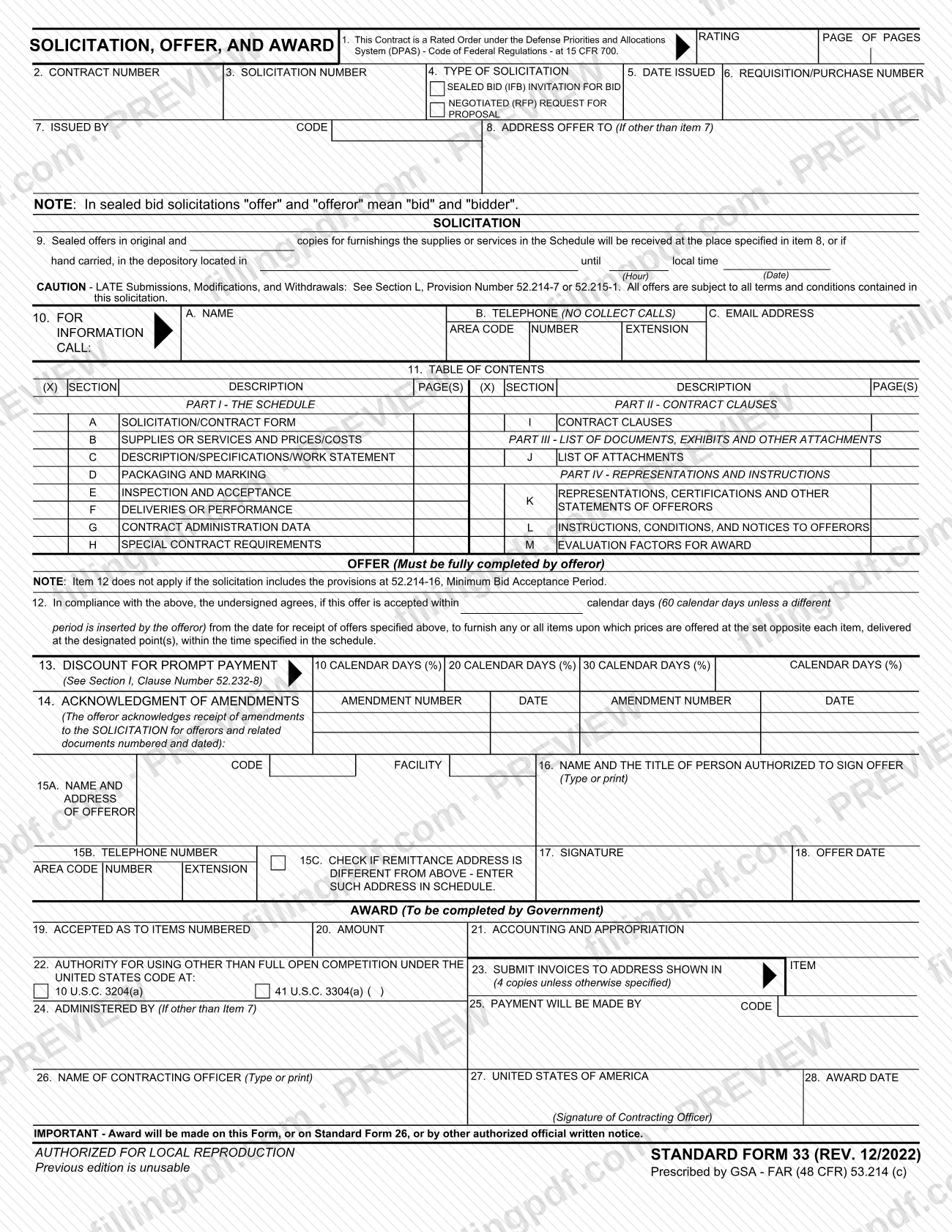
SF33 is Standard Form 33, Solicitation, Offer, and Award, a federal form prescribed by the General Services Administration (GSA) under FAR (48 CFR) 53.214(c). One document carries the government's solicitation, the offeror's offer and the contracting officer's award. This page lets you fill out the form online on FillingPDF and download or print the completed PDF; the current revision, Rev. 12/2022, is published by GSA at the official source URL.
Last updated
What is SF 33?
Standard Form 33 (SF 33), Solicitation, Offer, and Award, is the General Services Administration (GSA) form that combines a government solicitation, a bidder's or offeror's offer and the government's award in a single document. It is prescribed by FAR (48 CFR) 53.214(c).
The form is divided into three blocks. The solicitation block (items 1 to 11) identifies the contract, solicitation and requisition numbers, the type of solicitation (sealed bid (IFB) or negotiated (RFP)), the issuing office, where and when offers are received, a contact person and a table of contents of Sections A to M. The offer block (items 12 to 18) is, in the form's words, to be fully completed by the offeror. The award block (items 19 to 28) is completed by the government.
The form states that in sealed bid solicitations "offer" and "offeror" mean "bid" and "bidder". Item 1 is marked when the contract is a Rated Order under the Defense Priorities and Allocations System (DPAS), 15 CFR 700.
An award may be made on this form, on Standard Form 26, or by other authorized official written notice. The form is authorized for local reproduction, and the printed note says the previous edition is unusable.
Who needs to file SF 33?
The form has two sets of users. The government office that issues the solicitation completes the solicitation block (items 1 to 11) and, at award, the award block (items 19 to 28); the contracting officer names and signs in items 26 and 27. The offeror, or bidder in a sealed bid, completes the offer block (items 12 to 18), which the form says must be fully completed by the offeror.
On the offeror's side, item 16 asks for the name and title of the person authorized to sign the offer, and item 17 is that person's signature.
Item 12 does not apply if the solicitation includes provision 52.214-16, Minimum Bid Acceptance Period.
The form is not the only way to make an award: the printed note allows award on Standard Form 26 or by other authorized official written notice. The form gives no other eligibility rules; the solicitation itself, including Sections K, L and M, carries the representations, instructions and evaluation factors.
When to file SF 33
The form is used when a government solicitation is issued: item 5 records the date issued, and item 9 states the hour and date by which sealed offers must be received. A submission after that time is late; the form cautions that late submissions, modifications and withdrawals are governed by Section L, provision 52.214-7 or 52.215-1.
In item 12 the offeror agrees to hold the offer open for a number of calendar days from the date for receipt of offers. The form prints 60 calendar days unless the offeror inserts a different period, and the item does not apply if the solicitation includes provision 52.214-16. Item 14 lists amendments the offeror has received, so check for amendments before signing. The award is made later, by the government, in items 19 to 28 or by one of the alternatives named on the form. The form prints no other deadline.
How to fill out SF 33
Enter rating and identification numbers
Item 1 applies when the contract is a Rated Order under DPAS (15 CFR 700). Enter the contract number (item 2), solicitation number (item 3), date issued (item 5) and requisition/purchase number (item 6).
Select the type of solicitation
In item 4, mark sealed bid (IFB) invitation for bid or negotiated (RFP) request for proposal.
Enter issuing office and offer address
Item 7 is the issuing office and its code. In item 8, enter the address to send offers to, only if it differs from item 7.
Set the offer receipt time and place
In item 9, enter the depository for hand-carried offers and the local time (hour) and date offers are due. Item 10 gives a contact name, telephone (no collect calls) and email address.
Complete the table of contents
In item 11, mark (X) each Section A to M included and enter its page numbers, covering Parts I to IV.
State the offer acceptance period
Item 12 is the offeror's agreement to furnish items at the prices offered. Enter a number of calendar days or leave the printed 60 days; it does not apply if provision 52.214-16 is included.
Enter prompt payment discount terms
In item 13, enter the percentage for 10, 20 and 30 calendar days, or another period in the blank column, as offered.
Acknowledge amendments
In item 14, list each amendment number and date received for the solicitation and related documents.
Enter offeror name and signer
Item 15A is the name and address of the offeror, with the code, facility and telephone number (15B). Check 15C if the remittance address differs. Item 16 is the name and title of the authorized signer.
Sign and date the offer
The authorized person signs in item 17 and enters the offer date in item 18.
Leave the award block to the government
Items 19 to 28 are completed by the government: items accepted, amount, accounting data, authority for other than full open competition, invoice address, administration and payment offices, and the contracting officer's name, signature and award date.
Review and download the completed PDF
Check each item you completed, then download or print the completed PDF from FillingPDF and deliver it as described under How to submit.
How to submit SF 33
Offers on SF 33 are delivered to the place the solicitation names, either by mail or similar delivery to the address in item 8 or by hand to the depository named in item 9.
- Address in item 8: sealed offers, in the original and the number of copies the solicitation specifies, are received at the place in item 8 (the address to send the offer to, if other than the issuing office in item 7).
- Hand delivery: if hand carried, the offer goes to the depository named in item 9, before the local time and date printed there.
- Questions: item 10 gives a name, telephone number (no collect calls) and email address to contact for information.
The form prints no portal or email channel for submitting an offer. Check the solicitation, particularly Section L, for further instructions. Late submissions, modifications and withdrawals are covered by provision 52.214-7 or 52.215-1. After award, item 23 states where invoices go (4 copies unless otherwise specified). FillingPDF lets you fill out and download the PDF; submission follows the channels above.
Common mistakes to avoid
- Using an earlier edition: the form prints that the previous edition is unusable, so use the Rev. 12/2022 edition.
- Leaving the offer block (items 12 to 18) incomplete; the form says it must be fully completed by the offeror.
- Delivering an offer after the hour and date in item 9 without checking provision 52.214-7 or 52.215-1 in Section L, which govern late submissions.
- Sending the offer to the issuing office in item 7 when item 8 gives a different address to send it to.
- Forgetting to list received amendments in item 14 with their numbers and dates.
- Completing item 12 as if it always applies; it does not apply if the solicitation includes provision 52.214-16, Minimum Bid Acceptance Period.
- Signing in item 17 without the name and title of the authorized person in item 16, or leaving the offer date in item 18 blank.
- Entering a different remittance address in the form instead of in the Schedule; item 15C says to enter such an address in the Schedule.
Frequently asked questions
What is the SF33 form?
SF33 is Standard Form 33, Solicitation, Offer, and Award, prescribed by GSA under FAR (48 CFR) 53.214(c). It holds the government's solicitation, the offeror's offer and the contract award in one document, with items 1 to 28.
Who completes which parts of SF 33?
The government completes the solicitation block (items 1 to 11) and the award block (items 19 to 28). The offeror completes the offer block, items 12 to 18, which the form says must be fully completed. A person authorized to sign signs in item 17.
Where do I send my offer on an SF 33?
To the place in item 8, or by hand to the depository named in item 9, before the time and date printed there. The form prints no email or portal channel, so check the solicitation, including Section L, for any other instruction.
How long must my offer stay open under item 12?
The form prints 60 calendar days from the date for receipt of offers, unless the offeror inserts a different period. Item 12 does not apply if the solicitation includes provision 52.214-16, Minimum Bid Acceptance Period.
What happens if my offer arrives late?
The form cautions that late submissions, modifications and withdrawals are covered by Section L, provision 52.214-7 or 52.215-1. Read the provision named in your solicitation, because the form itself sets only the receipt time in item 9.
Is the award always made on SF 33?
No. The form states that award will be made on this form, on Standard Form 26, or by other authorized official written notice. On SF 33, the contracting officer completes items 19 to 28.
Which revision of SF 33 is current?
The form and the GSA forms page show Rev. 12/2022. The form says the previous edition is unusable, so check that you are not using an older copy.
Can I fill out SF33 online?
Yes. You can fill out the fillable PDF online on FillingPDF and download or print it. FillingPDF is an independent service: it does not submit offers or awards, so delivery follows the solicitation's instructions.
Ready to fill out SF 33?
Fill out SF 33 now