
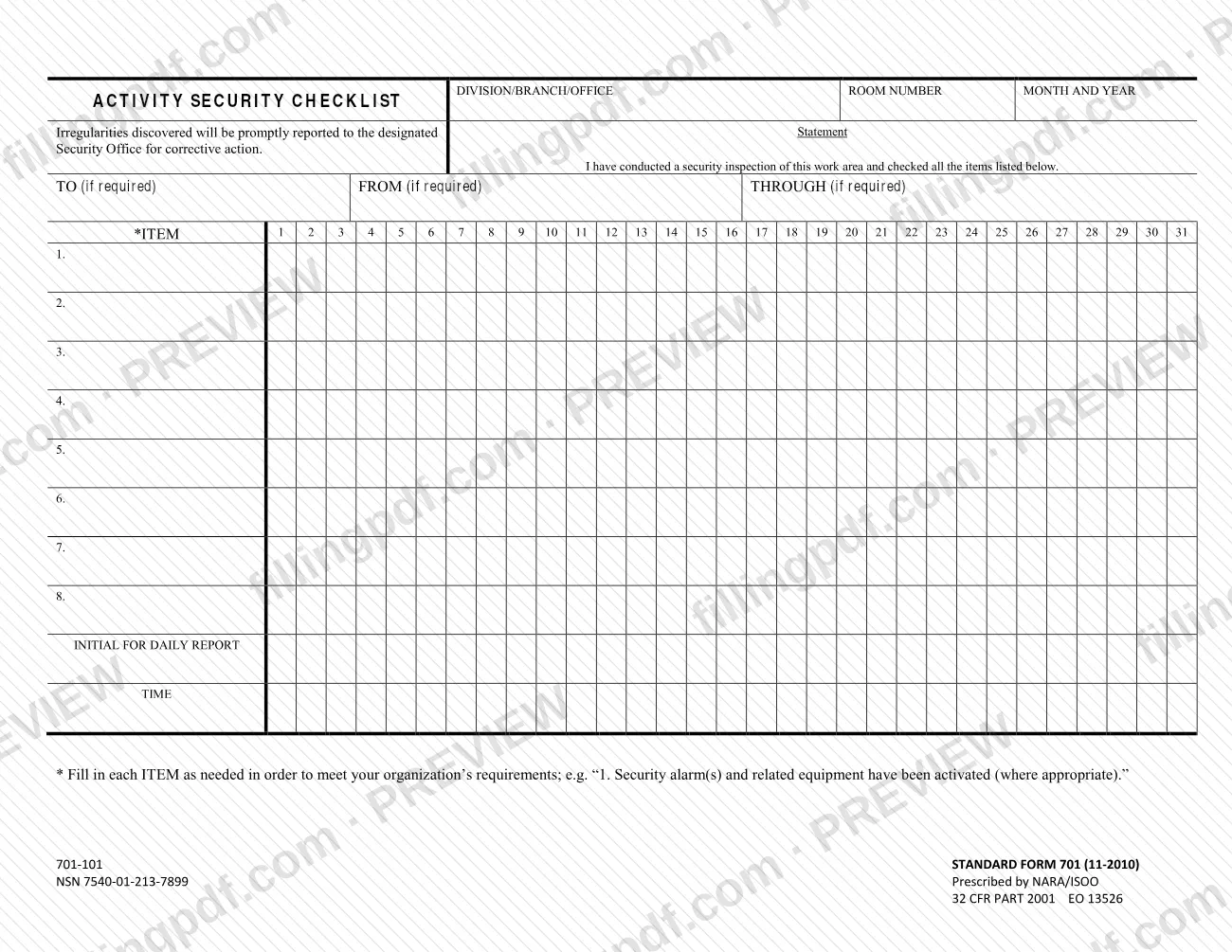
SF 701 is the Activity Security Checklist, a Standard Form (11-2010) prescribed by NARA/ISOO and published by the U.S. General Services Administration (GSA) among its forms. A person who has inspected a work area uses it to record, day by day across one month, that each security item listed on the sheet was checked. On this page you can fill out the SF 701 online on FillingPDF and download or print the completed PDF; the official PDF is published by GSA at gsa.gov.
Last updated
What is SF 701?
Standard Form 701, Activity Security Checklist, is a one-page log on which a person certifies that they have conducted a security inspection of a work area and checked every item listed, with one column for each day of the month.
The sheet is headed by the division, branch or office, the room number and the month and year. Below the certification statement sit optional TO, FROM and THROUGH lines, a grid of up to eight numbered items, and a column for each day from 1 to 31. For each day there is a place to initial the daily report and a place to record the time.
The items are not preprinted. A footnote tells you to fill in each item as needed to meet your organization's requirements, and gives as an example "1. Security alarm(s) and related equipment have been activated (where appropriate)."
The form states that irregularities discovered will be promptly reported to the designated security office for corrective action. It is printed as Standard Form 701 (11-2010), NSN 7540-01-213-7899, prescribed by NARA/ISOO, and cites 32 CFR Part 2001 and EO 13526. GSA lists it on its forms page as form number SF701 with a revision date of 11/2010.
Who needs to file SF 701?
The form is used by the person who inspects a work area and signs off that the listed security items were checked. Its own certification reads: "I have conducted a security inspection of this work area and checked all the items listed below." Each organization decides which items go on its checklist, because the form tells you to fill in the items to meet your organization's requirements.
The TO, FROM and THROUGH lines are marked "(if required)", so they are completed only when your organization or office routing calls for them.
The form does not say who must use it, which offices are covered or who may sign for someone else. Those questions are answered by your organization's security procedures and by your designated security office. The form cites 32 CFR Part 2001 and EO 13526 as its authority, and it is prescribed by NARA/ISOO.
When to file SF 701
The form is completed during the month it covers, with one column for each day from 1 to 31. Each day you inspect the work area, you initial the column for that day and record the time; the month and year are entered at the top of the sheet.
The form prints no filing deadline and no separate due date. The triggering event is the inspection itself: the certification states that you have conducted a security inspection of the work area and checked all the items listed. If you find irregularities, the form says they will be promptly reported to the designated security office for corrective action, so that report is not held until the end of the month.
How to fill out SF 701
Enter division, branch or office
In the top-left box labeled DIVISION/BRANCH/OFFICE, write the unit that is responsible for the work area.
Add room number and month
Enter the ROOM NUMBER of the work area and the MONTH AND YEAR the sheet covers.
Complete routing lines if required
Fill in TO, FROM and THROUGH only if your organization requires them; each is marked "(if required)".
Write the checklist items
In rows 1 to 8 of the ITEM column, write each security item your organization wants checked, such as the footnote's example about security alarms and related equipment being activated (where appropriate). Use only the rows you need.
Mark each day's inspection
After you inspect the work area and check all the items listed, mark the column for that day, numbered 1 to 31, against each item.
Initial and record the time
In the same day's column, enter your initials on the INITIAL FOR DAILY REPORT line and the time on the TIME line.
Report any irregularities
If you find an irregularity, report it promptly to the designated security office for corrective action, as the form states.
Review and download the completed PDF
Check the header, the items and each day's initials and time, then download or print the completed PDF from FillingPDF and handle it as your organization directs.
How to submit SF 701
The SF 701 prints no mailing address, portal or submission channel. It is a checklist kept for the work area it covers, and the only routing the form states is the optional TO, FROM and THROUGH lines, which are completed "if required".
- Irregularities: the form states that irregularities discovered are promptly reported to the designated security office for corrective action. Use the channel your organization sets for that office.
- Routing the sheet: if your organization requires it, enter the recipient on TO, the sender on FROM and any intermediate office on THROUGH. The form does not say who the recipients are.
- Questions on handling or retention: ask your designated security office, since the form gives no instruction on either.
The official PDF is published by GSA at https://www.gsa.gov/system/files/SF701.pdf. FillingPDF lets you fill out and download the PDF; what happens to the completed form follows your organization's procedures.
Common mistakes to avoid
- Leaving the item rows blank. The form prints no items, and its footnote says to fill in each ITEM as needed to meet your organization's requirements.
- Omitting the division, branch or office, the room number or the month and year in the header, so the sheet cannot be tied to a work area and period.
- Marking a day without initialing the Initial for Daily Report line or leaving the Time line empty for that day's column.
- Initialing days for an inspection that did not happen; the form certifies that you conducted the inspection and checked all the items listed.
- Not reporting irregularities found during the inspection; the form says they will be promptly reported to the designated security office for corrective action.
- Treating the TO, FROM and THROUGH lines as always required, or skipping them when your organization requires routing; they are marked "(if required)".
- Writing items that do not match your organization's requirements, for example copying the footnote's alarm example "where appropriate" when it does not apply.
Frequently asked questions
What is SF 701 used for?
SF 701 is the Activity Security Checklist. You use it to record that you inspected a work area and checked every security item listed, day by day for a month. Irregularities found are to be promptly reported to the designated security office for corrective action.
Can I fill out SF 701 online?
Yes. You can fill out the SF 701 PDF online on FillingPDF and download or print it. FillingPDF is an independent service, is not connected to GSA or NARA/ISOO and does not file or send the form; handling follows your organization's procedures.
What items go on the SF 701 checklist?
You decide them. The form has eight numbered item rows left blank, and its footnote says to fill in each item as needed to meet your organization's requirements. The footnote's example is that security alarm(s) and related equipment have been activated, where appropriate.
How many days does one SF 701 cover?
One month. The grid has columns numbered 1 to 31 and a header for the month and year. For each day you initial the daily report and record the time.
Who do I report irregularities to on SF 701?
To the designated security office. The form states that irregularities discovered will be promptly reported to that office for corrective action. It does not name the office, so use the one your organization has designated.
Do I have to complete the TO, FROM and THROUGH lines?
Only if required. Each of the three lines is marked "(if required)" on the form, so you complete them when your organization or routing calls for it and may leave them blank otherwise.
What revision of SF 701 is current?
The form is printed as Standard Form 701 (11-2010), NSN 7540-01-213-7899, prescribed by NARA/ISOO. GSA's forms page lists form number SF701 with a current revision date of 11/2010.
Ready to fill out SF 701?
Fill out SF 701 now