
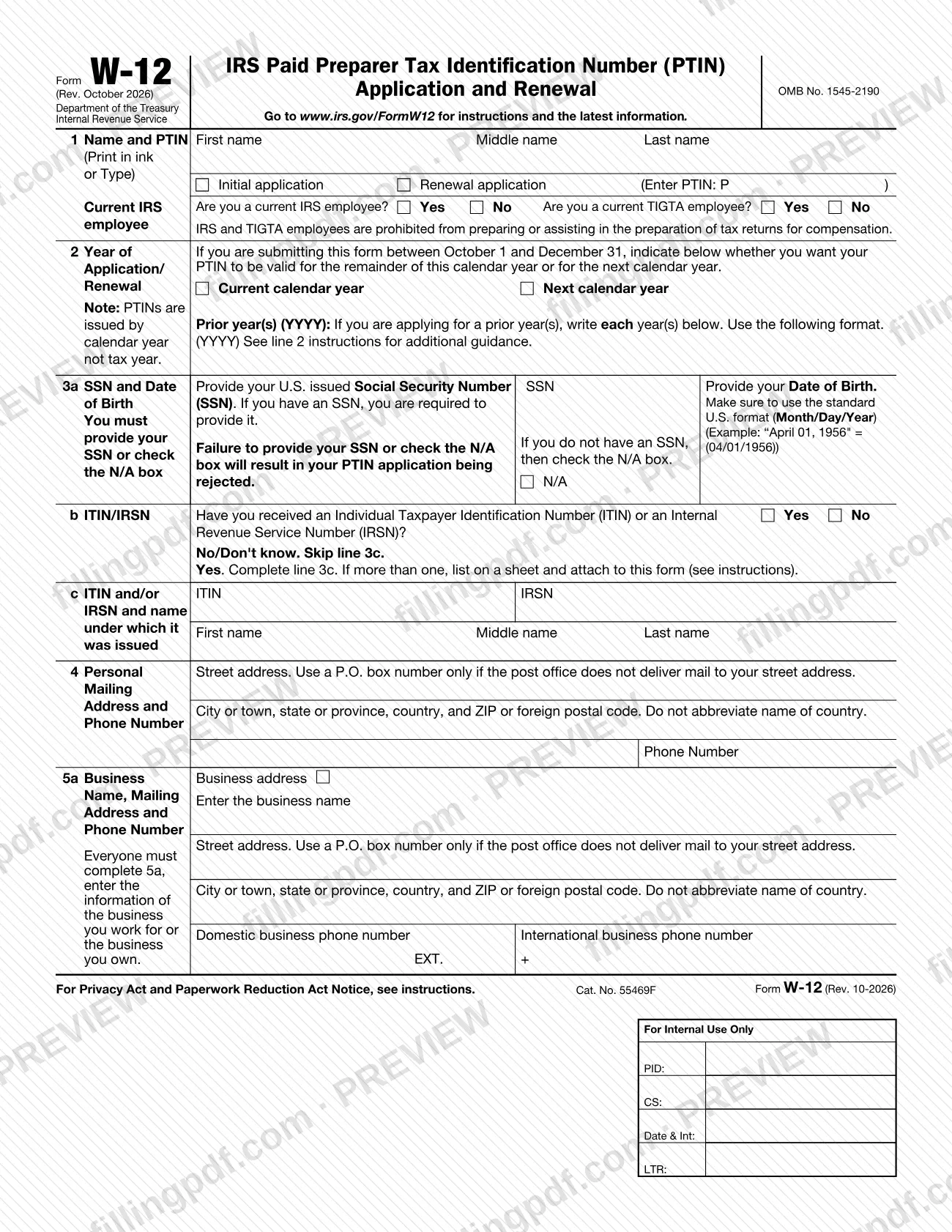
Form W-12, IRS Paid Preparer Tax Identification Number (PTIN) Application and Renewal, often searched as w12, is the Internal Revenue Service (IRS) form used to apply for or renew a PTIN. Anyone who is paid to prepare federal tax returns, including enrolled agents, must hold a PTIN and renew it every year. On this page you can fill out the form online on FillingPDF and download or print the completed PDF; the official PDF and its instructions are published by the IRS, which also takes PTIN applications online at www.irs.gov/ptin.
Last updated
What is W-12?
Form W-12, IRS Paid Preparer Tax Identification Number (PTIN) Application and Renewal is the Internal Revenue Service (IRS) form that paid tax return preparers use to apply for a new PTIN or to renew an existing one. It is issued under OMB No. 1545-2190.
A PTIN is the number a paid preparer puts on the returns he or she prepares. The form collects your legal name, Social Security number (SSN) and date of birth, personal and business addresses, any ITIN or IRSN you have received, your last filed federal tax return, answers on felony convictions, federal tax compliance and data security, and your professional credentials.
The IRS instructions say that certain information from the application is made available to the public under the Freedom of Information Act: your name, business name, business address, business phone number, business website address and professional credentials. The business address on line 5a also appears in the online Directory of Federal Tax Return Preparers with Credentials and Select Qualifications if you meet the qualifications for inclusion.
Two supplemental forms exist for people without a U.S. issued SSN. Form 8945 is for U.S. citizens with a conscientious religious objection to having an SSN, and Form 8946 is for foreign persons. Enrolled agents can also use line 12 of Form W-12 to ask that the address in their EA account be updated.
Who needs to file W-12?
Anyone who is a paid tax return preparer must apply for and receive a PTIN. Enrolled agents (EAs) must also obtain one. For this purpose, a tax return preparer is any individual compensated for preparing, or assisting in the preparation of, all or substantially all of a tax return or claim for refund. The PTIN must be renewed annually. Applicants must be at least 18 years of age.
Conditions and exclusions in the IRS instructions:
- IRS employees are prohibited from preparing or assisting in the preparation of tax returns for compensation; line 1 asks whether you are a current IRS employee.
- No U.S. issued SSN: a U.S. citizen who is a conscientious religious objector must also complete Form 8945. A foreign person, meaning an individual who has and is not eligible for a U.S. issued SSN and is neither a U.S. citizen nor a resident alien, must provide additional identity proofing, either online or with Form 8946.
- Incarceration: a felony conviction does not necessarily disqualify you, but generally a person currently incarcerated for any felony conviction will not be permitted to obtain or renew a PTIN.
- Inactive preparers: if you do not expect to prepare federal returns for compensation for a full calendar year, you can inactivate your PTIN in your online PTIN account. EAs should not inactivate unless they retire, because they must keep a current PTIN to keep the EA credential.
When to file W-12
Apply for a PTIN before you prepare federal tax returns for compensation, and renew it every year. Form W-12 sets no single due date; timing depends on your situation.
- Initial application between October 1 and December 31: line 2 asks whether the PTIN should be valid for the current calendar year (valid until December 31) or the next calendar year (not valid until January 1). If you select neither, the application is processed for the current calendar year.
- Prior-year renewals: enter each prior year (YYYY) on line 2, on a single Form W-12. If your PTIN has been expired for more than 1 full calendar year, you must renew for each expired year unless you were inactive during that year.
- Inactive or expired more than 3 consecutive years: you must submit a new registration application. A voluntarily inactivated PTIN can be reactivated within 3 years.
Allow 6 weeks for processing of a mailed application. Online, the PTIN generally is provided immediately after you complete the application and payment.
Documents you need
- Check or money order for each calendar year you are registering or renewing, payable to IRS Tax Pro PTIN Fee, with the year written on it. Do not staple or clip it to the form.
- If you have an SSN and have never filed a U.S. federal tax return, have not filed in the past 4 years, or have no filing requirement: an original or notarized copy of your U.S. issued Social Security card.
- In the same situations: an original or notarized copy of one other government-issued ID with a current photo, such as a passport or passport card, driver's license, U.S. state ID card, military ID card or national ID card. All documents must be current.
- If your last federal return was filed more than 4 years ago (line 9): the same identity verification documents described for line 8.
- Form 8945, if you are a U.S. citizen without an SSN because of a conscientious religious objection, with the documents that form requires.
- Form 8946, if you are a foreign person without a U.S. issued SSN and do not apply online, with the documents that form requires.
- A separate sheet listing every ITIN or IRSN you have received, when you have more than one (line 3b).
- A written explanation in the space provided on line 7 if you answer Yes to a felony conviction in the past 10 years, and on line 10 if you answer No to federal tax compliance.
How to fill out W-12
Enter your name and application type
Line 1: print or type your first, middle and last name as on your last filed federal return, then check Initial application or Renewal application. For a renewal, enter your PTIN (P followed by the number), and answer whether you are a current IRS employee.
Choose the PTIN year
Line 2: if you check Initial application between October 1 and December 31, mark Current calendar year or Next calendar year. For prior-year renewals, write each prior year in YYYY format.
Provide your SSN and date of birth
Line 3a: enter your U.S. issued SSN and your date of birth in Month/Day/Year format, for example 04/01/1956. If you do not have an SSN, check the N/A box.
Report any ITIN or IRSN
Line 3b: answer Yes or No. If Yes, complete line 3c with the ITIN or IRSN and the name under which it was issued; list more than one on an attached sheet.
Enter your personal mailing address
Line 4: give your street address, city, state or province, country and ZIP or foreign postal code, plus a phone number. Use a P.O. box only if the post office does not deliver to your street address.
Enter your business information
Line 5a: give the name, address and phone number of the business you work for or own. Check the box if it matches your personal mailing address. If you have more than one location, enter your primary one.
Complete business identification numbers
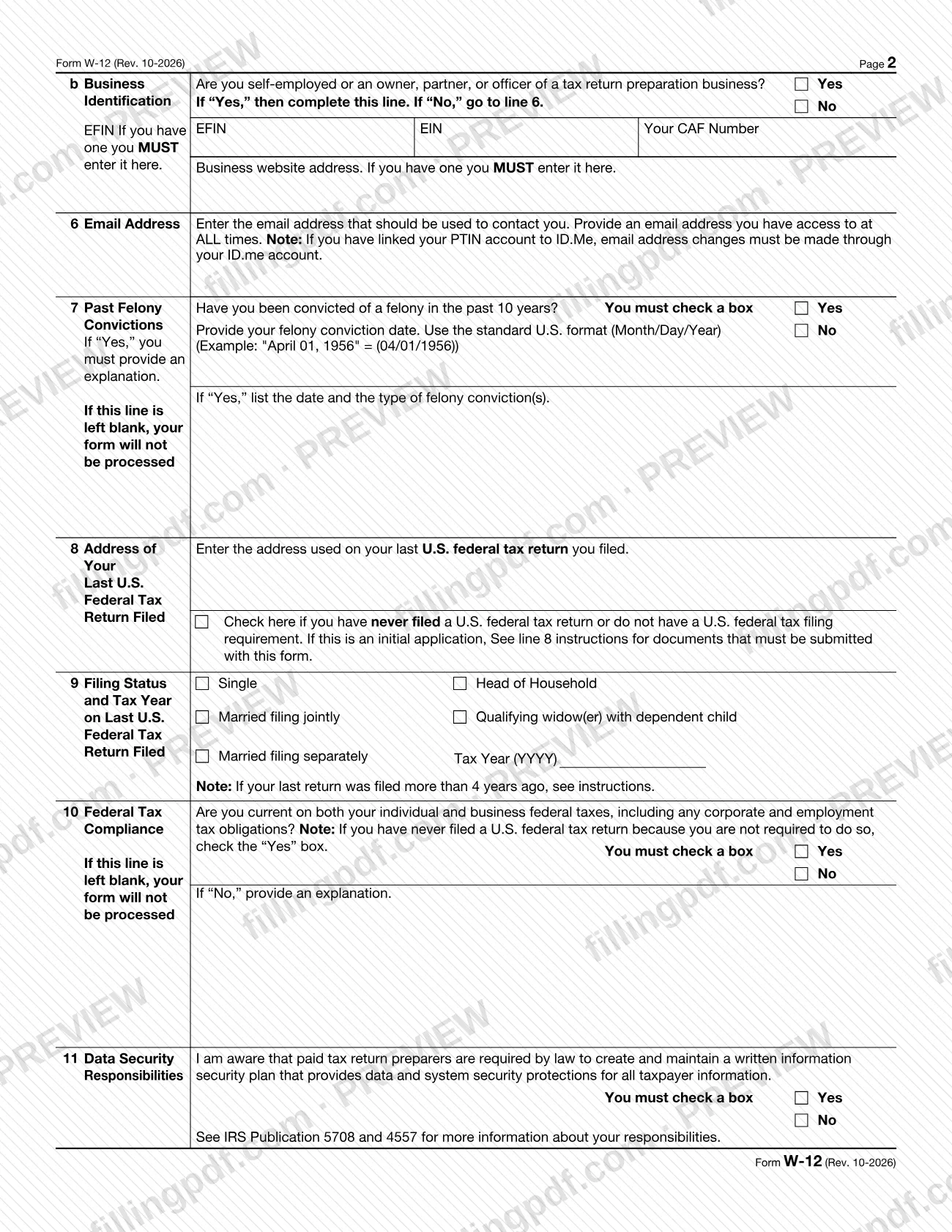
Line 5b: if you are self-employed or an owner, partner or officer of a tax return preparation business, check Yes and enter your EFIN, EIN, CAF number and website, if you have them. If you have several EINs or EFINs, enter the one used most often.
Enter your email address
Line 6: enter an email address you can access at all times. The IRS sends most PTIN correspondence there.
Answer the felony question
Line 7: check Yes or No for a felony conviction in the past 10 years. If Yes, list the date and type of each conviction in the space provided.
Give your last federal return details
Line 8: enter the address used on your last filed U.S. federal return, or check the box if you have never filed or have no filing requirement. Line 9: check your filing status and enter the tax year (YYYY).
Answer compliance and data security
Line 10: check Yes or No on federal tax compliance; if No, explain. Line 11: check Yes or No to acknowledge your data security responsibilities.
List your professional credentials
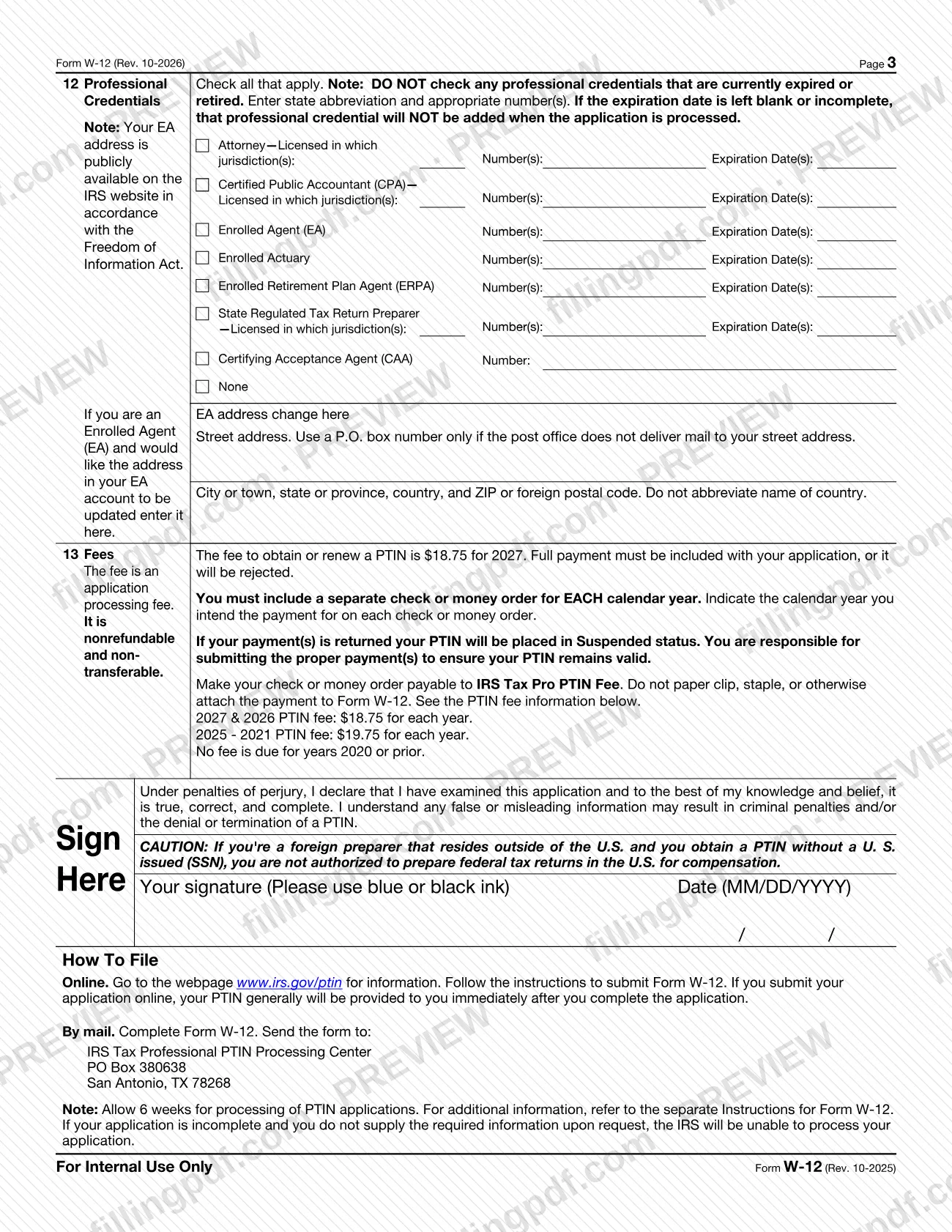
Line 12: check each current credential and enter jurisdiction, number and expiration date where asked, or check None. EAs who want their EA account address updated enter it in the space provided.
Prepare the payment
Line 13: prepare a separate check or money order for each calendar year, payable to IRS Tax Pro PTIN Fee, marked with the year. Do not attach it to the form.
Review, sign and download the PDF
Read the penalties of perjury statement, then sign in blue or black ink and enter the date as MM/DD/YYYY. Download or print the completed PDF from FillingPDF and assemble the package described under How to submit.
How to submit W-12
You can submit Form W-12 online or by mail.
- Online: go to www.irs.gov/ptin and follow the instructions to submit Form W-12. If you submit the application and payment online, your PTIN generally is provided to you immediately after you complete the application. Supporting ID documents, when required, can be uploaded online as notarized copies.
- By mail: send the completed, signed Form W-12, the required payment and any required documentation to: IRS Tax Professional PTIN Processing Center, PO Box 380638, San Antonio, TX 78268. Do not send it to the Tax Forms and Publications Division address used for comments.
A fee applies, and the amount depends on the calendar year. See line 13 of the form and its instructions. Include a separate check or money order for each calendar year, write the intended year on each, and make it payable to IRS Tax Pro PTIN Fee. Do not paper clip, staple or otherwise attach the payment to the form. The fee is nonrefundable, and a returned payment places your PTIN in Suspended status.
For help, call 1-877-613-PTIN (7846); TTY/TDD 1-877-613-3686; from outside the United States, +1 915-342-5655 (not toll free). Lines are generally open Monday through Friday, 8:00 a.m. to 5:00 p.m. Central time.
FillingPDF lets you fill out and download the PDF; submission follows the channels above.
Common mistakes to avoid
- Leaving line 7 (felony convictions), line 10 (federal tax compliance) or line 11 (data security) without a Yes or No box checked; the form says it will not be processed.
- Skipping line 3a: if you have a U.S. issued SSN you must enter it, and failing to provide the SSN or check the N/A box results in rejection.
- Mailing the application without full payment, or sending one check for several years; each calendar year needs its own check or money order.
- Stapling or paper clipping the check or money order to Form W-12, or making it payable to someone other than IRS Tax Pro PTIN Fee.
- Checking a professional credential that is expired or retired, or leaving its expiration date blank or incomplete; that credential will not be added.
- Abbreviating the name of the country in an address on line 4, 5a or 8, or using a P.O. box owned by a private firm instead of a U.S. Postal Service box.
- Omitting the ID documents when you have never filed a federal return or last filed more than 4 years ago, or submitting expired or non-notarized copies.
- Submitting the form unsigned, or signed in ink that is not blue or black.
- Mailing the form to the Tax Forms and Publications Division address instead of the PTIN Processing Center in San Antonio.
Frequently asked questions
What is Form W-12 (w12) used for?
Form W-12, often searched as w12, is the IRS application to obtain or renew a Preparer Tax Identification Number (PTIN). Anyone paid to prepare, or assist in preparing, all or substantially all of a federal tax return or claim for refund must have a PTIN, and enrolled agents must have one too.
Who has to get a PTIN?
Any paid tax return preparer, including enrolled agents. A preparer is anyone compensated for preparing or assisting in preparing all or substantially all of a return or claim for refund. Applicants must be at least 18, and current IRS employees cannot prepare returns for compensation.
Can I apply for a PTIN online instead of mailing Form W-12?
Yes. The IRS accepts PTIN applications at www.irs.gov/ptin, and your PTIN generally is provided immediately after you complete the application and payment online. Mailed applications go to the IRS Tax Professional PTIN Processing Center in San Antonio, TX.
How long does it take to get a PTIN by mail?
The form and instructions say to allow 6 weeks for processing of PTIN applications. If your application is incomplete and you do not supply the missing information when the IRS asks, the IRS will be unable to process it.
Is there a fee for Form W-12, and how do I pay it?
Yes. A nonrefundable fee applies for each calendar year, and the amount depends on the year; see line 13 of the form. By mail, include a separate check or money order per year payable to IRS Tax Pro PTIN Fee, not attached to the form.
How often do I renew my PTIN?
Every year. If your PTIN has been expired for more than 1 full calendar year, you must renew for each expired year unless you were inactive. If it has been inactive or expired for more than 3 consecutive years, you must submit a new registration application.
What if I do not have a Social Security number?
Check the N/A box on line 3a and provide additional documents. U.S. citizens with a conscientious religious objection to an SSN complete Form 8945; foreign persons complete Form 8946 or apply online. Without a U.S. issued SSN, a foreign preparer is not authorized to prepare federal returns for compensation.
Can I fill out Form W-12 online on FillingPDF?
Yes. You can fill out the fillable PDF online on FillingPDF and download or print it. FillingPDF is an independent service and does not submit the application to the IRS; you file it through the IRS website or by mail.
Does a felony conviction stop me from getting a PTIN?
Not necessarily. Line 7 requires you to check Yes or No and explain any conviction in the past 10 years, and the IRS considers all facts and circumstances. Generally, a person currently incarcerated for any felony conviction will not be permitted to obtain or renew a PTIN.
Ready to fill out W-12?
Fill out W-12 now