
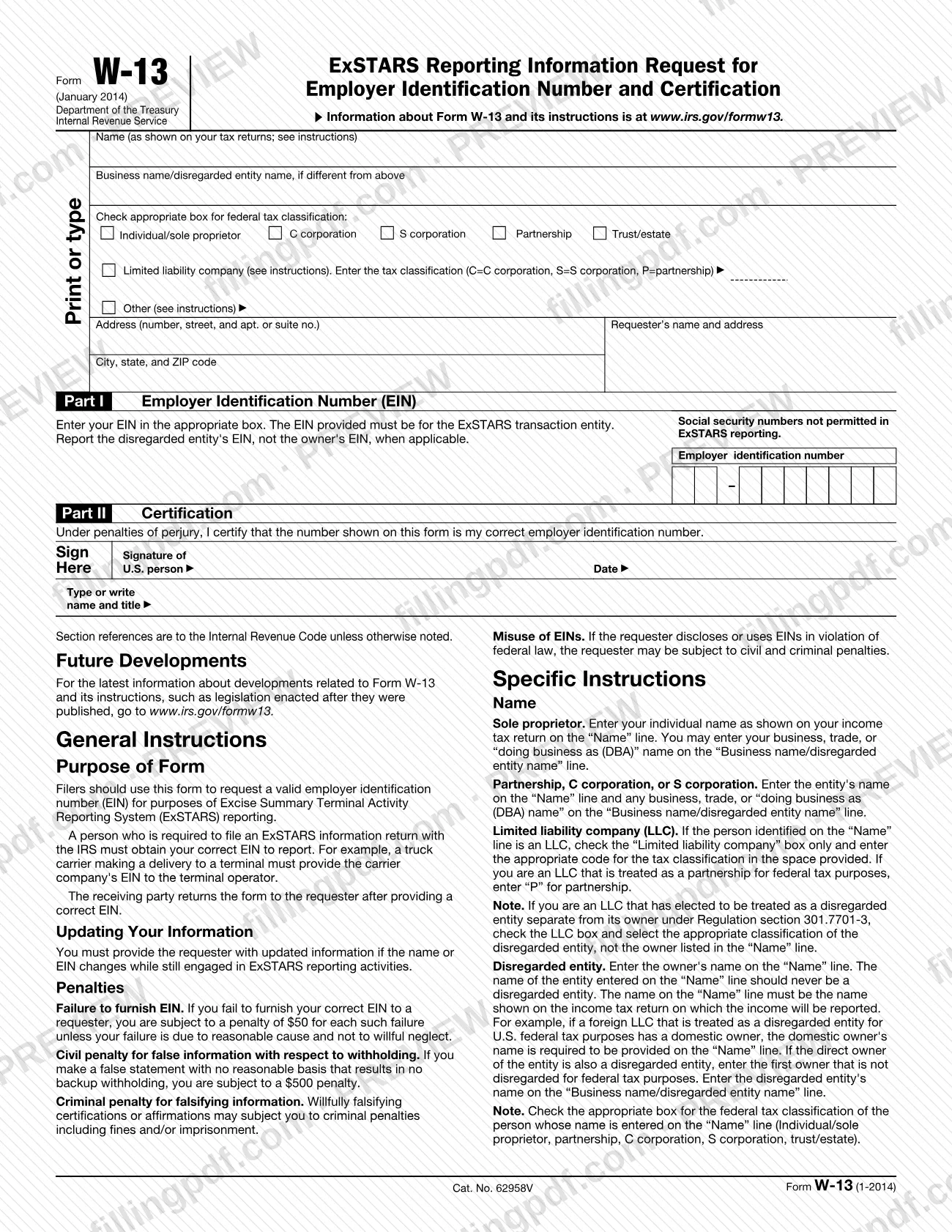
The w13 is Form W-13, the Internal Revenue Service (IRS) form that a person who must file an ExSTARS information return uses to get a valid employer identification number (EIN) from the other party. The party who receives it enters the EIN, certifies it under penalties of perjury and returns the form to the requester. On this page you can fill out Form W-13 online on FillingPDF and download or print the completed PDF. The IRS publishes the form and its instructions at www.irs.gov/formw13.
Last updated
What is W-13?
Form W-13, ExSTARS Reporting Information Request for Employer Identification Number and Certification, is the IRS form used to request a valid employer identification number (EIN) for Excise Summary Terminal Activity Reporting System (ExSTARS) reporting.
A person who must file an ExSTARS information return with the IRS needs the correct EIN of the party being reported. The IRS instructions give an example: a truck carrier making a delivery to a terminal must provide the carrier company's EIN to the terminal operator. The requester hands over Form W-13, and the receiving party returns it after providing a correct EIN.
The form has two parts. Part I collects the EIN, which must be the EIN of the ExSTARS transaction entity. Part II is the certification, signed under penalties of perjury, that the number shown is the signer's correct EIN. Above them are the name, business name, federal tax classification and address lines, plus the requester's name and address.
Form W-13 is not a request for a Social Security number: Social Security numbers are not permitted in ExSTARS reporting. A person without an EIN applies for one first, using Form SS-4, Application for Employer Identification Number.
Who needs to file W-13?
Anyone engaged in ExSTARS activities whom a requester asks for an EIN completes Form W-13. The requester is a person required to file an ExSTARS information return with the IRS; for example, a terminal operator collects it from a truck carrier that delivers to the terminal.
Conditions that apply to the person completing it:
- You must hold an EIN. Social Security numbers and "Applied For" designations are not valid on this form.
- The EIN must be the one associated with the ExSTARS activities. If the entity is disregarded, report the disregarded entity's EIN, not the owner's.
- The form must be signed by an owner or principal officer, who types or clearly writes their name and title. The signature line is for a U.S. person.
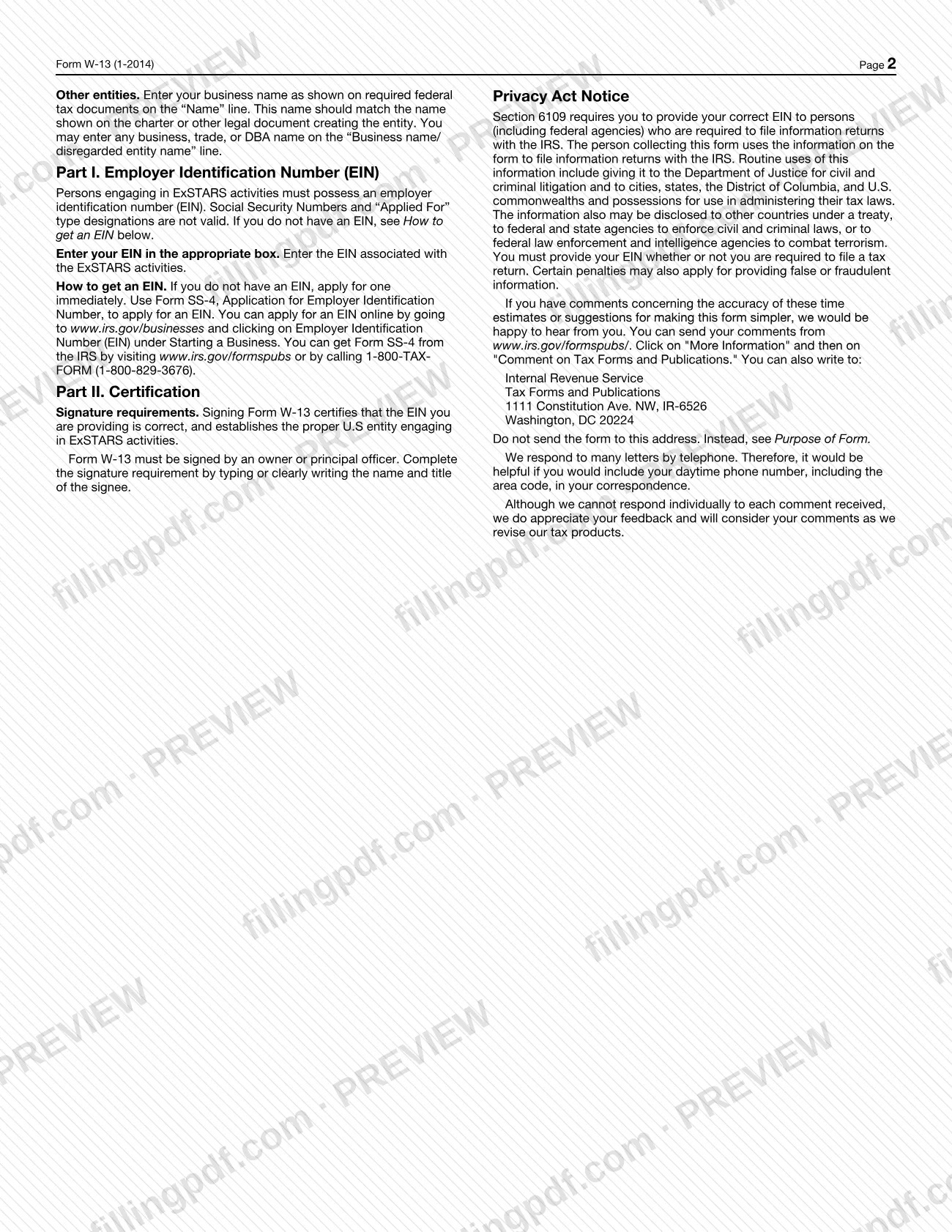
If you have no EIN, the instructions tell you to apply immediately with Form SS-4 before completing this form. Requesters keep the completed form; it is not sent to the IRS Tax Forms and Publications address printed in the instructions.
When to file W-13
Complete Form W-13 when a requester who must file an ExSTARS information return asks you for your EIN. The form prints no calendar due date; the trigger is the request.
After you have provided it, you must give the requester updated information if your name or EIN changes while you are still engaged in ExSTARS reporting activities.
If you do not yet have an EIN, the instructions say to apply for one immediately, because persons engaging in ExSTARS activities must possess an EIN.
How to fill out W-13
Enter the name on your tax returns
On the Name line, enter the name as shown on your tax returns. Sole proprietors use their individual name; partnerships, C corporations and S corporations use the entity's name; other entities use the name on the charter or other legal document.
Add any business name
On the Business name/disregarded entity name line, enter any business, trade or "doing business as (DBA)" name if it differs from the Name line. For a disregarded entity, enter the entity's name here and the owner's name on the Name line.
Check the federal tax classification
Check one box: Individual/sole proprietor, C corporation, S corporation, Partnership, Trust/estate, Limited liability company or Other. For an LLC, check only that box and enter C, S or P for its tax classification; an LLC treated as a partnership enters P.
Enter your address
Fill in the Address line (number, street, and apt. or suite no.) and the City, state, and ZIP code line.
Check the requester's details
The Requester's name and address box identifies the person who asked for the form. Complete it only if you are the requester preparing the form.
Enter the EIN in Part I
Write your nine-digit EIN in the boxes. It must be the EIN of the ExSTARS transaction entity; for a disregarded entity, report the entity's EIN, not the owner's.
Sign the Part II certification
An owner or principal officer signs on the Signature of U.S. person line and enters the date. This certifies, under penalties of perjury, that the number shown is the correct EIN.
Type or write name and title
Under the signature, enter the signer's name and title, as the instructions require.
Review and download the completed PDF
Check that no SSN or "Applied For" appears in Part I and that the classification matches the Name line. Download or print the completed PDF from FillingPDF and return it to the requester.
How to submit W-13
Form W-13 is returned to the requester who gave it to you; it is not filed with the IRS by the person completing it.
- Return to the requester: after you enter a correct EIN and sign Part II, the instructions say the receiving party returns the form to the requester. The requester's name and address are printed on the form, next to your own address.
- Do not mail it to the IRS publications address: the Tax Forms and Publications address in Washington, DC on the form is only for comments about the form. The form says not to send it there.
- Questions or comments about the form: go to www.irs.gov/formspubs/, click "More Information" and then "Comment on Tax Forms and Publications."
The requester uses the information to file information returns with the IRS. FillingPDF lets you fill out and download the PDF; submission follows the channels above.
Common mistakes to avoid
- Entering a Social Security number in Part I; the form states Social Security numbers are not permitted in ExSTARS reporting.
- Writing "Applied For" in the EIN boxes; the instructions say "Applied For" type designations are not valid.
- Entering the owner's EIN for a disregarded entity instead of the disregarded entity's EIN.
- Entering a disregarded entity's name on the Name line; the owner's name goes there and the disregarded entity's name goes on the Business name/disregarded entity name line.
- Checking more than the Limited liability company box for an LLC, or leaving out the tax classification code (C, S or P).
- Having someone other than an owner or principal officer sign Part II, or omitting the signer's printed name and title.
- Mailing the completed form to the IRS Tax Forms and Publications address instead of returning it to the requester.
- Failing to give the requester the new name or EIN after a change while still engaged in ExSTARS reporting.
Frequently asked questions
What is the w13 form used for?
The w13 is IRS Form W-13. A person required to file an ExSTARS information return uses it to obtain a valid employer identification number (EIN) from the party being reported. The receiving party enters a correct EIN, signs the certification and returns it to the requester.
Who has to sign Form W-13?
An owner or principal officer must sign. The signer also types or clearly writes their name and title. Signing certifies that the EIN is correct and establishes the proper U.S. entity engaging in ExSTARS activities.
Can I use my Social Security number on Form W-13?
No. Social Security numbers are not permitted in ExSTARS reporting, and "Applied For" designations are not valid. You must enter an EIN associated with the ExSTARS activities. A disregarded entity reports its own EIN, not the owner's.
How do I get an EIN if I don't have one?
Apply immediately. You can apply online at www.irs.gov/businesses under Employer Identification Number (EIN), or use Form SS-4, Application for Employer Identification Number, available at www.irs.gov/formspubs or by calling 1-800-TAX-FORM (1-800-829-3676).
Where do I send a completed Form W-13?
Return it to the requester who asked for it. The form says the receiving party returns it to the requester. Do not send it to the IRS Tax Forms and Publications address printed on the form, which is only for comments on the form.
What happens if I don't give the requester my EIN?
The IRS instructions state a penalty applies for each failure to furnish your correct EIN to a requester, unless the failure is due to reasonable cause and not willful neglect. False statements and willful falsification of certifications can carry further civil or criminal penalties.
What if my name or EIN changes after I submit Form W-13?
You must give the requester updated information if your name or EIN changes while you are still engaged in ExSTARS reporting activities, according to the IRS instructions.
Can I fill out Form W-13 online?
Yes. You can fill out the fillable PDF online on FillingPDF and download or print it. FillingPDF is an independent service and does not send the form to the requester or the IRS; you return it to the requester yourself.
Ready to fill out W-13?
Fill out W-13 now