
The W4 form is Form W-4, Employee's Withholding Certificate, the Internal Revenue Service (IRS) form that tells your employer how much federal income tax to withhold from your pay. Employees complete it when they start a job and again whenever a change in their personal or financial situation would change their entries. On this page you can fill out the 2026 form online on FillingPDF and download or print the completed PDF; the form itself and its instructions are published by the IRS, and you give the finished form to your employer.
Last updated
What is W-4?
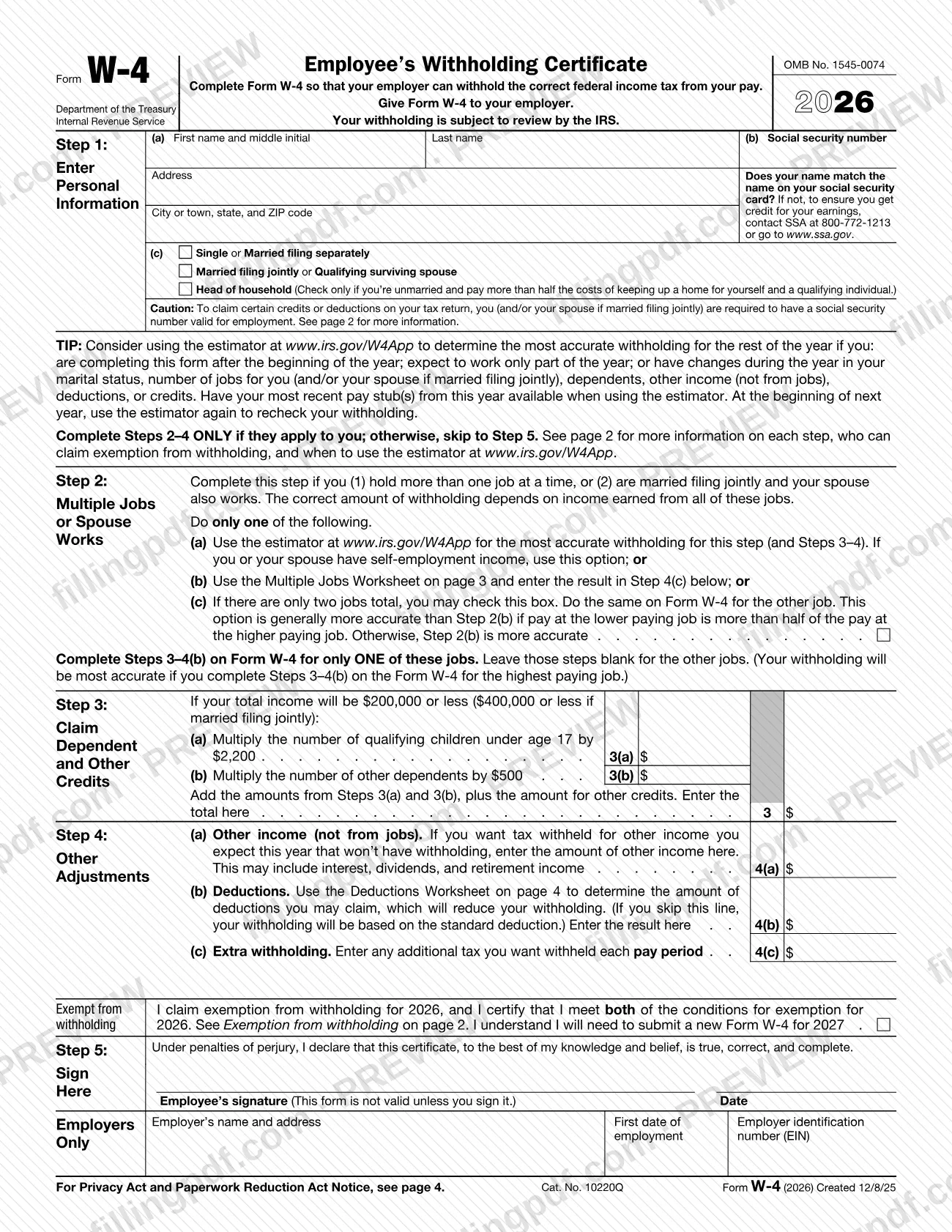
Form W-4, Employee's Withholding Certificate, is the IRS form an employee completes so that the employer can withhold the correct federal income tax from the employee's pay. The version on this page is the 2026 form, issued under OMB No. 1545-0074.
The form works in steps. Step 1 collects your name, Social Security number, address and filing status. Steps 2 to 4 are completed only if they apply: Step 2 for multiple jobs or a working spouse, Step 3 for dependent and other credits, and Step 4 for other income, deductions and extra withholding. Step 5 is your signature. A box above Step 5 lets you claim exemption from withholding if you meet both conditions printed on the form. The last block, Employers Only, is completed by the employer.
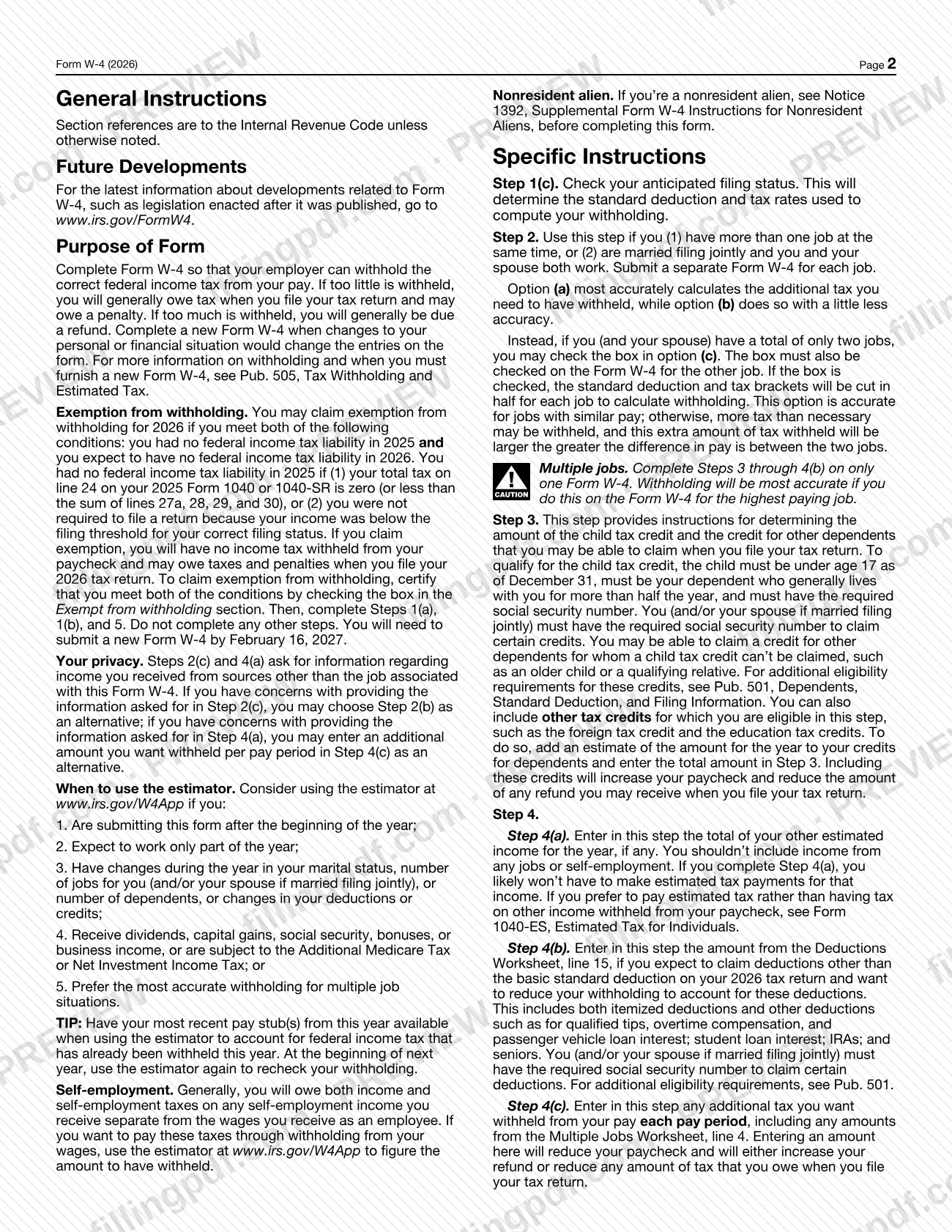
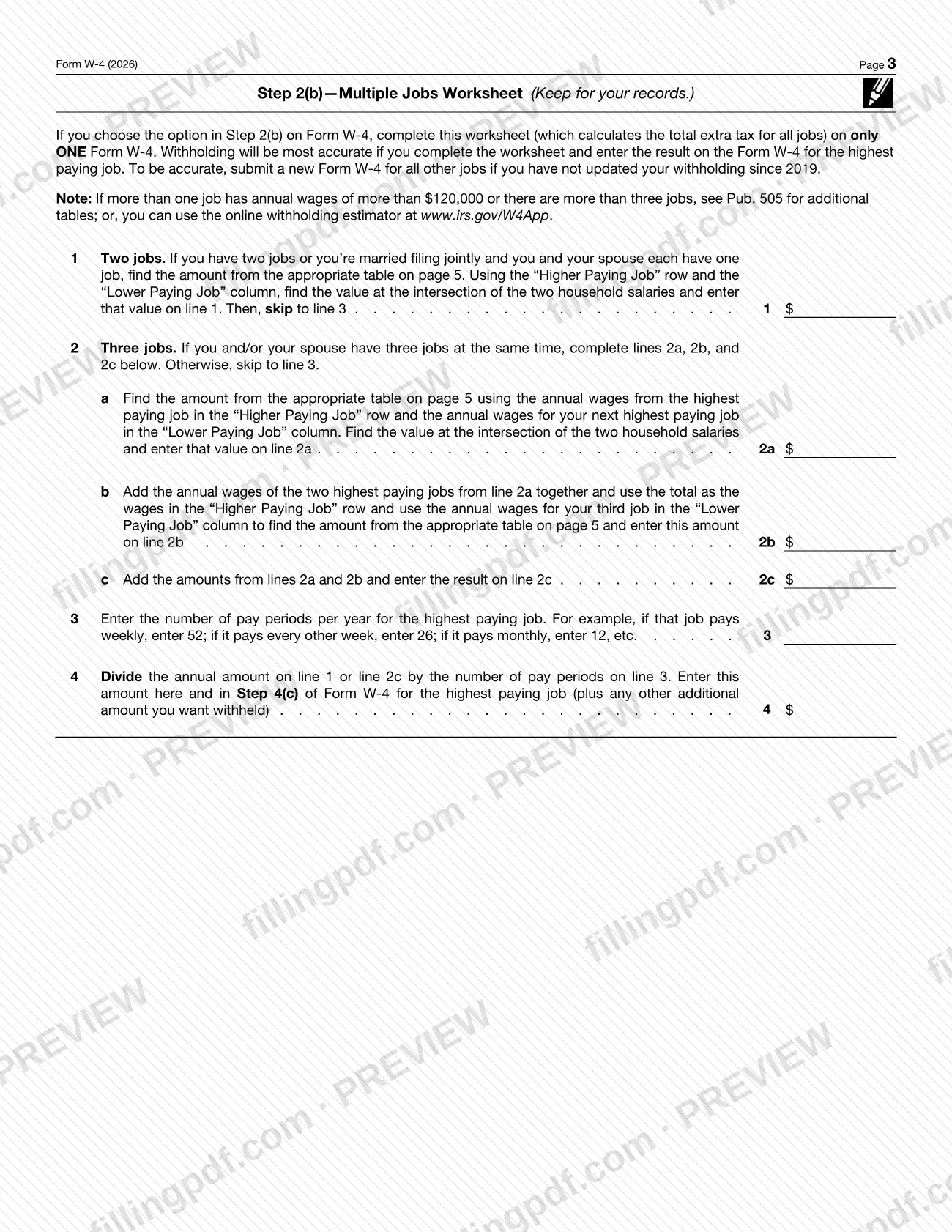
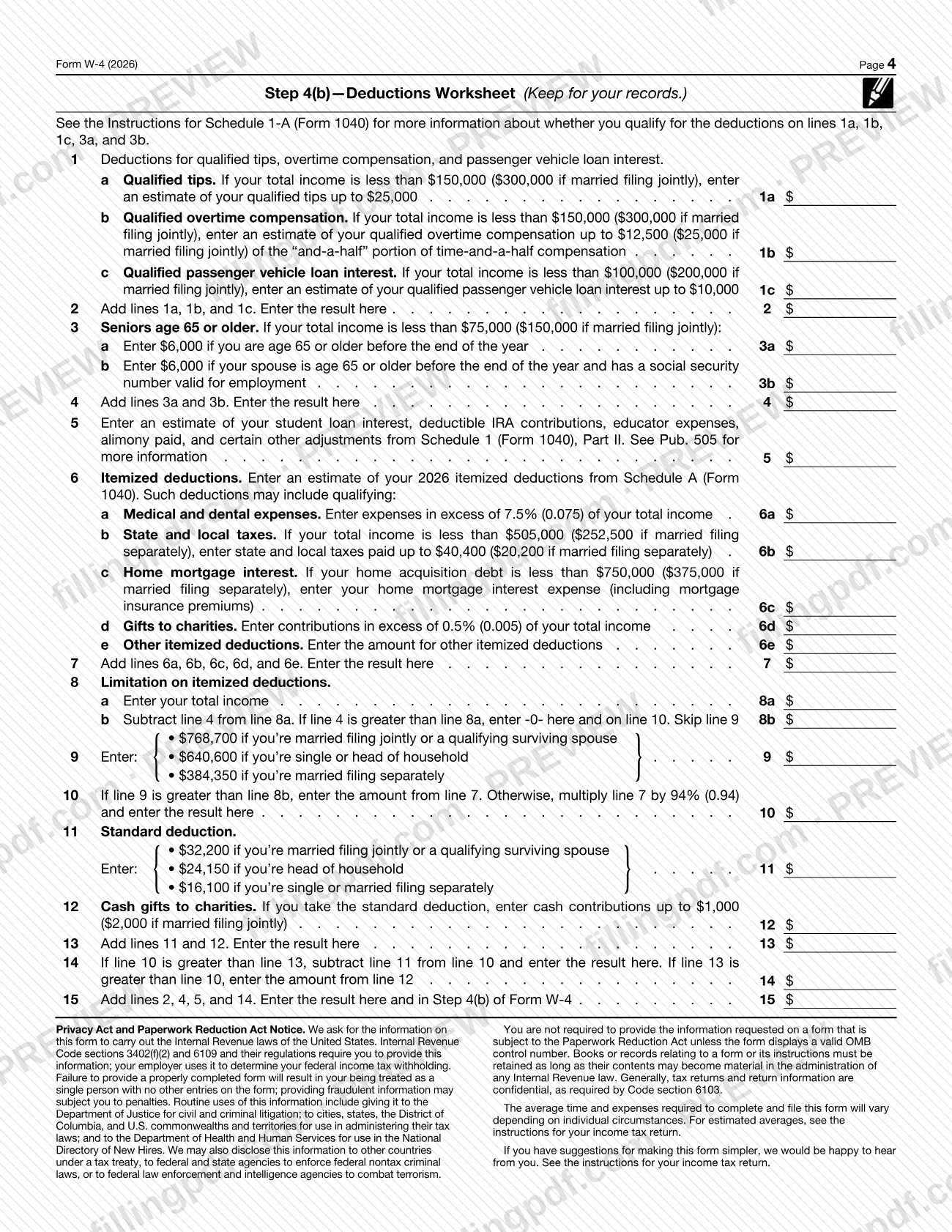
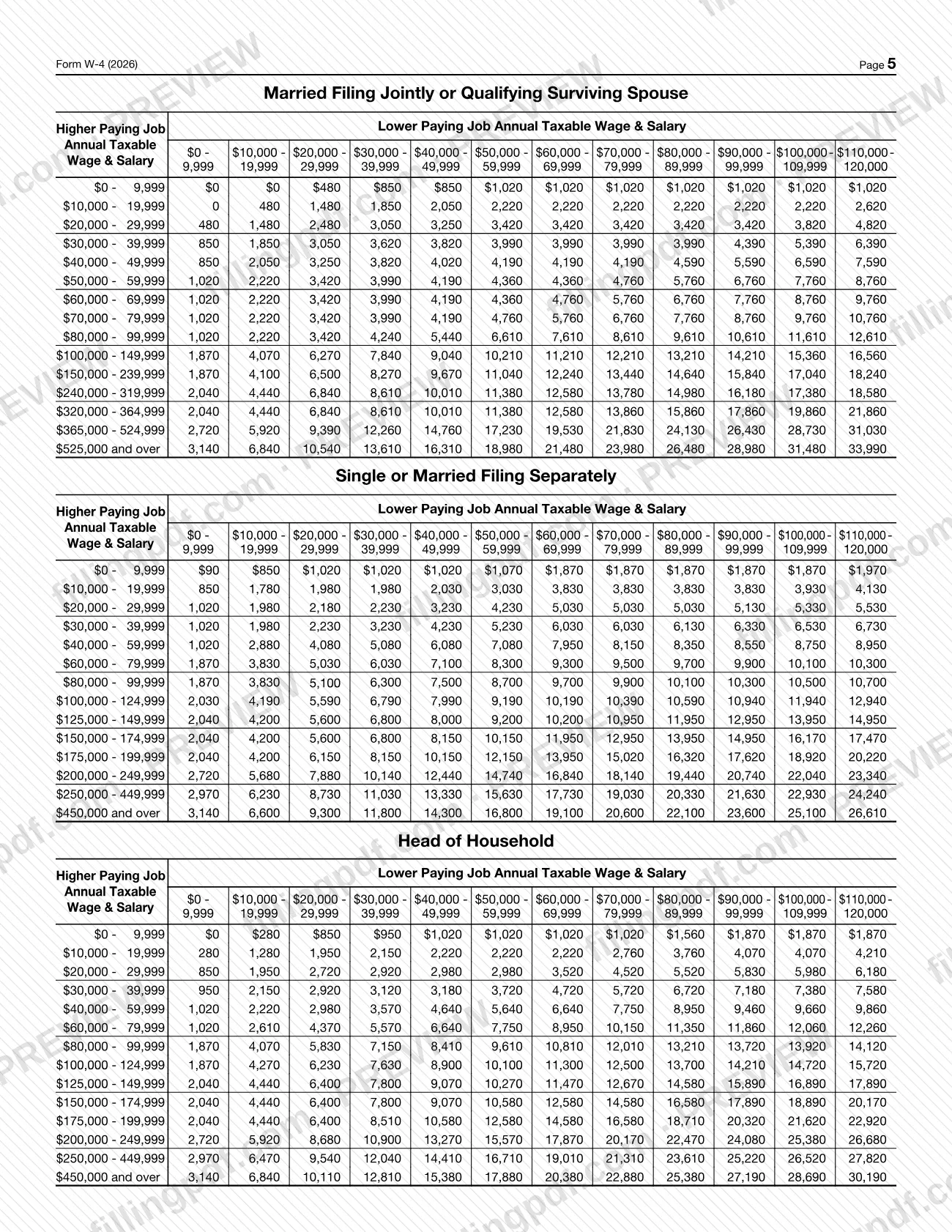
The IRS explains the purpose plainly: if too little tax is withheld, you will generally owe tax and may owe a penalty when you file your return; if too much is withheld, you will generally be due a refund. Pages 3 and 4 hold two worksheets, the Multiple Jobs Worksheet and the Deductions Worksheet, which you keep for your records. Your withholding is subject to review by the IRS.
Other IRS withholding certificates exist for other payers: Form W-4P for periodic pension or annuity payments and Form W-4R for nonperiodic payments and eligible rollover distributions. Form W-4 is the one for wages paid by an employer.
Who needs to file W-4?
Employees who want their employer to withhold federal income tax from their wages complete Form W-4 and give it to the employer. The IRS instructions say to complete a new form when changes to your personal or financial situation would change the entries on it.
Specific situations the form addresses:
- More than one job, or a working spouse: complete Step 2 if you hold more than one job at a time, or you are married filing jointly and your spouse also works. Submit a separate Form W-4 for each job.
- Dependents and credits: use Step 3 if your total income is at or below the limits printed on the form.
- Other income, deductions or extra withholding: use Step 4 if you want withholding to reflect them.
- Exemption from withholding: you may claim it for 2026 only if you had no federal income tax liability in 2025 and expect none in 2026.
Nonresident aliens should read Notice 1392, Supplemental Form W-4 Instructions for Nonresident Aliens, before completing the form. The IRS Tax Withholding Estimator cannot be used by people with nonresident status.
Pension and annuity payees use Form W-4P, and people with nonperiodic payments or eligible rollover distributions use Form W-4R, not this form.
When to file W-4
Give Form W-4 to your employer when you start a job, and complete a new one whenever a change in your personal or financial situation would change the entries on it. The IRS also suggests considering a new form each year.
The IRS tip printed on the form recommends using its estimator at www.irs.gov/W4App if you are completing the form after the beginning of the year, expect to work only part of the year, or have changes during the year in marital status, number of jobs, dependents, other income, deductions or credits.
If you claim exemption from withholding for 2026, it covers 2026 only. You will need to submit a new Form W-4 by February 16, 2027. The form sets no other filing deadline of its own.
Documents you need
- Most recent pay stub(s) from this year, if you use the IRS estimator at www.irs.gov/W4App; the IRS advises having them available so the estimator can account for tax already withheld.
- Your spouse's most recent pay stubs, if you think you will file jointly and use the IRS Tax Withholding Estimator.
- Multiple Jobs Worksheet (page 3), only if you choose the Step 2(b) option; complete it on one Form W-4 and keep it for your records.
- Deductions Worksheet (page 4), only if you want to enter an amount in Step 4(b); keep it for your records.
- Notice 1392, Supplemental Form W-4 Instructions for Nonresident Aliens, only if you are a nonresident alien; read it before completing the form.
How to fill out W-4
Enter personal information in Step 1
In Step 1(a) enter your first name and middle initial and your last name, then your address and your city or town, state, and ZIP code. In Step 1(b) enter your Social Security number; if your name does not match your Social Security card, contact SSA at 800-772-1213 or www.ssa.gov.
Check your filing status
In Step 1(c) check one box: Single or Married filing separately; Married filing jointly or Qualifying surviving spouse; or Head of household. Check Head of household only if you are unmarried and pay more than half the costs of keeping up a home for yourself and a qualifying individual.
Decide whether Steps 2 to 4 apply
Complete Steps 2 to 4 only if they apply to you; otherwise skip to Step 5. Consider the estimator at www.irs.gov/W4App if you are completing the form after the beginning of the year or expect changes during the year.
Handle multiple jobs in Step 2
If you hold more than one job, or are married filing jointly and your spouse works, do only one of the options: (a) use the estimator, (b) use the Multiple Jobs Worksheet on page 3 and enter the result in Step 4(c), or (c) check the box if there are only two jobs total and do the same on the other job's form.
Complete Steps 3 to 4(b) for one job only
With multiple jobs, fill in Steps 3 through 4(b) on the Form W-4 for only one job and leave them blank for the others. Withholding is most accurate if you use the form for the highest paying job.
Claim dependents and credits in Step 3
If your total income is at or below the limits printed in Step 3, enter the amount for qualifying children under age 17 on line 3(a) and for other dependents on line 3(b), then add other credits and enter the total on line 3.
Add other income in Step 4(a)
Enter the other income you expect this year that won't have withholding, such as interest, dividends and retirement income. Do not include income from jobs or self-employment.
Enter deductions in Step 4(b)
Use the Deductions Worksheet on page 4 and enter line 15 of the worksheet here. If you skip this line, withholding is based on the standard deduction.
Request extra withholding in Step 4(c)
Enter any additional tax you want withheld each pay period, including the amount from line 4 of the Multiple Jobs Worksheet if you used it. This reduces your paycheck.
Claim exemption only if you qualify
If you meet both conditions, check the box in the Exempt from withholding section; then complete only Steps 1(a), 1(b) and 5 and nothing else.
Sign and date in Step 5
Sign the declaration made under penalties of perjury and enter the date. The form is not valid unless you sign it. Leave the Employers Only block for your employer.
Review, download and give to your employer
Check every entry, then download or print the completed PDF from FillingPDF and give it to your employer through the channels described under How to submit.
How to submit W-4
Form W-4 is not filed with the IRS: the form says "Give Form W-4 to your employer." The channels are whatever your employer uses to accept it, such as a paper copy or its payroll or human resources system.
- To your employer: hand over the signed form. The form is not valid unless you sign it. The employer completes the Employers Only block with its name and address, the first date of employment and its employer identification number (EIN).
- Multiple jobs: give a separate Form W-4 to each employer.
- Estimator route: the IRS Tax Withholding Estimator at https://www.irs.gov/individuals/tax-withholding-estimator can generate a pre-filled Form W-4 that you download and give to your employer, or use to update your withholding through its payroll or human resources system.
Keep the Multiple Jobs Worksheet and Deductions Worksheet for your records; they are not part of what you hand over. FillingPDF lets you fill out and download the PDF; submission follows the channels above.
Common mistakes to avoid
- Giving the employer an unsigned form. The form states it is not valid unless you sign it, and an improperly completed form results in treatment as a single person with no other entries.
- Completing Steps 3 through 4(b) on more than one Form W-4 when you have multiple jobs; complete them on only one, ideally the highest paying job.
- Checking the Step 2(c) box on only one of the two jobs' forms; the box must be checked on the Form W-4 for the other job as well.
- Checking Head of household in Step 1(c) when you are not unmarried or do not pay more than half the costs of keeping up a home for yourself and a qualifying individual.
- Completing Steps 2 to 4 or other lines when claiming exemption from withholding; the instructions say to complete only Steps 1(a), 1(b) and 5.
- Claiming exemption without meeting both conditions: no federal income tax liability in 2025 and none expected in 2026.
- Forgetting to submit a new Form W-4 by February 16, 2027 after claiming exemption for 2026.
- Using a name that does not match your Social Security card; the form tells you to contact SSA at 800-772-1213 or www.ssa.gov so your earnings are credited.
- Including income from any job or self-employment in Step 4(a), which is for other income not from jobs.
Frequently asked questions
What is the W4 form used for?
The W4 form, Form W-4, Employee's Withholding Certificate, tells your employer how much federal income tax to withhold from your pay. If too little is withheld you may owe tax and a penalty at filing; if too much is withheld you will generally get a refund.
Do I send Form W-4 to the IRS?
No. The form says to give it to your employer, who uses it to set your withholding. You do not mail it to the IRS, although your withholding is subject to IRS review.
Can I fill out Form W-4 online?
Yes. You can fill out the W-4 PDF online on FillingPDF and download or print it. FillingPDF is an independent service and does not send the form to your employer or the IRS; you give the completed form to your employer yourself.
How do I claim exemption from withholding on Form W-4?
Check the box in the Exempt from withholding section only if you had no federal income tax liability in 2025 and expect none in 2026. Then complete Steps 1(a), 1(b) and 5 only. You must submit a new Form W-4 by February 16, 2027.
What do I do with Form W-4 if I have two jobs?
Complete Step 2 and choose one option: the IRS estimator, the Multiple Jobs Worksheet, or the Step 2(c) box if there are only two jobs total. Fill in Steps 3 to 4(b) on only one form, ideally the highest paying job.
How often should I update my W-4?
Complete a new Form W-4 whenever changes to your personal or financial situation would change your entries, such as marital status, jobs, dependents, other income, deductions or credits. The IRS also suggests considering a new form each year.
Can nonresident aliens use the standard W-4 instructions?
Nonresident aliens should see Notice 1392, Supplemental Form W-4 Instructions for Nonresident Aliens, before completing Form W-4. The IRS Tax Withholding Estimator also cannot be used by people with nonresident status.
What happens if I do not complete Form W-4 properly?
The Privacy Act notice on the form says that failure to provide a properly completed form results in your being treated as a single person with no other entries. Providing fraudulent information may subject you to penalties.
Ready to fill out W-4?
Fill out W-4 now