
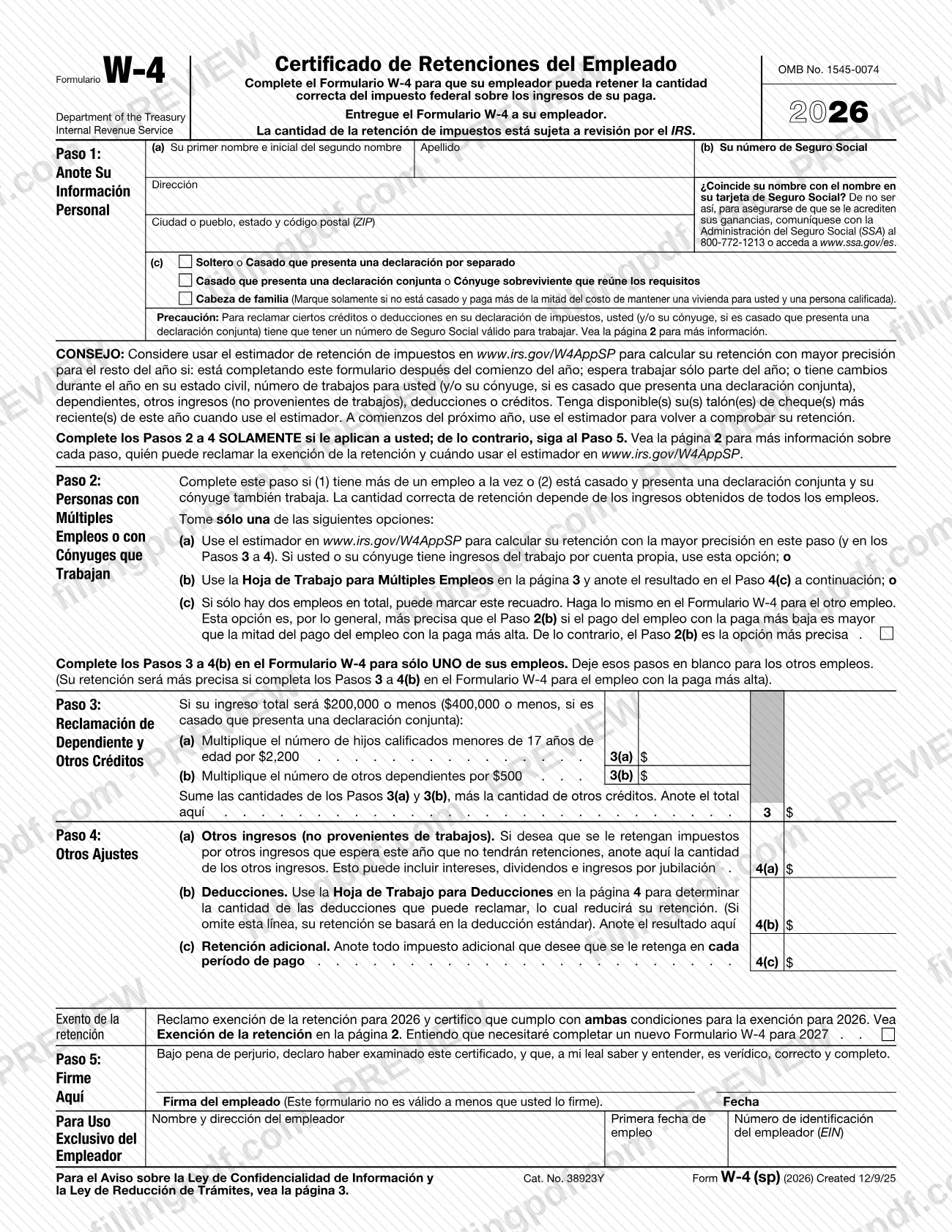
Form W-4 (sp), Employee's Withholding Certificate (Spanish Version), is the Spanish-language edition of the W4 form that the Internal Revenue Service (IRS) publishes for 2026. An employee completes it so the employer can withhold the correct federal income tax from each paycheck, and gives it to the employer, not to the IRS. On this page you can fill out Form W-4 (sp) online on FillingPDF and download or print the completed PDF. The original PDF is published by the IRS at irs.gov.
Last updated
What is Form W-4 (sp)?
Form W-4 (sp), Employee's Withholding Certificate (Spanish Version), is the Spanish-language edition of the Internal Revenue Service (IRS) form that an employee completes so the employer can withhold the correct amount of federal income tax from pay.
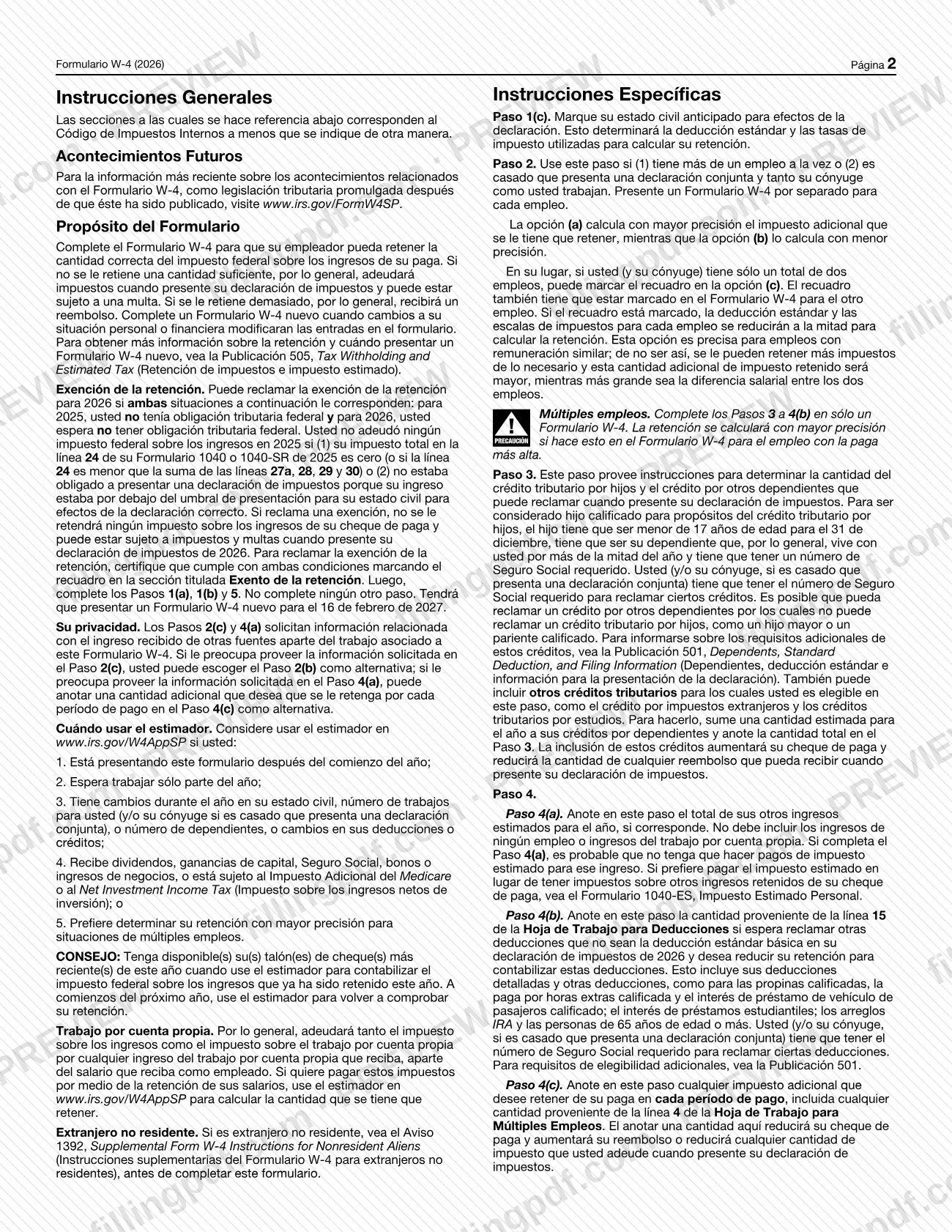
The printed title is "Formulario W-4 Certificado de Retenciones del Empleado," and the whole form and its instructions are in Spanish. It is issued under OMB No. 1545-0074 and carries the 2026 tax year. The IRS instructions explain the stakes: if too little is withheld you generally owe tax when you file your return and may owe a penalty; if too much is withheld you generally receive a refund.
The form has five steps:
- Step 1 (Anote Su Información Personal): name, Social Security number, address and filing status.
- Step 2 (Personas con Múltiples Empleos o con Cónyuges que Trabajan): multiple jobs or a working spouse.
- Step 3 (Reclamación de Dependiente y Otros Créditos): dependents and other credits.
- Step 4 (Otros Ajustes): other income, deductions and extra withholding.
- Step 5 (Firme Aquí): signature.
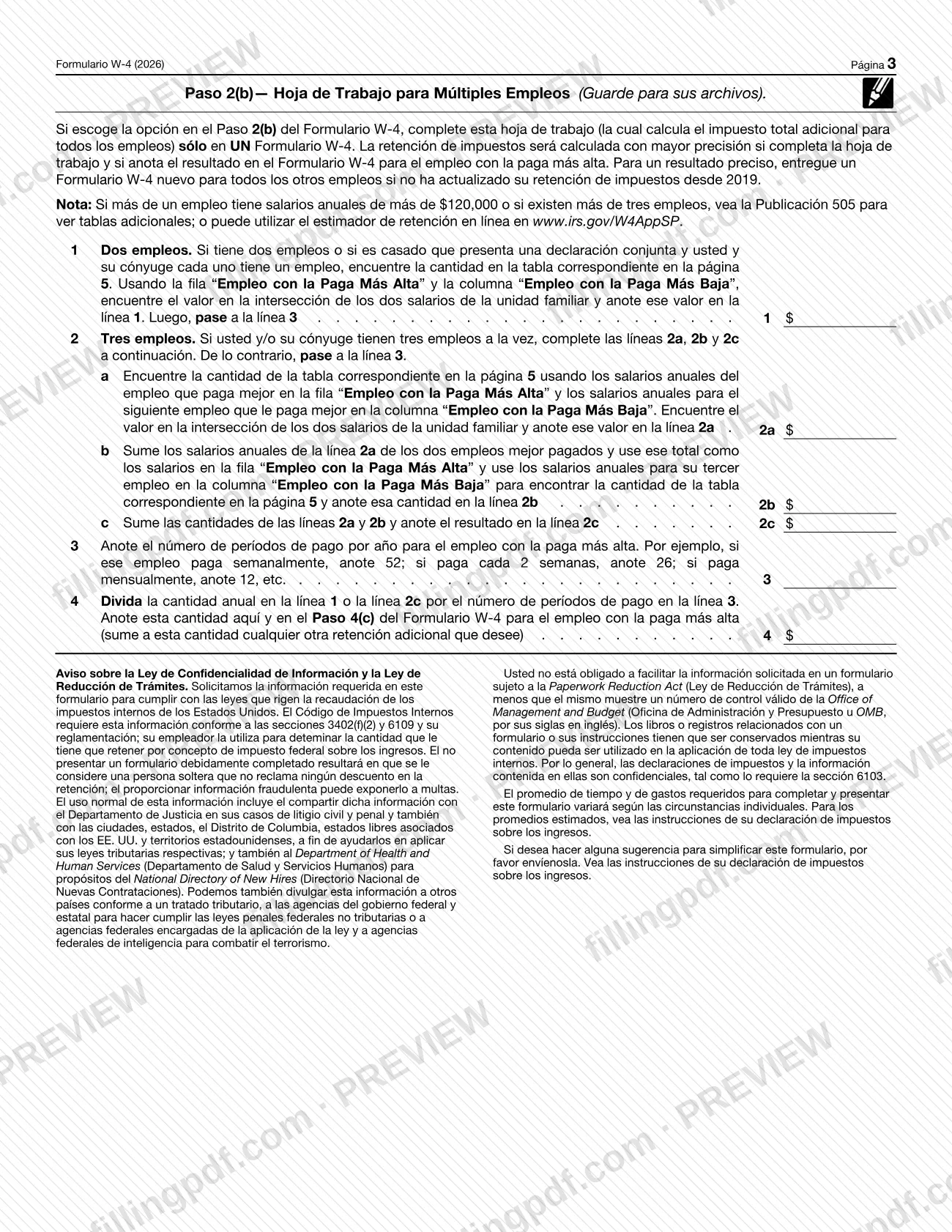
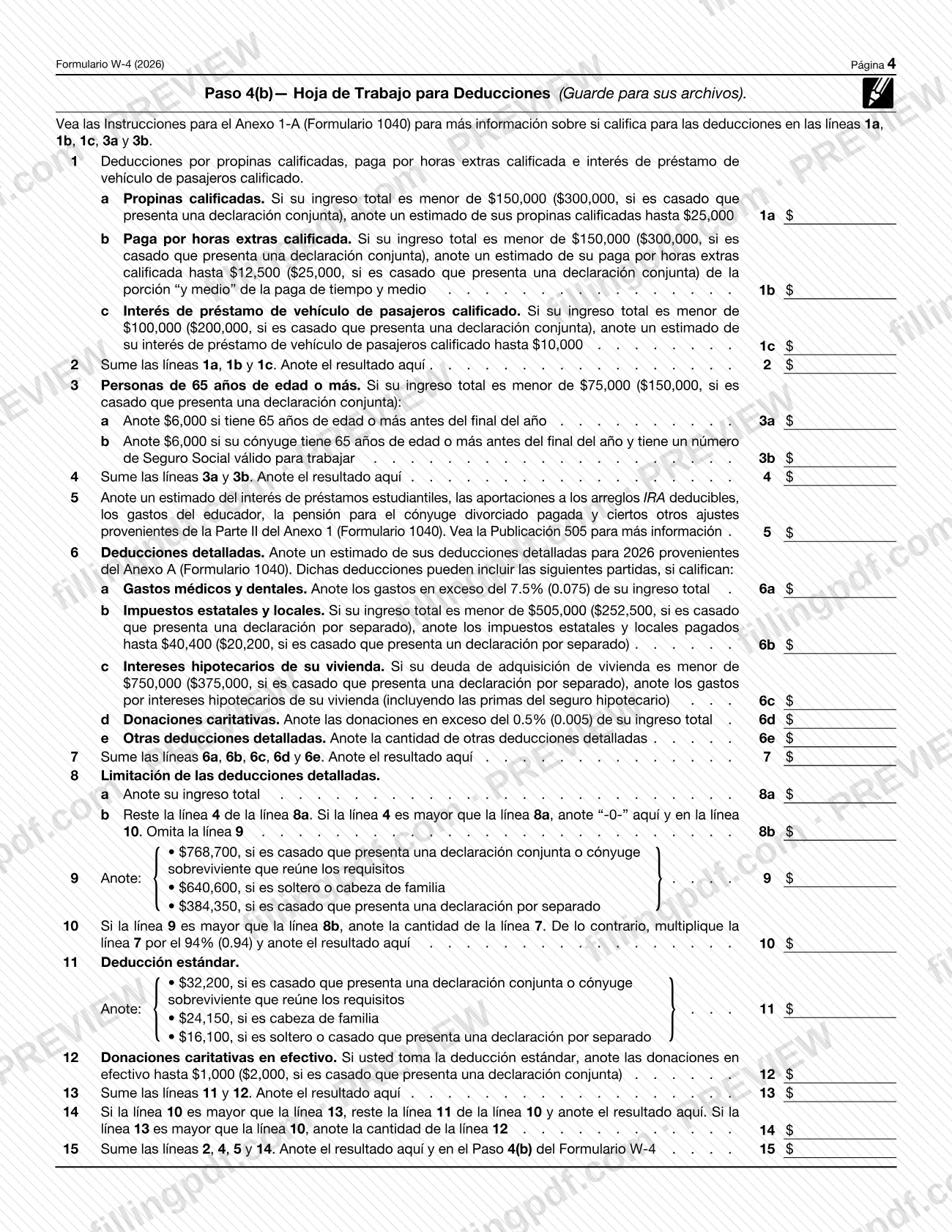
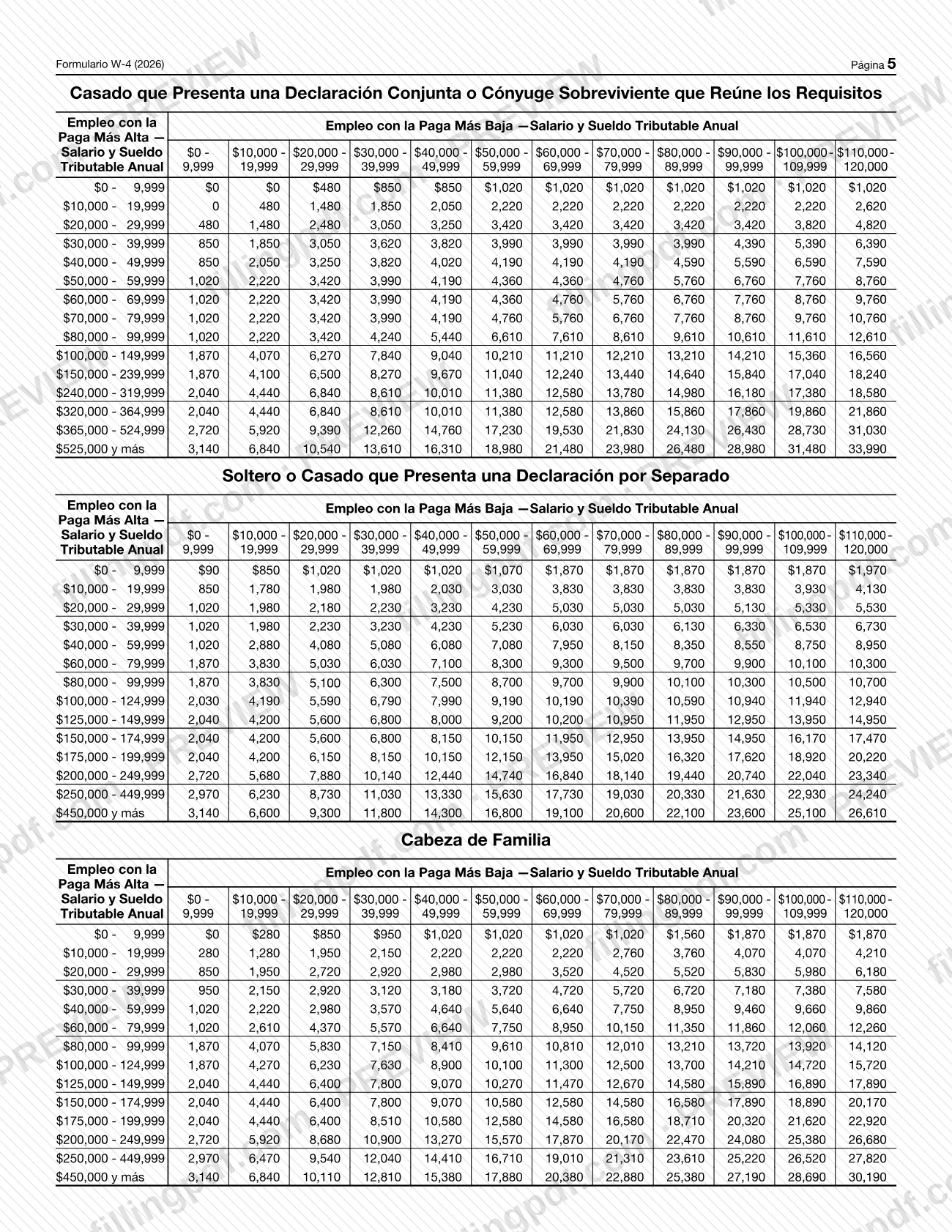
Pages 3 to 5 hold the Multiple Jobs Worksheet, the Deductions Worksheet and the lookup tables. The IRS tells you to keep the worksheets for your records.
This page covers the Spanish-language edition. The IRS describes Form W-4 itself on its "About Form W-4" page, which also lists related withholding forms such as Form W-4P and Form W-4R, and Notice 1392 for nonresident aliens.
Who needs to file Form W-4 (sp)?
Employees who want their employer to withhold the correct federal income tax from their pay complete Form W-4 (sp). The IRS instructions say to complete a new form whenever a change in your personal or financial situation would change the entries on it.
Parts of the form apply only to some people:
- Step 2: if you hold more than one job at a time, or you are married filing jointly and your spouse also works. Submit a separate form for each job.
- Step 3: if you claim qualifying children under 17 or other dependents; the instructions say you (and your spouse on a joint return) need the required Social Security number to claim certain credits.
- Step 4: if you have other income without withholding, deductions beyond the standard deduction, or want extra tax withheld.
- Exento de la retención (exempt from withholding): only if you had no federal tax liability for 2025 and expect none for 2026.
Nonresident aliens should read Notice 1392, Supplemental Form W-4 Instructions for Nonresident Aliens, before completing this form. The IRS Tax Withholding Estimator also cannot be used by people with nonresident status for U.S. tax purposes.
When to file Form W-4 (sp)
Give Form W-4 (sp) to your employer when you start a job and whenever a change in your personal or financial situation would change its entries. The IRS suggests considering a new form each year, and it advises checking your withholding every January and after major life changes such as a new job, a major income change, marriage, divorce or separation, a child's birth or adoption, or a home purchase.
If you claim exemption from withholding for 2026, you must submit a new Form W-4 by February 16, 2027. The exemption is only for 2026.
Consider the IRS Tax Withholding Estimator if you complete the form after the year has begun, expect to work only part of the year, or have changes during the year. If you change your withholding mid-year, you may need to update it again in late December for the next year.
How to fill out Form W-4 (sp)
Enter your personal information
In Step 1(a) and 1(b), write your first name and middle initial, last name and Social Security number, then your address, city or town, state and ZIP code. If your name differs from your Social Security card, the form tells you to contact the SSA at 800-772-1213 or www.ssa.gov/es.
Check your filing status
In Step 1(c), check one box: Soltero o Casado que presenta una declaración por separado, Casado que presenta una declaración conjunta o Cónyuge sobreviviente que reúne los requisitos, or Cabeza de familia. Check head of household only if you are unmarried and pay more than half the cost of keeping up a home for yourself and a qualifying person.
Decide whether Steps 2 to 4 apply
Complete Steps 2 to 4 only if they apply to you; otherwise go to Step 5. The IRS also suggests the Tax Withholding Estimator at www.irs.gov/W4AppSP in several situations, such as filing after the year has begun.
Handle multiple jobs in Step 2
Use this step if you have more than one job or your spouse also works. Take only one option: 2(a) the estimator (use it if you or your spouse are self-employed), 2(b) the Multiple Jobs Worksheet on page 3 with the result entered in Step 4(c), or 2(c) the box, only when there are two jobs in total and the other job's form is also checked.
Claim dependents and credits in Step 3
Enter on line 3(a) the number of qualifying children under 17 multiplied by the amount printed on the form, and on line 3(b) the number of other dependents multiplied by the amount printed. Add both, plus any other credits, and enter the total on line 3.
Add other income in Step 4(a)
Enter other income you expect this year that will have no withholding, such as interest, dividends and retirement income. Do not include income from any job or self-employment.
Enter deductions in Step 4(b)
If you expect deductions beyond the standard deduction, use the Deductions Worksheet on page 4 and enter the result of its line 15. If you leave this line blank, withholding is based on the standard deduction.
Request extra withholding in Step 4(c)
Enter any additional tax you want withheld each pay period, including the amount from line 4 of the Multiple Jobs Worksheet if you used Step 2(b).
Claim exemption only if you qualify
In the Exento de la retención section, check the box only if you meet both conditions. Then complete only Steps 1(a), 1(b) and 5, and leave all other steps blank.
Sign and date in Step 5
Sign and date the certificate under penalty of perjury; the form is not valid without your signature. Leave the "Para Uso Exclusivo del Empleador" block for your employer.
Review and download the PDF
Check that names, the Social Security number and any worksheet results match your entries, then download or print the completed PDF from FillingPDF and give it to your employer as described under How to submit.
How to submit Form W-4 (sp)
The form's instruction is to give the completed Form W-4 (sp) to your employer. It names no mailing address, portal or other channel, and the withholding amount is subject to IRS review.
- To your employer: hand in the signed form, or submit it through your employer's payroll or human resources system. The block labeled "Para Uso Exclusivo del Empleador" is for the employer, who enters its name and address, the first date of employment and its employer identification number (EIN).
- Using the estimator first: the IRS Tax Withholding Estimator at https://www.irs.gov/individuals/tax-withholding-estimator can generate a pre-filled Form W-4 that you give to your employer. The estimator page says it does not ask for your name, Social Security number or address.
Keep a copy of any worksheets you complete. FillingPDF lets you fill out and download the PDF; submission follows the channels above.
Common mistakes to avoid
- Submitting the form unsigned: the form states it is not valid unless you sign it in Step 5.
- Completing Steps 2 to 4 when claiming exemption. The instructions say to check the exemption box, then complete only Steps 1(a), 1(b) and 5.
- Claiming exemption without meeting both conditions: no federal tax liability for 2025 and none expected for 2026.
- Forgetting that an exemption lasts only for 2026 and a new Form W-4 is due by February 16, 2027.
- Completing Steps 3 to 4(b) on the forms for more than one job; the instructions say to complete them for only one job and leave them blank for the others.
- Checking the Step 2(c) box on only one of two jobs' forms; the box must be checked on the Form W-4 for the other job too.
- Entering income from a job or self-employment in Step 4(a); it covers other income such as interest, dividends and retirement income.
- Using a name that does not match the Social Security card without contacting the Social Security Administration (SSA) first.
- Leaving the form improperly completed: the privacy notice says the employer will then treat you as a single person with no adjustments.
Frequently asked questions
What is Form W-4 (sp)?
Form W-4 (sp), Employee's Withholding Certificate (Spanish Version), is the IRS Spanish-language edition of Form W-4. You complete it so your employer can withhold the correct federal income tax from your pay, and you give it to your employer.
Is Form W-4 (sp) the same as the W4 form?
It is the Spanish-language edition of Form W-4. Its printed title is "Formulario W-4 Certificado de Retenciones del Empleado," and the IRS instructions are in Spanish. This page covers Form W-4 (sp), not the English-language form.
Do I send Form W-4 (sp) to the IRS?
No. The form says to give it to your employer. Your employer uses it to figure how much federal income tax to withhold, and the withholding amount is subject to IRS review.
Can I claim exemption from withholding on Form W-4 (sp)?
Yes, if both conditions apply: you had no federal tax liability for 2025 and expect none for 2026. Check the exemption box, complete only Steps 1(a), 1(b) and 5, and submit a new form by February 16, 2027.
When should I fill out a new Form W-4 (sp)?
Complete a new form when a change in your personal or financial situation would change its entries, such as a new job, marriage, divorce, a child's birth or adoption, or a major income change. The IRS also advises checking withholding every January.
What do I do if I have two jobs?
Complete Step 2 and submit a separate Form W-4 for each job. Choose one option: the IRS estimator, the Multiple Jobs Worksheet, or the Step 2(c) box when there are only two jobs, checked on both forms. Fill Steps 3 to 4(b) for only one job.
Can I fill out Form W-4 (sp) online?
Yes. You can fill out the fillable PDF online on FillingPDF and download or print it. FillingPDF is an independent service and does not submit the form to your employer or the IRS; you give it to your employer yourself.
Does the IRS have a tool to help me complete it?
Yes. The IRS Tax Withholding Estimator can estimate the right withholding and generate a pre-filled Form W-4. It takes about 25 minutes, and you need recent paystubs. Nonresident aliens cannot use it and should see Notice 1392.
Ready to fill out Form W-4 (sp)?
Fill out Form W-4 (sp) now