
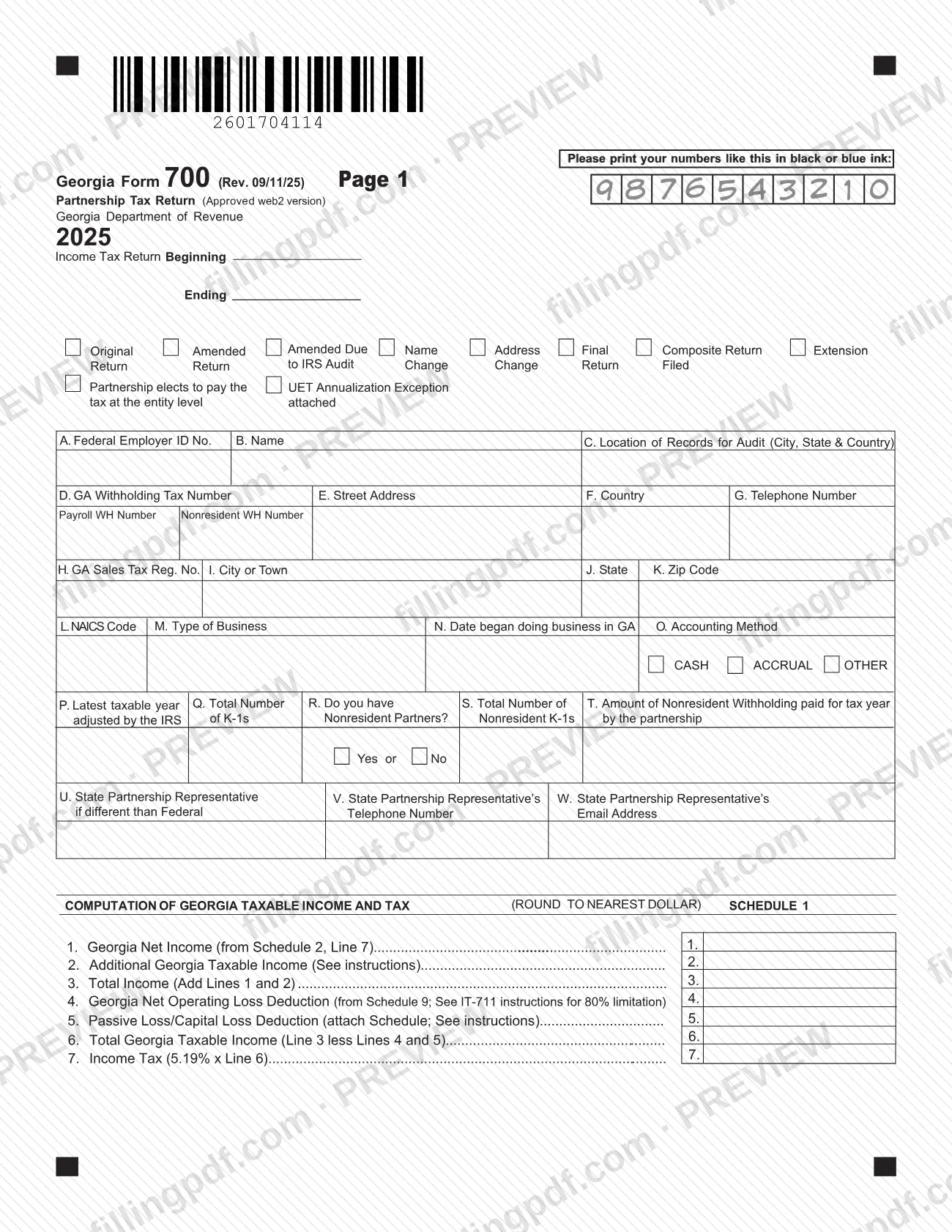
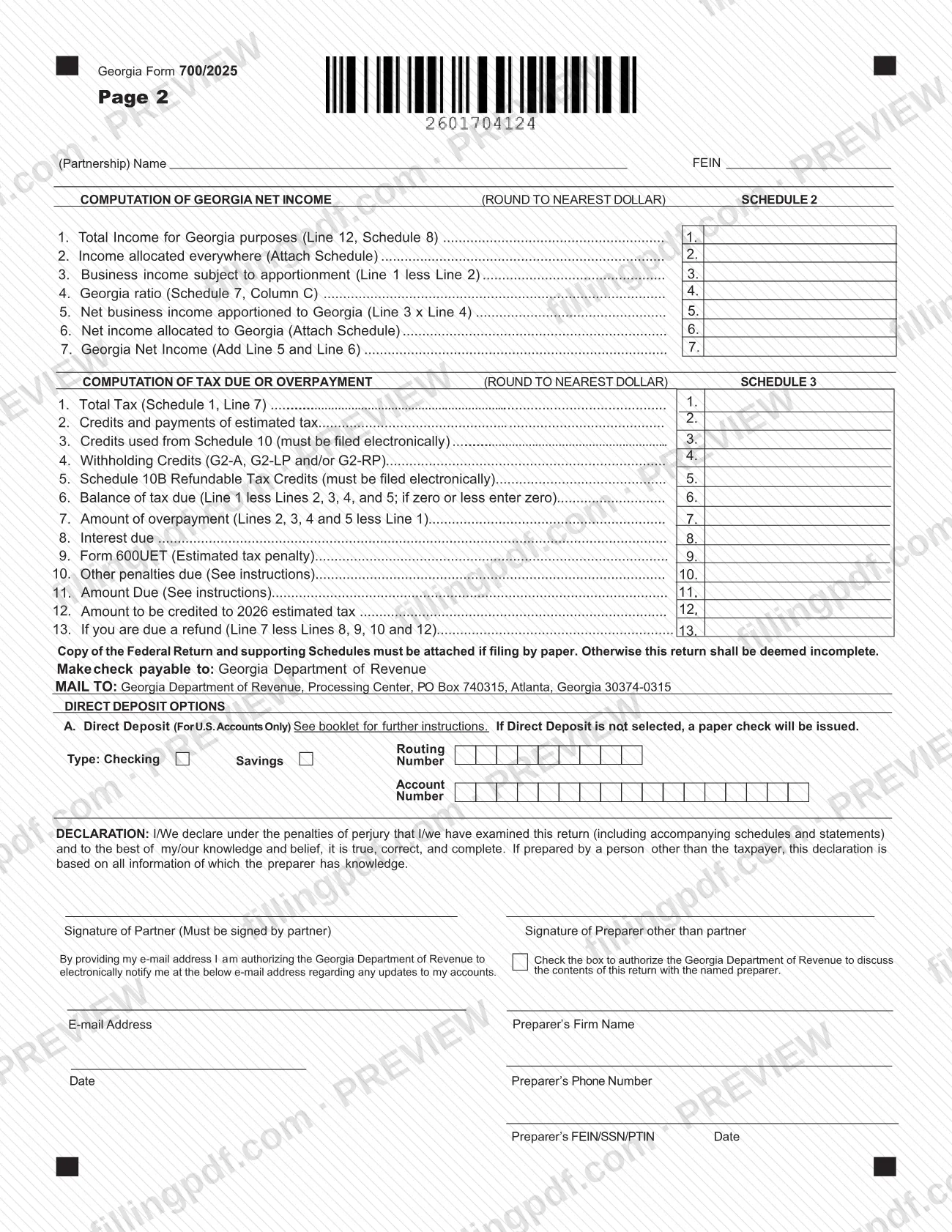
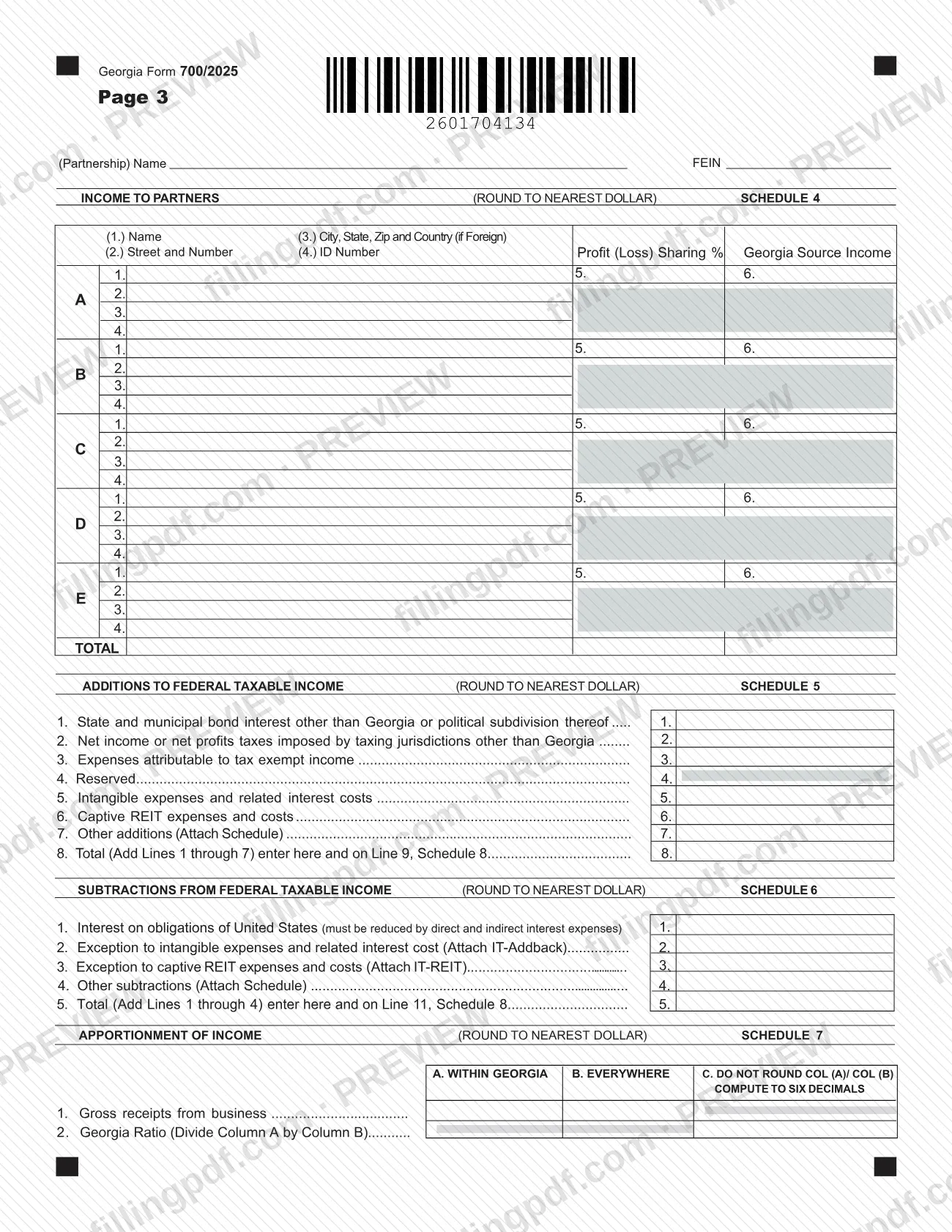
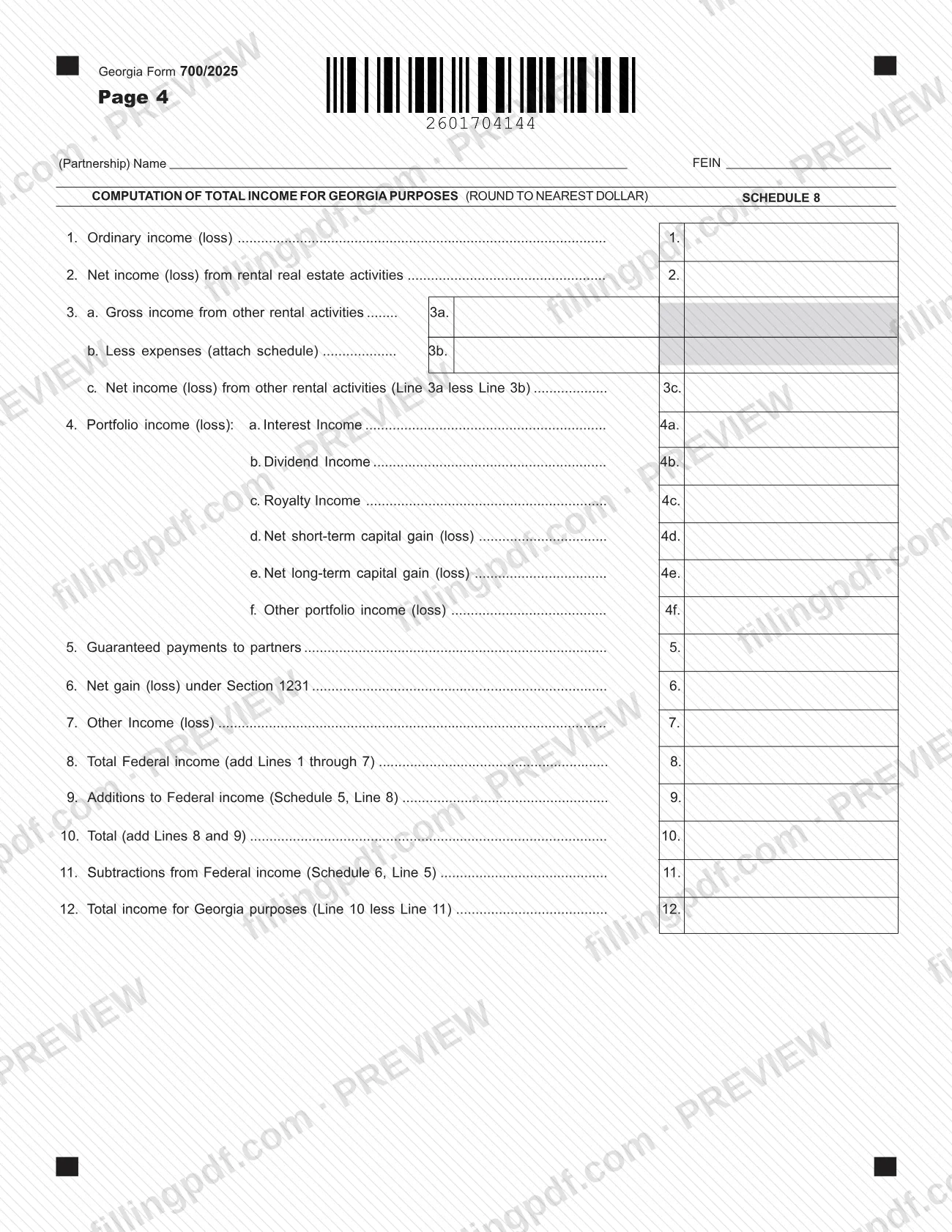
Georgia Form 700, Partnership Tax Return, is the return the Georgia Department of Revenue publishes for tax year 2025 (Rev. 09/11/25). A partnership uses it to work out its Georgia net income, Georgia taxable income and the tax due or overpaid, and to list the income that passes to each partner on Schedule 4. On this page you can fill out the form online on FillingPDF and download or print the completed PDF; the agency's own copy and its online version are on the Georgia Department of Revenue website.
Last updated
What is 700?
Georgia Form 700, Partnership Tax Return, is the Georgia Department of Revenue form on which a partnership computes its Georgia net income, taxable income and tax for the year, reports each partner's share, and settles any balance due or overpayment.
It is a Georgia state return, not a federal one. Schedule 8 starts from federal figures (ordinary income, rental activities, portfolio income, guaranteed payments, Section 1231 gains), adds and subtracts the Georgia adjustments, and arrives at total income for Georgia purposes. A paper filer must attach a copy of the federal return and its supporting schedules.
The 2025 form is nine pages of schedules around a front page of identifying information:
- Schedule 1: computation of Georgia taxable income and tax.
- Schedule 2: computation of Georgia net income, including the apportionment ratio.
- Schedule 3: computation of tax due or overpayment.
- Schedule 4: income to partners.
- Schedules 5 and 6: additions to and subtractions from federal taxable income.
- Schedule 7: apportionment of income.
- Schedule 8: computation of total income for Georgia purposes.
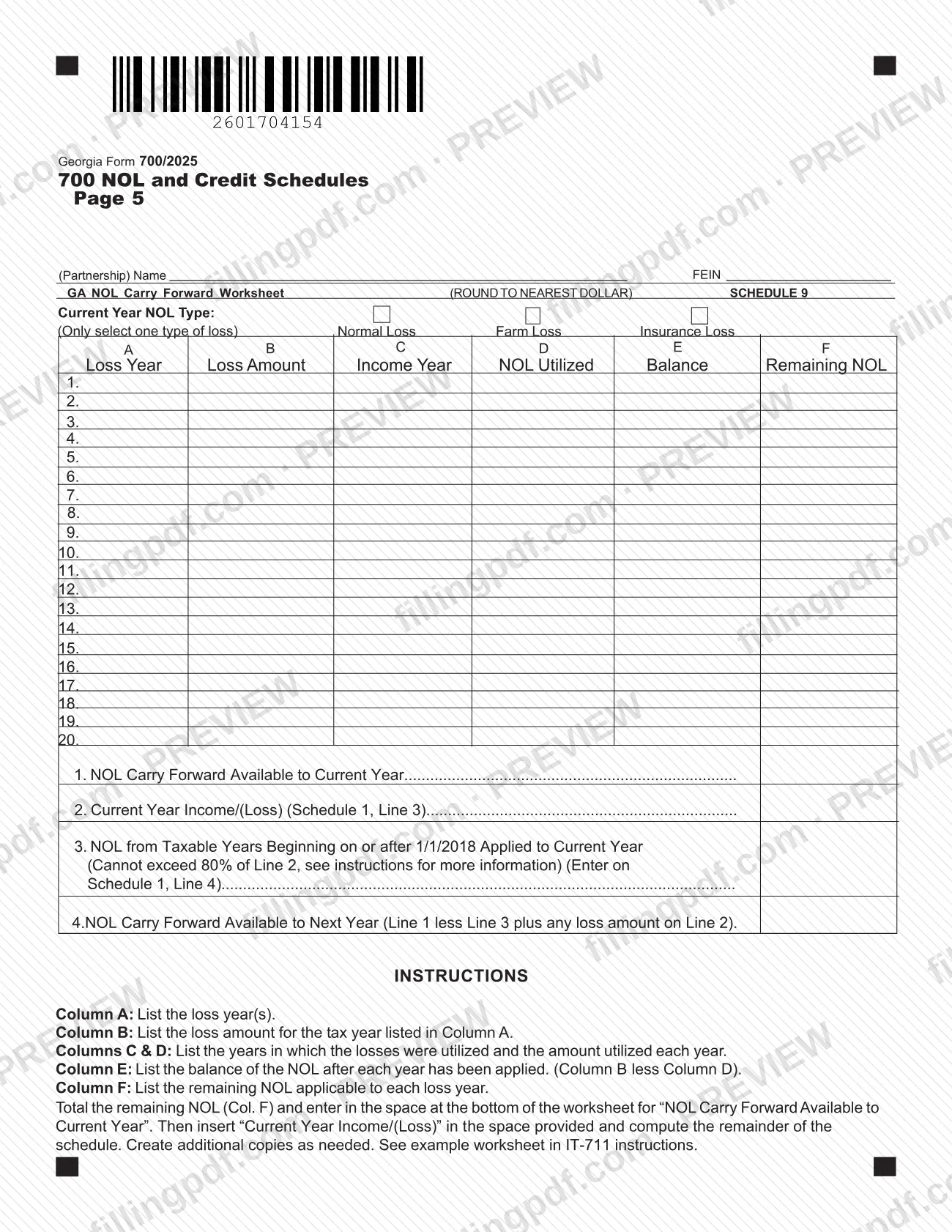
- Schedule 9: Georgia net operating loss (NOL) carry forward worksheet.
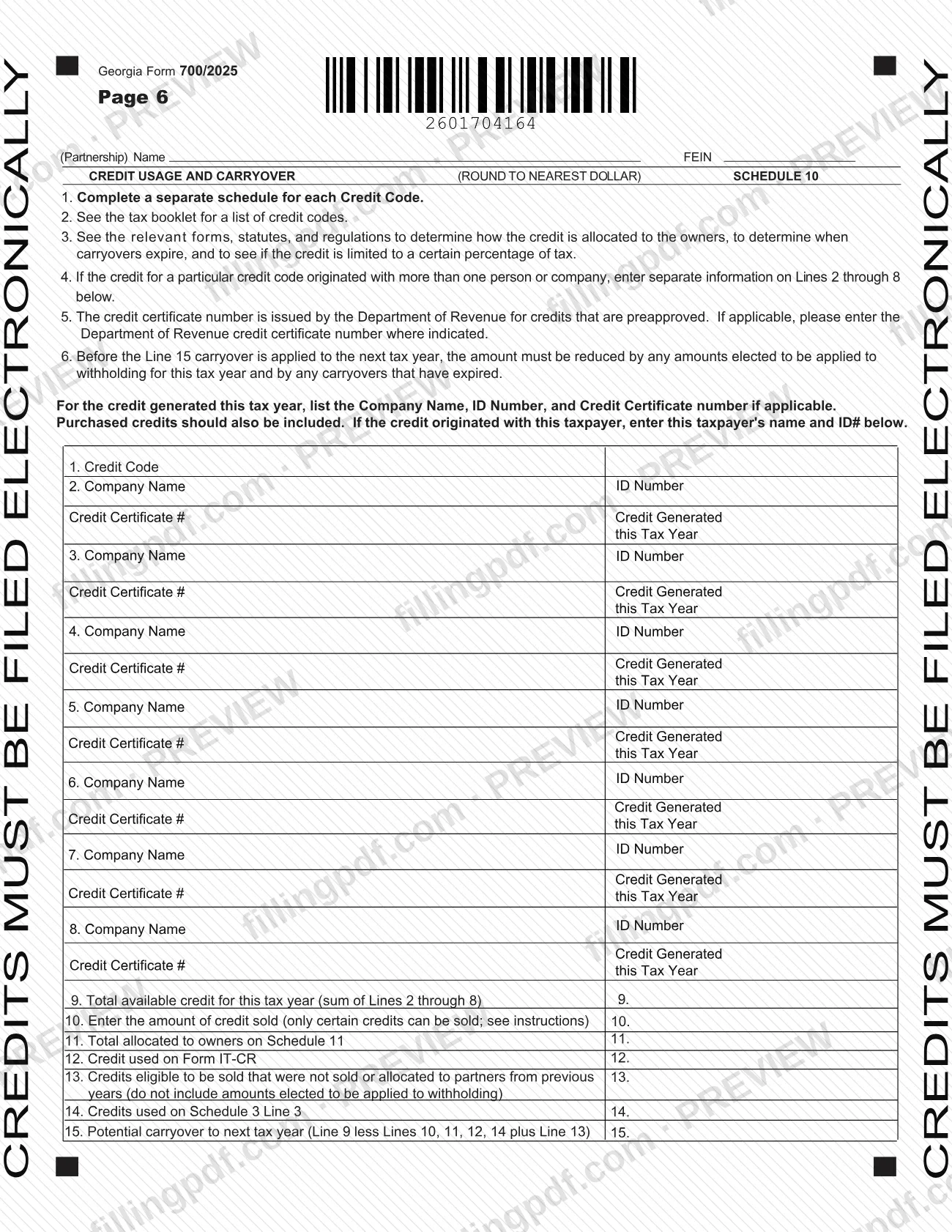
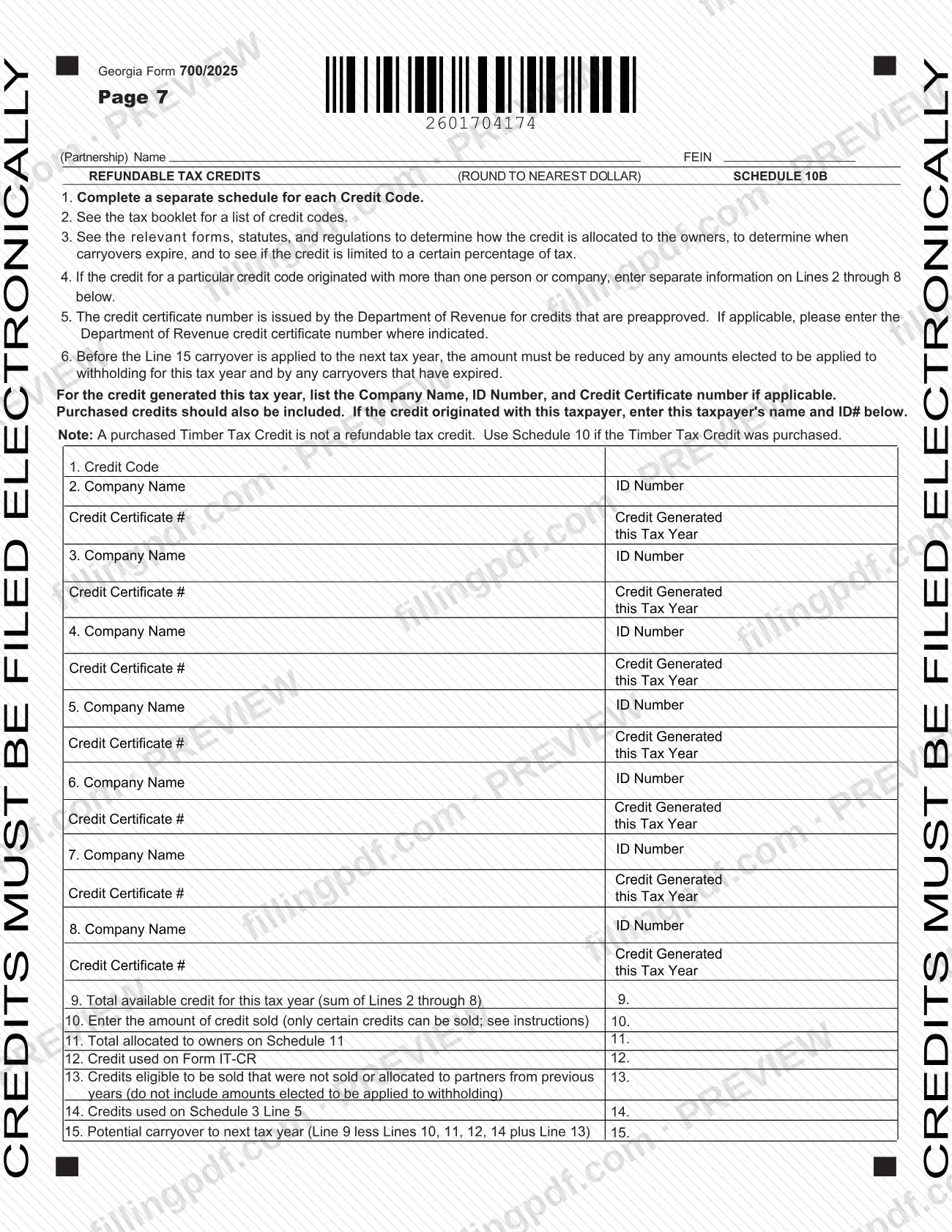
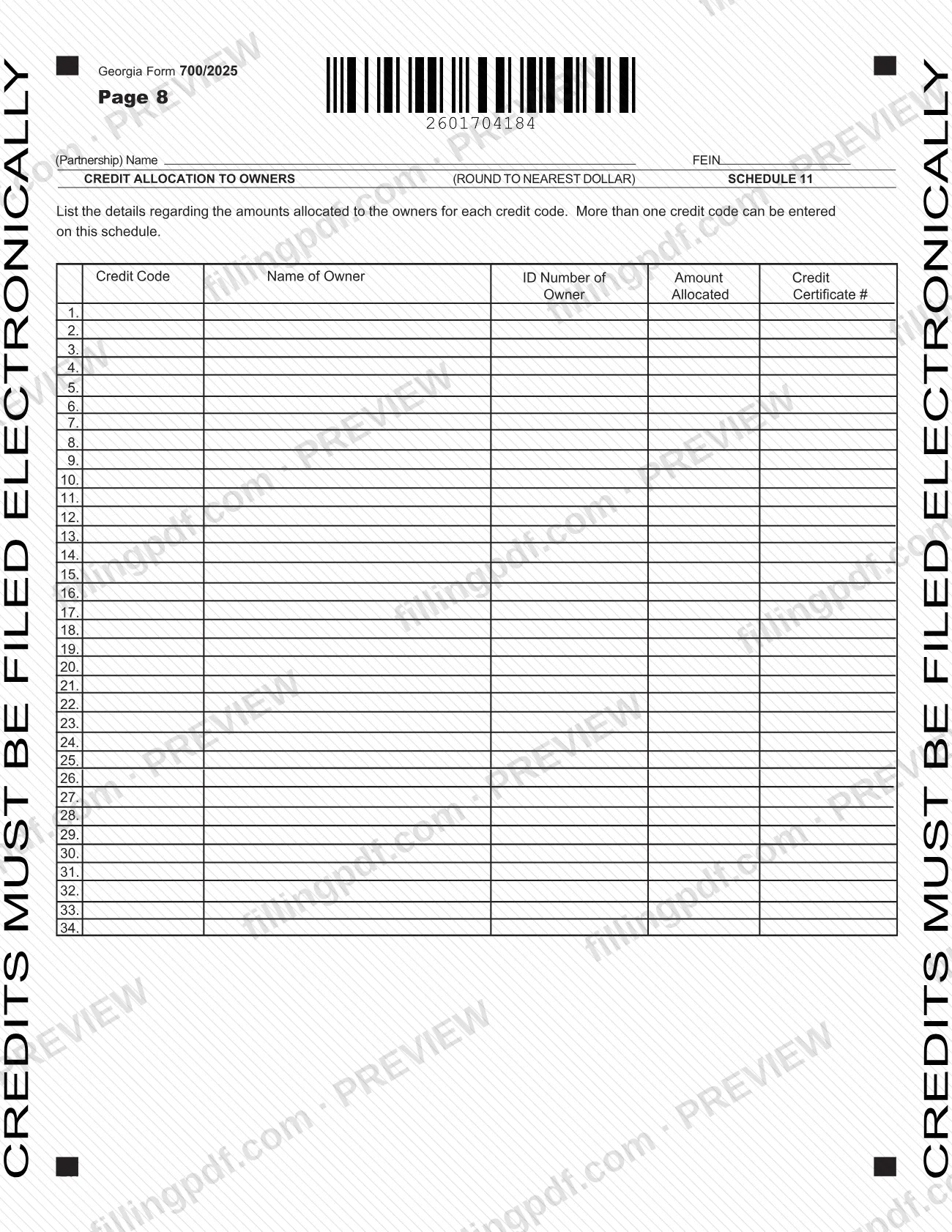
- Schedules 10, 10B and 11: credit usage and carryover, refundable tax credits, and credit allocation to owners.
The department's page for Form 700 lets you complete, save and print the current-year form in a browser, and lists earlier years of the form, 2007 through 2019, as PDFs.
Who needs to file 700?
The form is the Georgia return for partnerships: the name and FEIN block at the top of each schedule page is headed "(Partnership)". A partnership reports its Georgia income and tax on it for the tax year shown at the top of page 1.
The form builds in several situations:
- Partnerships with nonresident partners answer items R, S and T: whether they have nonresident partners, the number of nonresident K-1s and the nonresident withholding paid for the tax year.
- Partnerships filing a composite return, or electing to pay the tax at the entity level, check the matching boxes at the top of page 1.
- Partnerships with a net operating loss carry forward complete Schedule 9.
- Partnerships with Georgia credits complete Schedules 10, 10B and 11. The form states that credits must be filed electronically.
- Partnerships correcting a return, changing their name or address, or filing a final return use the corresponding boxes at the top.
The declaration must be signed by a partner. A preparer other than a partner signs separately and may be authorized, by a check box, to discuss the return with the department. Schedule 4 has rows for five partners, lettered A through E.
When to file 700
Form 700 is the return for tax year 2025, covering the period you enter beside Income Tax Return Beginning and Ending at the top of page 1. The form prints no due date of its own, so check the Georgia Department of Revenue's page for Form 700 for filing dates.
The boxes on page 1 show the timing situations the form handles: Original return, Amended return, amended for an IRS audit change, name change, address change, Final Return, Composite Return and Extension Filed. Schedule 3 also carries lines for interest due (line 8), the estimated tax penalty on Form 600UET (line 9), other penalties (line 10) and an amount to be credited to 2026 estimated tax (line 12).
Documents you need
- A copy of the federal return and supporting schedules, attached when filing by paper; the form says the return is otherwise deemed incomplete.
- A schedule for the passive loss or capital loss deduction on Schedule 1, line 5.
- A schedule for income allocated everywhere (Schedule 2, line 2) and for net income allocated to Georgia (Schedule 2, line 6).
- A schedule for other additions (Schedule 5, line 7) and for other subtractions (Schedule 6, line 4), if you enter amounts there.
- Form IT-Addback with Schedule 6, line 2, and Form IT-REIT with Schedule 6, line 3, if you claim those exceptions.
- A schedule of expenses supporting Schedule 8, line 3b, if you report other rental activities.
- Additional copies of the Schedule 9 NOL worksheet, if you need more rows.
- One Schedule 10 or 10B for each credit code, filed electronically, with the credit certificate number where the Department issued one.
How to fill out 700
Set the tax year and return type
At the top of page 1, enter the dates beside Income Tax Return Beginning and Ending. Check the boxes that fit, such as original, amended, final, composite, extension filed, entity-level tax election, UET attached or annualization exception.
Identify the partnership (items A to O)
Enter the Federal Employer ID No. (A), name (B), location of records for audit (C), GA withholding tax number (D), address and telephone (E to K), NAICS code (L), type of business (M), date began doing business in GA (N) and accounting method (O: cash, accrual or other).
Complete the partner and withholding items
Enter the latest taxable year adjusted by the IRS (P), total number of K-1s (Q), whether you have nonresident partners (R), number of nonresident K-1s (S) and nonresident withholding paid (T). Add the State Partnership Representative, phone and email in U to W if different from the federal one.
Compute taxable income on Schedule 1
Bring Georgia net income from Schedule 2, line 7 to line 1, add additional Georgia taxable income (line 2), subtract the NOL deduction from Schedule 9 and the passive or capital loss deduction (lines 4 and 5), and figure the income tax on line 7.
Compute Georgia net income on Schedule 2
Enter total income from Schedule 8, line 12 on line 1, subtract income allocated everywhere (line 2), multiply by the Georgia ratio from Schedule 7, column C (line 4), and add net income allocated to Georgia (line 6) to get line 7.
Figure tax due or overpayment on Schedule 3
Start with total tax on line 1, subtract credits and payments, Schedule 10 credits, withholding credits and Schedule 10B credits (lines 2 to 5), then complete balance due, overpayment, interest, penalties, amount due, amount credited to 2026 estimated tax and refund (lines 6 to 13).
Add direct deposit and sign the declaration
For a refund by direct deposit, give account type, routing number and account number for a U.S. account. Have a partner sign and date; a paid preparer adds their signature, firm name, phone, FEIN/SSN/PTIN and date.
List partners on Schedule 4
For each partner (rows A to E), enter name, street, city, state, ZIP and country if foreign, ID number, profit (loss) sharing percentage and Georgia source income, then the totals.
Enter additions and subtractions
On Schedule 5, list additions such as out-of-state bond interest, other states' income taxes and intangible expenses, and total on line 8. On Schedule 6, list U.S. obligation interest and other subtractions, and total on line 5.
Apportion income on Schedule 7
On line 1, enter gross receipts from business within Georgia (column A) and everywhere (column B). Divide A by B on line 2 and enter the ratio in column C to six decimals, without rounding.
Compute total income on Schedule 8
Enter ordinary income, rental, portfolio, guaranteed payment, Section 1231 and other income on lines 1 to 7, total on line 8, add Schedule 5 (line 9), subtract Schedule 6 (line 11) and enter line 12.
Track losses on Schedule 9
Select one NOL type, list each loss year, amount, years used and balance in columns A to F, then complete lines 1 to 4. Enter the line 3 result on Schedule 1, line 4.
Complete the credit schedules
Use a separate Schedule 10 or 10B for each credit code, listing credit generated and totals through line 15. Allocate credits to owners on Schedule 11 with credit code, owner name, ID number, amount and certificate number.
Review and download the completed PDF
Check that amounts round to the nearest dollar, that names and FEINs repeat on every page, and that the partner signature is in place. Download or print the completed PDF from FillingPDF and assemble the package described under How to submit.
How to submit 700
Form 700 goes to the Georgia Department of Revenue by mail on paper, or electronically; the form prints a mailing address only.
- By mail: Georgia Department of Revenue, Processing Center, PO Box 740315, Atlanta, Georgia 30374-0315. Make any check payable to Georgia Department of Revenue.
- Attachments on paper: a copy of the federal return and supporting schedules must be attached, otherwise the form says the return is deemed incomplete.
- Credits: Schedule 10, Schedule 10B and the credits on Schedule 3, lines 3 and 5, are marked on the form as must be filed electronically.
- Refunds: the Direct Deposit Options block takes a routing number and account number for U.S. accounts only; if you do not select direct deposit, a paper check is issued.
- Online version: the department's page at https://dor.georgia.gov/700-partnership-tax-return offers the form to complete, save and print in a browser.
FillingPDF lets you fill out and download the PDF; submission follows the channels above.
Common mistakes to avoid
- Mailing a paper return without a copy of the federal return and supporting schedules; the form says the return is then deemed incomplete.
- Trying to file Schedule 10, Schedule 10B or the credits on Schedule 3, lines 3 and 5, on paper; the form says credits must be filed electronically.
- Selecting more than one loss type on Schedule 9; the worksheet says to select only one type.
- Applying an NOL on Schedule 9, line 3 that exceeds 80% of line 2 for losses from taxable years beginning on or after 1/1/2018.
- Rounding the Georgia ratio on Schedule 7, column C; the form says not to round and to compute to six decimals, while other amounts round to the nearest dollar.
- Putting a purchased Timber Tax Credit on Schedule 10B; the form says it is not refundable and belongs on Schedule 10.
- Leaving the declaration without a partner's signature; the form says it must be signed by a partner.
- Entering a negative figure on Schedule 3, line 6; the form says to enter zero if the result is zero or less.
- Entering a non-U.S. account in the Direct Deposit Options; direct deposit is for U.S. accounts only.
Frequently asked questions
What is the Georgia partnership tax return, Form 700?
Form 700 is the Georgia Department of Revenue's Partnership Tax Return. A partnership uses it to compute Georgia net income, taxable income and tax, list each partner's share on Schedule 4, and show any balance due or overpayment for the tax year, which is 2025 on this edition.
Where do I mail Georgia Form 700?
Mail it to Georgia Department of Revenue, Processing Center, PO Box 740315, Atlanta, Georgia 30374-0315. Make any check payable to Georgia Department of Revenue. The form prints this as its only mailing address.
Do I have to attach the federal return to Form 700?
If you file on paper, yes: the form says a copy of the federal return and supporting schedules must be attached, or the return is deemed incomplete. The form ties that requirement to paper filing.
Can I file Schedule 10 credits on paper?
No. Schedule 10, Schedule 10B and the credits claimed on Schedule 3, lines 3 and 5, are marked on the form as must be filed electronically. Use a separate schedule for each credit code.
Can I fill out Form 700 online?
Yes. You can fill out the PDF online on FillingPDF and download or print it. The Georgia Department of Revenue's page also lets you complete, save and print the form in a browser. FillingPDF does not file the return; you submit it through the department's channels.
Who has to sign Form 700?
A partner must sign the declaration. A preparer other than a partner signs in a separate block and enters firm name, phone and FEIN/SSN/PTIN. A check box authorizes the department to discuss the return with the named preparer.
How is the NOL deduction limited on Form 700?
On Schedule 9, line 3, an NOL from taxable years beginning on or after 1/1/2018 cannot exceed 80% of line 2, the current year income. The result goes to Schedule 1, line 4. The form refers to the IT-711 instructions for more detail.
How do I get a refund by direct deposit from Form 700?
Complete the Direct Deposit Options block with account type (checking or savings), routing number and account number. Direct deposit is for U.S. accounts only; if you do not select it, the department issues a paper check.
Is there a Form 700 for earlier years?
Yes. The department's Form 700 page lists earlier editions, with the 2007 through 2019 versions as downloadable PDFs and other prior years completed online. This page covers the 2025 form, Rev. 09/11/25.
Ready to fill out 700?
Fill out 700 now