
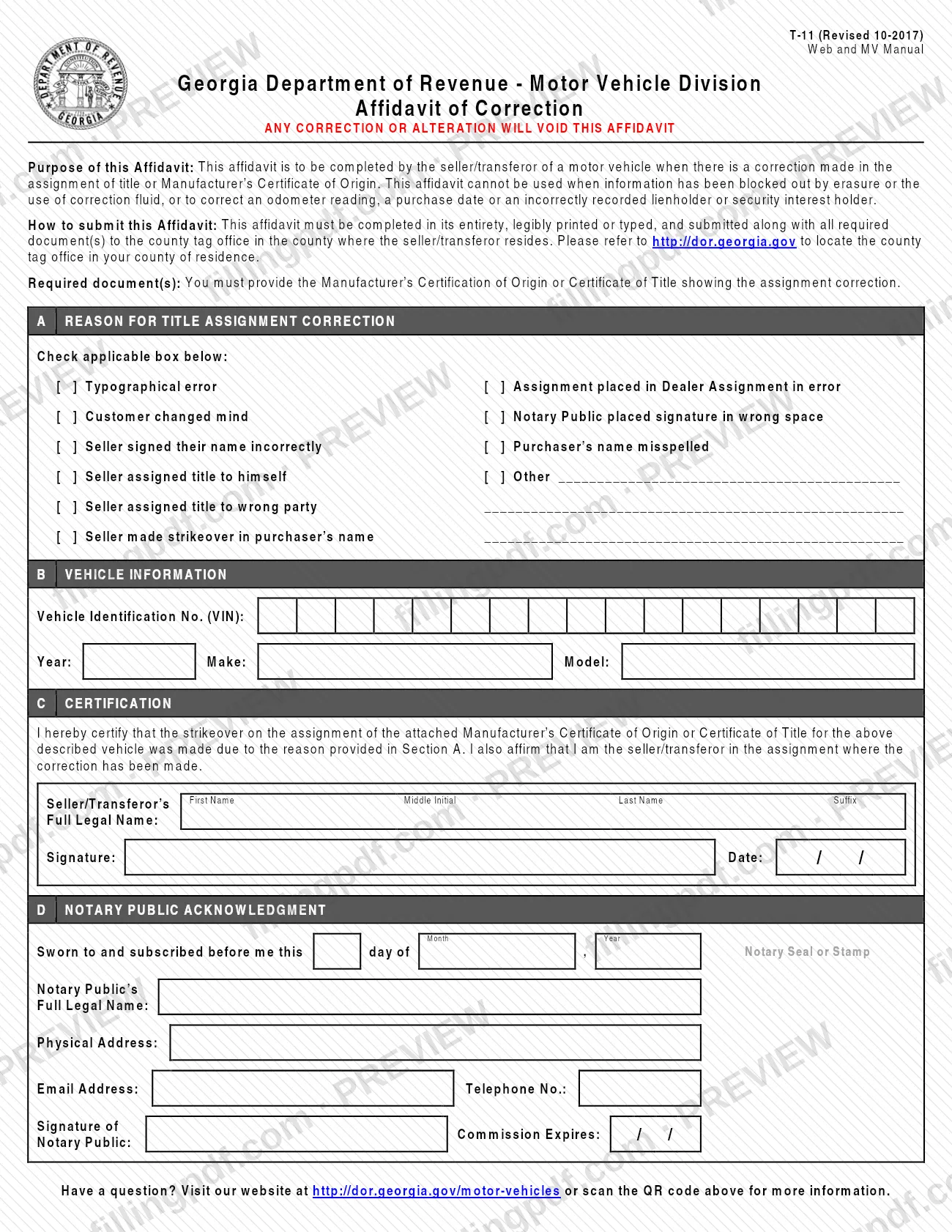
Form T-11, Affidavit of Correction, is a Georgia Department of Revenue Motor Vehicle Division form that the seller or transferor of a motor vehicle completes when a correction has been made in the assignment of a title or Manufacturer's Certificate of Origin. The seller states the reason for the correction, identifies the vehicle and signs before a notary public. The PDF is published on the Henry County Tax Commissioner's website. On this page you can fill out the form online on FillingPDF and download or print the completed PDF; the affidavit goes to the county tag office described below.
Last updated
What is T-11?
Form T-11, Affidavit of Correction, is the Georgia Department of Revenue Motor Vehicle Division affidavit that the seller or transferor of a motor vehicle completes when a correction has been made in the assignment of a title or Manufacturer's Certificate of Origin.
The affidavit has four parts. Section A records the reason for the correction, chosen from a printed list: typographical error, assignment placed in Dealer Assignment in error, customer changed mind, notary public placed signature in wrong space, seller signed their name incorrectly, purchaser's name misspelled, seller assigned title to himself, seller assigned title to wrong party, seller made strikeover in purchaser's name, or other. Section B identifies the vehicle by VIN, year, make and model. Section C is the seller's certification that the strikeover was made for the reason given and that the signer is the seller or transferor in the corrected assignment. Section D is the notary public acknowledgment.
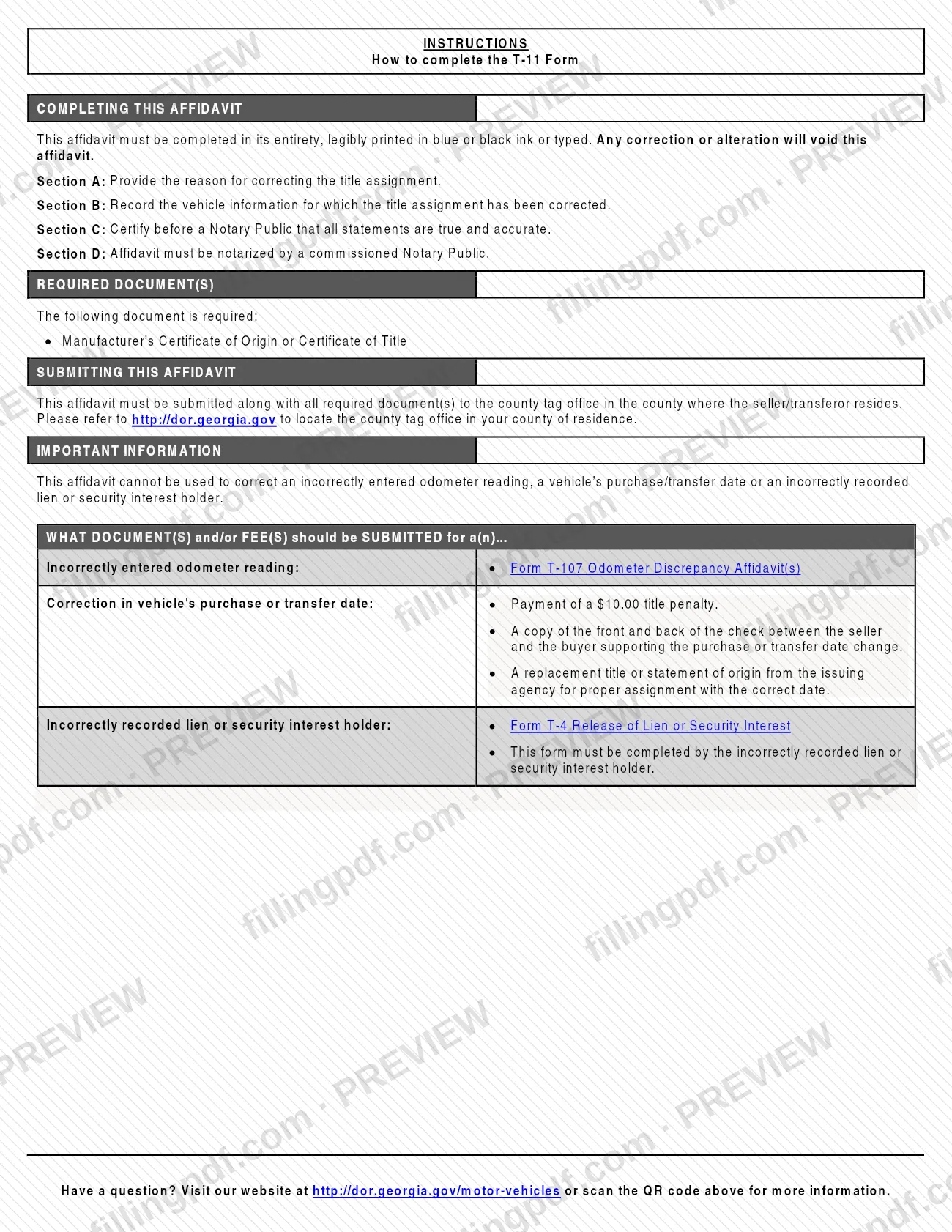
The form states that any correction or alteration will void the affidavit. It is not a general-purpose correction form. It cannot be used when information has been blocked out by erasure or correction fluid, or to correct an odometer reading, a purchase date or an incorrectly recorded lienholder or security interest holder. The instructions name other documents for those cases: Form T-107, Odometer Discrepancy Affidavit, for an odometer reading, and Form T-4, Release of Lien or Security Interest, for a lienholder.
Who needs to file T-11?
The seller or transferor of a motor vehicle completes Form T-11 when a correction has been made in the assignment of the title or Manufacturer's Certificate of Origin. The certification in Section C is made by the person who is the seller or transferor in the assignment where the correction was made, and it is sworn before a commissioned notary public.
Do not use Form T-11 in these cases:
- Information on the title assignment has been blocked out by erasure or correction fluid.
- You need to correct an odometer reading. The instructions point to Form T-107, Odometer Discrepancy Affidavit.
- You need to correct a purchase or transfer date. The instructions list a title penalty, a copy of the front and back of the check between seller and buyer, and a replacement title or statement of origin with the correct date.
- A lienholder or security interest holder was recorded incorrectly. The instructions point to Form T-4, Release of Lien or Security Interest, which the incorrectly recorded holder must complete.
The form does not describe anyone signing on the seller's behalf.
When to file T-11
Complete Form T-11 when a correction has been made in the assignment of a title or Manufacturer's Certificate of Origin and the seller or transferor needs to explain it. The affidavit is submitted together with the Manufacturer's Certificate of Origin or Certificate of Title that shows the assignment correction, so it travels with that document to the county tag office. No separate due date is printed on the form.
The affidavit must be completed in its entirety, and any correction or alteration made to it will void it, so prepare the notary appointment and have the title in hand before you sign. If your problem is an odometer reading, a purchase date or a recorded lienholder, the T-11 is not the right form, and the documents the instructions list for those situations apply instead.
Documents you need
- Manufacturer's Certificate of Origin or Certificate of Title showing the assignment correction; the instructions require it to be submitted with the affidavit.
How to fill out T-11
Confirm Form T-11 fits your situation
Use it only for a correction in the assignment of a title or Manufacturer's Certificate of Origin. Do not use it for an odometer reading, purchase date or lienholder correction, or where information was erased or covered with correction fluid.
Complete every part legibly
The affidavit must be completed in its entirety, typed or legibly printed in blue or black ink. Do not overwrite or alter an entry, because any correction voids the affidavit.
Check the reason in Section A
Under A, Reason for Title Assignment Correction, check the applicable box, such as Typographical error, Purchaser's name misspelled or Seller made strikeover in purchaser's name.
Describe an Other reason
If none of the printed reasons fits, check Other and write the reason on the lines provided next to it.
Enter the vehicle information
In Section B, enter the Vehicle Identification No. (VIN), Year, Make and Model of the vehicle whose title assignment was corrected.
Enter the seller's full legal name
In Section C, enter the Seller/Transferor's Full Legal Name in the First Name, Middle Initial, Last Name and Suffix spaces.
Sign and date before the notary
Section C is certified before a notary public. Sign in the Signature box and enter the date; the certification says you are the seller or transferor in the corrected assignment.
Have the notary complete Section D
The notary enters the day, month and year of the oath, applies the seal or stamp, and provides full legal name, physical address, email address, telephone number, signature and commission expiration date.
Review and download the completed PDF
Check that every entry is accurate and nothing is altered. Download or print the completed PDF from FillingPDF, then assemble the affidavit with the title or Manufacturer's Certificate of Origin as described under How to submit.
How to submit T-11
Submit Form T-11 in person or by the means your county tag office accepts, to the county tag office in the county where the seller or transferor resides. The form names no other channel and gives no street address; it refers you to http://dor.georgia.gov to locate the county tag office in your county of residence.
- Where: the county tag office in the seller or transferor's county of residence, not necessarily the county whose website hosts the PDF.
- What to include: the completed affidavit and the Manufacturer's Certificate of Origin or Certificate of Title showing the assignment correction.
- Condition of the form: it must be completed in its entirety, legibly printed in blue or black ink or typed, and notarized by a commissioned notary public. Any correction or alteration voids it.
The form refers questions to http://dor.georgia.gov/motor-vehicles. FillingPDF lets you fill out and download the PDF; submission follows the channels above.
Common mistakes to avoid
- Making a correction or alteration on the affidavit itself; the form states that any correction or alteration will void it.
- Using Form T-11 where information on the title was blocked out by erasure or correction fluid, which the form says it cannot cover.
- Using the affidavit to correct an odometer reading, a purchase or transfer date or an incorrectly recorded lienholder, instead of the documents the instructions list for those cases.
- Signing the certification without a commissioned notary public completing the acknowledgment in Section D.
- Leaving sections incomplete, handwriting in ink other than blue or black, or writing illegibly; the form must be complete and legibly printed or typed.
- Submitting the affidavit without the Manufacturer's Certificate of Origin or Certificate of Title showing the correction.
- Taking the affidavit to a county tag office other than the one in the county where the seller or transferor resides.
- Having someone other than the seller or transferor in the corrected assignment sign the Section C certification.
Frequently asked questions
What is Form T-11 Affidavit of Correction used for?
Form T-11 is completed by the seller or transferor of a motor vehicle to explain a correction made in the assignment of a title or Manufacturer's Certificate of Origin. It records the reason, identifies the vehicle and is notarized. It is a Georgia Department of Revenue Motor Vehicle Division form.
Is the T-11 a Henry County property tax form?
No. The T-11 is a Georgia Department of Revenue Motor Vehicle Division affidavit about vehicle title assignments, not about Henry County property tax. The PDF is hosted on the Henry County Tax Commissioner's website, but it is submitted to the county tag office where the seller resides.
Does Form T-11 have to be notarized?
Yes. Section D is a notary public acknowledgment, and the instructions say the affidavit must be notarized by a commissioned notary public. The seller or transferor certifies in Section C before the notary, who completes the notary block and applies a seal or stamp.
Where do I submit Form T-11?
Submit it to the county tag office in the county where the seller or transferor resides, along with the Manufacturer's Certificate of Origin or Certificate of Title showing the correction. The form refers you to http://dor.georgia.gov to find the tag office for your county of residence.
Can I use Form T-11 to fix an odometer reading or purchase date?
No. The form cannot correct an odometer reading, a purchase or transfer date, or an incorrectly recorded lienholder. For an odometer reading the instructions list Form T-107; for a lien, Form T-4; for a date, a title penalty, a copy of the check and a replacement title.
What happens if I correct or cross out something on the T-11?
The affidavit becomes void. The form states in capital letters that any correction or alteration will void it, so complete it carefully in blue or black ink or typed, and start with a new form if you make a mistake.
What do I attach to Form T-11?
Attach the Manufacturer's Certificate of Origin or Certificate of Title that shows the assignment correction. The instructions list it as the required document for this affidavit.
Can I fill out Form T-11 online on FillingPDF?
Yes. You can fill out the fillable PDF online on FillingPDF and download or print it. FillingPDF is an independent service and does not file the affidavit or provide notarization; you submit it to the county tag office yourself.
Ready to fill out T-11?
Fill out T-11 now