
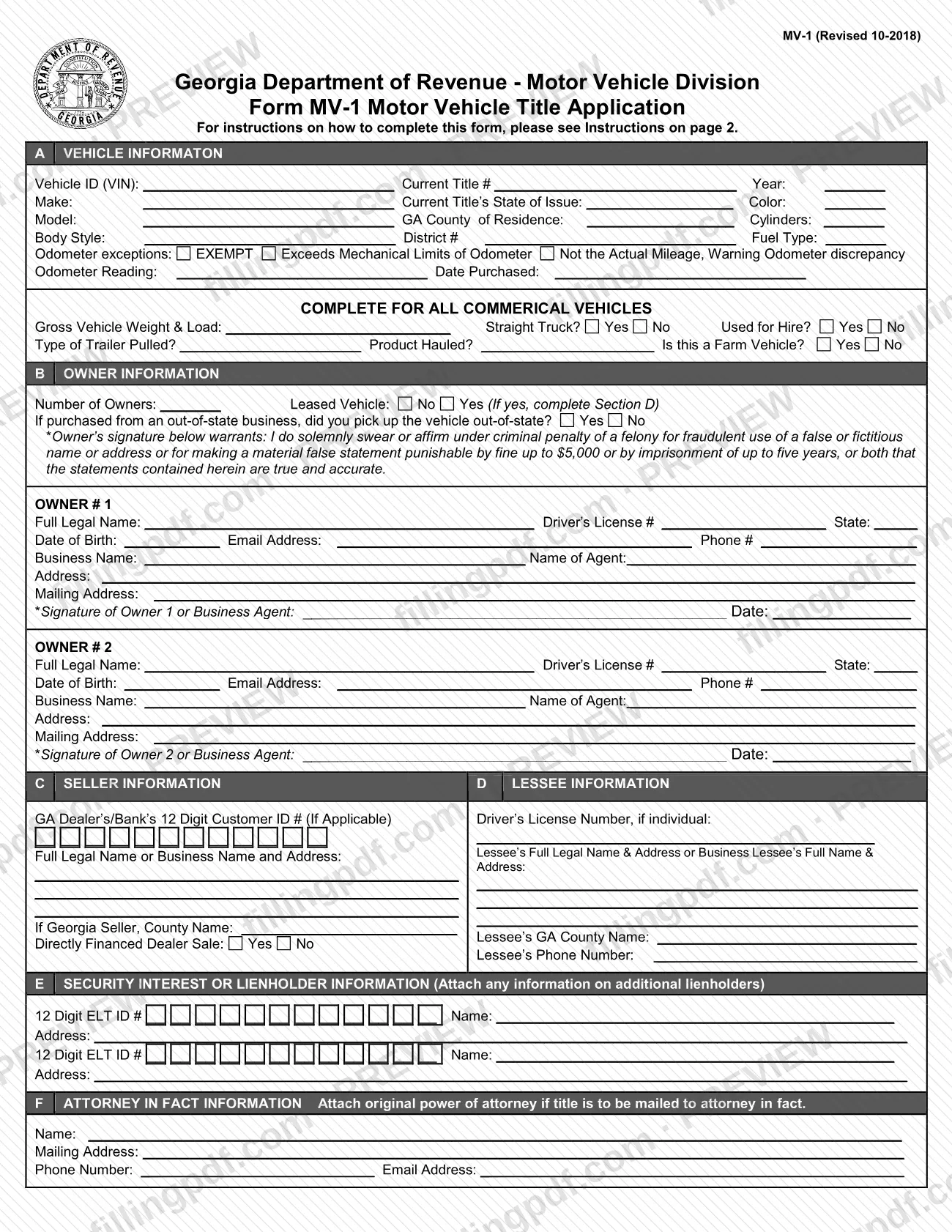
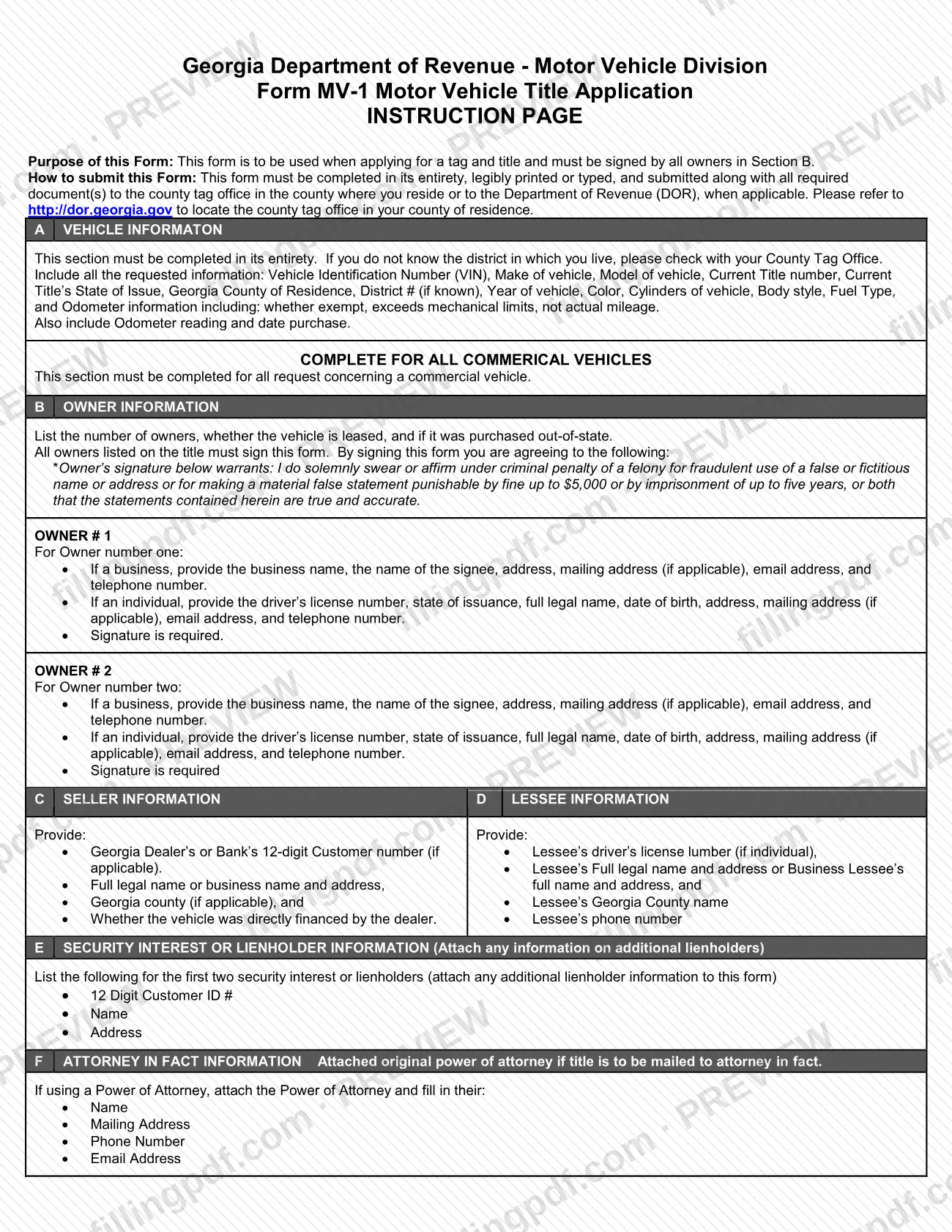
The MV-1 Motor Vehicle Title Application is the Georgia Department of Revenue (DOR) Motor Vehicle Division form used when applying for a tag and title. The copy behind this page is published by the Henry County Tax Commissioner and is marked Revised 10-2018. It collects the vehicle details and the owner details, plus seller, lessee, lienholder and attorney-in-fact information where they apply. On this page you can fill out the form online on FillingPDF and download or print the completed PDF; the original PDF and the county's own page remain with the agency.
Last updated
What is MV-1?
Form MV-1, MV-1 Motor Vehicle Title Application, is the Georgia Department of Revenue Motor Vehicle Division form used when applying for a tag and title for a vehicle. Every owner listed in Section B must sign it.
The form is a single application with six lettered sections:
- A, Vehicle Information: VIN, current title number and state of issue, year, make, model, body style, color, cylinders, fuel type, Georgia county of residence, district number, odometer information and the date purchased. A separate block, marked for all commercial vehicles, asks about gross vehicle weight and load, straight truck, used for hire, trailer type, product hauled and farm use.
- B, Owner Information: the number of owners, whether the vehicle is leased, whether an out-of-state purchase was picked up out of state, and details and signatures for Owner 1 and Owner 2.
- C, Seller Information and D, Lessee Information.
- E, Security Interest or Lienholder Information.
- F, Attorney in Fact Information.
The owner's signature warrants that the statements are true and accurate, under criminal penalty of a felony for fraudulent use of a false or fictitious name or address or for a material false statement. The form is issued by the state Motor Vehicle Division, while the PDF used here is hosted by the Henry County Tax Commissioner. Its printed purpose is a tag and title application; it prints no property tax lines.
Who needs to file MV-1?
Anyone applying for a tag and title for a vehicle uses Form MV-1. The instructions say it must be signed by all owners in Section B, and that all owners listed on the title must sign.
- Individual owners give a driver's license number and state, full legal name, date of birth, address, mailing address (if applicable), email address and telephone number.
- Business owners give the business name, the name of the signee, address, mailing address (if applicable), email address and telephone number; the business agent signs.
- Lessees: if the vehicle is leased, Section D is completed with the lessee's details.
- Commercial vehicles: the commercial block must be completed for every request concerning a commercial vehicle.
- Representatives: if a power of attorney is used, Section F names the attorney in fact. The original power of attorney must be attached if the title is to be mailed to the attorney in fact.
The form has room for two owners and two lienholders; information on additional lienholders is attached separately.
When to file MV-1
Submit Form MV-1 when you apply for a tag and title; it is the application itself. The form prints no separate due date, and the instructions do not set one.
Section A asks for the date purchased, so have the purchase paperwork ready before you start. The instructions require the form to be completed in its entirety, legibly printed or typed, and submitted together with all required documents. For any timing rule that applies to your purchase or transfer, ask your county tag office, which the instructions name as the place to submit it.
Documents you need
- Original power of attorney, only if the title is to be mailed to an attorney in fact named in Section F.
- Information on any additional lienholders, if there are more than the two security interests or lienholders listed in Section E.
- All other documents the county tag office requires for your application; the form says to submit it with all required documents but does not list them.
How to fill out MV-1
Enter the vehicle details
In Section A, enter the VIN, current title number, current title's state of issue, year, make, model, body style, color, cylinders and fuel type. Add your GA county of residence and, if known, the district number; ask your county tag office if you do not know it.
Record odometer and purchase date
Enter the odometer reading and the date purchased. Mark an odometer exception if one applies: EXEMPT, Exceeds Mechanical Limits of Odometer, or Not the Actual Mileage, Warning Odometer discrepancy.
Complete the commercial vehicle block
For a commercial vehicle only, enter the gross vehicle weight and load, and answer Straight Truck, Used for Hire and Is this a Farm Vehicle. Enter the type of trailer pulled and the product hauled.
Answer the owner questions
In Section B, enter the number of owners and mark Leased Vehicle Yes or No; if Yes, Section D is required. If you bought from an out-of-state business, answer whether you picked up the vehicle out of state.
Enter Owner 1 and Owner 2
For an individual, enter full legal name, driver's license number and state, date of birth, email, phone, address and mailing address. For a business, enter the business name, name of agent, address and mailing address. Use the Owner 2 block only if there is a second owner.
Complete the seller information
In Section C, enter the Georgia dealer's or bank's 12-digit customer ID if applicable, and the seller's full legal or business name and address. Add the county name for a Georgia seller and answer Directly Financed Dealer Sale.
Complete the lessee information
Only for a leased vehicle, in Section D enter the lessee's driver's license number if an individual, full legal name and address (or business name and address), Georgia county name and phone number.
List lienholders
In Section E, enter the 12-digit ELT ID number, name and address for up to two security interests or lienholders. Attach information on any additional lienholders.
Add an attorney in fact
If someone acts under a power of attorney, enter their name, mailing address, phone number and email address in Section F. Attach the original power of attorney if the title is to be mailed to them.
Review, sign and download the PDF
Check every section for completeness, then have every owner sign and date in Section B (a business agent signs for a business). Download or print the completed PDF from FillingPDF and submit it as described under How to submit.
How to submit MV-1
Form MV-1 is submitted to the county tag office in the county where you reside or, when applicable, to the Georgia Department of Revenue (DOR).
- County tag office: take or send the completed form, with all required documents, to the tag office in your county of residence. The instructions point to http://dor.georgia.gov for locating the tag office in your county.
- Department of Revenue: the instructions say to submit to the DOR "when applicable" and name no address or portal for the form itself.
The form must be completed in its entirety, legibly printed or typed, and signed by all owners listed in Section B. Attach the original power of attorney if the title is to be mailed to an attorney in fact, and attach information on any lienholders beyond the two the form has room for. The form states no fee or payment method; ask the county tag office what else is needed. The Henry County Tax Commissioner publishes this copy of the PDF, but the form does not name that office as a submission point. FillingPDF lets you fill out and download the PDF; submission follows the channels above.
Common mistakes to avoid
- Submitting the form without the signature of every owner listed in Section B; the instructions say all owners listed on the title must sign.
- Leaving sections incomplete; the instructions require the form to be completed in its entirety, legibly printed or typed.
- Skipping the commercial vehicle block on a commercial vehicle request; it must be completed for all such requests.
- Answering Yes to Leased Vehicle in Section B but not completing Section D with the lessee's details.
- Asking for the title to be mailed to an attorney in fact without attaching the original power of attorney.
- Listing more than two lienholders in Section E without attaching the additional lienholder information.
- Entering a false or fictitious name or address or a materially false statement; the owner's signature warrants accuracy under criminal penalty of a felony, with a fine up to $5,000, up to five years in prison, or both.
- Guessing the District # instead of checking with your county tag office when you do not know it.
Frequently asked questions
What is Form MV-1 used for?
Form MV-1 is the Georgia Department of Revenue Motor Vehicle Division's Motor Vehicle Title Application. According to its instructions, it is used when applying for a tag and title and must be signed by all owners listed in Section B.
Is the MV-1 a Henry County property tax form?
No. The MV-1 is a state title and tag application issued by the Georgia Department of Revenue Motor Vehicle Division. The Henry County Tax Commissioner hosts a copy of the PDF, but the form itself prints no property tax lines.
Who has to sign the MV-1?
All owners listed on the title must sign in Section B. Owner 1 and Owner 2 each have a signature line, and a business owner signs through its business agent. The signature warrants the statements are true, under criminal penalty of a felony.
Where do I submit the MV-1?
Submit it with all required documents to the county tag office in the county where you reside, or to the Georgia Department of Revenue when applicable. The instructions point to http://dor.georgia.gov for finding your county tag office.
Can I fill out the MV-1 online?
You can fill out the MV-1 PDF online on FillingPDF and download or print it. FillingPDF is independent, does not file the application and is not connected to the agency; you submit it through the county tag office or the DOR.
What do I mark for odometer exceptions on the MV-1?
Section A offers three exceptions: EXEMPT, Exceeds Mechanical Limits of Odometer, and Not the Actual Mileage, Warning Odometer discrepancy. Mark the one that applies, and still enter the odometer reading and the date purchased.
Do I have to attach a power of attorney to the MV-1?
Only if the title is to be mailed to an attorney in fact. In that case, fill in Section F with their name, mailing address, phone number and email address, and attach the original power of attorney.
What if there are more than two lienholders?
Section E has room for two security interests or lienholders, each with a 12-digit ELT ID number, name and address. Attach the information on any additional lienholders to the form.
How do I find my district number for the MV-1?
If you do not know the district in which you live, check with your County Tag Office. The instructions ask for the District # only "if known", so the tag office can help you complete that line.
Ready to fill out MV-1?
Fill out MV-1 now