
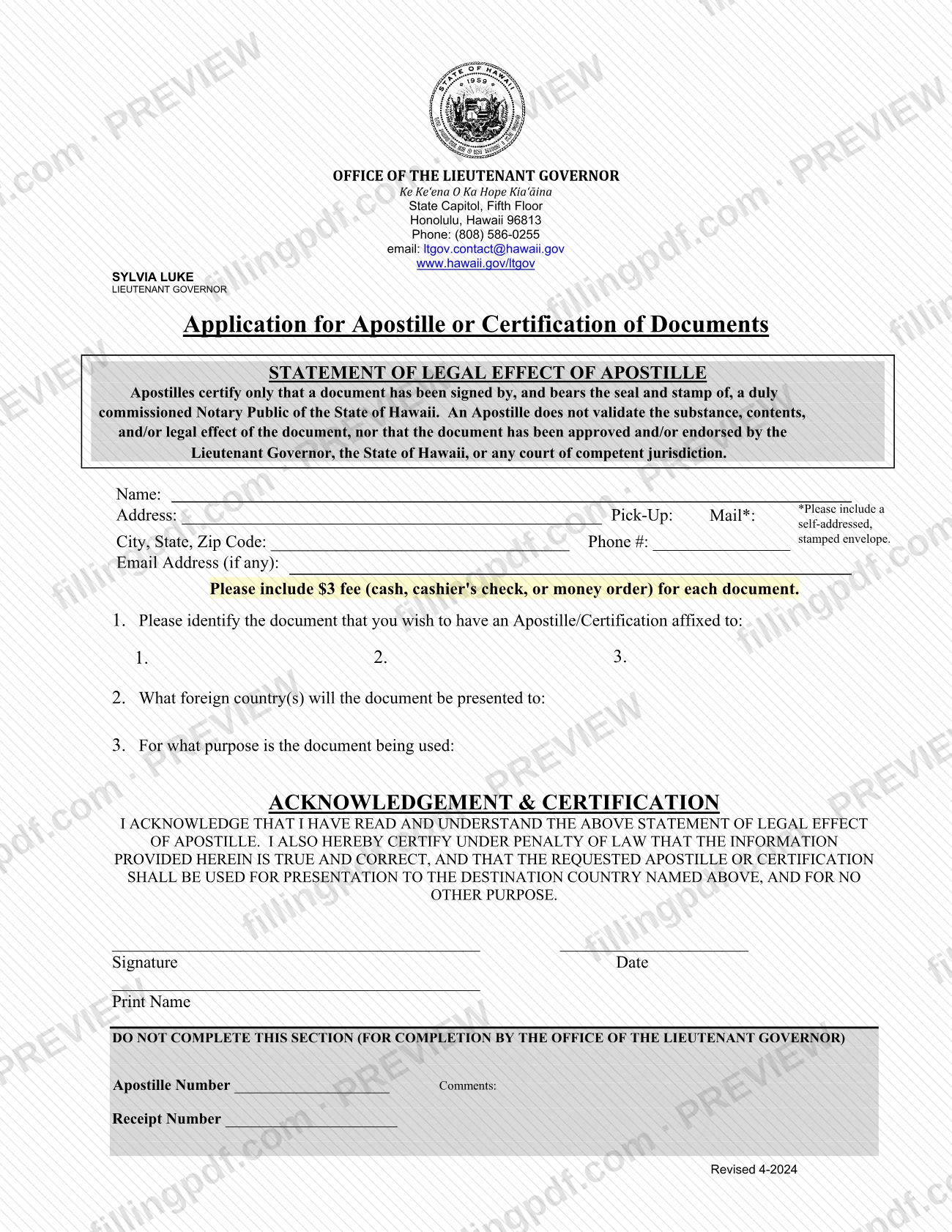
The apostille request form is the Application for Apostille or Certification of Documents of the Hawaii Office of the Lieutenant Governor. You use it to ask for an apostille or certification on a document that will be presented in another country. The form is linked from the Hawaii Department of Health Vital Records website, and its revision date printed on the page is Revised 4-2024. On this page you can fill out the form online on FillingPDF and download or print the completed PDF; the agency's own PDF stays at the official source link.
Last updated
What is Apostille Request Form – Hawaii?
The Apostille Request Form, printed under the title Application for Apostille or Certification of Documents, is the one-page application that the Hawaii Office of the Lieutenant Governor uses to receive requests for an apostille or certification to be affixed to a document.
The form opens with a Statement of Legal Effect of Apostille. It says an apostille certifies only that a document has been signed by, and bears the seal and stamp of, a duly commissioned Notary Public of the State of Hawaii. It does not validate the substance, contents or legal effect of the document, and it does not mean the Lieutenant Governor, the State of Hawaii or any court has approved or endorsed the document.
The applicant gives contact details and a pick-up or mail choice, identifies up to three documents, names the foreign country or countries where the document will be presented, and states the purpose. The signature block is an acknowledgement and certification, made under penalty of law, that the information is true and that the apostille or certification will be used only for presentation to the destination country named on the form.
A section at the bottom (apostille number, receipt number, comments) is reserved for the Office of the Lieutenant Governor and is not completed by the applicant. The form is not a request for a certified copy of a vital record.
Who needs to file Apostille Request Form – Hawaii?
The main group is anyone who needs an apostille or certification affixed to a document that will be presented in a foreign country and who is asking the Hawaii Office of the Lieutenant Governor to provide it.
Conditions printed on the form:
- The apostille the form describes certifies a signature and seal: that the document was signed by, and bears the seal and stamp of, a duly commissioned Notary Public of the State of Hawaii.
- You must name the foreign country or countries where the document will be presented and the purpose of use. By signing, you certify that the apostille or certification will be used for that destination country and for no other purpose.
- Each form lists up to three documents in the numbered spaces under item 1.
Do not expect an apostille to confirm what a document says. The statement of legal effect on the form says it does not validate the substance, contents or legal effect of the document.
The form has one signature block, with a printed name and date, and it prints no rule about representatives signing for the applicant. Ask the Office of the Lieutenant Governor, at (808) 586-0255, before someone else signs.
When to file Apostille Request Form – Hawaii
Submit the application when you need an apostille or certification affixed to a document before presenting it in a foreign country. The form prints no deadline, validity period or processing time of its own.
Because you certify that the apostille will be used only for the destination country named on the form, know the country and the purpose before you complete it. If you want to pick up the document or have it mailed back, decide that choice at the same time; a mailed return needs a self-addressed, stamped envelope. For questions about timing, the form gives the Office of the Lieutenant Governor's phone number, (808) 586-0255, and email, [email protected].
Documents you need
- The document or documents (up to three on one form) that you want the apostille or certification affixed to, identified under item 1. The apostille described on the form covers a Hawaii Notary Public's signature, seal and stamp.
- Payment for each document: cash, cashier's check or money order. The form prints the fee amount; confirm the current figure with the Office of the Lieutenant Governor.
- A self-addressed, stamped envelope, only if you choose mail for the return of the document.
How to fill out Apostille Request Form – Hawaii
Read the statement of legal effect
Read the Statement of Legal Effect of Apostille at the top. It says an apostille certifies only the Hawaii Notary Public's signature, seal and stamp, and you acknowledge it when you sign.
Enter your name and address
Fill in Name, Address and City, State, Zip Code for the person requesting the apostille.
Add phone and email
Enter your Phone # and, if you have one, your Email Address (if any).
Choose pick-up or mail
Mark how you will receive the document next to Pick-Up or Mail. If you choose mail, plan to include a self-addressed, stamped envelope.
Identify your documents
Under item 1, list each document you want the apostille or certification affixed to, in the spaces numbered 1, 2 and 3.
Name the country and purpose
Under item 2, enter the foreign country or countries where the document will be presented. Under item 3, state the purpose for which it will be used.
Sign, date and print your name
In the ACKNOWLEDGEMENT & CERTIFICATION block, sign, enter the date and print your name. You certify under penalty of law that the information is true and that the apostille will be used only for the destination country named.
Leave the office section blank
Do not complete the section marked for completion by the Office of the Lieutenant Governor; it holds the apostille number, receipt number and comments.
Review and download the completed PDF
Check the document list, country and signature, then download or print the completed PDF from FillingPDF and prepare payment as described under How to submit.
How to submit Apostille Request Form – Hawaii
The form is directed to the Office of the Lieutenant Governor, State Capitol, Fifth Floor, Honolulu, Hawaii 96813, and offers a pick-up or mail choice for the finished document.
- Pick-up or mail: mark your choice next to Pick-Up / Mail on the form. If you choose mail, include a self-addressed, stamped envelope.
- Payment: a fee applies for each document, payable by cash, cashier's check or money order. The form prints the amount; confirm the current figure with the office before sending payment.
- Contact: phone (808) 586-0255, email [email protected], website www.hawaii.gov/ltgov.
The form prints no separate mailing address or online submission channel beyond the office letterhead above, so confirm with the office how to deliver your package. Do not write in the box at the bottom that is reserved for the Office of the Lieutenant Governor. FillingPDF lets you fill out and download the PDF; submission follows the agency's channels above.
Common mistakes to avoid
- Expecting the apostille to validate the contents of the document; the form states it certifies only the notary's signature, seal and stamp.
- Listing the wrong destination country or a vague purpose, when you certify that the apostille will be used only for the country named on the form.
- Choosing mail without including a self-addressed, stamped envelope.
- Paying in a form the office does not take; the form lists cash, cashier's check or money order only.
- Sending payment for fewer documents than you list; the fee applies to each document.
- Writing in the section for completion by the Office of the Lieutenant Governor (apostille number, receipt number, comments).
- Leaving the signature, date or print name blank on the acknowledgement and certification.
- Listing more than the three numbered documents on one form instead of using another form.
Frequently asked questions
What is the apostille request form in Hawaii?
It is the Application for Apostille or Certification of Documents of the Hawaii Office of the Lieutenant Governor. You use it to request an apostille or certification on a document to be presented in a foreign country.
What does a Hawaii apostille certify?
Only that the document was signed by, and bears the seal and stamp of, a duly commissioned Notary Public of the State of Hawaii. The form states it does not validate the document's contents or legal effect, or mean the State has endorsed it.
Is there a fee for the apostille request?
Yes. The form says a fee applies for each document, payable by cash, cashier's check or money order. The amount is printed on the form; confirm the current figure with the Office of the Lieutenant Governor at (808) 586-0255.
Can I get the apostille by mail?
The form has a Pick-Up and Mail choice. If you choose mail, include a self-addressed, stamped envelope. The form prints no mailing instructions beyond the office letterhead, so confirm delivery details with the office.
How many documents can I list on one request form?
The form has three numbered spaces under item 1, so you can identify up to three documents. The fee applies for each document listed.
Can I use the apostille in any country?
The form asks you to name the foreign country or countries and certifies that the apostille will be used for the destination country named, and for no other purpose. State the correct country and purpose when you fill it out.
Can I fill out the apostille request form online?
Yes. You can fill out the PDF online on FillingPDF and download or print it. FillingPDF is an independent service and does not submit the form or issue the apostille; you deliver it to the Office of the Lieutenant Governor yourself.
Ready to fill out Apostille Request Form – Hawaii?
Fill out Apostille Request Form – Hawaii now