
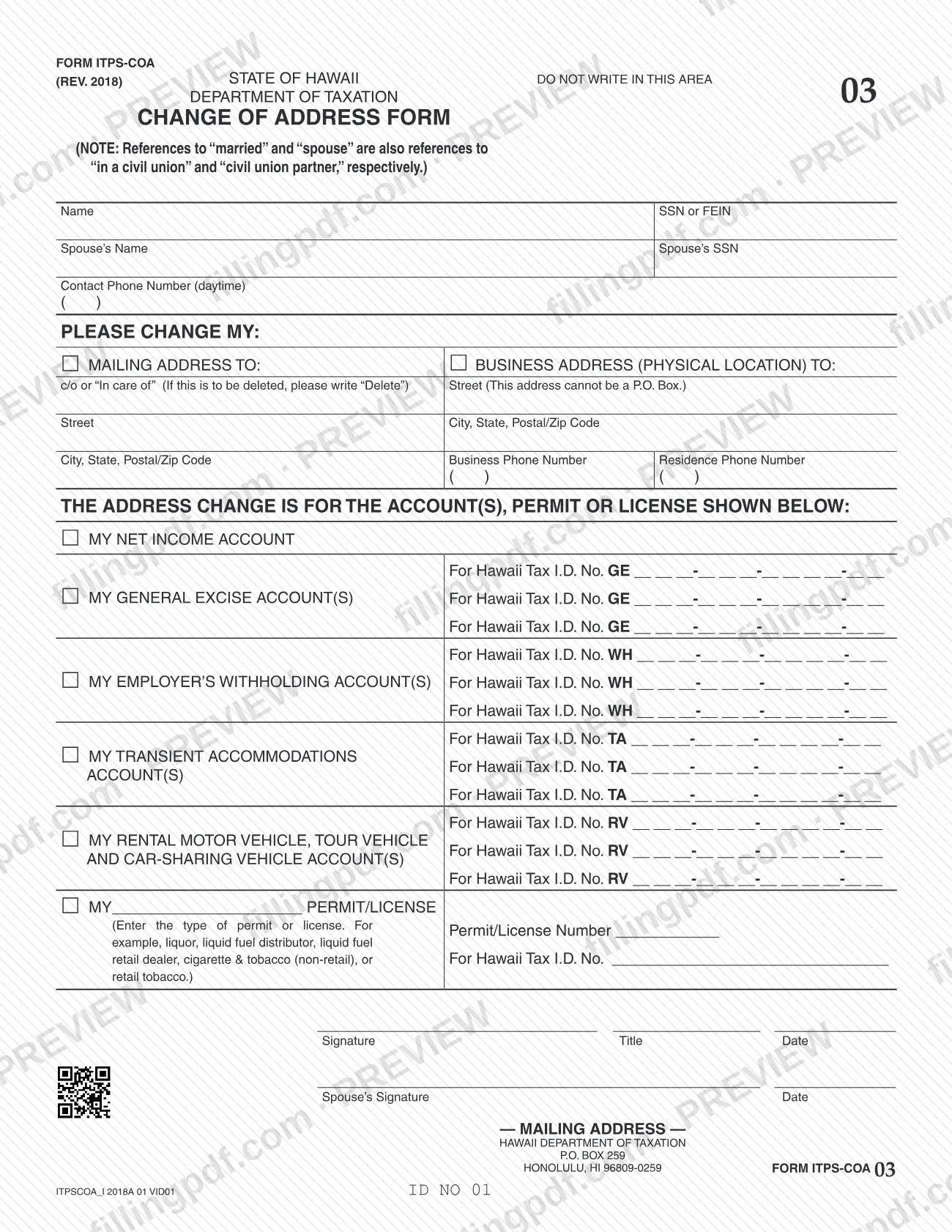
Form ITPS-COA, Change of Address, is the State of Hawaii Department of Taxation form for reporting a new mailing address or a new business address (physical location) for the tax accounts, permit or license you hold with the Department. One form can list a net income account, general excise accounts, employer's withholding accounts, transient accommodations accounts, rental motor vehicle, tour vehicle and car-sharing vehicle accounts, and a permit or license. On this page you can fill out the form online on FillingPDF and download or print the completed PDF; the Department publishes the form at the official source link and receives it by mail.
Last updated
What is ITPS-COA?
Form ITPS-COA, Change of Address, printed on the form as the Change of Address Form, is the State of Hawaii Department of Taxation form on which a taxpayer, business, permit holder or licensee asks the Department to change the address it has on file for specific tax accounts.
The form has two address requests. You can ask to change your mailing address, with an optional "c/o" (in care of) line, or your business address (physical location), which also asks for a business phone number and a residence phone number. A second block identifies which accounts the change covers, using the Hawaii Tax I.D. No. for each one:
- net income account;
- general excise accounts (GE);
- employer's withholding accounts (WH);
- transient accommodations accounts (TA);
- rental motor vehicle, tour vehicle and car-sharing vehicle accounts (RV);
- a permit or license, for example liquor, liquid fuel distributor, liquid fuel retail dealer, cigarette and tobacco (non-retail), or retail tobacco.
The form carries a note that references to "married" and "spouse" also mean "in a civil union" and "civil union partner". It is a single page identified as Form ITPS-COA 03, Rev. 2018, and it is returned to the Department's mailing address in Honolulu. It changes the address on the Department's records for the accounts you list; it is not a tax return.
Who needs to file ITPS-COA?
Anyone who holds a Hawaii tax account, permit or license with the Hawaii Department of Taxation and needs the Department to use a new mailing address or business address uses Form ITPS-COA. The form identifies the filer by name and SSN or FEIN, so it serves both individuals and businesses.
The accounts it covers are the ones printed on it:
- a net income account;
- general excise accounts;
- employer's withholding accounts;
- transient accommodations accounts;
- rental motor vehicle, tour vehicle and car-sharing vehicle accounts;
- a permit or license of a type you write in, such as liquor, liquid fuel distributor, liquid fuel retail dealer, cigarette and tobacco (non-retail), or retail tobacco.
You list only the accounts the new address applies to. If you are married or in a civil union, the form has lines for your spouse's or civil union partner's name, SSN and signature. A business address given on the form must be a physical location: the street line for the business address cannot be a P.O. Box. A P.O. Box is not ruled out for the mailing address, which the form lists separately.
When to file ITPS-COA
Use Form ITPS-COA when the address the Department of Taxation has on file for one of your accounts, permits or licenses needs to change, either your mailing address or your business address (physical location). No due date is printed on the form, so it is submitted whenever you want the Department to start using the new address. Because the form asks for the Hawaii Tax I.D. No. of each affected account, gather those numbers before you start and list every account that should receive the new address on a single form.
How to fill out ITPS-COA
Enter your name and SSN or FEIN
At the top, write your name and your SSN or FEIN. Add a daytime contact phone number.
Add your spouse's information
If it applies to you, enter your spouse's name and SSN. The form states that "married" and "spouse" also mean "in a civil union" and "civil union partner".
Enter your new mailing address
Under Please change my: mailing address to, fill in the street and the city, state and postal/ZIP code. On the c/o or "In care of" line, enter the name, or write "Delete" if that line is to be deleted.
Enter your new business address
Under business address (physical location) to, enter the street, which cannot be a P.O. Box, and the city, state and postal/ZIP code. Add the business phone number and the residence phone number.
List your net income account
If the change is for your net income account, mark it and enter the Hawaii Tax I.D. No. in the boxes printed on the form.
List general excise accounts
For each general excise account that should get the new address, enter its Hawaii Tax I.D. No. in the GE spaces. The form has room for three.
List withholding accounts
For each employer's withholding account, enter its Hawaii Tax I.D. No. in the WH spaces. The form has room for three.
List transient accommodations accounts
For each transient accommodations account, enter its Hawaii Tax I.D. No. in the TA spaces. The form has room for three.
List rental and car-sharing vehicle accounts
For rental motor vehicle, tour vehicle and car-sharing vehicle accounts, enter each Hawaii Tax I.D. No. in the RV spaces. The form has room for three.
Identify a permit or license
If the change is for a permit or license, write the type on the blank (for example liquor, liquid fuel distributor, liquid fuel retail dealer, cigarette and tobacco (non-retail), or retail tobacco). Then enter the Permit/License Number and the Hawaii Tax I.D. No.
Sign and date the form
Sign, enter your title and the date. Add your spouse's signature and date on the spouse's line if you are listing a spouse or civil union partner.
Review and download the completed PDF
Check that the new addresses, tax I.D. numbers and signatures are complete. Download or print the completed PDF from FillingPDF and mail it as described under How to submit.
How to submit ITPS-COA
The form names one channel: mail. Send the completed and signed Form ITPS-COA to the address printed on it:
- By mail: Hawaii Department of Taxation, P.O. Box 259, Honolulu, HI 96809-0259.
The form prints no other address, fax number, portal or appointment option, and it states no fee. Do not write in the area marked "Do not write in this area" at the top of the form. For other ways to reach the Department, see the Department's website or Hawaii Tax Online at https://hitax.hawaii.gov/; the form itself does not say that address changes can be made there. FillingPDF lets you fill out and download the PDF; submission follows the mailing channel above.
Common mistakes to avoid
- Entering a P.O. Box on the street line for the business address (physical location); the form says this address cannot be a P.O. Box.
- Leaving the "c/o" or "In care of" line with old text when it should be removed; the form says to write "Delete" if it is to be deleted.
- Listing no Hawaii Tax I.D. No. for the account the change is for, so the form does not show which account, permit or license should receive the new address.
- Using the permit or license line without writing the type of permit or license (for example liquor or retail tobacco) and its number.
- Leaving out the SSN or FEIN at the top, which the form uses to identify the filer.
- Sending the form unsigned: the form has a signature, title and date line, plus a spouse's signature line.
- Writing in the area marked "Do not write in this area" at the top of the form.
- Mailing the form somewhere other than Hawaii Department of Taxation, P.O. Box 259, Honolulu, HI 96809-0259, the only address printed on it.
Frequently asked questions
What is Form ITPS-COA?
Form ITPS-COA is the Hawaii Department of Taxation's Change of Address Form. You use it to give the Department a new mailing address or business address (physical location) for the tax accounts, permit or license you list on the form by Hawaii Tax I.D. No.
Which Hawaii tax accounts can I change the address for on this form?
The form covers a net income account, general excise (GE) accounts, employer's withholding (WH) accounts, transient accommodations (TA) accounts, rental motor vehicle, tour vehicle and car-sharing vehicle (RV) accounts, and one permit or license whose type you write in.
Where do I mail Form ITPS-COA?
Mail it to Hawaii Department of Taxation, P.O. Box 259, Honolulu, HI 96809-0259. That is the only address printed on the form, and it prints no fax number or other submission channel.
Can I use a P.O. Box for my business address?
No. The form states that the street line for the business address (physical location) cannot be a P.O. Box. The mailing address is a separate request on the form, with its own street and city lines.
How do I remove the "c/o" line from my mailing address?
Write "Delete" on the c/o or "In care of" line. The form tells you to do this when that line is to be deleted, instead of leaving it blank or crossing it out.
Does Form ITPS-COA apply to civil union partners?
Yes. A note at the top says that references to "married" and "spouse" are also references to "in a civil union" and "civil union partner". The form has lines for the spouse's name, SSN and signature.
Can I fill out Form ITPS-COA online?
You can fill out the PDF online on FillingPDF and download or print it. FillingPDF is an independent service, is not the Hawaii Department of Taxation and does not submit the form; you mail it to the Department yourself.
Do I need a separate form for each account?
The form has spaces for several accounts, so you can list the Hawaii Tax I.D. No. of each affected account of each type on one page: three each for general excise, withholding, transient accommodations and rental or car-sharing vehicle accounts.
Ready to fill out ITPS-COA?
Fill out ITPS-COA now