
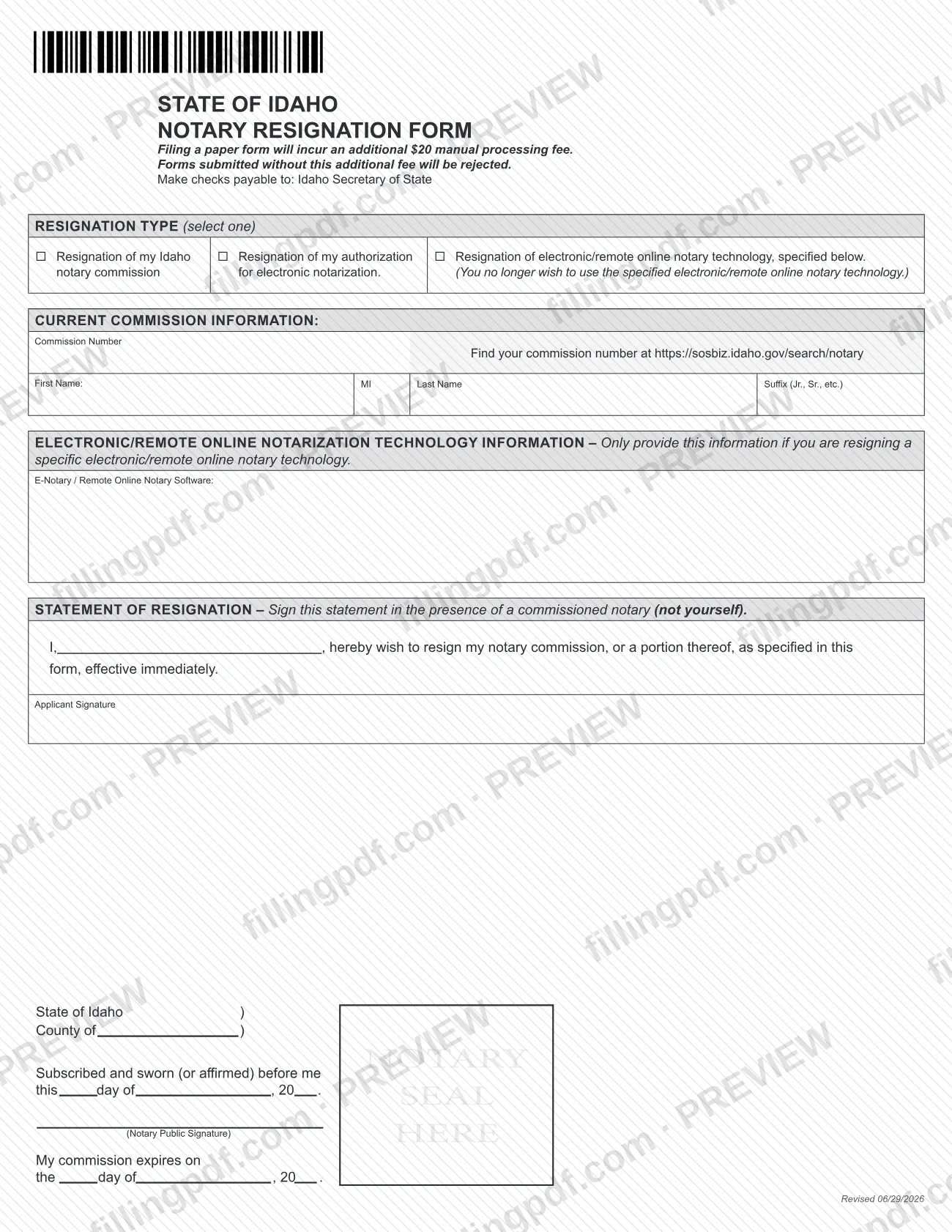
The Idaho Notary Resignation Form, listed by the Idaho Secretary of State as the Resignation Form, is the paper form a notary uses to give up an Idaho notary commission or part of it. One form covers three cases: resigning the commission, resigning the authorization for electronic notarization, or resigning one specific electronic or remote online notary technology. You sign the statement in front of another commissioned notary. On this page you can fill out the form online on FillingPDF and download or print the completed PDF; the form itself is published by the Secretary of State.
Last updated
What is Resignation Form – Idaho?
The Notary Resignation Form, listed on the Idaho Secretary of State's business forms page as the Resignation Form, is the State of Idaho paper form a notary files to resign an Idaho notary commission, or a portion of it, effective immediately.
The form asks you to select one resignation type:
- Resignation of my Idaho notary commission.
- Resignation of my authorization for electronic notarization.
- Resignation of electronic/remote online notary technology, specified below. Use this when you no longer wish to use the specific technology you name.
It identifies the notary by commission number and name. Only when you are resigning a specific technology do you fill in the e-notary or remote online notary software section. The form then carries a statement of resignation, which you sign in the presence of a commissioned notary other than yourself. That notary completes the "Subscribed and sworn (or affirmed) before me" block with a signature, seal and commission expiration date.
The Secretary of State lists this form under Notary on its business forms page, next to forms for applying for or renewing a commission, becoming an electronic or remote notary, changing a notary name or address, and reporting a lost or stolen notary stamping device. This form is only for resigning.
Who needs to file Resignation Form – Idaho?
Idaho notaries who want to end all or part of their notarial authority use this form. The three resignation types on the form define the groups:
- Notaries who want to resign their Idaho notary commission.
- Notaries who hold authorization for electronic notarization and want to resign that authorization.
- Notaries who use electronic or remote online notary technology and no longer wish to use a specific product. They name the technology in the e-notary / remote online notary software section.
Select only one resignation type on the form. The e-notary software section is for the technology resignation only.
You cannot witness your own signature. The form requires the statement of resignation to be signed in the presence of a commissioned notary, and it says "not yourself." The form has no section for a representative to sign for you, and it prints no rule on who else may file it.
When to file Resignation Form – Idaho
File the form when you decide to resign. The statement on the form says you resign "effective immediately," so the resignation is made as of the statement you sign; the form prints no deadline and no waiting period.
Sign the statement only when you are in front of the commissioned notary who will notarize it. Allow time to get that notarization before you send the paper form, because a form that arrives without the manual processing fee that applies to paper filings will be rejected. The Secretary of State's business forms page repeats that rule for paper submissions.
How to fill out Resignation Form – Idaho
Select one resignation type
Under RESIGNATION TYPE, select one option: resignation of your Idaho notary commission, resignation of your authorization for electronic notarization, or resignation of specified electronic/remote online notary technology.
Enter your commission number
Under CURRENT COMMISSION INFORMATION, enter your Commission Number. If you do not know it, the form points to https://sosbiz.idaho.gov/search/notary.
Enter your name
Fill in First Name, MI, Last Name and Suffix (Jr., Sr., etc.) as they appear on your commission.
Name the technology if resigning it
In the electronic/remote online notarization technology section, enter the E-Notary / Remote Online Notary Software only if you are resigning a specific technology. Otherwise leave it empty.
Add your name to the statement
In the STATEMENT OF RESIGNATION, write your name after "I," so it reads that you wish to resign your notary commission, or a portion thereof, as specified in the form, effective immediately.
Sign before a commissioned notary
Sign on the Applicant Signature line in the presence of a commissioned notary who is not you. Do not sign in advance.
Have the notary complete the jurat
The notary fills in the county, the day, month and year of the "Subscribed and sworn (or affirmed) before me" statement, signs, applies the seal and enters the date the notary's commission expires.
Review and download the completed PDF
Check that one resignation type is selected and the commission number and name are correct. Download or print the completed PDF from FillingPDF, then prepare the manual processing fee check and submit the form as described under How to submit.
How to submit Resignation Form – Idaho
The Idaho Secretary of State accepts paper forms by mail or by hand delivery to its office. Its business forms page says completed paper forms may be mailed or hand delivered to the Secretary of State's Office.
- Mail or hand delivery: send or bring the signed and notarized form to the Idaho Secretary of State. The form does not print a street address or P.O. box; use the contact details on the agency's business forms page at https://sos.idaho.gov/business-forms/.
- Fee: filing a paper form incurs an additional manual processing fee, and forms submitted without it are rejected. Make the check payable to Idaho Secretary of State. The form does not state the amount; the agency's business forms page lists it next to the Resignation Form.
- Online: the agency says most business filings can be completed online at sosbiz.idaho.gov, which avoids the paper processing fee. The form itself describes only the paper route.
To look up your commission number before you start, the form points to https://sosbiz.idaho.gov/search/notary. FillingPDF lets you fill out and download the PDF; submission follows the channels above.
Common mistakes to avoid
- Signing the statement of resignation before you are in front of the commissioned notary; the form requires it to be signed in that notary's presence.
- Having yourself notarize the statement. The form says the commissioned notary must be someone other than you.
- Selecting more than one resignation type instead of the single option the form allows.
- Filling in the e-notary / remote online notary software section when you are resigning your commission or authorization; it is only for resigning a specific technology.
- Mailing or delivering the paper form without the manual processing fee; the form says forms submitted without it will be rejected.
- Writing a check payable to someone other than Idaho Secretary of State.
- Leaving out the commission number, which you can look up at https://sosbiz.idaho.gov/search/notary.
- Sending the form without the notary's signature, seal and commission expiration date in the notarial block.
Frequently asked questions
What is the Idaho Notary Resignation Form used for?
It is the Idaho Secretary of State form a notary uses to resign an Idaho notary commission, or a portion of it, effective immediately. You choose one type: the commission itself, your authorization for electronic notarization, or a specific electronic/remote online notary technology.
Who has to notarize my resignation statement?
A commissioned notary other than you. The form says to sign the statement of resignation in the presence of a commissioned notary (not yourself). That notary completes the sworn-or-affirmed block with a signature, seal and commission expiration date.
Is there a fee to file the Idaho notary resignation form?
Yes, a manual processing fee applies to paper filings, and forms submitted without it are rejected. Make the check payable to Idaho Secretary of State. The amount is not printed on the form; the agency's business forms page lists it.
Can I resign only my electronic notary authorization?
Yes. The form has a separate option, resignation of my authorization for electronic notarization. A third option resigns one specified electronic/remote online notary technology, for when you no longer wish to use it. Select only one option.
Where do I find my notary commission number?
The form points to the Secretary of State's notary search at https://sosbiz.idaho.gov/search/notary. Enter the number under Current Commission Information, along with your first name, middle initial, last name and any suffix.
When does my resignation take effect?
Immediately. The statement on the form says you wish to resign your notary commission, or a portion thereof, as specified in the form, effective immediately. The form prints no waiting period or later effective date.
Where do I send the resignation form?
The agency says completed paper forms may be mailed or hand delivered to the Idaho Secretary of State's Office. The form prints no address, so use the contact details on the agency's business forms page at https://sos.idaho.gov/business-forms/.
Can I fill out the Idaho notary resignation form online on FillingPDF?
You can fill out the PDF online on FillingPDF and download or print it. FillingPDF is independent and not affiliated with the Secretary of State, and it does not file the form or collect the fee: you still get the notarization and submit the form through the agency's channels.
Ready to fill out Resignation Form – Idaho?
Fill out Resignation Form – Idaho now