
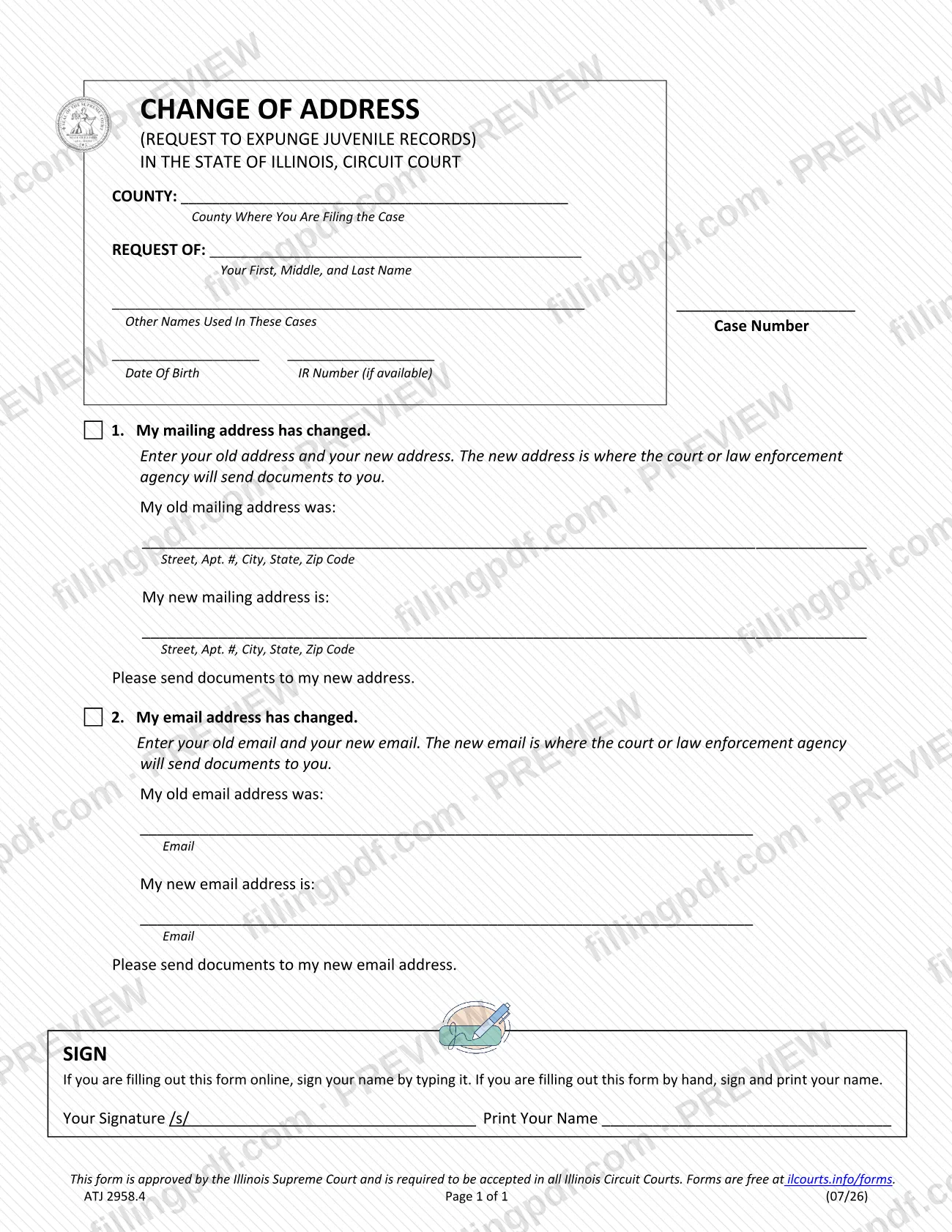
Change of Address (Request to Expunge Juvenile Records) is a statewide form approved by the Illinois Supreme Court for people who need to give the court or a law enforcement agency a new mailing address, a new email address, or both. It belongs to the Juvenile group of Approved Statewide Forms for expungement and sealing, and Illinois circuit courts are required to accept it. On this page you can fill out the form online on FillingPDF and download or print the completed PDF; the original PDF is published by the Illinois courts at the official source link.
Last updated
What is ATJ 2958.4?
Change of Address (Request to Expunge Juvenile Records) is the Illinois form that a person in a juvenile expungement case uses to give the court or law enforcement agency a new mailing address, a new email address, or both.
The form has two parts. Item 1, "My mailing address has changed," asks for your old and new mailing addresses. Item 2, "My email address has changed," asks for your old and new email addresses. In each part, the new address is where the court or law enforcement agency will send documents to you. The top of the form identifies the case: the county where you are filing, your name, other names used in these cases, your case number, your date of birth and your IR number, if available.
The Illinois Supreme Court approved the form, and the printed footer says it must be accepted in all Illinois Circuit Courts. The Supreme Court Commission on Access to Justice lists it as Change of Address, approved 07/2026, among the Juvenile forms on the Approved Statewide Forms page for expungement and sealing. That group also includes Request to Expunge Juvenile Records, Case List for Request to Expunge Juvenile Records, Notice of Filing for Juvenile Expungement, Order to Expunge Juvenile Records, Additional Juvenile Records and Additional Arresting Agencies. The form is one page and carries the code ATJ 2958.4.
Who needs to file ATJ 2958.4?
The main group is anyone with a juvenile expungement case in an Illinois circuit court whose contact details have changed. The form is titled for requests to expunge juvenile records, and the person named on the "Request of" line is the one who completes and signs it.
- Your mailing address changed: complete item 1 with your old and new mailing addresses so documents are sent to the new one.
- Your email address changed: complete item 2 with your old and new email addresses so documents are sent to the new one.
- Both changed: the form has a separate item for each, so you can complete both on the same page.
If neither your mailing address nor your email address has changed, this form has nothing for you to report. The form identifies the person by the name, other names used, case number and date of birth lines at the top, and it prints no rule about someone else signing on your behalf.
When to file ATJ 2958.4
Complete this form when your mailing address, your email address, or both change and you want the court or law enforcement agency to send documents to the new address. The form prints no deadline or filing window of its own.
Before you start, have your old and new addresses ready, plus the county where you are filing, your case number and, if you have one, your IR number. If you plan to e-file, finish the form first and flatten it before you upload it, as the Illinois courts' instructions describe.
How to fill out ATJ 2958.4
Enter the county where you file
At the top, write the county where you are filing the case on the COUNTY line.
Enter your name as requester
On the REQUEST OF line, enter your first, middle and last name.
List other names and case number
Enter any other names used in these cases and your case number on the line below.
Enter birth date and IR number
Enter your date of birth. Add your IR number only if it is available; the form marks it as optional.
Complete item 1, mailing address
If your mailing address changed, enter the old and new address, each with street, apartment number, city, state and ZIP code. The new address is where the court or law enforcement agency will send documents.
Complete item 2, email address
If your email address changed, enter your old email and your new email. The new email is where the court or law enforcement agency will send documents.
Sign and print your name
In the SIGN section, type your name as your signature when filling out the form online. If you fill it out by hand, sign and print your name.
Review and download the completed PDF
Check that the county, case number and both addresses are correct. Download or print the completed PDF from FillingPDF; if you will e-file it, flatten it first as described under How to submit.
How to submit ATJ 2958.4
The form names the county where you are filing the case at the top, and it prints no court address, portal or appointment rule of its own. The Illinois courts say the form must be accepted in all Illinois Circuit Courts, so you file it in the county you entered.
If you e-file, the Illinois courts require you to "flatten" the completed PDF so it cannot be changed afterward:
- Adobe Acrobat or Reader (recommended): open the File menu, choose Print, then pick "Adobe PDF" or "Print to PDF" and save the file. The saved copy is flattened.
- Other software: look for a "Save as PDF" option, often in the print dialog box under Print.
- Open the flattened file before you e-file it to confirm that it looks filled out.
Save or download the PDF before you begin typing; if you fill out a form on a webpage, you lose your progress. FillingPDF lets you fill out and download the PDF; submission follows the channels above.
Common mistakes to avoid
- Leaving the county line blank; the form asks for the county where you are filing the case.
- Entering a new mailing or email address that you do not want documents sent to; the form says the new address is where the court or law enforcement agency will send documents.
- Leaving out the old address or old email in the "was" lines; each item asks for both the old and the new.
- Filling out the form on a webpage without first saving or downloading it as a PDF, which loses your progress.
- E-filing the form without flattening it first, so it can still be changed after you complete it.
- Not opening the flattened file before e-filing to check that it looks filled out.
- Signing by hand without printing your name, or leaving the signature blank; by hand you must sign and print your name, and online you type your name as the signature.
Frequently asked questions
What is the Change of Address (Request to Expunge Juvenile Records) form?
It is an Illinois Supreme Court approved statewide form, code ATJ 2958.4, that you use to give the court or law enforcement agency a new mailing address, a new email address, or both in a juvenile expungement case. It is one page.
Can I use this form to change my email address?
Yes. Item 2, "My email address has changed," asks for your old and new email addresses and says the new email is where the court or law enforcement agency will send documents to you.
Do I have to fill out both the mailing address and email parts?
The form has two separate parts, item 1 for your mailing address and item 2 for your email address. Complete the part that matches what changed; if both changed, complete both.
How do I sign the change of address form?
If you fill out the form online, sign by typing your name. If you fill it out by hand, sign and print your name. The form has one signature block, labeled Your Signature, next to a Print Your Name line.
Where do I file this change of address form?
You file it in the Illinois circuit court for the county you write on the COUNTY line at the top. The form says it must be accepted in all Illinois Circuit Courts, and it prints no court address or portal of its own.
How do I flatten the form before e-filing it?
In Adobe Acrobat or Reader, choose File, then Print, then "Adobe PDF" or "Print to PDF" and save the file. With other software, use a "Save as PDF" option, often in the print dialog box. Open the saved file to confirm it looks filled out.
What if I do not have an IR number?
Leave it blank. The form labels the IR number line "if available," so it is only entered when you have one.
Can I fill out this change of address form online on FillingPDF?
Yes. You can fill out the PDF online on FillingPDF and download or print it. FillingPDF is an independent service, not the Illinois courts, and it does not file the form; you file it through the court channels described under How to submit.
Ready to fill out ATJ 2958.4?
Fill out ATJ 2958.4 now