
The Prepaid Internet Account Application and Guide is the Cook County Clerk's Office application for a Prepaid Internet Account, which lets you print documents online without processing each transaction individually or paying credit card transaction fees. The Clerk's Office states that there is no fee to open the account; it is activated after you send an initial payment. On FillingPDF you can fill out the application online and download or print the completed PDF. The account is opened only through the Clerk's Office channels described below, and the Clerk publishes the form on its website.
Last updated
What is Prepaid Internet Account Application and Guide – Cook County, IL?
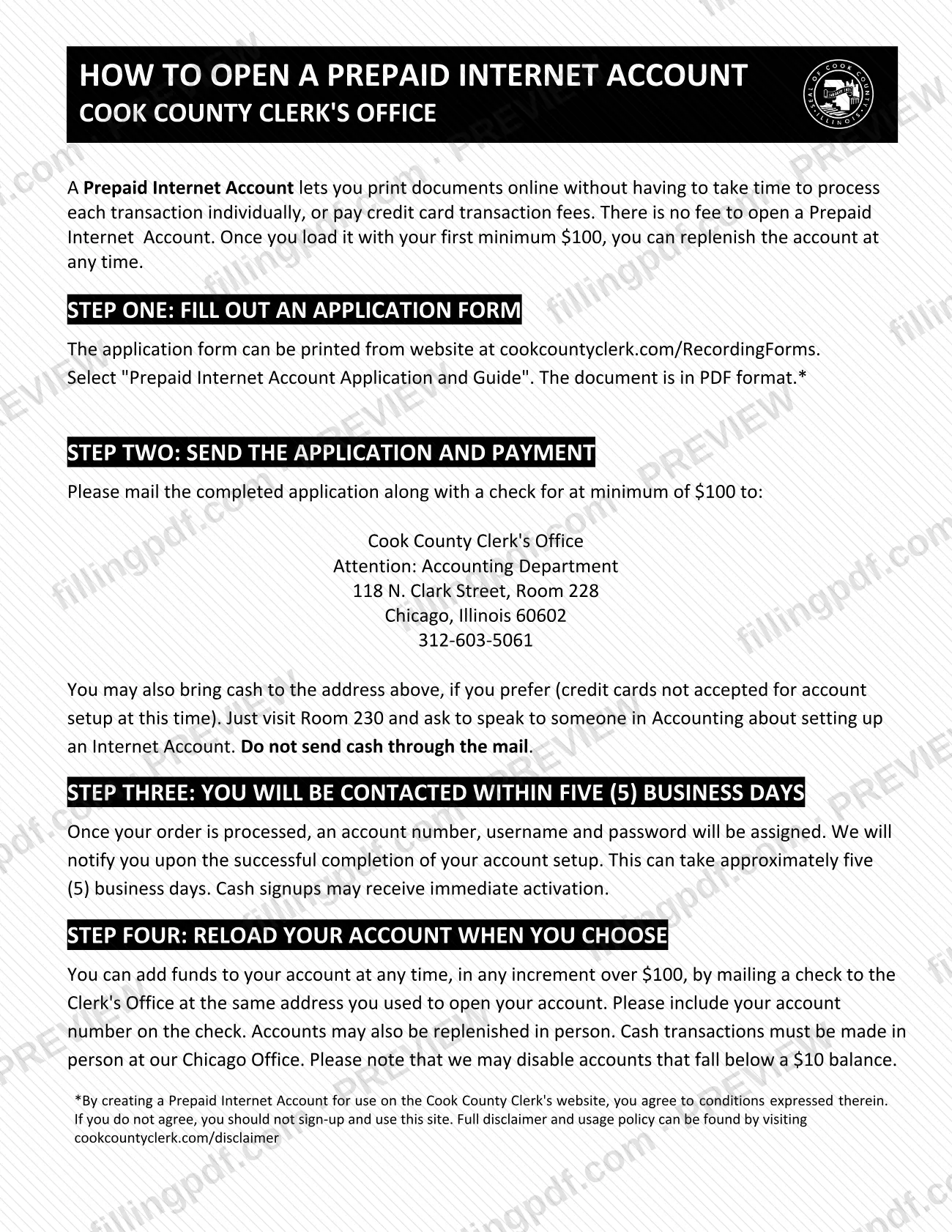
The Prepaid Internet Account Application and Guide is the Cook County Clerk's Office document for opening a Prepaid Internet Account, a funded account used to print documents online from the Clerk's website without paying credit card transaction fees or processing each transaction one by one.
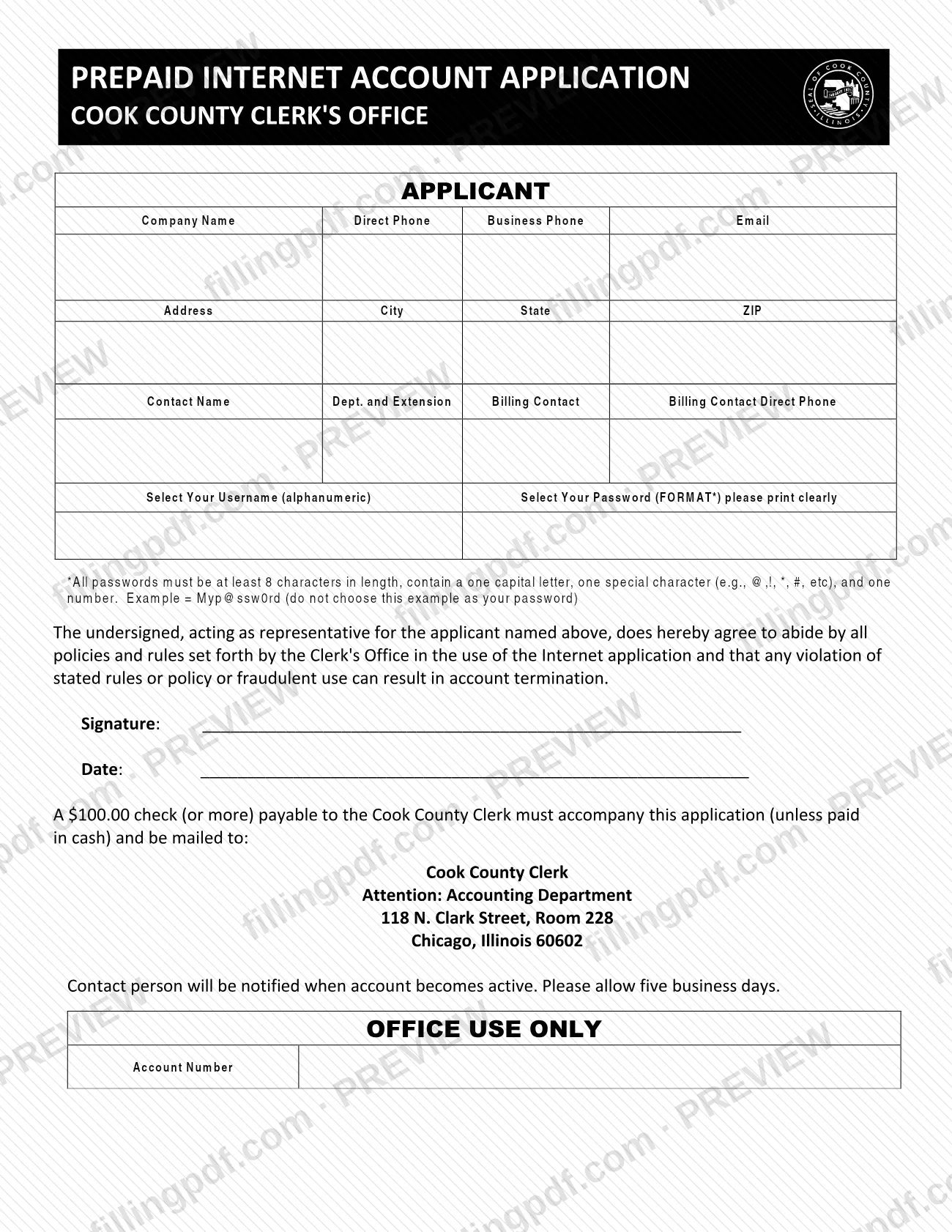
The document has two parts. The guide, titled "How to Open a Prepaid Internet Account," walks through four steps: fill out the application, send the application and payment, wait to be contacted, and reload the account whenever you choose. The application itself, titled "Prepaid Internet Account Application," collects the applicant's company and contact details, billing contact, a chosen username and password, and a representative's signature and date. A box marked "Office Use Only" holds the account number, which the Clerk's Office assigns.
Once your order is processed, the Clerk's Office assigns an account number, a username and a password and notifies you when setup is complete. The Clerk states there is no fee to open the account, but a first payment by check, or by cash in person, must load it before it is active.
The form is an account application, not a recording instrument. The Clerk's Office lists it among the applications and information on its recording forms page, whose disclaimer says it is your responsibility to determine the correct instruments and forms for your transaction. By creating an account you agree to the conditions in the Clerk's disclaimer and usage policy.
Who needs to file Prepaid Internet Account Application and Guide – Cook County, IL?
Anyone who wants a Prepaid Internet Account with the Cook County Clerk's Office to print documents online from the Clerk's website completes this application. The form is written for an organization: it asks for a company name, a contact name with department and extension, and a billing contact.
The application is signed by a representative. The signature block states that the undersigned acts as representative for the applicant named on the form and agrees to abide by all policies and rules the Clerk's Office sets for the use of the Internet application. The form warns that any violation of those rules, or fraudulent use, can result in account termination.
You do not need to submit a new application to add money later: the guide says you can reload an existing account at any time, by mailing a check with your account number to the same address or by paying in person. Cash must be paid in person at the Chicago office.
If you do not agree to the conditions in the Clerk's disclaimer and usage policy, the guide says you should not sign up for or use the account.
When to file Prepaid Internet Account Application and Guide – Cook County, IL
Submit the application whenever you want a Prepaid Internet Account; neither the form nor the guide sets a deadline. The account is not active until the Clerk's Office processes your order, which the guide says can take approximately five (5) business days, and you will be notified when setup is complete. Cash signups made in person may receive immediate activation.
After the account is open you can reload it at any time. The guide notes that the Clerk's Office may disable accounts that fall below a minimum balance it sets, so reload before the balance runs low.
Documents you need
- A check payable to the Cook County Clerk, for at least the minimum initial load stated on the application, when you apply by mail or do not pay in cash.
- Cash for the initial load, only if you bring it in person to Room 230 at 118 N. Clark Street; cash must never be sent through the mail.
How to fill out Prepaid Internet Account Application and Guide – Cook County, IL
Enter company and contact numbers
Under APPLICANT, enter the Company Name, Direct Phone, Business Phone and Email. Print clearly, as the form asks.
Enter the applicant address
Complete Address, City, State and ZIP for the company.
Name the contact person
Enter the Contact Name and, in the Dept. and Extension field, the contact's department and phone extension. The Clerk's Office notifies this person when the account becomes active.
Enter the billing contact
Fill in the Billing Contact name and the Billing Contact Direct Phone.
Select your username
In Select Your Username, enter an alphanumeric username of your choice.
Create a compliant password
In Select Your Password, use at least 8 characters with one capital letter, one special character (for example @, !, * or #) and one number. Do not use the example password printed on the form.
Read the representative's agreement
The undersigned agrees, as representative for the applicant, to abide by the Clerk's Office policies and rules for the Internet application. A violation or fraudulent use can result in account termination.
Sign and date the application
The representative signs on the Signature line and enters the Date.
Leave the Office Use Only box blank
The Account Number under OFFICE USE ONLY is completed by the Clerk's Office.
Prepare your payment
Prepare a check payable to the Cook County Clerk for at least the minimum initial load stated on the form, unless you will pay in cash in person.
Review and download the completed PDF
Check each field, especially the password format and signature, then download or print the completed PDF from FillingPDF. Submit it with your payment through one of the channels described under How to submit.
How to submit Prepaid Internet Account Application and Guide – Cook County, IL
You can open the account by mail or in person at the Cook County Clerk's Office in Chicago.
- By mail: send the completed application with a check payable to the Cook County Clerk, for at least the minimum initial load stated on the application, to: Cook County Clerk's Office, Attention: Accounting Department, 118 N. Clark Street, Room 228, Chicago, Illinois 60602. The phone number printed on the guide is 312-603-5061.
- In person: you may bring cash to the same address. Go to Room 230 and ask to speak to someone in Accounting about setting up an Internet Account.
Do not send cash through the mail. Credit cards are not accepted for account setup at this time.
The Clerk's Office contacts the person named on the application once the account is active; allow about five business days. To reload later, mail a check to the same address with your account number on it, or pay in person; cash transactions must be made in person at the Chicago office. FillingPDF lets you fill out and download the PDF; submission follows the channels above.
Common mistakes to avoid
- Sending cash through the mail; the guide says cash must be brought in person to Room 230 and must not be mailed.
- Planning to pay for account setup by credit card; the Clerk's Office does not accept credit cards for setup at this time.
- Mailing the application without the check when you are not paying in cash; payment must accompany the application.
- Making the check payable to someone other than the Cook County Clerk.
- Choosing a password that is shorter than 8 characters or lacks a capital letter, a special character or a number.
- Using the example password printed on the form; the form says not to choose it.
- Leaving the signature and date blank; the representative's signature is what agrees to the Clerk's policies and rules.
- Writing in the Office Use Only box; the Account Number there is filled in by the Clerk's Office.
- Reloading by mail without writing your account number on the check.
Frequently asked questions
What is the Prepaid Internet Account Application and Guide?
It is the Cook County Clerk's Office document for opening a Prepaid Internet Account, which lets you print documents online without processing each transaction individually or paying credit card transaction fees. It includes a four-step guide and the application form.
Is there a fee to open a Prepaid Internet Account?
The Clerk's Office says there is no fee to open the account. You must still load it with a first payment before it is active, by check payable to the Cook County Clerk or by cash in person. For the current minimum, see the application or call 312-603-5061.
Can I pay for the account setup by credit card?
No. The guide says credit cards are not accepted for account setup at this time. Pay by check mailed with the application, or bring cash in person to Room 230 at 118 N. Clark Street in Chicago. Do not mail cash.
How long does it take to activate the account?
Approximately five (5) business days after the order is processed. The Clerk's Office notifies the contact person once an account number, username and password are assigned. Cash signups made in person may receive immediate activation.
Where do I mail the Prepaid Internet Account Application?
Mail it with your check to Cook County Clerk's Office, Attention: Accounting Department, 118 N. Clark Street, Room 228, Chicago, Illinois 60602. The phone number printed on the guide is 312-603-5061.
Can I fill out the application online?
Yes. You can fill out the PDF online on FillingPDF and download or print it. FillingPDF is independent of the Clerk's Office and does not open the account; you submit the application and payment through the Clerk's channels.
How do I add money to my Prepaid Internet Account later?
Mail a check to the Clerk's Office at the address you used to open the account, with your account number on the check, or pay in person. Cash must be paid in person at the Chicago office. Accounts below a minimum balance may be disabled.
Is this a Cook County property tax form?
No. This document opens a Prepaid Internet Account with the Cook County Clerk's Office for printing documents online. It does not concern a property tax bill or payment, and it is listed with the Clerk's recording forms.
What password format does the application require?
At least 8 characters, with one capital letter, one special character (such as @, !, * or #) and one number. The form prints an example password but tells you not to choose it as your own.
Ready to fill out Prepaid Internet Account Application and Guide – Cook County, IL?
Fill out Prepaid Internet Account Application and Guide – Cook County, IL now