
A motion for default in an Illinois divorce is the request a petitioner makes when the respondent was served with the Summons and Petition for Divorce but has not filed an Appearance, Answer or Response. Form ATJ 140.1, Motion for Default, is the version approved by the Illinois Supreme Court, and Illinois courts must accept it. On FillingPDF you can fill out the form online and download or print the completed PDF; the form itself is published by the Illinois courts at ilcourts.info/forms.
Last updated
What is ATJ 140.1?
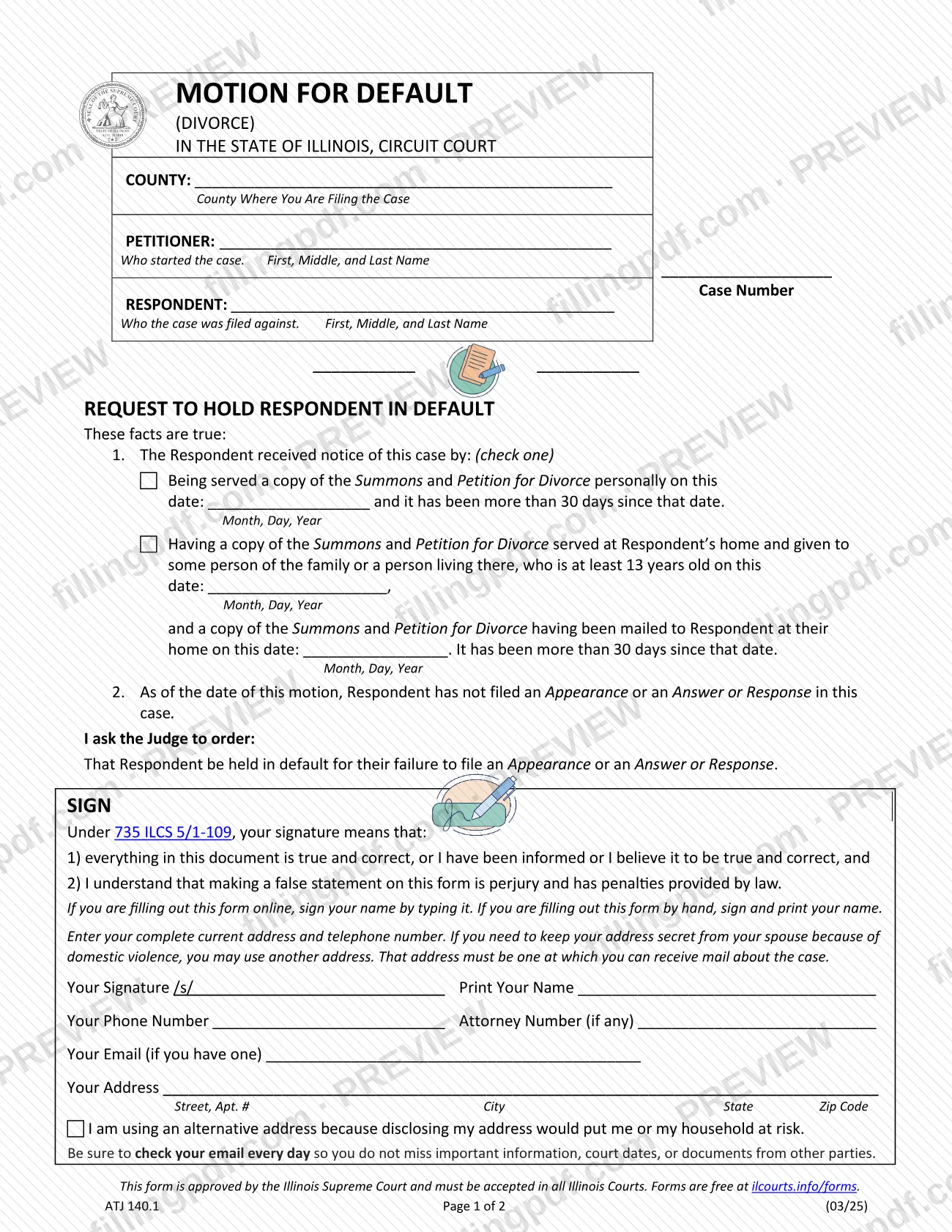
Motion for Default (Divorce), Form ATJ 140.1, is the Illinois Supreme Court approved statewide form a petitioner files in a divorce case to ask the judge to hold the respondent in default because the respondent has not filed an Appearance, Answer or Response.
The form has two pages. Page 1 is the motion. It states two facts: how the Respondent received notice of the case, and that as of the date of the motion the Respondent has not filed an Appearance or an Answer or Response. It then asks the judge to order that the Respondent be held in default for that failure. Your signature under 735 ILCS 5/1-109 means the statements are true and correct, or that you have been informed or believe them to be, and that a false statement is perjury with penalties provided by law.
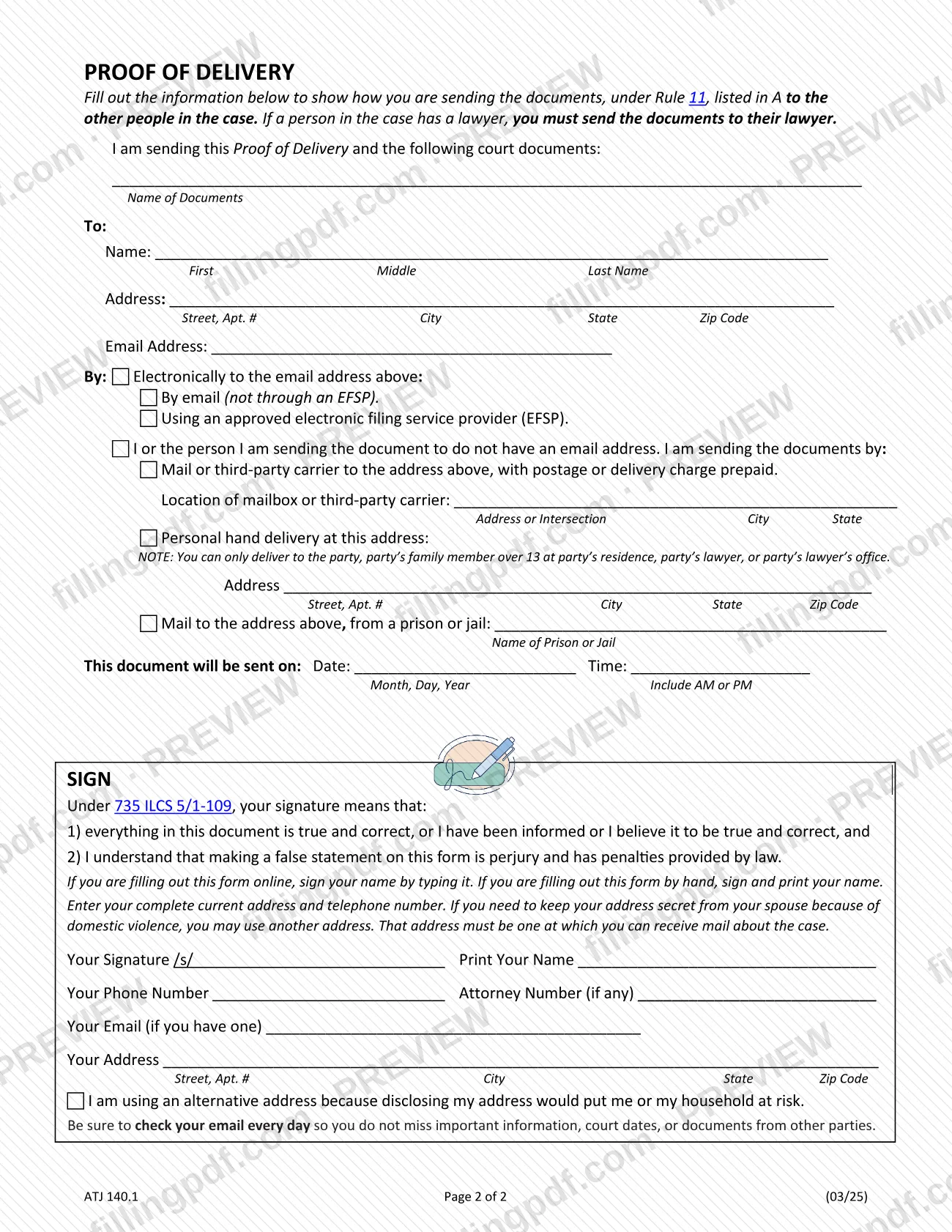
Page 2 is a Proof of Delivery, which shows how you are sending the motion to the other people in the case under Rule 11.
The form refers to the Summons and Petition for Divorce, so it belongs to divorce cases. The Illinois Courts approved-forms page lists it, approved 03/2025, in both the Divorce With Children and Divorce No Children sections, next to the companion Order for Default, the Divorce Summons and the Divorce Appearance. The same page says all Illinois courts must accept these forms.
Who needs to file ATJ 140.1?
The petitioner, meaning the person who started the divorce case, uses this form when the respondent has been served with the Summons and Petition for Divorce and has not filed an Appearance, Answer or Response. The petitioner signs it; an attorney may add an attorney number, which the form asks for only "if any".
Both statements on the form must be true on the date you sign:
- the Respondent was served personally, or served at home through a person of the family or living there who is at least 13 years old, with a copy also mailed to the Respondent's home, and more than 30 days have passed since the date you enter;
- the Respondent has not filed an Appearance or an Answer or Response.
Do not use this motion if the Respondent has already filed an Appearance, Answer or Response, or if more than 30 days have not yet passed since service. If you must keep your address secret from your spouse because of domestic violence, the form lets you enter another address where you can receive mail about the case and check the alternative-address box.
When to file ATJ 140.1
File the motion once more than 30 days have passed since the date you enter for service, and while the Respondent still has not filed an Appearance or an Answer or Response. The form asks for that date in one of two ways. For personal service, it is the date the Respondent was served a copy of the Summons and Petition for Divorce. For service at the Respondent's home, it is the date you state after the home service and the mailing of a copy to the Respondent at home. The form states the facts "as of the date of this motion", so check the court record for any filing by the Respondent right before you sign. The form prints no other deadline. The Proof of Delivery on page 2 records the date and time the motion is sent to the other people in the case.
How to fill out ATJ 140.1
Download and save the PDF first
Save or download the form as a PDF before you start, because progress is lost if you fill it out on a webpage. You can type into the form or handwrite it.
Enter the court and case details
Enter the county where you are filing the case, the Petitioner (who started the case) and the Respondent (who the case was filed against), each with first, middle and last name, and the case number.
Check how the Respondent was served
In item 1, check one box. For personal service, enter the date in Month, Day, Year. For service at home, enter the service date and the date the copy was mailed to the Respondent's home. Either way, more than 30 days must have passed.
Confirm the Appearance and Answer statement
Item 2 states that as of the date of the motion the Respondent has not filed an Appearance or an Answer or Response. Complete the form only if that is true.
Sign and print your name
In the SIGN block, type your name after /s/ if you are filling out the form online, or sign by hand if you are filling it out by hand, and print your name. Your signature is made under 735 ILCS 5/1-109.
Add your contact information
Enter your phone number, attorney number if any, email if you have one and complete address. Check the alternative-address box if disclosing your address would put you or your household at risk.
List the documents you are sending
On page 2, under Proof of Delivery, write the name of the documents, such as this motion, in the space after "I am sending this Proof of Delivery and the following court documents".
Enter who receives the documents
Under To, enter the name, address and email address of each person you are sending the documents to. If that person has a lawyer, use the lawyer's details.
Choose the delivery method
Check the email, approved electronic filing service provider, mail or third-party carrier, personal hand delivery or mail from a prison or jail option, and complete its address or location line.
Enter the date and time sent
Fill in the date in Month, Day, Year and the time, including AM or PM, when the documents will be sent.
Sign the Proof of Delivery
Sign and print your name in the second SIGN block, and repeat your phone number, attorney number if any, email and address.
Review, flatten and download the PDF
Check every entry, then download or print the completed PDF from FillingPDF. If you will e-file, flatten the form first and open it to confirm it looks filled out.
How to submit ATJ 140.1
The form is addressed to the Illinois Circuit Court of the county where you are filing the case, named at the top of page 1. It prints no address or portal, so use the filing method your county circuit court offers, and the Illinois Courts approved-forms page covers e-filing.
- E-filing: save or download the PDF before you start, because progress is lost if you fill it out on a webpage. Flatten the completed form so it cannot be changed: in Adobe Acrobat or Reader, choose File, then Print, then Adobe PDF or Print to PDF, and save. Open the flattened file to confirm it looks filled out before you e-file.
- Delivery to the other people in the case: use the Proof of Delivery on page 2 and list the motion as a document sent. If a person has a lawyer, send the documents to the lawyer. Methods on the form are email (directly or through an approved electronic filing service provider), mail or third-party carrier with postage or delivery charge prepaid, personal hand delivery, or mail from a prison or jail.
The form's own instruction is to check your email every day so you do not miss court dates or documents from other parties. FillingPDF lets you fill out and download the PDF; submission follows the channels above.
Common mistakes to avoid
- Checking both service boxes in item 1; the form says to check one.
- Filing before more than 30 days have passed since the service date you enter in item 1.
- Choosing service at the Respondent's home but leaving out the mailing date for the copy sent to the Respondent's home.
- Filing the motion after the Respondent has filed an Appearance, Answer or Response, which makes item 2 untrue.
- Leaving the signature blank; when you fill out the form online you sign by typing your name after /s/, and you also print your name.
- Sending the Proof of Delivery documents to a party who has a lawyer instead of to that lawyer.
- Choosing personal hand delivery to someone other than the party, a family member over 13 at the party's residence, the party's lawyer or the lawyer's office.
- Entering an alternative address where you cannot receive mail about the case.
- Filling out the PDF on a webpage without downloading it first, or e-filing it without flattening it.
Frequently asked questions
What is a motion for default in an Illinois divorce?
It is a request that the judge hold the Respondent in default because the Respondent was served with the Summons and Petition for Divorce and has not filed an Appearance, Answer or Response. Form ATJ 140.1 is the Illinois Supreme Court approved statewide version, and Illinois courts must accept it.
When can I file the Motion for Default?
After more than 30 days have passed since the service date you enter on the form, and while the Respondent still has not filed an Appearance or an Answer or Response. The form states both facts as of the date of the motion, so they must be true when you sign.
What if the Respondent was not served personally?
Check the second box in item 1 instead. It covers a copy of the Summons and Petition for Divorce left at the Respondent's home with a person of the family or living there who is at least 13 years old, plus a copy mailed to the Respondent's home. You enter both dates.
Do I have to send a copy of the motion to the other side?
Page 2, the Proof of Delivery, shows how you send the documents listed to the other people in the case under Rule 11. If a person has a lawyer, you must send the documents to the lawyer. Enter the date and time the documents are sent.
How do I sign the Motion for Default online?
If you are filling out the form online, sign by typing your name after /s/ and print your name. If you fill it out by hand, sign and print your name. Your signature is made under 735 ILCS 5/1-109, so a false statement is perjury.
Can I fill out the Motion for Default online?
Yes. You can fill out the PDF online on FillingPDF and download or print it. FillingPDF does not file it with the court or deliver it to anyone, so you still file and deliver it through the court's and the form's channels.
Can I use a different address on the form?
Yes, if you need to keep your address secret from your spouse because of domestic violence. Enter another address where you can receive mail about the case, and check the box saying you are using an alternative address because disclosing yours would put you or your household at risk.
What do I do before e-filing the completed form?
Flatten it so it cannot be changed. In Adobe Acrobat or Reader, choose File, Print, then Adobe PDF or Print to PDF, and save the file. Open the saved file to make sure it looks filled out before you e-file.
Is there a form for the judge's order after this motion?
Yes. The Illinois Courts divorce forms page lists an Order for Default, approved 03/2025, next to the Motion for Default in the Divorce With Children and Divorce No Children sections.
Ready to fill out ATJ 140.1?
Fill out ATJ 140.1 now