
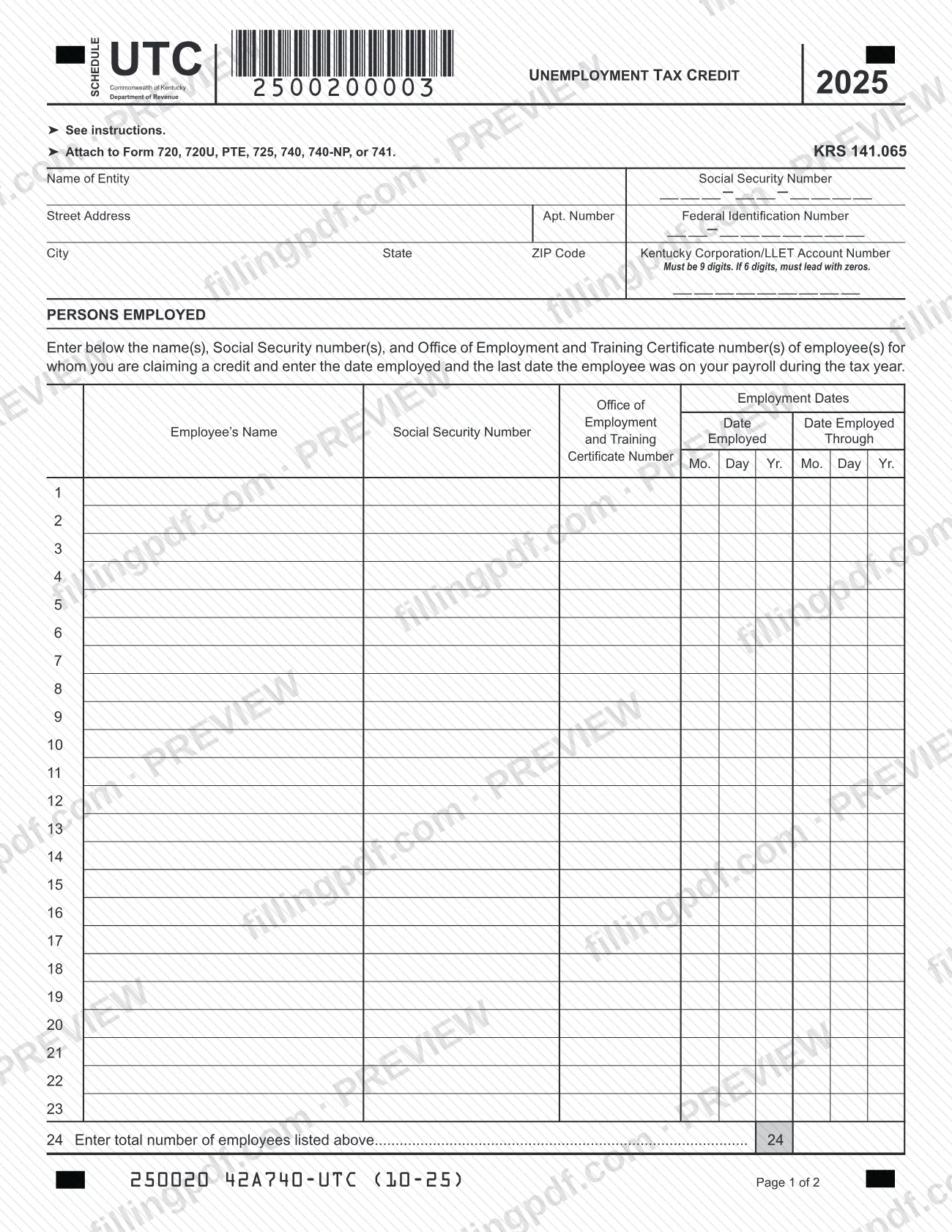

Schedule UTC, Unemployment Tax Credit, is the Kentucky Department of Revenue schedule for claiming the unemployment tax credit allowed by KRS 141.065 for hiring people who were classified as unemployed. You attach it to the Kentucky return you file, such as Form 720, 720U, PTE, 725, 740, 740-NP or 741. On this page you can fill out the 2025 schedule online on FillingPDF and download or print the completed PDF; the form itself is published by the Kentucky Department of Revenue.
Last updated
What is Schedule UTC?
Schedule UTC, Unemployment Tax Credit, is the Kentucky Department of Revenue schedule on which a taxpayer lists qualifying newly hired employees and figures the credit allowed under KRS 141.065, then carries it to the return the schedule is attached to.
The printed form is for tax year 2025. Page 1 identifies the entity and lists each employee with a Social Security number, an Office of Employment and Training Certificate number, the date employed and the last date the employee was on your payroll during the tax year. Page 2 totals the employees on lines 24 and 25, figures the credit on line 26 by multiplying line 25 by a fixed per-employee amount printed on the form, and then sends the result to the right place for each return on lines 27 through 32.
Under KRS 141.065(2), the credit applies against the taxes imposed by KRS 141.020 or 141.040 and 141.0401. The person hired must have been classified as unemployed by the Education and Workforce Development Cabinet, Department of Workforce Investment, Office of Development and Training for at least sixty days before being hired, and must stay employed by you for at least one hundred eighty consecutive days during the taxable year in which the credit is claimed. The credit is subject to the ordering of credits under KRS 141.0205.
Schedule UTC is a schedule, not a return: it is never filed alone.
Who needs to file Schedule UTC?
Taxpayers that file Kentucky Form 720, 720U, PTE, 725, 740, 740-NP or 741 and hired one or more people who meet the credit conditions complete Schedule UTC and attach it to that return. A hired person qualifies only if the Education and Workforce Development Cabinet had classified them as unemployed for at least sixty days before the hire and they remain employed by you for at least one hundred eighty consecutive days during the taxable year.
Special rules in the instructions:
- Related businesses: related corporations or unincorporated trades and businesses are treated as a single employer, and the credit for any qualified employee cannot be claimed more than once for a tax year.
- Pass-through entities: the credit is applied at the entity level against the limited liability entity tax under KRS 141.0401 and is distributed to each partner, member or shareholder by pro rata share.
- Estates and trusts: the credit is apportioned between the estate or trust and the beneficiaries based on the income allocable to each.
No credit is allowed for a person for whom you receive federally funded on-the-job training payments, for certain relatives of the taxpayer or of a corporation's majority owner, for a dependent of the taxpayer, or for the related persons of an estate's or trust's grantor, beneficiary or fiduciary. No organization that is exempt from income tax under KRS Chapter 141 may claim the credit.
When to file Schedule UTC
Complete Schedule UTC for the tax year in which the credit is claimed, and file it at the same time as the return it is attached to. The form carries no due date of its own, so the deadline is the one for your Form 720, 720U, PTE, 725, 740, 740-NP or 741.
The timing that matters is the employment period. Each person you list must have remained on your payroll for at least one hundred eighty consecutive days during the taxable year in which you claim the credit, and the schedule asks for the date employed and the last date the employee was on your payroll during the tax year. The printed form is the 2025 edition, revision 10-25.
Documents you need
- The Kentucky return the schedule supports (Form 720, 720U, PTE, 725, 740, 740-NP or 741); Schedule UTC is attached to it.
- An Office of Employment and Training Certificate number for each employee you list; the schedule asks for it next to the employee's name and Social Security number.
How to fill out Schedule UTC
Check that the hires qualify
Before listing anyone, confirm each person was classified as unemployed for at least sixty days before hire and stays employed at least one hundred eighty consecutive days. Do not list persons the instructions exclude under KRS 141.065(3).
Enter the entity name and tax IDs
Write the Name of Entity, then the Social Security Number or Federal Identification Number, whichever applies to you, in the boxes provided.
Enter the entity address
Fill in Street Address, Apt. Number, City, State and ZIP Code.
Enter the Kentucky account number
Write the Kentucky Corporation/LLET Account Number. It must be 9 digits; if yours has 6 digits, lead with zeros.
List each employee and certificate
In Persons Employed, enter each employee's name, Social Security number and Office of Employment and Training Certificate number, one employee per numbered row. Rows 1 through 23 are provided for employees.
Enter the employment dates
For each row, enter the Date Employed and the Date Employed Through, which is the last date the employee was on your payroll during the tax year, using Mo., Day and Yr.
Count the employees on line 24
Enter the total number of employees you listed above on line 24. Extra pages are not provided on the form.
Carry the count to line 25
On line 25, enter the total number of employees listed on line 24.
Figure the credit on line 26
Multiply line 25 by the per-employee amount printed on line 26 and enter the result as your unemployment tax credit.
Transfer the credit by return type
Use only the line for your return, 27 through 32, and enter the credit where it directs, such as Schedule TCS, Part II, Schedule ITC, Section A, Line 7 or Form 741, Line 18. General Partnerships enter it only on Form PTE, Schedule K.
Review and download the completed PDF
Check names, Social Security numbers, certificate numbers, dates and the totals on lines 24 through 26, then download or print the completed PDF from FillingPDF and attach it to your return.
How to submit Schedule UTC
Schedule UTC is submitted as an attachment to the Kentucky return it supports; it has no separate address, portal or filing channel printed on it.
- With your return: attach the completed schedule to Form 720, 720U, PTE, 725, 740, 740-NP or 741 and file that return the way you normally file it with the Kentucky Department of Revenue.
- Carry the credit over: the amount from line 26 is entered where line 27 through line 32 directs for your return, such as Schedule TCS, Part II, Schedule ITC, Section A, Line 7, or Form 741, Line 18.
Keep the Office of Employment and Training Certificate numbers and employment dates you entered for each employee. FillingPDF lets you fill out and download the PDF; submission follows the channels used for the return it is attached to.
Common mistakes to avoid
- Claiming the credit for a person hired with federally funded on-the-job training payments, which KRS 141.065(3) excludes.
- Listing a relative, a dependent, or a related person of an estate's or trust's grantor, beneficiary or fiduciary; the instructions bar the credit for them.
- Listing an employee who was not employed for at least one hundred eighty consecutive days during the taxable year of the claim.
- Claiming the same employee more than once when related corporations or unincorporated businesses act as a single employer.
- Entering a Kentucky Corporation/LLET Account Number that is not 9 digits; a 6-digit number must lead with zeros.
- Leaving out an employee's Office of Employment and Training Certificate number or the employment dates beside the name.
- Making line 25 differ from the employee count on line 24.
- Carrying the credit to the wrong place; lines 27 through 32 direct each return to a different schedule or line.
- Claiming the credit as an organization exempt from income tax under KRS Chapter 141.
Frequently asked questions
What is the Kentucky unemployment tax credit on Schedule UTC?
It is a credit under KRS 141.065 for hiring a person who the Education and Workforce Development Cabinet classified as unemployed for at least sixty days before the hire. Schedule UTC lists the employees and figures the credit, which you then carry to your Kentucky return.
Which returns does Schedule UTC attach to?
The form says to attach it to Form 720, 720U, PTE, 725, 740, 740-NP or 741. Lines 27 through 32 give the destination of the credit for each of those returns, for example Schedule ITC, Section A, Line 7 for Form 740.
How long must an employee stay employed to qualify?
At least one hundred eighty consecutive days during the taxable year in which the credit is claimed. The person must also have been classified as unemployed for at least sixty days before being hired by you.
Who cannot be counted for the unemployment tax credit?
No credit is allowed for a person for whom you get federally funded on-the-job training payments, for certain relatives of the taxpayer or of a corporation's majority owner, or for a dependent of the taxpayer. Tax-exempt organizations under KRS Chapter 141 cannot claim it.
How does a partnership or LLC claim the credit?
A pass-through entity applies the credit at the entity level against the limited liability entity tax under KRS 141.0401, then distributes it to each partner, member or shareholder by pro rata share. On line 28, Form PTE filers enter it on Schedule TCS and Schedule K; general partnerships use Schedule K only.
Do I need a certificate number for each employee?
The schedule asks for an Office of Employment and Training Certificate number next to each employee's name and Social Security number. Enter the number for every employee you list in the Persons Employed section.
Can I fill out Schedule UTC online?
Yes. You can fill out the 2025 Schedule UTC PDF online on FillingPDF and download or print it. FillingPDF is an independent service and does not file anything with the Kentucky Department of Revenue; you attach the schedule to your return and file it through the usual channels.
Ready to fill out Schedule UTC?
Fill out Schedule UTC now