
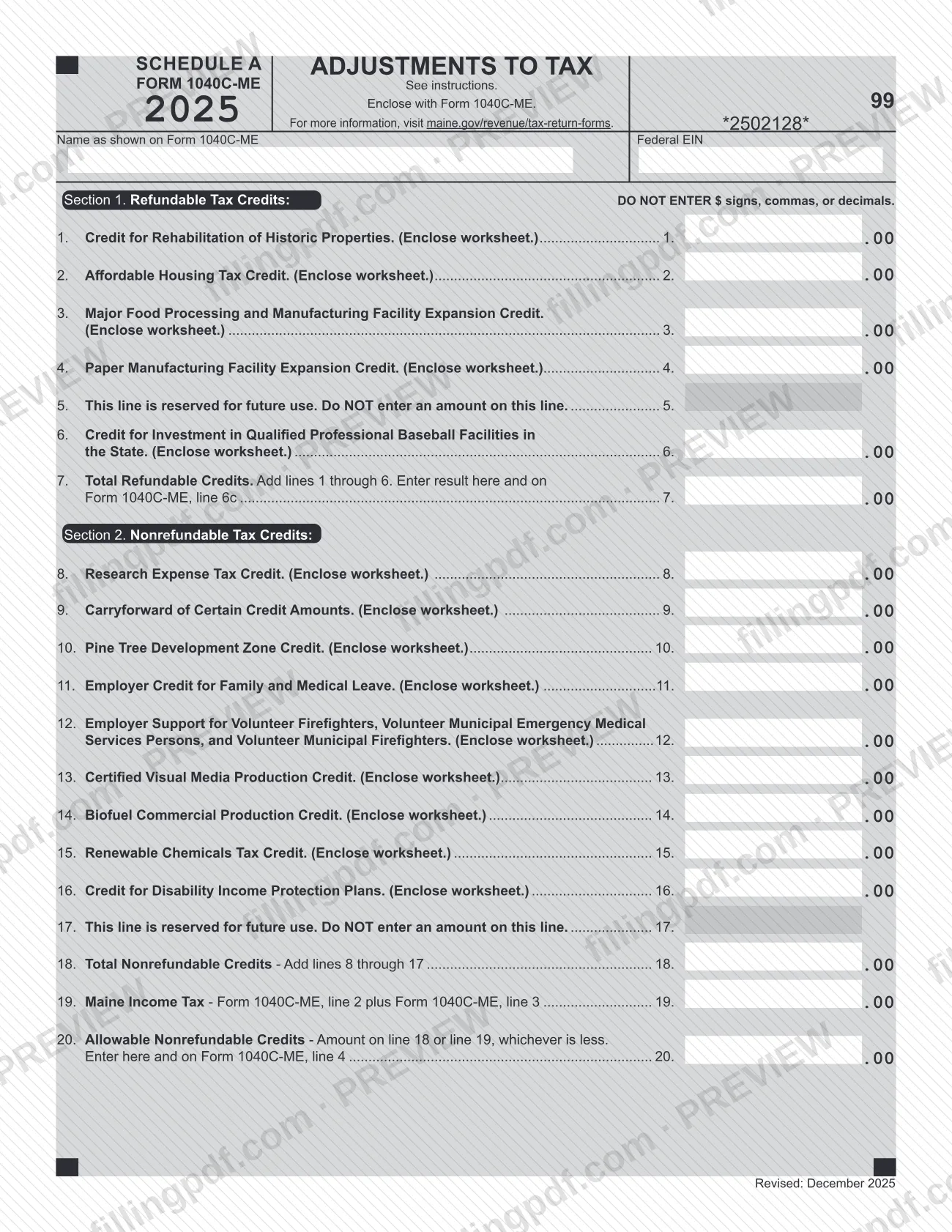
Schedule A (Form 1040C-ME), Adjustments to Tax, is the schedule that Maine Revenue Services (MRS) prints for tax year 2025 to report refundable and nonrefundable Maine tax credits and to limit the nonrefundable credits to the Maine income tax. You enclose it with Form 1040C-ME, and its totals carry to lines 4 and 6c of that form. On this page you can fill out Schedule A online on FillingPDF and download or print the completed PDF; the form itself is published by MRS at maine.gov/revenue/tax-return-forms.
Last updated
What is Schedule A (Form 1040C-ME)?
Schedule A (Form 1040C-ME), Adjustments to Tax, is the 2025 Maine Revenue Services (MRS) schedule on which a filer lists refundable and nonrefundable tax credits and figures how much of the nonrefundable credits can be used against Maine income tax.
The schedule has two sections. Section 1. Refundable Tax Credits (lines 1 through 7) lists the Credit for Rehabilitation of Historic Properties, the Affordable Housing Tax Credit, the Major Food Processing and Manufacturing Facility Expansion Credit, the Paper Manufacturing Facility Expansion Credit and the Credit for Investment in Qualified Professional Baseball Facilities in the State. Line 7 totals them and is entered on Form 1040C-ME, line 6c.
Section 2. Nonrefundable Tax Credits (lines 8 through 20) lists the Research Expense Tax Credit, Carryforward of Certain Credit Amounts, Pine Tree Development Zone Credit, Employer Credit for Family and Medical Leave, the volunteer firefighter and emergency medical services employer credit, Certified Visual Media Production Credit, Biofuel Commercial Production Credit, Renewable Chemicals Tax Credit and Credit for Disability Income Protection Plans. Line 20 takes the smaller of the total nonrefundable credits (line 18) or the Maine income tax (line 19) and carries it to Form 1040C-ME, line 4.
Lines 5 and 17 are reserved for future use. This is a schedule of Maine Form 1040C-ME, so it is a different document from any other schedule that happens to share the letter A.
Who needs to file Schedule A (Form 1040C-ME)?
Filers of Form 1040C-ME who claim any of the Maine credits printed on Schedule A use it to report them. The form tells you to enclose it with Form 1040C-ME, and it asks for the name as shown on Form 1040C-ME and a federal EIN.
- Claim a refundable credit on lines 1 through 4 or line 6 if it applies to you; the total goes on Form 1040C-ME, line 6c.
- Claim a nonrefundable credit on lines 8 through 16 if it applies to you; line 20 sets the amount allowed against the Maine income tax and carries to Form 1040C-ME, line 4.
Lines 5 and 17 are reserved for future use: do not enter an amount on either line. The schedule does not say who may sign or file for another person, so check the instructions for Form 1040C-ME for that.
When to file Schedule A (Form 1040C-ME)
Schedule A has no due date of its own: the form says to enclose it with Form 1040C-ME, so it is submitted whenever that return is filed. It is printed for tax year 2025 (revised December 2025). For the filing deadline that applies to Form 1040C-ME, check the instructions for that form or the Maine Revenue Services page at maine.gov/revenue/tax-return-forms.
Documents you need
- A worksheet for each credit you claim on lines 1 through 4 and line 6 (refundable credits); the form says to enclose a worksheet with each of these lines.
- A worksheet for each credit you claim on lines 8 through 16 (nonrefundable credits), including the Carryforward of Certain Credit Amounts on line 9; the form says to enclose a worksheet with each line.
How to fill out Schedule A (Form 1040C-ME)
Enter your name and federal EIN
At the top, write the name exactly as shown on Form 1040C-ME and your federal EIN.
Enter the refundable credits
In Section 1, enter the amount of each credit that applies on lines 1 through 4 and line 6, with no $ signs, commas or decimals. Enclose a worksheet for each credit. Leave line 5 blank; it is reserved for future use.
Total the refundable credits
On line 7, add lines 1 through 6. Enter the result here and on Form 1040C-ME, line 6c.
Enter the nonrefundable credits
In Section 2, enter each credit that applies on lines 8 through 16: Research Expense Tax Credit, Carryforward of Certain Credit Amounts, Pine Tree Development Zone Credit and the others printed there. Enclose a worksheet for each.
Skip the reserved line 17
Do not enter an amount on line 17; the form marks it as reserved for future use.
Total the nonrefundable credits
On line 18, add lines 8 through 17.
Enter your Maine income tax
On line 19, enter the amount from Form 1040C-ME, line 2 plus Form 1040C-ME, line 3.
Find the allowable nonrefundable credits
On line 20, enter the amount on line 18 or line 19, whichever is less. Enter it here and on Form 1040C-ME, line 4.
Review and download the completed PDF
Check that every total carries to the right line of Form 1040C-ME and that the worksheets are ready. Download or print the completed PDF from FillingPDF and enclose it with Form 1040C-ME as described under How to submit.
How to submit Schedule A (Form 1040C-ME)
Schedule A (Form 1040C-ME) travels with Form 1040C-ME, so it uses the channels for that return. The schedule prints no address or portal of its own.
- Electronically: MRS says tax return forms and supporting documents must be filed electronically (see Electronic Services on its website) or submitted on paper.
- On paper: enclose the completed schedule, with the worksheets for the credits you claim, with Form 1040C-ME.
Do not submit disks, USB flash drives or any other electronic media; MRS says it cannot process them and will destroy them. Forms and the latest information are at maine.gov/revenue/tax-return-forms. FillingPDF lets you fill out and download the PDF; submission follows the MRS channels above.
Common mistakes to avoid
- Entering $ signs, commas or decimals in the amount boxes; the form's Section 1 heading says not to enter them.
- Entering an amount on line 5 or line 17; both lines are reserved for future use and the form says not to enter an amount.
- Claiming a credit on lines 1 through 4, 6, or 8 through 16 without enclosing the worksheet the form asks for on that line.
- Entering the line 18 total as the allowed credit instead of the smaller of line 18 or line 19 on line 20.
- Carrying line 7 to the wrong place; the total refundable credits go on Form 1040C-ME, line 6c, and line 20 goes on Form 1040C-ME, line 4.
- Figuring line 19 from the wrong lines; it is Form 1040C-ME, line 2 plus line 3.
- Filing the schedule on its own instead of enclosing it with Form 1040C-ME.
- Sending the schedule or a return on a disk or USB flash drive; MRS cannot process electronic media and destroys it.
Frequently asked questions
What is Schedule A (Form 1040C-ME)?
Schedule A (Form 1040C-ME), Adjustments to Tax, is the Maine Revenue Services schedule for 2025 on which you report refundable credits (Section 1) and nonrefundable credits (Section 2). It is enclosed with Form 1040C-ME, and its totals carry to that form.
Where do the totals from Schedule A go on Form 1040C-ME?
Line 7, total refundable credits, goes on Form 1040C-ME, line 6c. Line 20, allowable nonrefundable credits, goes on Form 1040C-ME, line 4. Line 19 draws on Form 1040C-ME, line 2 plus line 3.
How do I figure the allowable nonrefundable credits on line 20?
Enter the amount on line 18 (total nonrefundable credits) or line 19 (Maine income tax), whichever is less. That smaller amount is the allowable credit and also goes on Form 1040C-ME, line 4.
Do I have to enclose worksheets with Schedule A?
Yes, for each credit you claim. The form says to enclose a worksheet on lines 1 through 4, line 6 and lines 8 through 16, including the carryforward on line 9. Lines 5 and 17 take no amount.
Can I enter cents or dollar signs on Schedule A?
No. The Section 1 heading says not to enter $ signs, commas or decimals. Enter whole amounts only in the amount boxes.
When is Schedule A (Form 1040C-ME) due?
It has no separate due date: you enclose it with Form 1040C-ME, so it is due when that return is filed. Check the Form 1040C-ME instructions or maine.gov/revenue/tax-return-forms for the return's deadline.
Can I fill out Schedule A (Form 1040C-ME) online on FillingPDF?
Yes. You can fill out the PDF online on FillingPDF and download or print it. FillingPDF is independent of Maine Revenue Services and does not file it; you submit it with Form 1040C-ME through the MRS channels.
Ready to fill out Schedule A (Form 1040C-ME)?
Fill out Schedule A (Form 1040C-ME) now