
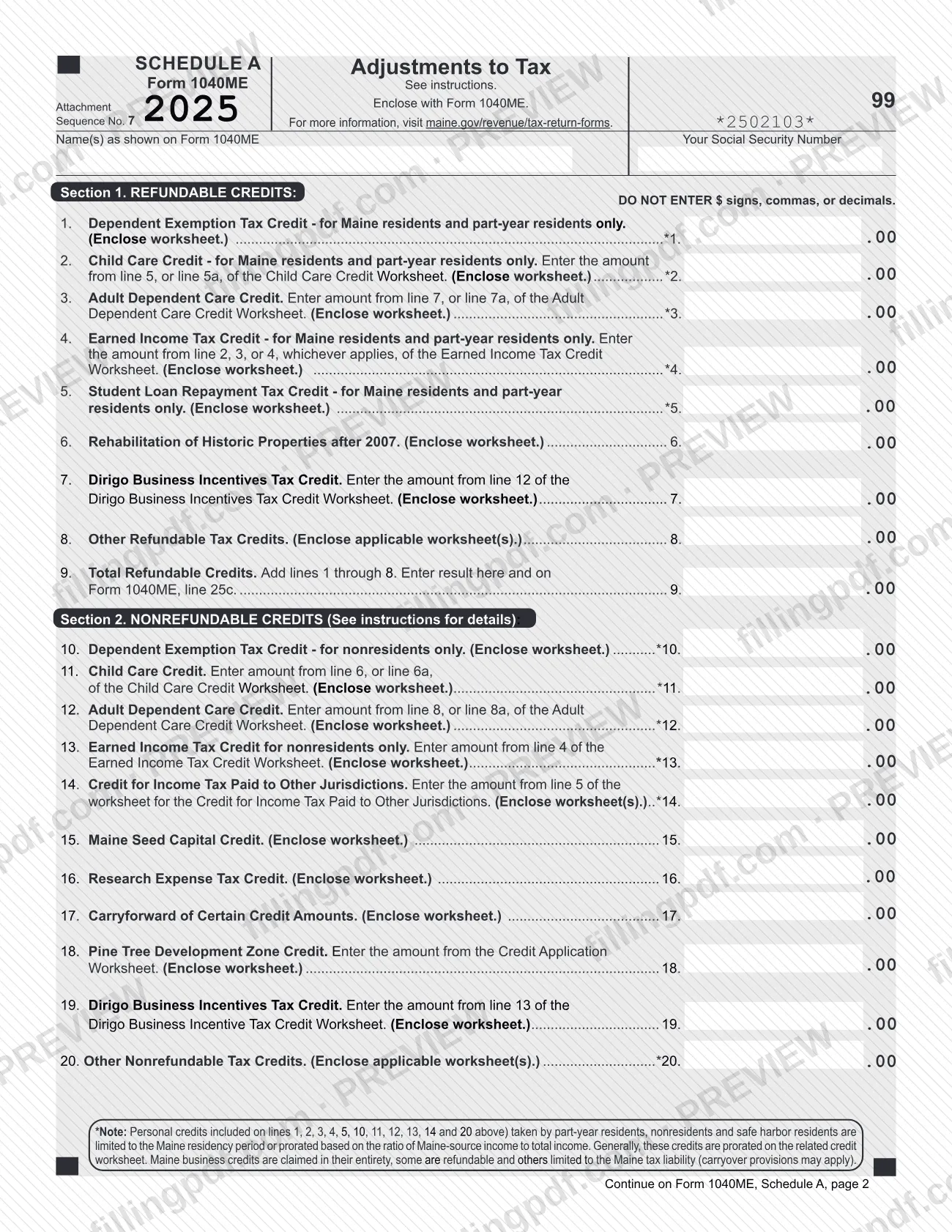

Schedule A (Form 1040ME), Adjustments to Tax, is the 2025 schedule on which Maine Revenue Services (MRS) collects the refundable and nonrefundable tax credits claimed on a Maine individual income tax return. It is enclosed with Form 1040ME, and its totals carry to lines 25c and 23 of that return. On FillingPDF you can fill out the schedule online and download or print the completed PDF; the form and the current forms list are published by MRS at maine.gov/revenue/tax-return-forms.
Last updated
What is Schedule A (Form 1040ME)?
Schedule A (Form 1040ME), Adjustments to Tax, is the Maine Revenue Services (MRS) schedule, enclosed with Form 1040ME, on which a filer lists refundable credits in Section 1 and nonrefundable credits in Section 2 and totals them for the Maine return.
The 2025 schedule has two pages. Section 1, Refundable Credits, covers lines 1 through 9: the Dependent Exemption Tax Credit, Child Care Credit, Adult Dependent Care Credit, Earned Income Tax Credit, Student Loan Repayment Tax Credit, Rehabilitation of Historic Properties after 2007, Dirigo Business Incentives Tax Credit, and other refundable credits. Line 9 adds lines 1 through 8 and is entered on Form 1040ME, line 25c.
Section 2, Nonrefundable Credits, covers lines 10 through 23. Credits include the nonresident versions of the dependent exemption and earned income credits, the Credit for Income Tax Paid to Other Jurisdictions, the Maine Seed Capital Credit, the Research Expense Tax Credit, carryforwards, the Pine Tree Development Zone Credit and other credits. Line 23 is the smaller of the total nonrefundable credits (line 21) or the Maine income tax from Form 1040ME, line 22, and goes on Form 1040ME, line 23.
Most amounts come from credit worksheets that must be enclosed with the schedule. The form carries Attachment Sequence No. 7 and is not filed on its own.
Who needs to file Schedule A (Form 1040ME)?
Filers of Form 1040ME who claim one or more of the credits listed on the schedule enclose Schedule A with their return. Several lines are limited by residency status as printed on the form:
- Maine residents and part-year residents only: line 1 (Dependent Exemption Tax Credit), line 2 (Child Care Credit), line 4 (Earned Income Tax Credit) and line 5 (Student Loan Repayment Tax Credit).
- Nonresidents only: line 10 (Dependent Exemption Tax Credit) and line 13 (Earned Income Tax Credit).
- Any filer who qualifies: the remaining lines, such as the Adult Dependent Care Credit, the Credit for Income Tax Paid to Other Jurisdictions and the business credits.
The note on the form says personal credits on lines 1, 2, 3, 4, 5, 10, 11, 12, 13, 14 and 20 taken by part-year residents, nonresidents and safe harbor residents are limited to the Maine residency period or prorated by the ratio of Maine-source income to total income. Maine business credits are claimed in full, though some are refundable and others are limited to the Maine tax liability. The form does not say who may sign or file for someone else.
When to file Schedule A (Form 1040ME)
Schedule A is enclosed with Form 1040ME, so it is filed when you file that return for tax year 2025; no separate due date is printed on the schedule. Complete the credit worksheets first, because most lines take their amounts from them, and have the Maine income tax from Form 1040ME, line 22, ready before you reach line 22 of the schedule. For the filing deadline of Form 1040ME itself, check MRS at maine.gov/revenue/tax-return-forms.
Documents you need
- Dependent Exemption Tax Credit worksheet: enclose it if you claim the credit on line 1 (residents and part-year residents) or line 10 (nonresidents).
- Child Care Credit Worksheet: enclose it if you claim the credit on line 2 (line 5 or 5a of the worksheet) or line 11 (line 6 or 6a).
- Adult Dependent Care Credit Worksheet: enclose it if you claim the credit on line 3 (line 7 or 7a) or line 12 (line 8 or 8a).
- Earned Income Tax Credit Worksheet: enclose it if you claim the credit on line 4 or, for nonresidents, line 13.
- Worksheet for the credit you claim on line 5, 6, 7, 15, 16, 17, 18 or 19 (Student Loan Repayment, Historic Properties, Dirigo, Seed Capital, Research Expense, carryforward, Pine Tree Development Zone).
- Worksheet for the Credit for Income Tax Paid to Other Jurisdictions: enclose it, as worksheet(s), if you claim line 14 (amount from line 5 of the worksheet).
- Applicable worksheet(s) for any other refundable credit on line 8 or other nonrefundable credit on line 20.
How to fill out Schedule A (Form 1040ME)
Enter your name and Social Security Number
At the top, enter your name(s) as shown on Form 1040ME and your Social Security Number. Enter whole dollar amounts only; do not use $ signs, commas or decimals.
Complete the credit worksheets first
Fill in each credit worksheet that applies to you, because most lines of the schedule take their amount from a named worksheet line. Keep the worksheets to enclose with the return.
Claim dependent and care credits
Line 1: Dependent Exemption Tax Credit (residents and part-year residents only). Line 2: Child Care Credit, from line 5 or 5a of its worksheet. Line 3: Adult Dependent Care Credit, from line 7 or 7a of its worksheet.
Claim earned income and loan credits
Line 4: Earned Income Tax Credit (residents and part-year residents only), from line 2, 3 or 4 of its worksheet, whichever applies. Line 5: Student Loan Repayment Tax Credit (residents and part-year residents only).
Claim business and other refundable credits
Line 6: Rehabilitation of Historic Properties after 2007. Line 7: Dirigo Business Incentives Tax Credit, from line 12 of its worksheet. Line 8: other refundable tax credits, with the applicable worksheet(s).
Total refundable credits on line 9
Add lines 1 through 8 and enter the result on line 9 and on Form 1040ME, line 25c.
Enter nonresident and care credits
Line 10: Dependent Exemption Tax Credit (nonresidents only). Line 11: Child Care Credit, from line 6 or 6a of its worksheet. Line 12: Adult Dependent Care Credit, from line 8 or 8a. Line 13: Earned Income Tax Credit for nonresidents only, from line 4 of its worksheet.
Enter other jurisdictions and business credits
Line 14: Credit for Income Tax Paid to Other Jurisdictions, from line 5 of its worksheet. Lines 15 through 19: Maine Seed Capital, Research Expense, carryforward of certain credit amounts, Pine Tree Development Zone (from the Credit Application Worksheet) and Dirigo Business Incentives (from line 13 of its worksheet).
Add other nonrefundable credits
Line 20: other nonrefundable tax credits, with the applicable worksheet(s). Part-year residents, nonresidents and safe harbor residents should check the note under line 20 on prorating personal credits.
Total and limit nonrefundable credits
On page 2, line 21: add lines 10 through 20. Line 22: copy the Maine income tax from Form 1040ME, line 22. Line 23: enter the smaller of line 21 or line 22 here and on Form 1040ME, line 23.
Review and download the completed PDF
Check that amounts match your worksheets and that no $ signs, commas or decimals were entered. Download or print the completed PDF from FillingPDF and enclose it, with the worksheets, with Form 1040ME as described under How to submit.
How to submit Schedule A (Form 1040ME)
Schedule A is submitted with Form 1040ME, either electronically or on paper. The MRS tax return forms page says tax return forms and supporting documents must be filed electronically (see Electronic Services on the MRS site) or submitted on paper.
- Electronically: use the MRS electronic services listed on the Maine Revenue Services website.
- On paper: enclose the completed schedule, with each credit worksheet it requires, with your Form 1040ME.
- Do not send electronic media: MRS says disks, USB flash drives or any other form of electronic media cannot be processed and will be destroyed.
The schedule itself prints no mailing address; use the one given with Form 1040ME. Forms and information are at maine.gov/revenue/tax-return-forms. FillingPDF lets you fill out and download the PDF; submission follows the MRS channels above.
Common mistakes to avoid
- Entering dollar signs, commas or decimals in the amount boxes; the form says not to enter $ signs, commas or decimals.
- Claiming a credit without enclosing its worksheet; nearly every line on the schedule says to enclose the worksheet.
- Using a resident-only line (1, 2, 4 or 5) as a nonresident, or the nonresident lines (10 and 13) as a resident or part-year resident.
- Entering the full amount of a personal credit as a part-year resident, nonresident or safe harbor resident, when the form says these credits are limited to the Maine residency period or prorated.
- Carrying line 9 to the wrong place; the total of refundable credits goes on Form 1040ME, line 25c.
- Entering the total on line 21 on line 23 instead of the smaller of line 21 or line 22 (Maine income tax from Form 1040ME, line 22).
- Taking the wrong worksheet line for a credit, for example line 5 or 5a for line 2 but line 6 or 6a for line 11 of the Child Care Credit Worksheet.
- Leaving out your name as shown on Form 1040ME or your Social Security Number at the top of page 1.
- Sending the schedule on a disk, USB flash drive or other electronic media, which MRS says cannot be processed and will be destroyed.
Frequently asked questions
What is Schedule A (Form 1040ME)?
Schedule A (Form 1040ME), Adjustments to Tax, is the Maine Revenue Services schedule enclosed with Form 1040ME. Section 1 lists refundable credits and Section 2 lists nonrefundable credits, and the totals carry to Form 1040ME, lines 25c and 23.
Where does the line 9 total go on Schedule A (Form 1040ME)?
Line 9, Total Refundable Credits, is the sum of lines 1 through 8. Enter the result on line 9 and on Form 1040ME, line 25c.
What goes on line 23 of Schedule A (Form 1040ME)?
Line 23, Allowable Nonrefundable Credits, is the smaller of line 21 (total nonrefundable credits) or line 22 (Maine income tax from Form 1040ME, line 22). Enter it on line 23 and on Form 1040ME, line 23.
Do I have to enclose worksheets with Schedule A (Form 1040ME)?
Yes, for the credits you claim. Almost every line says to enclose the worksheet, and lines such as 8, 14 and 20 ask for the applicable worksheet(s). Fill in the worksheets first because the schedule takes its amounts from them.
Which Schedule A credits are only for Maine residents?
Lines 1, 2, 4 and 5 (Dependent Exemption, Child Care, Earned Income and Student Loan Repayment credits) are for Maine residents and part-year residents only. Nonresidents use line 10 for the dependent exemption and line 13 for the earned income credit.
Are credits prorated for part-year residents and nonresidents?
Yes. The form's note says personal credits on lines 1, 2, 3, 4, 5, 10, 11, 12, 13, 14 and 20 taken by part-year residents, nonresidents and safe harbor residents are limited to the Maine residency period or prorated by Maine-source income. Generally the credit worksheet does this.
Can I file Schedule A (Form 1040ME) electronically?
Maine Revenue Services says tax return forms and supporting documents must be filed electronically (see Electronic Services) or submitted on paper. It also says disks, USB drives and other electronic media cannot be processed and will be destroyed.
Can I fill out Schedule A (Form 1040ME) online on FillingPDF?
Yes. You can fill out the fillable PDF online on FillingPDF and download or print it. FillingPDF is an independent service, not affiliated with Maine Revenue Services, and does not file the schedule; you submit it with Form 1040ME through MRS channels.
Ready to fill out Schedule A (Form 1040ME)?
Fill out Schedule A (Form 1040ME) now