
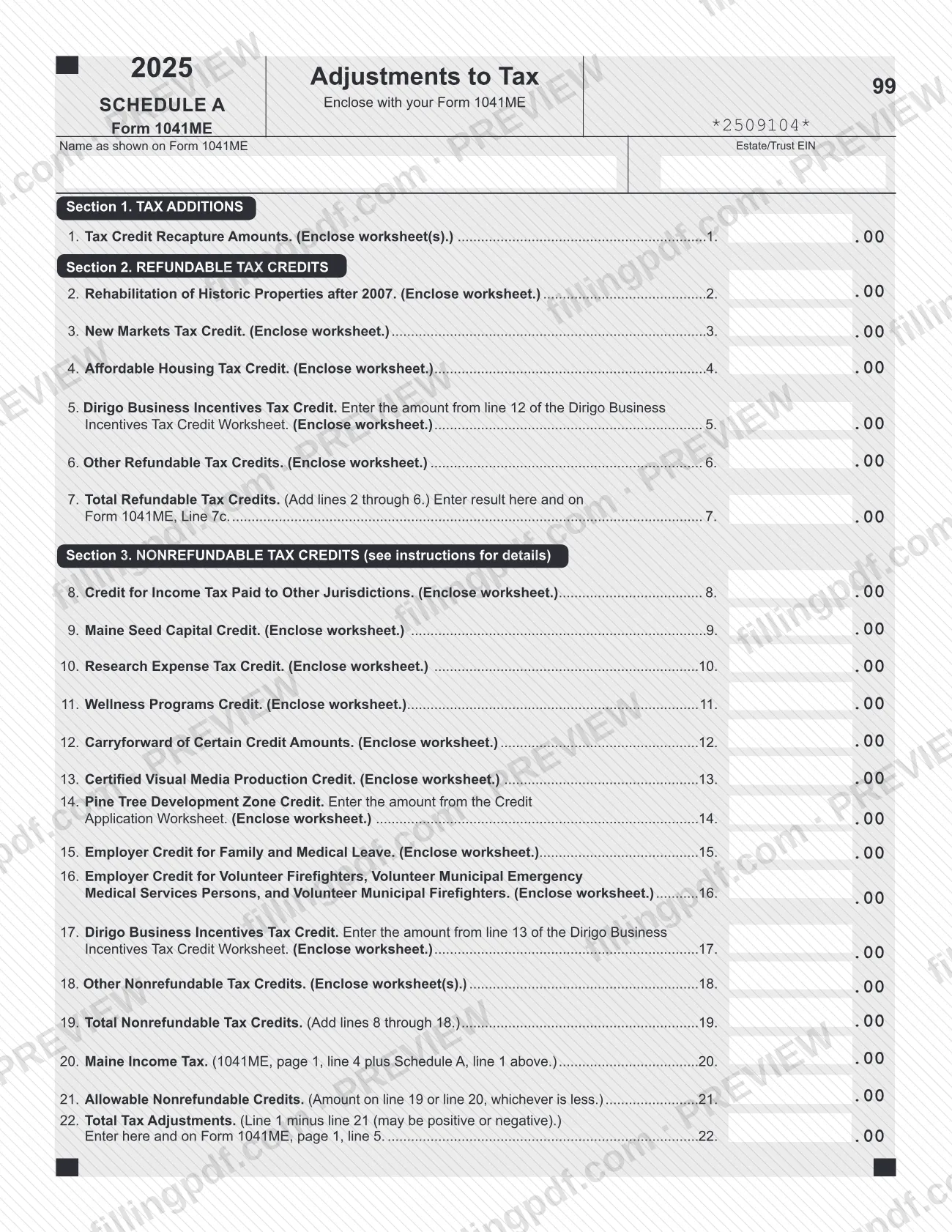
Schedule A (Form 1041ME), titled Adjustments to Tax for 2025, is the schedule Maine Revenue Services (MRS) provides for estates and trusts to report Maine tax additions, refundable credits and nonrefundable credits. It is enclosed with Form 1041ME, and its result is carried to that return. On FillingPDF you can fill out the form online and download or print the completed PDF; the form itself is published by MRS at maine.gov.
Last updated
What is Schedule A (Form 1041ME)?
Schedule A (Form 1041ME), Adjustments to Tax, is the Maine Revenue Services (MRS) schedule enclosed with Form 1041ME on which an estate or trust reports Maine tax additions and tax credits and figures the total tax adjustment for 2025.
The schedule has three sections. Section 1, Tax Additions, has one line: line 1, tax credit recapture amounts, which are credits previously used to reduce Maine income tax that are now subject to recapture. Section 2, Refundable Tax Credits, covers lines 2 through 7, including the rehabilitation of historic properties credit, the New Markets Tax Credit, the Affordable Housing Tax Credit and the refundable Dirigo Business Incentives Tax Credit. Section 3, Nonrefundable Tax Credits, covers lines 8 through 19, from the credit for income tax paid to other jurisdictions to the carryforward of certain credits.
Lines 20 through 22 then compare the credits with the Maine income tax and produce the figure that goes on page 1, line 5 of Form 1041ME. Line 7 goes on Form 1041ME, line 7c.
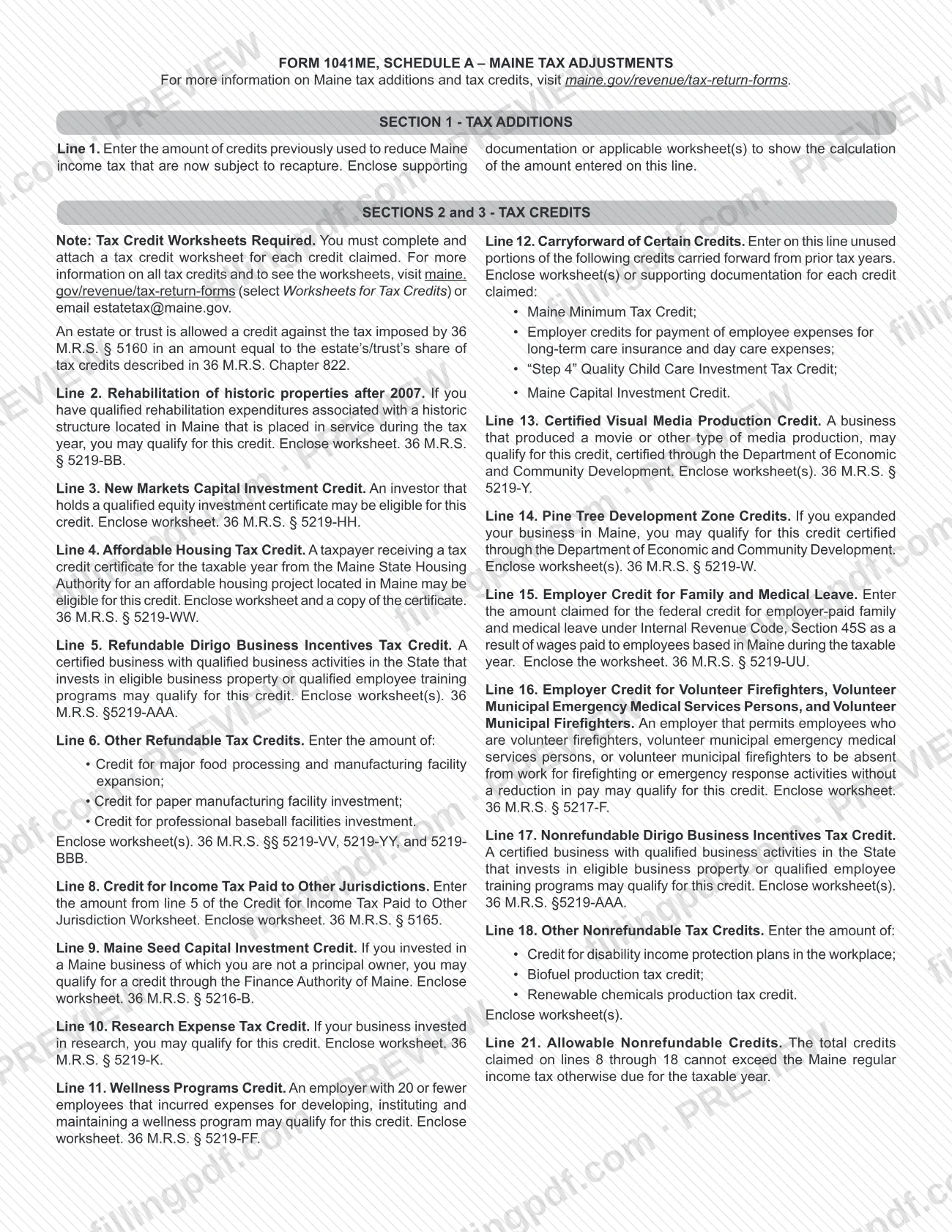
The instructions printed on the form say an estate or trust may claim its share of the tax credits described in 36 M.R.S. Chapter 822, against the tax imposed by 36 M.R.S. § 5160. A tax credit worksheet must be completed and attached for each credit claimed. This is the Maine schedule for Form 1041ME and is not any other agency's schedule with a similar letter.
Who needs to file Schedule A (Form 1041ME)?
Estates and trusts that file Form 1041ME and have either a Maine tax addition or a tax credit to report enclose Schedule A with that return. The form is headed "Enclose with your Form 1041ME" and asks for the name as shown on Form 1041ME and the estate's or trust's EIN.
Typical reasons to complete it, as the printed instructions describe them:
- Credits claimed in earlier years that are now subject to recapture (line 1).
- Refundable credits, such as the rehabilitation of historic properties credit, the New Markets Tax Credit, the Affordable Housing Tax Credit or the refundable Dirigo Business Incentives Tax Credit (lines 2 through 6).
- Nonrefundable credits, such as the credit for income tax paid to other jurisdictions, the Maine Seed Capital Credit, the Research Expense Tax Credit or the Pine Tree Development Zone Credit (lines 8 through 18).
- Unused portions of certain credits carried forward from prior tax years (line 12).
Each credit has its own eligibility conditions, and the instructions on the form summarize them line by line. The form names no separate rule for who may sign or file it for the estate or trust; it follows Form 1041ME.
When to file Schedule A (Form 1041ME)
Schedule A has no due date of its own: it is enclosed with Form 1041ME, so it is submitted whenever that return is submitted. The form is the 2025 edition and refers to the tax credits for that tax year.
Prepare the credit worksheets before you complete the schedule, because each credit claimed must be supported by a worksheet. Line 12 carries forward unused portions of certain credits from prior tax years, so have those prior-year amounts ready. For the filing deadline of Form 1041ME itself, see the instructions for that return at maine.gov/revenue/tax-return-forms.
Documents you need
- A tax credit worksheet for each credit claimed on lines 2 through 6 and 8 through 18; the form says to enclose the worksheet or worksheets.
- Worksheet(s) or supporting documentation showing how the amount on line 1 (tax credit recapture) was calculated.
- For line 4, the Affordable Housing Tax Credit: a copy of the tax credit certificate from the Maine State Housing Authority, with the worksheet.
- For line 5 and line 17, the Dirigo Business Incentives Tax Credit Worksheet; enter its line 12 on line 5 and its line 13 on line 17.
- For line 8, the Credit for Income Tax Paid to Other Jurisdiction Worksheet; enter its line 5 on line 8.
- For line 14, the Credit Application Worksheet for the Pine Tree Development Zone Credit; enter the amount from it on line 14.
- For line 12, worksheet(s) or supporting documentation for each carried-forward credit claimed.
How to fill out Schedule A (Form 1041ME)
Enter the estate or trust identifiers
At the top, write the name as shown on Form 1041ME and the Estate/Trust EIN.
Report tax credit recapture on line 1
In Section 1, enter the amount of credits previously used to reduce Maine income tax that are now subject to recapture. Enclose worksheet(s) or supporting documentation showing the calculation.
Enter refundable credits, lines 2 to 6
Enter each refundable credit you claim: line 2 historic properties, line 3 New Markets, line 4 Affordable Housing, line 5 Dirigo (from line 12 of its worksheet) and line 6 other refundable credits. Enclose a worksheet for each.
Total refundable credits on line 7
Add lines 2 through 6. Enter the result on line 7 and on Form 1041ME, line 7c.
Enter nonrefundable credits, lines 8 to 11
Enter the credit for income tax paid to other jurisdictions (line 8, from line 5 of its worksheet), then the Maine Seed Capital Credit, Research Expense Tax Credit and Wellness Programs Credit on lines 9 through 11.
Enter carryforwards on line 12
Enter unused portions of the listed credits carried forward from prior tax years, with worksheet(s) or supporting documentation for each credit claimed.
Enter credits on lines 13 to 16
Enter the Certified Visual Media Production Credit (13), Pine Tree Development Zone Credit (14, from the Credit Application Worksheet), Employer Credit for Family and Medical Leave (15) and the volunteer firefighter and emergency medical services employer credit (16).
Enter Dirigo and other credits
On line 17 enter the nonrefundable Dirigo Business Incentives Tax Credit from line 13 of its worksheet. On line 18 enter other nonrefundable credits listed in the instructions.
Total nonrefundable credits on line 19
Add lines 8 through 18 and enter the total on line 19.
Compare credits with Maine income tax
On line 20 enter Form 1041ME, page 1, line 4 plus Schedule A, line 1. On line 21 enter the amount from line 19 or line 20, whichever is less.
Figure total tax adjustments on line 22
Subtract line 21 from line 1; the result may be positive or negative. Enter it on line 22 and on Form 1041ME, page 1, line 5.
Review and download the completed PDF
Check each line and that a worksheet is enclosed for every credit. Download or print the completed PDF from FillingPDF and enclose it with Form 1041ME.
How to submit Schedule A (Form 1041ME)
Schedule A is not filed separately: it is enclosed with Form 1041ME and goes wherever that return goes. The MRS tax return forms page says tax return forms and supporting documents must be filed electronically (see Electronic Services) or submitted on paper.
- Electronically: use the MRS electronic services route that applies to Form 1041ME.
- On paper: enclose the completed schedule, with the credit worksheets and any supporting documents, with your Form 1041ME.
Do not submit disks, USB flash drives or any other form of electronic media. MRS says electronic media cannot be processed and will be destroyed. The form gives no mailing address of its own, so use the one in the Form 1041ME instructions. For more on tax credits and their worksheets, visit maine.gov/revenue/tax-return-forms or email [email protected]. FillingPDF lets you fill out and download the PDF; submission follows the channels above.
Common mistakes to avoid
- Claiming a credit without enclosing its tax credit worksheet; the form requires a worksheet for each credit claimed.
- Claiming the Affordable Housing Tax Credit on line 4 without a copy of the certificate from the Maine State Housing Authority.
- Mixing up the two Dirigo Business Incentives Tax Credit lines: line 5 (refundable) uses line 12 of the worksheet and line 17 (nonrefundable) uses line 13.
- Entering on line 21 more than the Maine income tax on line 20; the allowable amount is the lesser of line 19 or line 20.
- Forgetting to carry line 7 to Form 1041ME, line 7c, or line 22 to Form 1041ME, page 1, line 5.
- Dropping the sign on line 22, which is line 1 minus line 21 and may be positive or negative.
- Leaving out the estate's or trust's name as shown on Form 1041ME or its EIN at the top.
- Submitting the schedule on a disk, USB flash drive or other electronic media, which MRS says will be destroyed.
Frequently asked questions
What is Schedule A (Form 1041ME)?
Schedule A (Form 1041ME), Adjustments to Tax, is a Maine Revenue Services schedule enclosed with Form 1041ME. An estate or trust uses it to report tax additions and refundable and nonrefundable tax credits, and to figure the total tax adjustment for 2025.
Where does the Schedule A (Form 1041ME) total go?
Line 22, Total Tax Adjustments, goes on Form 1041ME, page 1, line 5. The total refundable credits on line 7 also go on Form 1041ME, line 7c. Line 22 is line 1 minus line 21 and may be positive or negative.
Do I need a worksheet for each credit on Schedule A?
Yes. The form says you must complete and attach a tax credit worksheet for each credit claimed. Line 4 also requires a copy of the certificate. Worksheets are at maine.gov/revenue/tax-return-forms, or you can email [email protected].
How much of my nonrefundable credits can I use?
No more than the Maine income tax. Line 21, Allowable Nonrefundable Credits, is the amount on line 19 or line 20, whichever is less. The instructions say the credits on lines 8 through 18 cannot exceed the Maine regular income tax otherwise due.
What goes on line 12 of Schedule A (Form 1041ME)?
Unused portions of certain credits carried forward from prior tax years: the Maine Minimum Tax Credit, certain employer credits for long-term care insurance and day care expenses, the "Step 4" Quality Child Care Investment Tax Credit and the Maine Capital Investment Credit. Enclose supporting documentation.
Is there a separate deadline or address for Schedule A?
No. The schedule is enclosed with Form 1041ME and travels with that return. MRS says returns and supporting documents are filed electronically or on paper, and it does not accept disks, USB flash drives or other electronic media.
Can I fill out Schedule A (Form 1041ME) online?
Yes, you can fill out the PDF online on FillingPDF and download or print it. FillingPDF is an independent service and does not file the schedule with MRS; you submit it with Form 1041ME through the agency's channels.
Ready to fill out Schedule A (Form 1041ME)?
Fill out Schedule A (Form 1041ME) now