
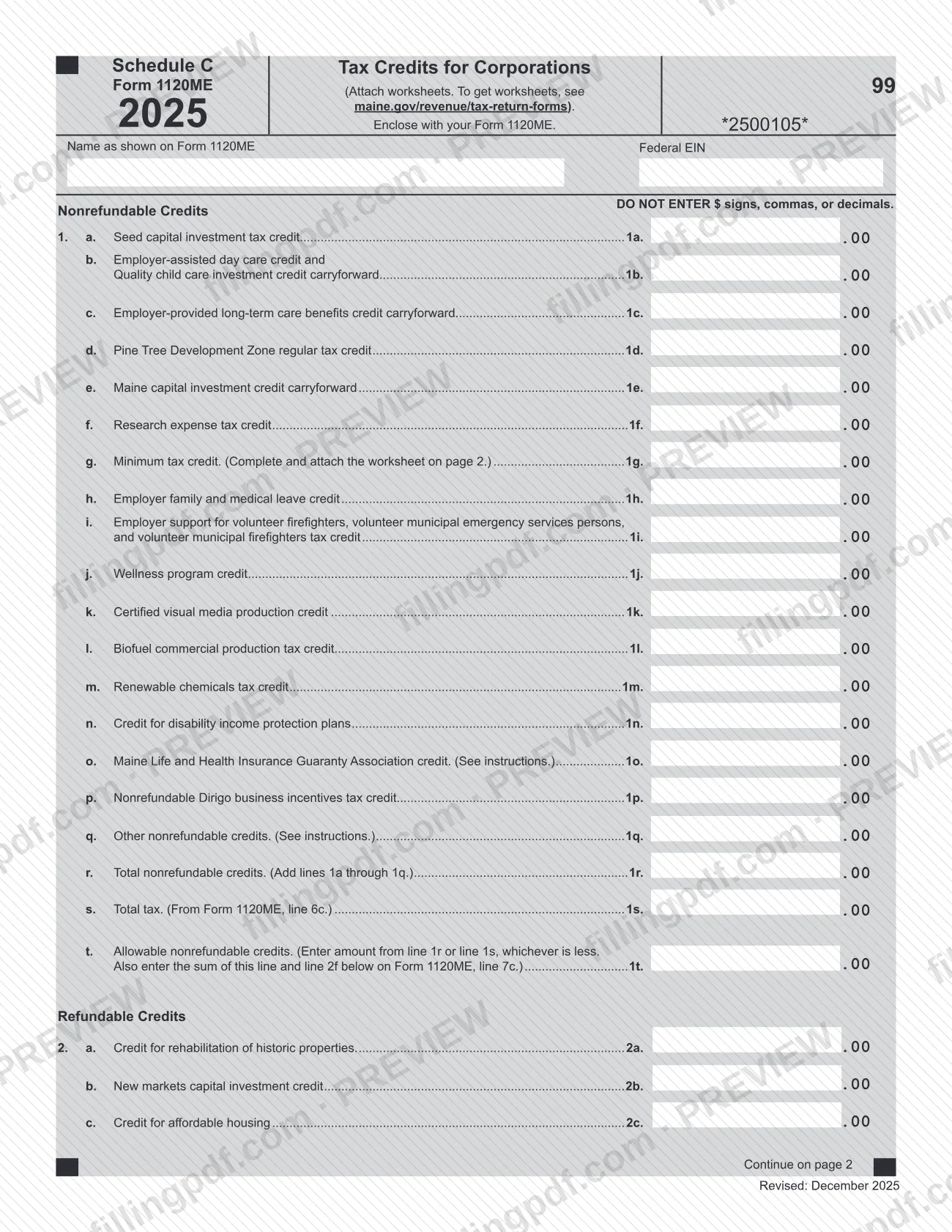
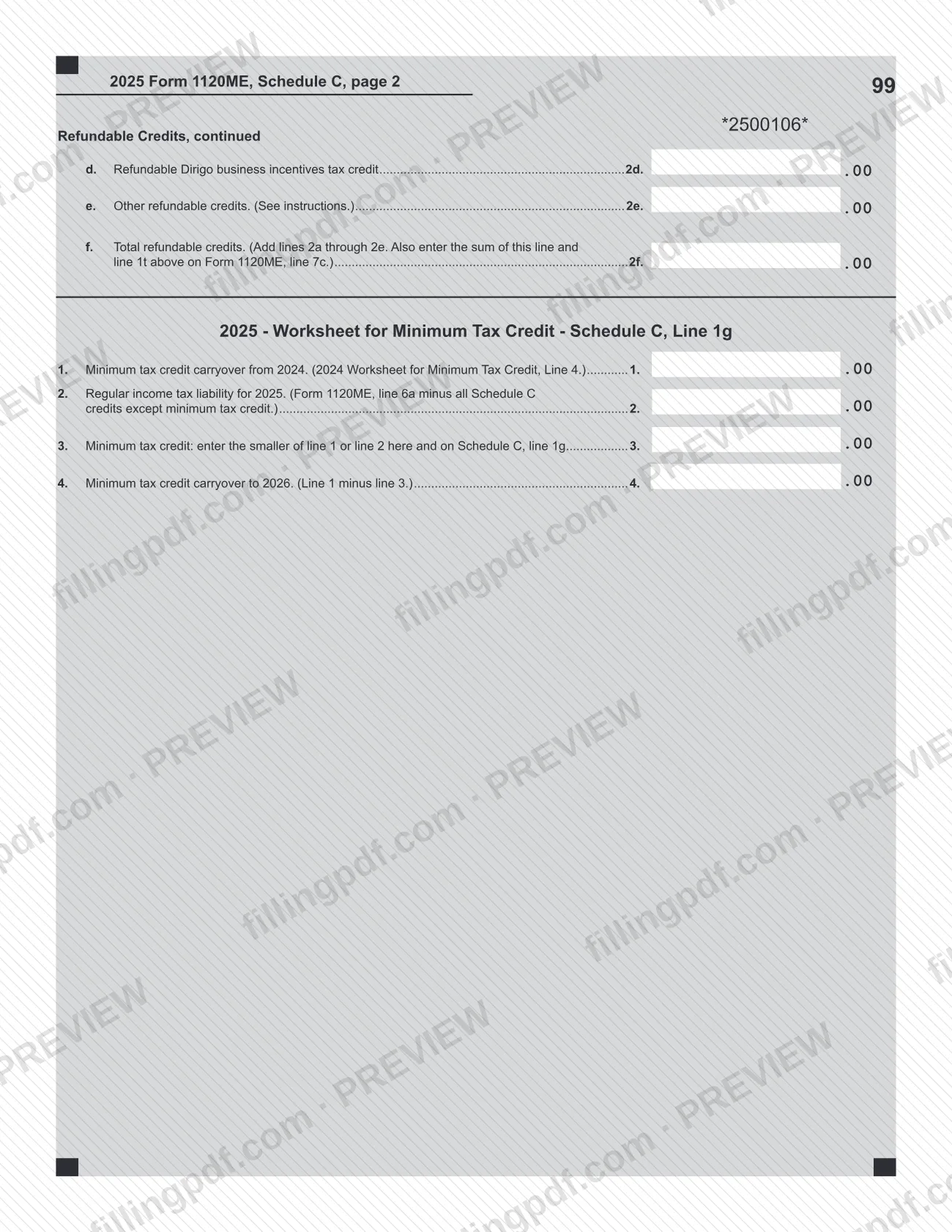
Schedule C (Form 1120ME), Tax Credits for Corporations, is the Maine Revenue Services schedule that a corporation encloses with Form 1120ME to claim its tax credits. It is the Maine corporate credits schedule, not any other schedule labeled C. The form lists nonrefundable credits on lines 1a through 1t and refundable credits on lines 2a through 2f, with a minimum tax credit worksheet on page 2. On this page you can fill out the form online on FillingPDF and download or print the completed PDF; the form itself is published by Maine Revenue Services.
Last updated
What is Schedule C (Form 1120ME)?
Schedule C (Form 1120ME), Tax Credits for Corporations, is the Maine Revenue Services schedule enclosed with Form 1120ME on which a corporation lists its nonrefundable and refundable tax credits for 2025 and figures the credits that carry to Form 1120ME, line 7c.
The schedule has two groups of credits. Nonrefundable credits are entered on lines 1a through 1q and totaled on line 1r. They include the seed capital investment tax credit, the research expense tax credit, the Pine Tree Development Zone regular tax credit, the minimum tax credit, the wellness program credit and the certified visual media production credit, among others. Line 1s brings in the total tax from Form 1120ME, line 6c, and line 1t takes the smaller of line 1r or line 1s as the allowable nonrefundable credits.
Refundable credits go on lines 2a through 2e: the credit for rehabilitation of historic properties, the new markets capital investment credit, the credit for affordable housing, the refundable Dirigo business incentives tax credit and other refundable credits. Line 2f totals them. The sum of line 1t and line 2f is entered on Form 1120ME, line 7c.
Page 2 holds the 2025 Worksheet for Minimum Tax Credit, which supports line 1g and figures the carryover to 2026. The schedule is part of the Form 1120ME package and is not filed on its own.
Who needs to file Schedule C (Form 1120ME)?
Corporations that file Maine Form 1120ME and claim one or more of the credits printed on this schedule enclose it with that return. The form says to enclose it with your Form 1120ME, and it asks for the name as shown on Form 1120ME and the federal EIN.
- Claimants of nonrefundable credits: use lines 1a through 1q for the credits listed there, including carryforwards such as the Maine capital investment credit carryforward on line 1e.
- Claimants of refundable credits: use lines 2a through 2e.
- Corporations with a minimum tax credit: complete the worksheet on page 2 and attach it. Line 1 of the worksheet starts from the carryover figured on line 4 of the 2024 Worksheet for Minimum Tax Credit.
- Credits not named on the form: lines 1q and 2e are for other nonrefundable and other refundable credits, and the form refers you to the instructions for them.
The form prints no exclusions and says nothing about who may sign for a corporation. Signature rules belong to Form 1120ME.
When to file Schedule C (Form 1120ME)
Schedule C (Form 1120ME) is completed and submitted with Form 1120ME, so it has no separate due date: it is due whenever the return it is enclosed with is due. This edition is for 2025, as printed on the form. Check the Form 1120ME instructions for the return's due date.
Two timing points come from the form itself. The minimum tax credit worksheet starts from the carryover from 2024, so have the 2024 worksheet at hand. It also figures the carryover to 2026 on its line 4.
Documents you need
- Worksheets for the credits you claim: the form says to attach worksheets and gives maine.gov/revenue/tax-return-forms as the place to get them.
- Worksheet for Minimum Tax Credit (Schedule C, Line 1g), on page 2 of the form: complete and attach it if you enter an amount on line 1g.
- The 2024 Worksheet for Minimum Tax Credit: needed for line 1 of the 2025 worksheet, which starts from the 2024 line 4 carryover, if you have a minimum tax credit carryover.
How to fill out Schedule C (Form 1120ME)
Enter corporation name and federal EIN
At the top, enter the name as shown on Form 1120ME and the federal EIN. Enter whole dollar amounts only, with no $ signs, commas or decimals.
Enter nonrefundable credits on lines 1a–1q
Enter the amount of each nonrefundable credit you claim, from line 1a (seed capital investment tax credit) through line 1q (other nonrefundable credits). Lines 1o and 1q refer you to the instructions.
Complete the minimum tax credit worksheet
If you claim the minimum tax credit, complete the worksheet on page 2. Enter the 2024 carryover on line 1 and the regular income tax liability on line 2, and enter the smaller of lines 1 and 2 on line 3 and on Schedule C, line 1g.
Figure the carryover to 2026
On worksheet line 4, subtract line 3 from line 1 to get the minimum tax credit carryover to 2026.
Total nonrefundable credits on line 1r
Add lines 1a through 1q and enter the result on line 1r.
Enter total tax on line 1s
Copy the total tax from Form 1120ME, line 6c, onto line 1s.
Find allowable credits on line 1t
Enter the amount from line 1r or line 1s, whichever is less. This is your allowable nonrefundable credits.
Enter refundable credits on lines 2a–2e
Enter the credit for rehabilitation of historic properties (2a), new markets capital investment credit (2b), credit for affordable housing (2c), refundable Dirigo business incentives tax credit (2d) and other refundable credits (2e, see instructions).
Total refundable credits on line 2f
Add lines 2a through 2e and enter the result on line 2f.
Carry the credits to Form 1120ME
Add line 1t and line 2f and enter the sum on Form 1120ME, line 7c.
Review and download the completed PDF
Check that amounts have no $ signs, commas or decimals, that the name and EIN match Form 1120ME and that the worksheet is complete. Download or print the completed PDF from FillingPDF and enclose it with Form 1120ME.
How to submit Schedule C (Form 1120ME)
Schedule C (Form 1120ME) is sent with Form 1120ME, either electronically or on paper, and it has no address or portal of its own.
- Electronically: Maine Revenue Services says tax return forms and supporting documents must be filed electronically (see Electronic Services on its website) or submitted on paper.
- On paper: enclose the completed schedule, with any worksheets, in the package for Form 1120ME. The form tells you to attach worksheets and to get them at maine.gov/revenue/tax-return-forms. Use the mailing address in the Form 1120ME instructions, since this schedule prints none.
- Do not send electronic media. Maine Revenue Services will not process disks, USB flash drives or any other electronic media, and destroys them.
The credit totals from this schedule are carried to Form 1120ME, line 7c, so complete the schedule before finishing that line. FillingPDF lets you fill out and download the PDF; submission follows the channels above.
Common mistakes to avoid
- Entering dollar signs, commas or decimals. The form says DO NOT ENTER $ signs, commas, or decimals.
- Claiming the minimum tax credit on line 1g without completing and attaching the worksheet on page 2.
- Entering the larger of line 1r or line 1s on line 1t. The form says to enter whichever is less.
- Entering only line 1t on Form 1120ME, line 7c. The form says to enter the sum of line 1t and line 2f.
- Totaling lines 1a through 1q incorrectly on line 1r, or lines 2a through 2e on line 2f, which feed Form 1120ME.
- Using the full regular tax on worksheet line 2. It is Form 1120ME, line 6a minus all Schedule C credits except the minimum tax credit.
- Writing a name or EIN that differs from Form 1120ME. The form asks for the name as shown on Form 1120ME and the federal EIN.
- Sending the schedule or its worksheets on a disk or USB flash drive. Maine Revenue Services cannot process electronic media and destroys it.
Frequently asked questions
What is Schedule C (Form 1120ME)?
Schedule C (Form 1120ME), Tax Credits for Corporations, is a Maine Revenue Services schedule enclosed with Form 1120ME. A corporation lists its nonrefundable credits on lines 1a to 1t and its refundable credits on lines 2a to 2f, and carries the totals to Form 1120ME, line 7c.
Is Schedule C (Form 1120ME) the same as other forms' Schedule C?
No. This page covers the Schedule C that belongs to Maine Form 1120ME. It is a Maine corporate tax credits schedule issued by Maine Revenue Services, and the same letter on another return is a separate document.
Where do I enter the totals from Schedule C on Form 1120ME?
On Form 1120ME, line 7c. The form says to enter there the sum of line 1t (allowable nonrefundable credits) and line 2f (total refundable credits). Line 1t is the smaller of line 1r or line 1s.
Do I need to attach a worksheet for the minimum tax credit?
Yes, if you claim the minimum tax credit on line 1g. The form says to complete and attach the worksheet on page 2. It starts from your 2024 carryover and shows the carryover to 2026 on its line 4.
Can I enter cents or dollar signs on Schedule C?
No. The form says not to enter $ signs, commas or decimals. Enter whole dollar amounts only in the amount boxes.
How do I submit Schedule C (Form 1120ME)?
Send it with Form 1120ME. Maine Revenue Services says returns and supporting documents must be filed electronically or on paper. It will not process disks, USB flash drives or other electronic media and destroys them.
Where do I get the worksheets to attach?
The form says to attach worksheets and to get them at maine.gov/revenue/tax-return-forms. The minimum tax credit worksheet is printed on page 2 of the schedule itself.
Can I fill out Schedule C (Form 1120ME) online on FillingPDF?
Yes. You can fill out the fillable PDF online on FillingPDF and download or print it. FillingPDF is an independent service and does not file the schedule with Maine Revenue Services; you submit it with Form 1120ME.
Ready to fill out Schedule C (Form 1120ME)?
Fill out Schedule C (Form 1120ME) now