
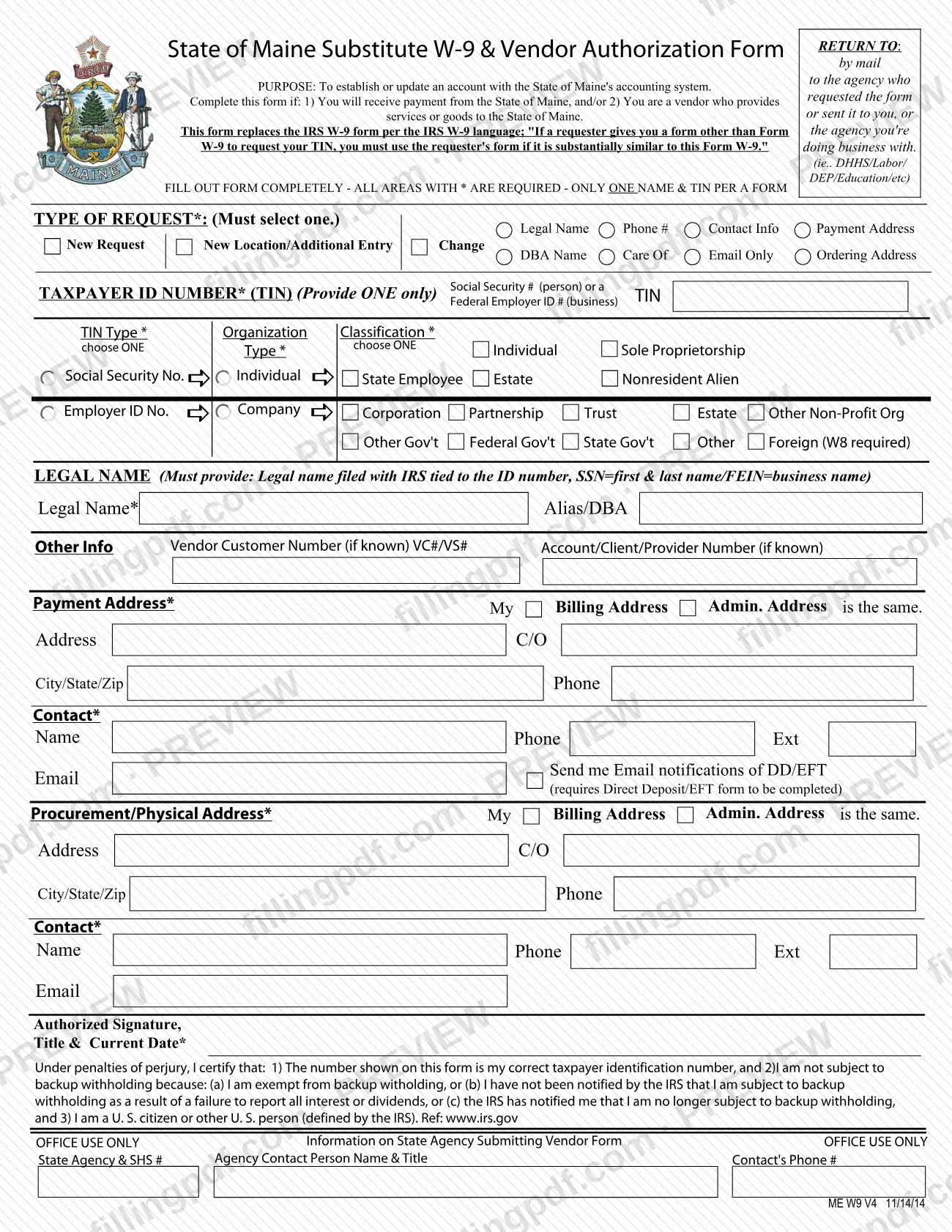
The vendor form for the State of Maine is the State of Maine Substitute W-9 & Vendor Authorization Form, which establishes or updates your account in the State of Maine's accounting system. You complete it if you will receive payment from the State or provide services or goods to it, and it stands in for the IRS Form W-9 when a state agency asks for your taxpayer identification number (TIN). On this page you can fill out the form online on FillingPDF and download or print the completed PDF; the form itself is posted on the Maine Revenue Services website, and you return it to the agency you do business with.
Last updated
What is ME W9 V4?
The State of Maine Substitute W-9 & Vendor Authorization Form is the form a payee or vendor completes to establish or update an account with the State of Maine's accounting system. It also collects the taxpayer identification number the State needs to pay you.
The form states that it replaces the IRS W-9 and quotes the IRS language behind that: if a requester gives you a form other than Form W-9 to request your TIN, you must use the requester's form if it is substantially similar to Form W-9. It therefore carries the same certification under penalties of perjury: that the number shown is your correct TIN, that you are not subject to backup withholding (or have been told by the IRS that you no longer are), and that you are a U.S. citizen or other U.S. person as the IRS defines it.
Beyond the W-9 content, the form is a vendor record. It states the type of request (new request, new location/additional entry, or a change), your legal name and any alias or DBA, a payment address, a procurement or physical address, a contact for each address, and optional vendor numbers such as VC#/VS#. A separate block marked OFFICE USE ONLY is filled in by the State agency that submits the form.
The form is printed as version ME W9 V4, dated 11/14/14. Only one name and one TIN may appear on each form.
Who needs to file ME W9 V4?
Complete this form if either of the two conditions printed on it applies to you:
- You will receive payment from the State of Maine.
- You are a vendor who provides services or goods to the State of Maine.
Use it for a first account or to change an existing one. The request-type boxes cover a New Request, a New Location/Additional Entry, and a Change to legal name, phone number, contact information, payment address, DBA name, care-of line, email, or ordering address.
The form works for individuals, sole proprietorships, companies, corporations, partnerships, trusts, estates, non-profit organizations, government entities, State employees and nonresident aliens; you choose one organization classification. If you check the Foreign (W8 required) option, the form says a W8 is required.
Each form carries only one name and one TIN. A person gives a Social Security number, and a business gives a Federal Employer ID number; you provide one of the two, not both. A separate form is needed for each additional name and TIN.
When to file ME W9 V4
Submit the form when you need to set up a vendor account because you will be paid by, or supply goods or services to, the State of Maine, and again whenever your account details change. The form prints no due date and no renewal cycle.
For a first-time account, select New Request under TYPE OF REQUEST. To add another location or entry, select New Location/Additional Entry. To correct existing information, select Change and mark what is changing: legal name, phone number, contact info, payment address, DBA name, care of, email only, or ordering address.
Because the form is returned to the agency that requested it or sent it to you, or the agency you are doing business with, the timing usually follows that agency's request for the form.
Documents you need
- Direct Deposit/EFT form: complete it as well if you check the box asking for email notifications of DD/EFT, which the form says requires it.
- Form W8: required if you select the Foreign organization classification, as the form notes "Foreign (W8 required)."
How to fill out ME W9 V4
Select the type of request
Under TYPE OF REQUEST*, select one: New Request, New Location/Additional Entry, or Change. For a change, also mark what is changing, such as Legal Name, Phone #, Contact Info, Payment Address, DBA Name, Care Of, Email Only or Ordering Address.
Enter your taxpayer ID number
In the TAXPAYER ID NUMBER* (TIN) area, provide one number only: a Social Security # for a person or a Federal Employer ID # for a business. Then choose one TIN Type: Social Security No. or Employer ID No.
Choose the organization classification
Choose one classification under Organization Classification*, such as Individual, Sole Proprietorship, Company, Corporation, Partnership, Trust, Estate, Non-Profit Org, a government option, or Foreign. Foreign requires a W8.
Write your legal name
In Legal Name*, enter the legal name filed with the IRS and tied to the ID number: first and last name for an SSN, or the business name for an FEIN. Use Alias/DBA for any other name you operate under.
Add vendor numbers if known
Under Other Info, enter your Vendor Customer Number (VC#/VS#) and any Account/Client/Provider Number, only if you know them.
Complete the payment address
Under Payment Address*, enter the address, C/O, city/state/zip and phone, or check that My Billing Address or the Admin. Address is the same. Add a contact name, phone, extension and email.
Decide on direct deposit notices
Check Send me Email notifications of DD/EFT only if you want them, and keep in mind the form says this requires the Direct Deposit/EFT form to be completed.
Complete the procurement address
Under Procurement/Physical Address*, enter the address and contact details, or check My Billing Address or the Admin. Address is the same.
Read the certification
Read the penalties-of-perjury statement: the number is your correct TIN, you are not subject to backup withholding for one of the listed reasons, and you are a U.S. citizen or other U.S. person.
Sign, title and date the form
Complete Authorized Signature, Title & Current Date*. Leave the OFFICE USE ONLY block, with State Agency & SHS # and agency contact, for the State agency.
Review and download the PDF
Check that every * area is complete and only one name and TIN appear. Download or print the completed PDF from FillingPDF and return it to the agency as described under How to submit.
How to submit ME W9 V4
The form is returned by mail to the State agency that requested it or sent it to you, or to the agency you are doing business with. The form gives DHHS, Labor, DEP and Education as examples of such agencies.
- By mail: send the signed form to that agency. The form prints no single central mailing address, so use the address the agency gave you.
- Agency-specific instructions: the form names no portal, fax number or in-person option; ask the agency that sent it to you whether it accepts other methods.
Before sending, check that every area marked with an asterisk (*) is complete and that the form is signed, titled and dated. If you ask for email notifications of DD/EFT (direct deposit/electronic funds transfer), the form says the Direct Deposit/EFT form must also be completed. Leave the OFFICE USE ONLY block blank: it is for the State agency's information (State agency and SHS #, agency contact person and phone number).
FillingPDF lets you fill out and download the PDF; submission follows the channels above.
Common mistakes to avoid
- Leaving areas marked with an asterisk (*) blank; the form says all of them are required, including type of request, TIN, TIN type, organization classification, legal name, addresses, contacts and signature.
- Providing both a Social Security number and a Federal Employer ID number; the form says to provide only one TIN.
- Listing more than one name and TIN on a single form; the form allows only one name and TIN per form.
- Not selecting a type of request, or selecting more than one; the form says you must select one.
- Entering a legal name that is not the one filed with the IRS for that number: use first and last name for an SSN, and the business name for an FEIN.
- Choosing the Foreign classification without a W8, which the form says is required.
- Requesting email notifications of DD/EFT without completing the Direct Deposit/EFT form.
- Sending the signed form to the wrong place instead of the agency that requested it or that you are doing business with.
- Submitting the form unsigned, or without the title and current date next to the authorized signature.
Frequently asked questions
What is the Maine vendor form?
It is the State of Maine Substitute W-9 & Vendor Authorization Form, used to establish or update an account with the State of Maine's accounting system. You complete it if you will receive payment from the State or provide goods or services to it.
Is the Maine vendor form the same as an IRS W-9?
It replaces the IRS W-9 for this purpose. The form quotes the IRS rule that you must use the requester's form if it is substantially similar to Form W-9, and it carries the same certification under penalties of perjury about your TIN and backup withholding.
Where do I send the State of Maine vendor form?
Mail it to the agency that requested the form or sent it to you, or the agency you are doing business with, such as DHHS, Labor, DEP or Education. The form prints no central address, so use the one that agency gives you.
Can I use one vendor form for two names or TINs?
No. The form states only one name and one TIN per form, and you provide only one TIN: a Social Security number for a person or a Federal Employer ID number for a business. Use a separate form for each additional name and TIN.
How do I change my information with the vendor form?
Select Change under TYPE OF REQUEST and mark what is changing: legal name, phone, contact info, payment address, DBA name, care of, email only, or ordering address. Use New Location/Additional Entry to add another location.
Do I need anything else if I am a foreign vendor?
Yes. The Organization Classification option reads Foreign (W8 required), so a W8 is required if you select it. The form does not name any other attachments for that classification.
Can I fill out the Maine vendor form online on FillingPDF?
You can fill out the PDF online on FillingPDF and download or print it. FillingPDF is an independent service and does not submit the form; you return it to the State agency that requested it.
Ready to fill out ME W9 V4?
Fill out ME W9 V4 now