
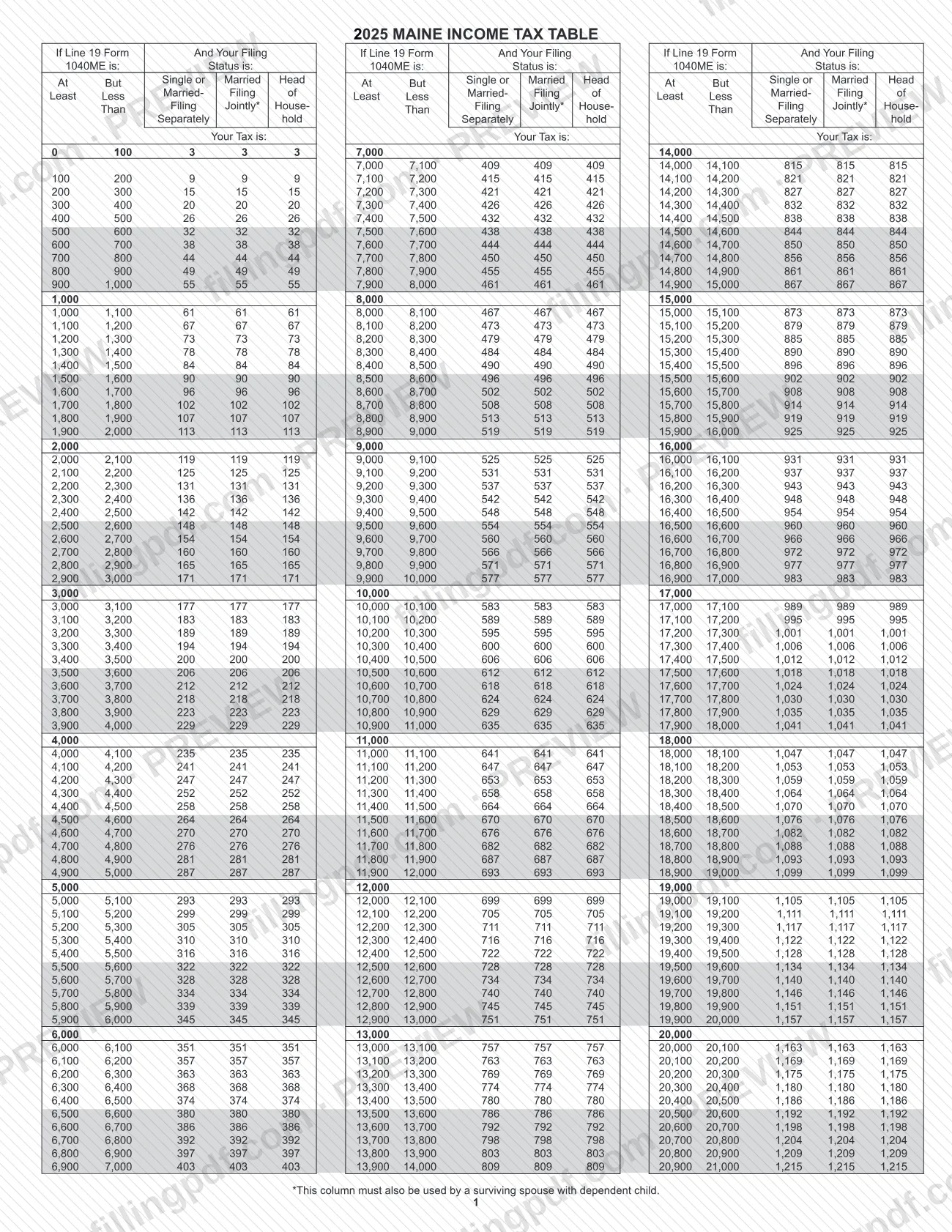
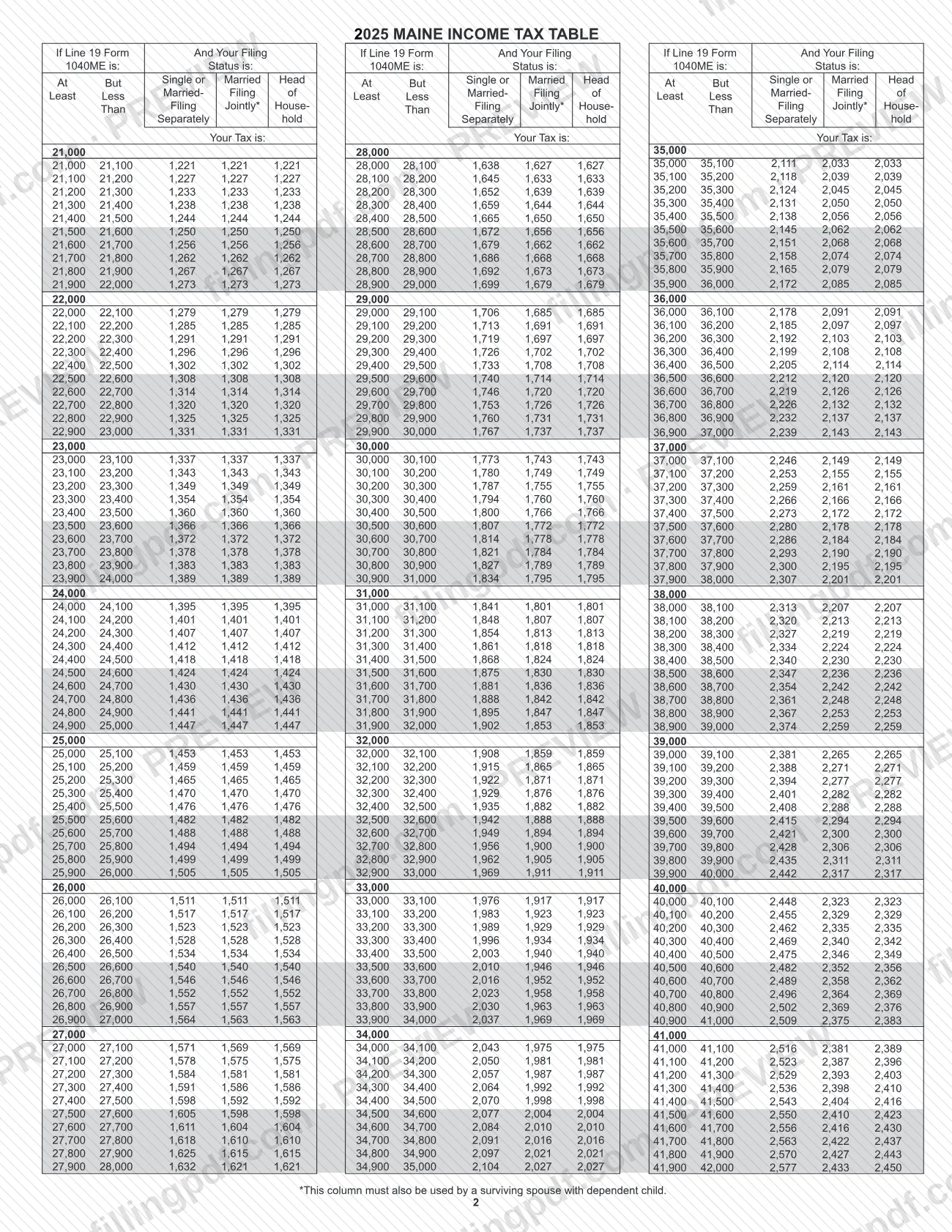
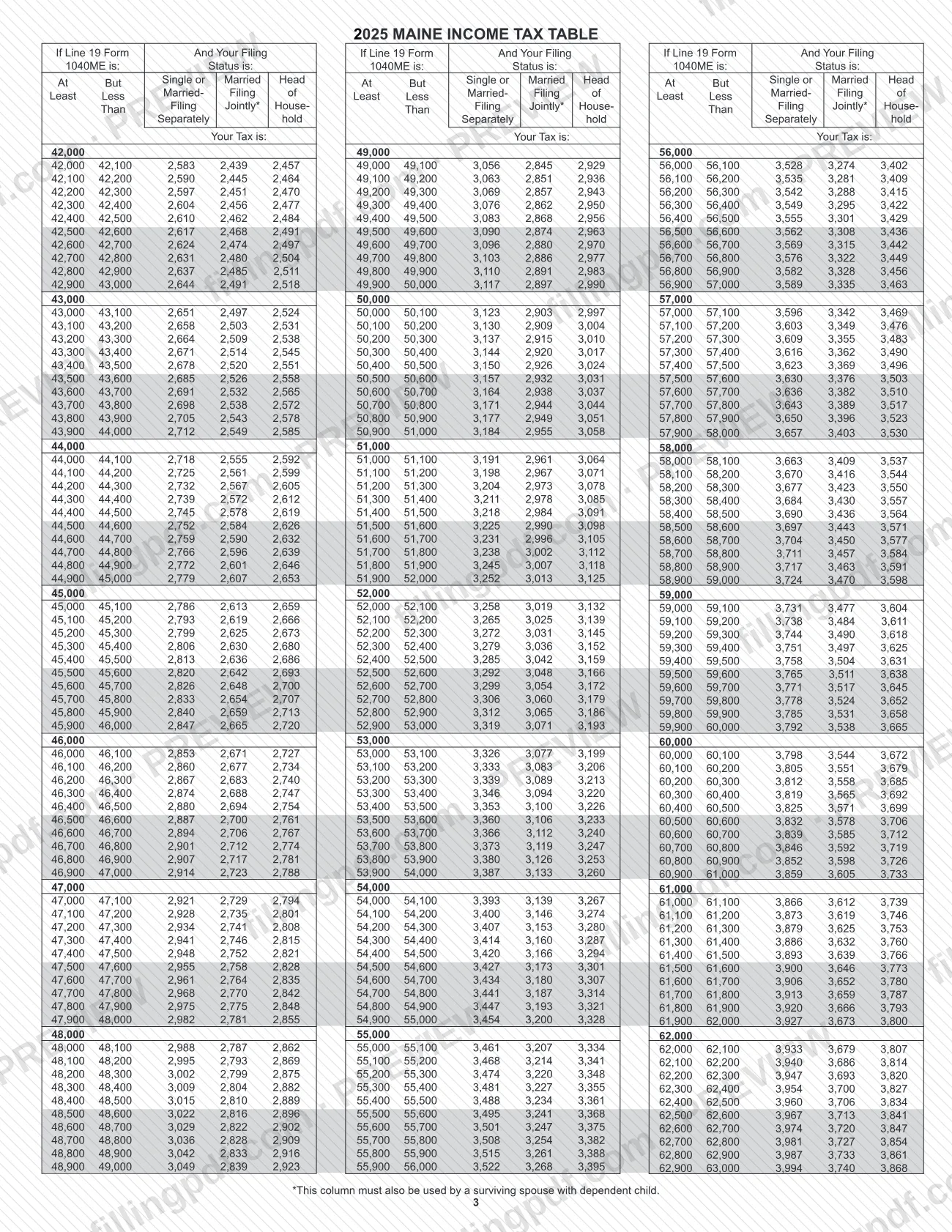
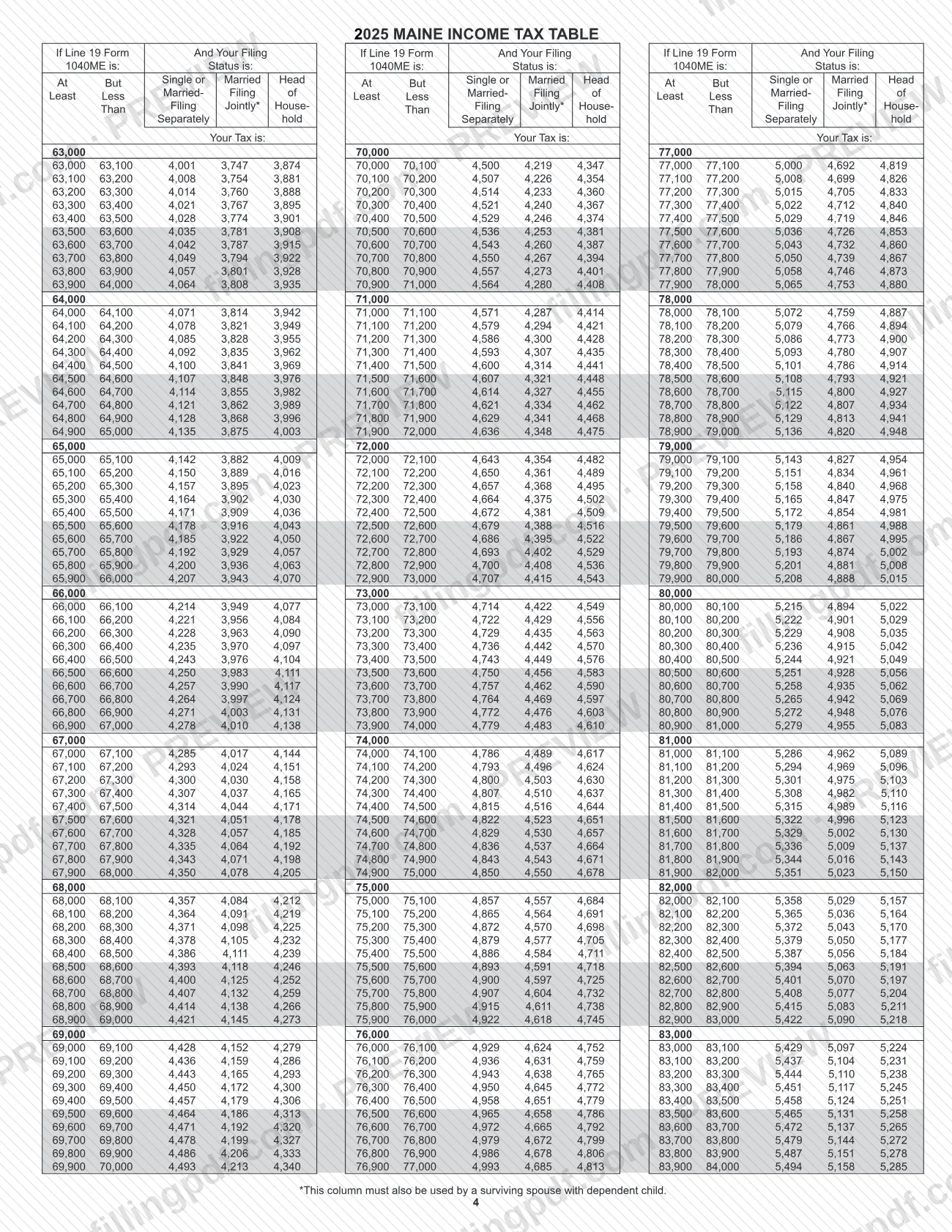
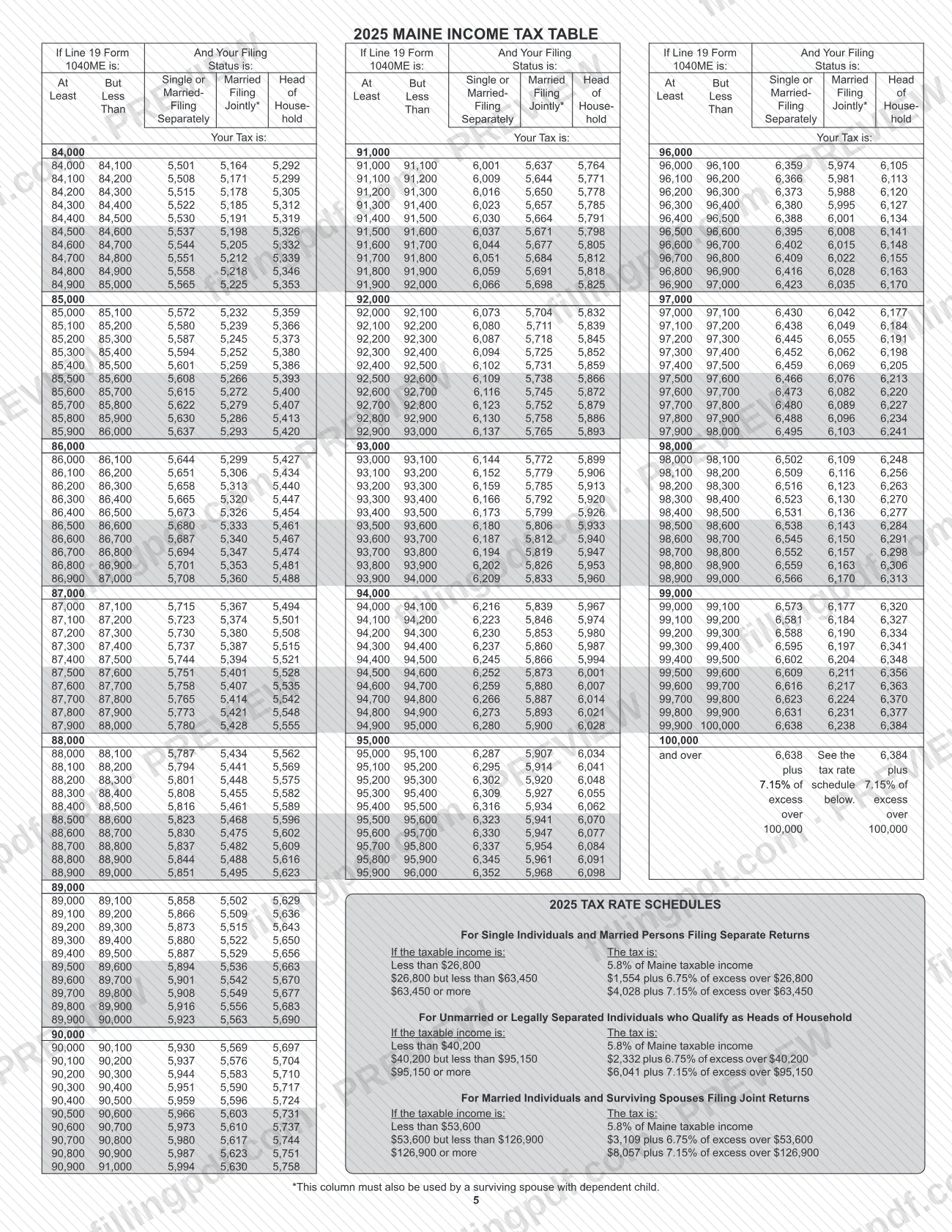
The Tax Tables PDF is a document published by Maine Revenue Services (MRS), the agency that also publishes Maine's tax return forms and supporting documents. Search results for plain "tax tables" cover many jurisdictions; this page is about the Maine Revenue Services Tax Tables file. On FillingPDF you can fill out the form online and download or print the completed PDF. The original PDF is published by MRS at maine.gov, and any return that relies on it is filed through the agency's own channels.
Last updated
What is Tax Tables – Maine?
Tax Tables is the PDF document that Maine Revenue Services (MRS) publishes on its maine.gov/revenue website, in the same place as the agency's tax return forms and supporting documents. It is issued at the state level and its file name at the agency is 25_tax_tables.pdf.
The document prints no form number and no revision or edition date, so identify it by its title, "Tax Tables", and by the MRS web address above. Any figure you take from it should be checked against the PDF that MRS publishes, because the agency's copy is the one that counts.
MRS sets one rule that applies to the tax return forms and supporting documents it publishes: they must be filed electronically (through its Electronic Services) or submitted on paper. The agency does not accept disks, USB flash drives or any other form of electronic media, and says that such media cannot be processed and will be destroyed.
This page covers only the Maine Revenue Services Tax Tables. It is not a federal document and not a table issued by another state or by a county or city.
Who needs to file Tax Tables – Maine?
Anyone who works with Maine tax returns and is directed to the Maine Revenue Services Tax Tables, whether a taxpayer preparing a return or someone helping with one, can use this document. MRS publishes it alongside its tax return forms and supporting documents.
The agency page does not say who must use the tables or under which conditions, and it sets no eligibility rule for this document. For questions about whether your return calls for them, check the instructions that come with the Maine return you are completing or contact MRS. If you are dealing with a tax table from the federal government or another state, this is not the right document.
How to fill out Tax Tables – Maine
Open the Tax Tables PDF
Use the PDF that Maine Revenue Services publishes at maine.gov/revenue; the document is titled Tax Tables and prints no form number.
Fill out the PDF online
Open it on FillingPDF and enter information only where the PDF offers an entry area. The document does not describe any lines to complete.
Check the agency's filing rules
MRS requires tax return forms and supporting documents to be filed electronically or on paper, and does not accept disks, USB flash drives or other electronic media.
Review and download the completed PDF
Check your entries against the MRS copy, then download or print the completed PDF from FillingPDF and use it with your Maine return as the agency's instructions direct.
How to submit Tax Tables – Maine
Maine Revenue Services accepts tax return forms and supporting documents through two channels: electronically, through the agency's Electronic Services, or on paper.
- Electronically: use the electronic filing options that MRS lists under Electronic Services on https://www.maine.gov/revenue/tax-return-forms.
- On paper: submit the paper forms and supporting documents to MRS.
Do not submit disks, USB flash drives or any other form of electronic media. MRS states that electronic media cannot be processed and will be destroyed.
The Tax Tables PDF prints no mailing address, portal or deadline of its own. Use the instructions of the Maine return it supports, or the MRS website, for the exact address and due date. FillingPDF lets you fill out and download the PDF; submission follows the MRS channels above.
Common mistakes to avoid
- Submitting tax return forms or supporting documents on a disk, USB flash drive or other electronic media; MRS says it cannot process them and will destroy them.
- Sending tax return forms by any route other than the two MRS accepts: electronic filing through Electronic Services, or paper.
- Assuming that electronic media sent with a paper return will be read or returned; MRS states it will be destroyed.
- Relying on a copy of the Tax Tables other than the PDF MRS publishes at maine.gov/revenue when checking a figure.
Frequently asked questions
What are the Maine Revenue Services tax tables?
They are a PDF titled Tax Tables that Maine Revenue Services (MRS) publishes on its maine.gov/revenue site. The document prints no form number or revision date, so identify it by its title and by the MRS web address.
Can I fill out the Maine Tax Tables PDF online?
Yes, you can fill out the PDF online on FillingPDF and download or print it. FillingPDF is an independent service, not connected to MRS, and it does not file anything for you; the agency's own channels handle filing.
How do I file Maine tax return forms?
MRS says tax return forms and supporting documents must be filed electronically, through its Electronic Services, or submitted on paper. Check the MRS tax return forms page or the instructions of your return for the exact details.
Can I send a USB drive or disk to Maine Revenue Services?
No. MRS says not to submit disks, USB flash drives or any other form of electronic media. It states that electronic media cannot be processed and will be destroyed.
Where do I get the original Maine tax tables PDF?
From MRS at https://www.maine.gov/revenue/sites/maine.gov.revenue/files/inline-files/25_tax_tables.pdf. The agency's copy is the one to check any figure against.
Ready to fill out Tax Tables – Maine?
Fill out Tax Tables – Maine now