
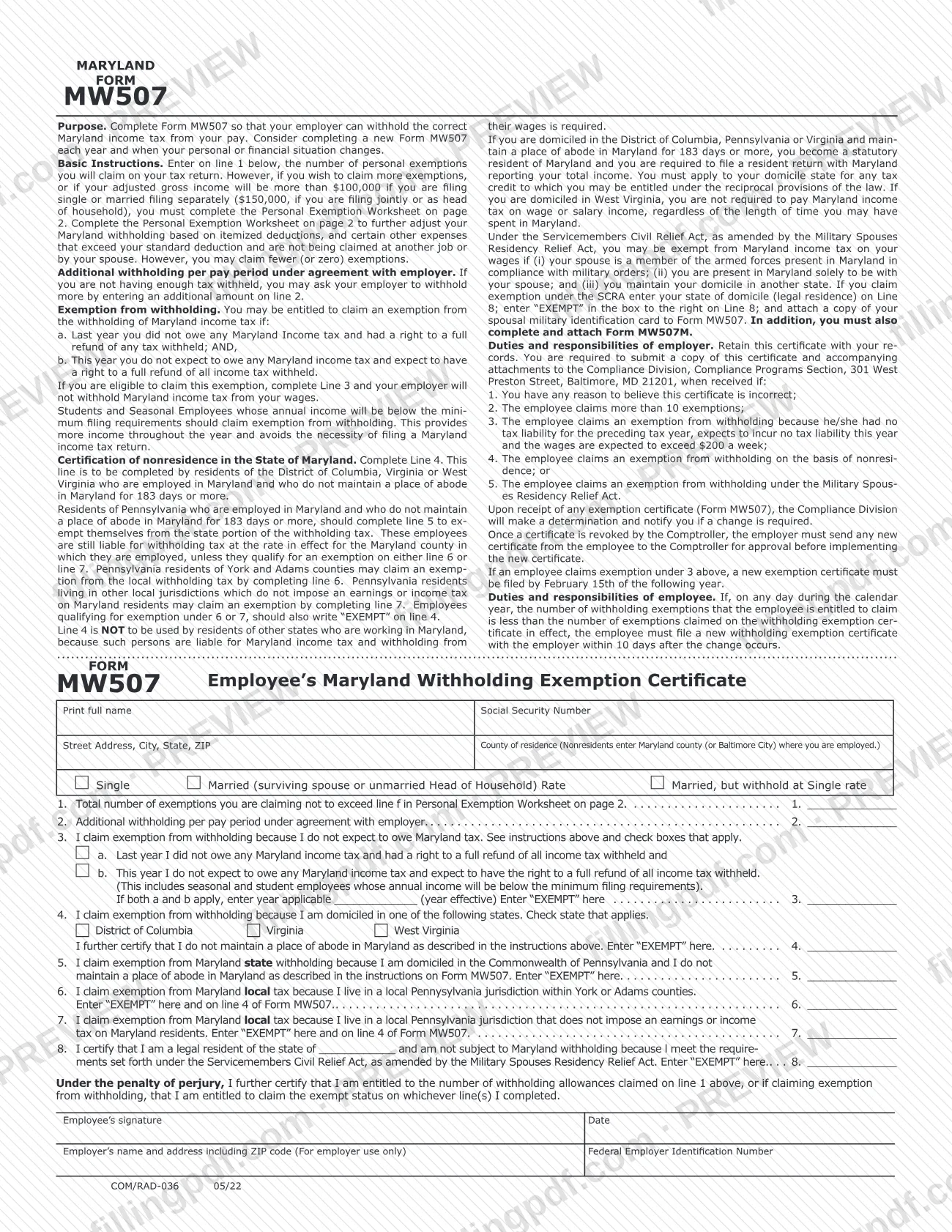
MW507 is the Employee's Maryland Withholding Exemption Certificate, the form the Comptroller of Maryland provides so that your employer withholds the correct Maryland income tax from your pay. You use it to state the number of exemptions you claim, ask for extra withholding, or claim exemption from withholding when you qualify. On FillingPDF you can fill out the form online and download or print the completed PDF; the certificate itself goes to your employer, and the Comptroller publishes the official PDF.
Last updated
What is MW507?
Form MW507, Employee's Maryland Withholding Exemption Certificate (2024), is the Comptroller of Maryland form an employee completes so that the employer can withhold the correct amount of Maryland income tax from the employee's pay.
The form works in two ways. On line 1 you enter the number of personal exemptions you claim, and on line 2 you can ask your employer, by agreement, to withhold an additional amount each pay period. Alternatively, you can claim exemption from withholding on lines 3 through 8: for no expected Maryland tax (line 3), for domicile in the District of Columbia, Virginia or West Virginia (line 4), for domicile in Pennsylvania (lines 5 to 7), or under the Servicemembers Civil Relief Act, as amended by the Military Spouses Residency Relief Act (line 8).
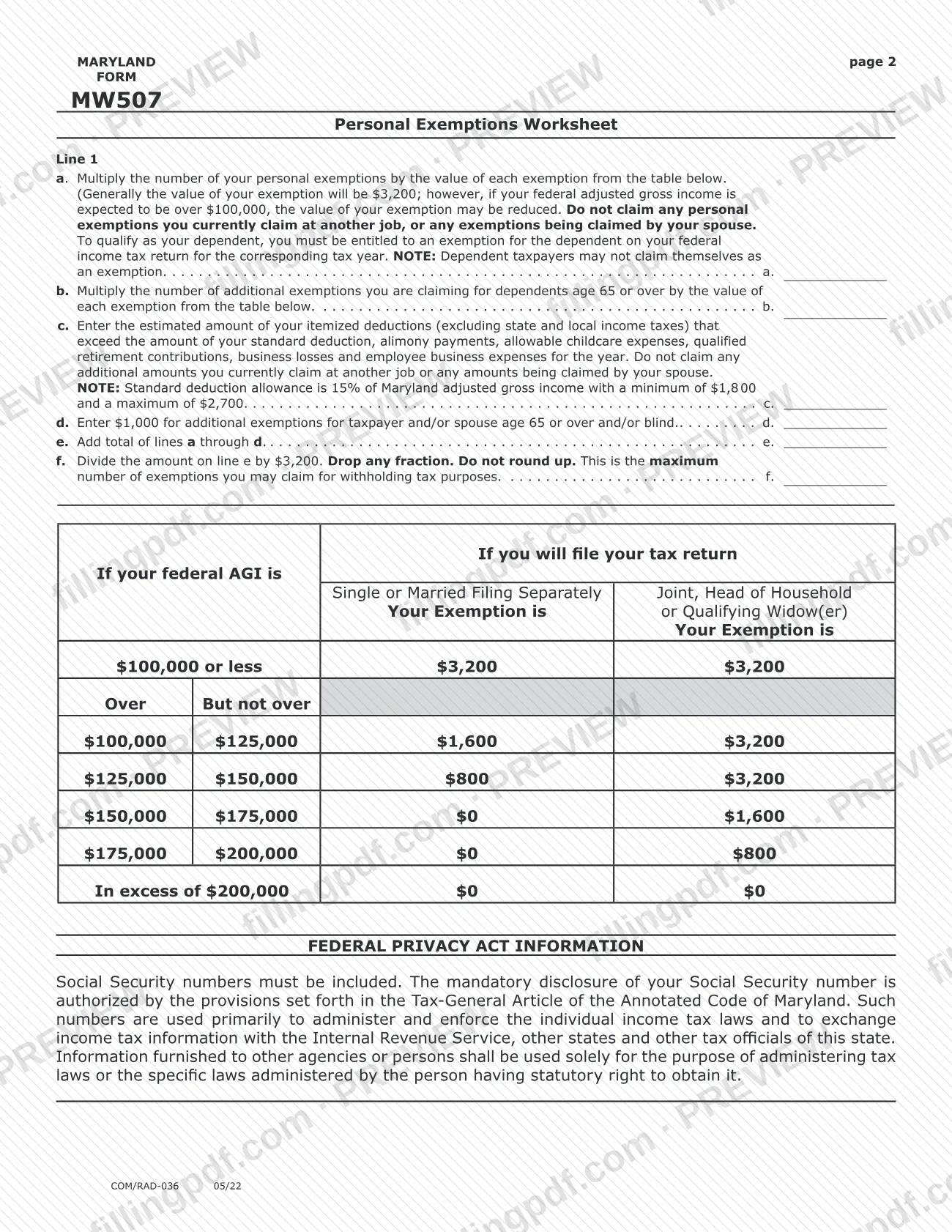
Page 2 holds the Personal Exemptions Worksheet, which caps the number of exemptions you may enter on line 1. You may claim fewer exemptions than the worksheet allows, or none.
The employer keeps the signed certificate and, in the situations listed in the form, sends a copy to the Comptroller's Compliance Division. Military spouses claiming exemption on line 8 also complete and attach Form MW507M.
Who needs to file MW507?
Employees who work in Maryland and want their employer to withhold Maryland income tax at the right level complete Form MW507. The form suggests completing a new one each year and whenever your personal or financial situation changes.
Groups the instructions address:
- Employees claiming exemptions on line 1. If you want more exemptions than the basic number, or your adjusted gross income will be above the printed thresholds for your filing status, you must complete the Personal Exemption Worksheet on page 2. You may claim fewer exemptions, or zero.
- Employees with no expected Maryland tax (line 3). This requires that you owed no Maryland income tax last year and expect to owe none this year, with a right to a full refund of tax withheld both times. The form says students and seasonal employees with annual income below the minimum filing requirements should claim it.
- Residents of the District of Columbia, Virginia or West Virginia (line 4) who do not maintain a place of abode in Maryland for 183 days or more.
- Pennsylvania residents (lines 5 to 7) with the same 183-day condition.
- Military spouses (line 8) who meet the three conditions printed in the instructions.
Do not use line 4 if you live in another state and work in Maryland: such employees are liable for Maryland income tax and withholding. Employees domiciled in the District of Columbia, Pennsylvania or Virginia who keep a place of abode in Maryland for 183 days or more become statutory residents and must file a resident return.
When to file MW507
Give Form MW507 to your employer when you need your Maryland withholding set or changed. The form suggests completing a new one each year and when your personal or financial situation changes.
Two timing rules appear in the instructions. If, on any day of the calendar year, the number of exemptions you are entitled to claim falls below the number on the certificate in effect, you must file a new certificate with your employer within 10 days after the change. If you claim exemption from withholding because you had no tax liability for the preceding year and expect none this year, a new certificate must be filed by February 15th of the following year.
Once an employer sends a certificate to the Compliance Division, the Division makes a determination and notifies the employer if a change is required.
Documents you need
- Personal Exemption Worksheet on page 2 of Form MW507: complete it if you claim more than the basic number of exemptions or your adjusted gross income will be above the printed thresholds; it sets the limit for line 1.
- Copy of your spousal military identification card: attach it to Form MW507 if you claim exemption under the Servicemembers Civil Relief Act on line 8.
- Form MW507M: complete and attach it, in addition to the ID copy, if you claim exemption on line 8 as a military spouse.
How to fill out MW507
Enter your name and Social Security number
At the top, print your full name and your Social Security Number. The form states that the number must be included.
Enter your address and county
Write your street address, city, state and ZIP code. In the county box, enter your county of residence; nonresidents enter the Maryland county (or Baltimore City) where they are employed.
Check your filing status
Mark one box: Single, Married (surviving spouse or unmarried Head of Household), or Rate Married, but withhold at Single rate.
Complete the Personal Exemptions Worksheet
On page 2, enter on line a the exemption amount, then add deductions on line c and the additional exemption on line d for age 65 or over or blind. Add lines a through d on line e and divide as the form directs on line f, dropping any fraction.
Enter your exemptions on line 1
Enter the total number of exemptions you claim. It must not exceed line f of the worksheet, and you may enter fewer or zero.
Add extra withholding on line 2
If you want more tax withheld, enter the additional amount per pay period that you have agreed with your employer.
Claim no-tax exemption on line 3
Check box a and box b if both apply, enter the year effective, and write "EXEMPT" on line 3. Skip this line if you do not qualify.
Certify nonresidence on line 4
If you are domiciled in the District of Columbia, Virginia or West Virginia and keep no place of abode in Maryland for 183 days or more, check your state and write "EXEMPT" on line 4.
Complete the Pennsylvania lines
Pennsylvania residents write "EXEMPT" on line 5 for state withholding. For local tax, use line 6 (York or Adams counties) or line 7 (other qualifying jurisdictions), and also write "EXEMPT" on line 4.
Claim the military spouse exemption
On line 8, enter your state of legal residence and "EXEMPT" only if you meet the Servicemembers Civil Relief Act conditions. Attach a copy of your spousal military ID card and Form MW507M.
Sign, date and pass to employer
Sign and date under penalty of perjury. The employer name, address and Federal Employer Identification Number block is for employer use only.
Review and download the PDF
Check that line 1 does not exceed worksheet line f and that each exemption line has its required entries. Download or print the completed PDF from FillingPDF and give it to your employer.
How to submit MW507
Give the signed Form MW507 to your employer; the employer retains it with its records. The form lists no portal or mailing address for employees.
Employers must send a copy of the certificate and its attachments to the Comptroller when received if any of these apply:
- the employer has reason to believe the certificate is incorrect;
- the employee claims more than 10 exemptions;
- the employee claims exemption because of no tax liability last year and none expected this year, and wages are expected to exceed the weekly figure printed on the form;
- the employee claims exemption based on nonresidence;
- the employee claims exemption under the Military Spouses Residency Relief Act.
The address is: Compliance Division, Compliance Programs Section, 301 West Preston Street, Baltimore, MD 21201. After the Comptroller revokes a certificate, the employer must send any new certificate from that employee to the Comptroller for approval before using it.
Attach a copy of your spousal military identification card and Form MW507M if you claim exemption on line 8. FillingPDF lets you fill out and download the PDF; submission follows the channels above.
Common mistakes to avoid
- Entering on line 1 more exemptions than line f of the Personal Exemption Worksheet allows.
- Claiming personal exemptions you already claim at another job, or that your spouse claims, or claiming yourself as an exemption when you are a dependent taxpayer.
- Using line 4 as a resident of a state other than the District of Columbia, Virginia or West Virginia; other states' residents working in Maryland are liable for Maryland tax and withholding.
- Claiming exemption on line 3 when only one of a (no tax owed last year) or b (none expected this year) is true; the exemption rests on both.
- Completing line 6 or 7 without also writing "EXEMPT" on line 4, as the form directs.
- Claiming the military spouse exemption on line 8 without the state of domicile, "EXEMPT", a copy of the spousal military ID card and Form MW507M.
- Rounding up on worksheet line f; the form says to drop any fraction.
- Not filing a new certificate within 10 days when the exemptions you may claim drop below the number on your current certificate.
- Leaving out the Social Security number, which the form states must be included.
Frequently asked questions
What is Form MW507 used for?
Form MW507 is the Employee's Maryland Withholding Exemption Certificate. You give it to your employer so that the correct Maryland income tax is withheld from your pay, by claiming exemptions, asking for extra withholding or, if you qualify, claiming exemption from withholding.
Can I claim exemption from Maryland withholding on the MW507?
Yes, if you qualify. Line 3 applies if you owed no Maryland tax last year and expect none this year, with a right to a full refund both times. Lines 4 to 8 cover residents of nearby states and military spouses. Each has its own conditions on the form.
How many exemptions can I claim on MW507 line 1?
No more than the figure on line f of the Personal Exemption Worksheet on page 2. You may claim fewer, or zero. Do not claim exemptions you already claim at another job or that your spouse claims.
Who sends the MW507 to the Comptroller?
Your employer. You give the signed certificate to the employer, who keeps it and sends a copy to the Compliance Division in the cases listed on the form, such as more than 10 exemptions or a nonresidence or military spouse exemption.
Do I have to file a new MW507 every year?
The form suggests a new one each year and when your situation changes. It is required within 10 days if your allowable exemptions fall below the number claimed, and by February 15th of the following year if you claimed exemption for having no tax liability.
Can Pennsylvania residents working in Maryland claim exemption?
Yes, if they keep no place of abode in Maryland for 183 days or more. Line 5 exempts the state portion, but county-rate withholding still applies unless line 6 (York or Adams counties) or line 7 applies; for those, write "EXEMPT" on line 4 too.
What do military spouses need to attach to the MW507?
To claim exemption on line 8, enter your state of legal residence and "EXEMPT", attach a copy of your spousal military identification card, and complete and attach Form MW507M. You must meet the three Servicemembers Civil Relief Act conditions in the instructions.
Can I fill out the MW507 online?
Yes. You can fill out the MW507 PDF online on FillingPDF and download or print it. FillingPDF does not send it to anyone; you give the signed certificate to your employer.
Ready to fill out MW507?
Fill out MW507 now