
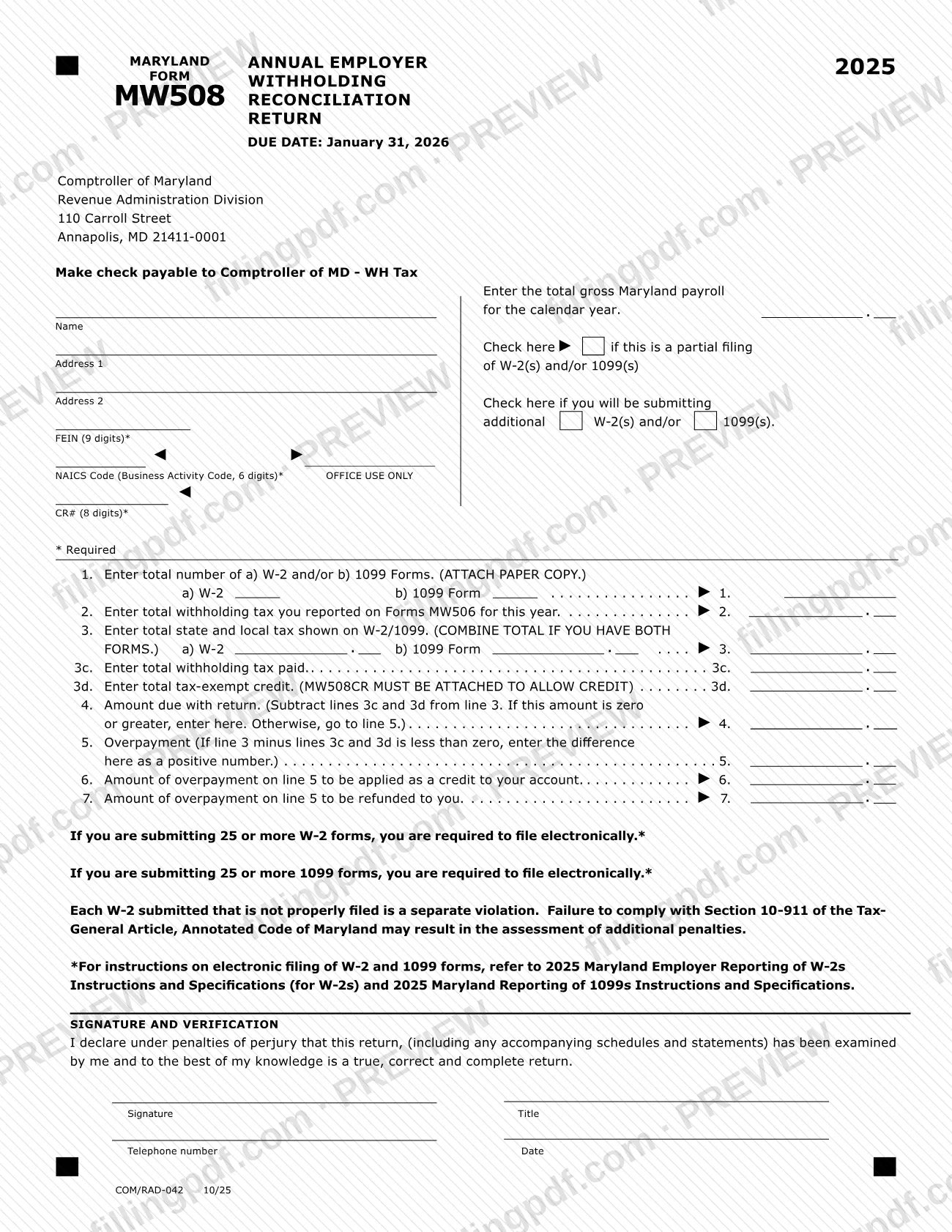
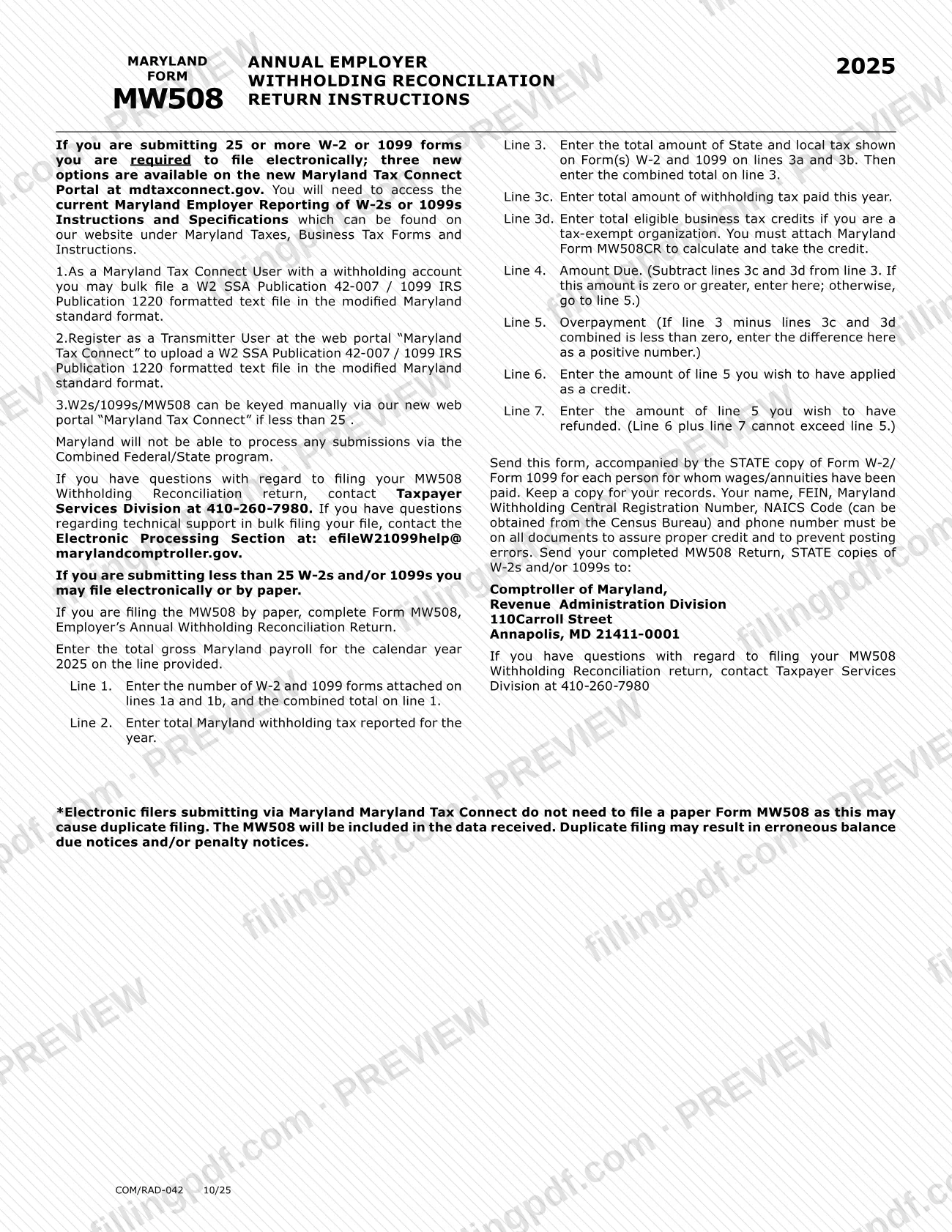
The MW508 is the Annual Employer Withholding Reconciliation Return that the Comptroller of Maryland uses to compare the Maryland withholding tax an employer reported and paid during 2025 with the tax shown on the W-2 and 1099 forms it issued. The 2025 return is due January 31, 2026, and employers submitting 25 or more W-2 or 1099 forms must file electronically. On this page you can fill out the form online on FillingPDF and download or print the completed PDF; the form and its instructions are published by the Comptroller of Maryland.
Last updated
What is MW508?
Form MW508, Annual Employer Withholding Reconciliation Return, is the Maryland return on which an employer reconciles the total withholding tax it reported and paid for the year against the state and local tax shown on its W-2 and 1099 forms. The Comptroller of Maryland, Revenue Administration Division, issues it. This edition is for calendar year 2025.
The return asks for the total gross Maryland payroll for the year, the number of W-2 and 1099 forms attached (line 1), the withholding tax reported on Forms MW506 (line 2), and the state and local tax shown on the W-2 and 1099 forms (line 3). It then compares that total with the withholding tax paid (line 3c) and any tax-exempt credit (line 3d). The result is either an amount due with the return (line 4) or an overpayment (line 5). An overpayment can be applied as a credit to your account (line 6) or refunded (line 7).
Form MW508CR is the companion form a tax-exempt organization must attach to calculate and take the credit on line 3d. Employers who file through Maryland Tax Connect do not send a paper MW508: the return is included in the data the Comptroller receives.
Who needs to file MW508?
Employers with a Maryland withholding account who paid wages or annuities and must reconcile the Maryland withholding they reported file Form MW508. The form requires your FEIN, NAICS Code and an 8-digit CR# (Maryland Withholding Central Registration Number).
- Employers submitting fewer than 25 W-2s and/or 1099s may file electronically or on paper.
- Employers submitting 25 or more W-2 forms, or 25 or more 1099 forms, are required to file electronically.
- Tax-exempt organizations that claim eligible business tax credits on line 3d must attach Form MW508CR.
Do not file a paper MW508 if you file electronically through Maryland Tax Connect. The instructions warn that a paper return in addition to an electronic one may cause a duplicate filing, which may lead to erroneous balance due or penalty notices. The form also says Maryland cannot process submissions made through the Combined Federal/State program.
When to file MW508
The 2025 Form MW508 is due January 31, 2026; the due date is printed at the top of the form. The form ties the return to the calendar year 2025 payroll and to the W-2 and 1099 forms for that year.
If you have only part of your W-2 or 1099 forms ready, the form has a box to check if this is a partial filing, and a second box to check if you will be submitting additional W-2(s) and/or 1099(s) later. The form warns that each W-2 that is not properly filed is a separate violation and that failure to comply with Section 10-911 of the Tax-General Article, Annotated Code of Maryland may result in additional penalties. Any amount due is entered on line 4 and goes with the return.
Documents you need
- STATE copy of each Form W-2 and/or 1099 for every person for whom wages or annuities were paid, sent with a paper MW508; line 1 asks you to attach a paper copy.
- Maryland Form MW508CR, only if you are a tax-exempt organization claiming eligible business tax credits on line 3d; the credit cannot be allowed without it.
How to fill out MW508
Enter gross Maryland payroll
Enter the total gross Maryland payroll for calendar year 2025 on the line provided at the top of the form.
Complete the employer identification block
Enter your name, Address 1 and Address 2, FEIN (9 digits), NAICS Code (6 digits) and CR# (8 digits). The FEIN, NAICS Code and CR# are marked as required; leave the OFFICE USE ONLY area blank.
Check the filing boxes if they apply
Check the box if this is a partial filing of W-2(s) and/or 1099(s), and the separate box if you will be submitting additional W-2(s) and/or 1099(s).
Count your W-2 and 1099 forms
On line 1, enter the number of W-2 forms on line 1a and 1099 forms on line 1b, and the combined total on line 1. Attach a paper copy of each.
Enter withholding reported on Forms MW506
On line 2, enter the total Maryland withholding tax you reported on Forms MW506 for the year.
Total the tax shown on W-2s and 1099s
Enter the state and local tax shown on Form(s) W-2 on line 3a and on Form(s) 1099 on line 3b, then the combined total on line 3.
Enter withholding tax paid
On line 3c, enter the total amount of withholding tax paid this year.
Claim a tax-exempt credit if eligible
On line 3d, enter total eligible business tax credits only if you are a tax-exempt organization, and attach Form MW508CR to calculate and take the credit.
Figure the amount due or overpayment
Subtract lines 3c and 3d from line 3. If the result is zero or greater, enter it on line 4; otherwise enter the difference as a positive number on line 5.
Choose credit or refund for an overpayment
On line 6, enter the part of line 5 to be applied as a credit to your account, and on line 7 the part to be refunded. Lines 6 and 7 together cannot exceed line 5.
Sign and date the return
In Signature and Verification, sign, enter your title, telephone number and the date, declaring under penalties of perjury that the return is true, correct and complete.
Review and download the completed PDF
Check every line and the attachments, then download or print the completed PDF from FillingPDF and submit it through one of the channels described under How to submit.
How to submit MW508
You can file Form MW508 electronically through Maryland Tax Connect or by paper mail; employers with 25 or more W-2 or 1099 forms must file electronically.
- Electronically: use the Maryland Tax Connect portal at mdtaxconnect.gov. Users with a withholding account can bulk file a W-2 (SSA Publication 42-007) or 1099 (IRS Publication 1220) text file in the modified Maryland standard format, register as a Transmitter User to upload such a file, or key W-2s, 1099s and the MW508 manually when there are fewer than 25. Technical support for bulk filing: Electronic Processing Section, [email protected].
- By mail (fewer than 25 forms): send the completed MW508 with the STATE copies of the W-2 and/or 1099 forms to Comptroller of Maryland, Revenue Administration Division, 110 Carroll Street, Annapolis, MD 21411-0001. Keep a copy for your records.
- Payment: make the check payable to Comptroller of MD - WH Tax.
Put your name, FEIN, Maryland Withholding Central Registration Number, NAICS Code and phone number on all documents so credit is posted correctly. Questions about the return go to the Taxpayer Services Division at 410-260-7980. FillingPDF lets you fill out and download the PDF; submission follows the channels above.
Common mistakes to avoid
- Filing a paper return when you are submitting 25 or more W-2 forms or 25 or more 1099 forms; the form requires electronic filing in those cases.
- Mailing a paper MW508 after filing through Maryland Tax Connect; the duplicate may cause erroneous balance due or penalty notices.
- Entering a tax-exempt credit on line 3d without attaching Form MW508CR; the form says it must be attached to allow the credit.
- Leaving out the FEIN, NAICS Code or CR#, which are marked as required on the form.
- Sending the return without the STATE copies of the W-2 and/or 1099 forms.
- Entering an overpayment on line 5 as a negative number; the instructions say to enter the difference as a positive number.
- Splitting the overpayment so that line 6 plus line 7 is greater than line 5.
- Submitting through the Combined Federal/State program, which Maryland cannot process.
- Forgetting to sign and date the Signature and Verification section.
Frequently asked questions
What is the MW508 form?
Form MW508 is the Annual Employer Withholding Reconciliation Return issued by the Comptroller of Maryland. Employers use it to reconcile the Maryland withholding tax reported and paid for the year with the tax shown on the W-2 and 1099 forms. This edition covers calendar year 2025.
When is the 2025 MW508 due?
January 31, 2026. The due date is printed at the top of the form. If you are submitting only some of your W-2 or 1099 forms, check the partial filing box, and check the other box if additional forms will follow.
Do I have to file the MW508 electronically?
Yes, if you submit 25 or more W-2 forms or 25 or more 1099 forms. With fewer than 25, you may file electronically or by paper. Electronic filing is done on the Maryland Tax Connect portal at mdtaxconnect.gov.
Where do I mail Form MW508?
Mail the completed MW508 and the STATE copies of the W-2 and/or 1099 forms to Comptroller of Maryland, Revenue Administration Division, 110 Carroll Street, Annapolis, MD 21411-0001. Make any check payable to Comptroller of MD - WH Tax.
Should I send a paper MW508 if I filed through Maryland Tax Connect?
No. Electronic filers on Maryland Tax Connect do not need a paper MW508, because the return is included in the data the Comptroller receives. A duplicate filing may cause erroneous balance due or penalty notices.
What goes on line 3d of the MW508?
Line 3d is the total eligible business tax credits for a tax-exempt organization. You must attach Form MW508CR to calculate and take the credit; without it the credit is not allowed.
How do I split an overpayment on the MW508?
Enter the overpayment on line 5 as a positive number, then put the part you want kept as a credit on line 6 and the part you want refunded on line 7. Line 6 plus line 7 cannot exceed line 5.
Can I fill out Form MW508 online on FillingPDF?
Yes. You can fill out the MW508 PDF online on FillingPDF and download or print it. FillingPDF is an independent service and does not file the return with the Comptroller; you submit it through Maryland Tax Connect or by mail.
Who do I call with questions about the MW508?
Call the Taxpayer Services Division at 410-260-7980 for questions about filing the return. For technical support with bulk filing, contact the Electronic Processing Section at [email protected].
Ready to fill out MW508?
Fill out MW508 now