
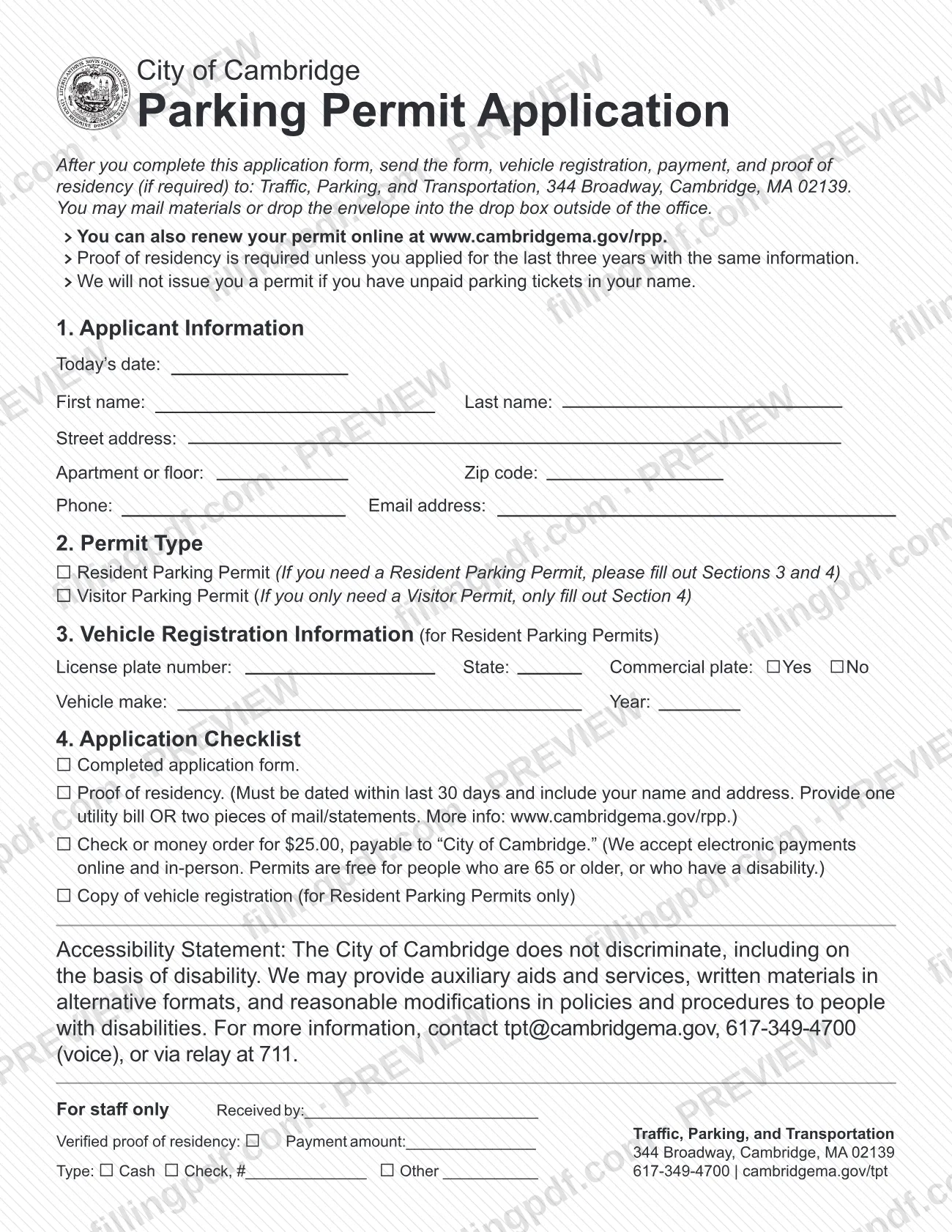
The Parking Permit Application is the paper application for a Cambridge parking permit, issued by the City of Cambridge Traffic, Parking, and Transportation department. Residents use it to request a Resident Parking Permit for a vehicle or a Visitor Parking Permit for guests, and its checklist lists the proof of residency, vehicle registration copy and payment to send with it. On FillingPDF you can fill out the form online and download or print the completed PDF; the city publishes the official PDF and receives applications only through its own channels.
Last updated
What is Parking Permit Application – Cambridge, MA?
The Parking Permit Application is the paper form of the City of Cambridge Traffic, Parking, and Transportation department, used to request a Resident Parking Permit or a Visitor Parking Permit, which allow parking in areas the city designates “Parking by Permit Only.”
The form has four sections: 1. Applicant Information, 2. Permit Type, 3. Vehicle Registration Information (for Resident Parking Permits) and 4. Application Checklist. Completing it and sending it with the items on the checklist is how you ask the department for a permit by mail or drop box.
The two permits differ. A Resident Parking Permit is a sticker placed on the inside lower driver's side corner of a passenger vehicle's windshield, and it is assigned to a specific vehicle. A Visitor Parking Permit is a paper permit that a visitor places on the dashboard while visiting a resident's home; the city's page says households get one Visitor Parking Permit and that residents do not need to own a vehicle to apply for one.
The paper form is one of several routes. The city also accepts online applications and renewals (the form points to www.cambridgema.gov/rpp) and in-person applications at 344 Broadway, where you do not need to bring a paper application. This form is not a Street Occupancy Permit, which reserves street space for a moving truck or event, and it is not the application for a Non-Resident Parking Permit or a Temporary Parking Permit, which the city treats as separate permits. All parking permits expire on March 31 of each year.
Who needs to file Parking Permit Application – Cambridge, MA?
Cambridge residents who want to park in “Parking by Permit Only” areas and prefer to apply on paper use this form. The city's page sets these conditions:
- Resident Parking Permit: you must be a Cambridge resident. The vehicle must be registered with the Massachusetts Registry of Motor Vehicles (RMV) in your name, show your Cambridge residential address and carry a garage code of Cambridge. The city lists exceptions for employer-owned and leased vehicles, whose registration need not show your Cambridge address, and for active-duty military members, who apply for a Military Parking Permit with a copy of their military orders.
- Visitor Parking Permit: residents who do not own a vehicle apply for one, limited to one per household. In a household with a vehicle, one Visitor Parking Permit is issued with the first Resident Parking Permit.
The city will not issue a permit if you have unpaid parking tickets in your name. Residents of Cambridge may not use Visitor Parking Permits for a vehicle they own or are using.
Use a different process if you are renting a vehicle or using a car subscription (a Temporary Parking Permit applies), if you are reserving space for a moving van (Street Occupancy Permit), or if you are a short-term resident: the city offers no short-term parking permits, though you may apply for a Resident Parking Permit if you meet every requirement.
When to file Parking Permit Application – Cambridge, MA
Apply when you need a permit to park in “Parking by Permit Only” areas. All permits expire on March 31 of each year, and residents must renew every year.
For the 2027 permit season the city's page gives these dates: renewals begin online on December 1, 2026; first-time applicants must wait until January 1, 2027 to apply online; in-person renewals start January 4, 2027 at 344 Broadway. The page gives no separate dates for paper applications.
If you buy a new car during the renewal season (January 2 through March 31) and have not yet renewed, follow the process for a new permit. If you do not receive a permit that was sent by mail, notify the department within 30 days to qualify for a free replacement. A Resident Parking Permit sent by mail is valid from the time it is issued.
Documents you need
- Completed Parking Permit Application, with Sections 1 and 2 and, for a Resident Parking Permit, Sections 3 and 4 filled out.
- Proof of residency, required unless you applied for the last three years with the same information. It must be dated within the last 30 days and show your name and address.
- Proof of residency option one: a single utility bill (gas, electric, telephone, water, cable or internet) listing a Cambridge service address and mailing address.
- Proof of residency option two: two pieces of mail or statements, such as bills, bank or credit card statements or auto and home insurance statements, showing your Cambridge address.
- Copy of your vehicle registration, for Resident Parking Permits only. The name and address must match your proof of residency.
- Check or money order payable to “City of Cambridge” for the permit fee; the city also takes electronic payments online and in person.
- For an employer-owned vehicle: a letter on the employer's letterhead stating the vehicle is assigned to you and that you control it at all times.
- For a Military Parking Permit: a copy of your military orders.
How to fill out Parking Permit Application – Cambridge, MA
Enter today's date and your name
In Section 1. Applicant Information, enter Today's date, your First name and your Last name.
Enter your Cambridge address
Write your Street address, the Apartment or floor if you have one, and your Zip code. The address should match your proof of residency.
Add your phone and email
Enter your Phone number and Email address in Section 1.
Choose the permit type
In Section 2. Permit Type, mark Resident Parking Permit or Visitor Parking Permit. The form says a Resident permit needs Sections 3 and 4, and a Visitor-only applicant fills out only Section 4.
Enter your license plate details
For a Resident Parking Permit, Section 3 asks for the License plate number, the State, and whether it is a Commercial plate (Yes or No). Copy these from your vehicle registration.
Enter vehicle make and year
Still in Section 3, write the Vehicle make and Year exactly as the registration shows them.
Work through the application checklist
Section 4 lists the completed form, proof of residency, the check or money order, and for Resident permits a copy of the vehicle registration. Tick each item you are including.
Review and download the completed PDF
Check names, address and plate number against your documents, then download or print the completed PDF from FillingPDF. Assemble the package and submit it through one of the channels described under How to submit.
How to submit Parking Permit Application – Cambridge, MA
You can send the paper application by mail or place it in the drop box outside the office. The city also takes online applications and in-person applications.
- By mail: send the form, vehicle registration copy (Resident Parking Permits only), payment and proof of residency (if required) to Traffic, Parking, and Transportation, 344 Broadway, Cambridge, MA 02139.
- Drop box: put the same envelope in the drop box outside the office at 344 Broadway.
- Online: the form says you can also renew your permit online at www.cambridgema.gov/rpp. Online applicants upload their proof of residency and the permit is mailed.
- In person: bring your documents and payment to 344 Broadway. You do not need to bring a paper application, and an appointment is not required.
A fee applies for the permit. For a paper application, make a check or money order payable to “City of Cambridge”; the form notes that electronic payments are accepted online and in person. Contact the department for the current fee, at [email protected] or 617-349-4700. The city's page does not recommend mailing or the drop box unless you have access to off-street parking, because your permit arrives by mail. FillingPDF lets you fill out and download the PDF; submission follows the channels above.
Common mistakes to avoid
- Sending no proof of residency when you have not applied with the same information for the last three years; the form says it is required unless you have.
- Using proof of residency dated more than 30 days ago, or without your name and address.
- Providing a document the city does not accept as proof, such as a lease agreement, driver's license, pay stub, mortgage statement, W2 or tax form.
- Submitting proof of residency whose name or address differs from the vehicle registration when you apply for a Resident Parking Permit.
- Leaving out the copy of the vehicle registration for a Resident Parking Permit.
- Applying while you have unpaid parking tickets in your name; the city will not issue the permit.
- Making the check or money order payable to anyone other than “City of Cambridge”.
- Applying for a Resident Parking Permit for a rented or subscription vehicle; the city offers a Temporary Parking Permit for those.
- Filling out Sections 3 and 4 for a Visitor Parking Permit only, when the form says a visitor-only applicant fills out Section 4.
Frequently asked questions
How do I get a Cambridge parking permit?
Apply online, in person at 344 Broadway, or by mail or drop box using this Parking Permit Application. Send the form, vehicle registration copy (Resident permits), payment and proof of residency if required. The city warns that it will not issue a permit if you have unpaid parking tickets.
Do I need proof of residency with the Cambridge parking permit application?
Yes, unless you applied for the last three years with the same information. It must be dated within the last 30 days and include your name and address: one utility bill or two pieces of mail or statements. For a Resident permit it must match your vehicle registration.
What is the difference between a Resident and a Visitor Parking Permit?
A Resident Parking Permit is a windshield sticker assigned to your registered vehicle. A Visitor Parking Permit is a paper permit placed on a visitor's dashboard during a visit to your home, limited to one per household. Residents may not use visitor permits for vehicles they own or use.
Can I fill out the Cambridge parking permit application online?
You can fill out the PDF online on FillingPDF and download or print it. FillingPDF does not send it to the city: you still mail it, use the drop box at 344 Broadway, or apply online or in person through the city. The form itself points to www.cambridgema.gov/rpp for online renewals.
Is there a fee for a Cambridge parking permit?
Yes, a fee applies, payable by check or money order to “City of Cambridge” on a mailed application. The form says permits are free for people 65 or older or with a disability, but the city's page announces changes starting December 1, 2026, so confirm the amount and waivers at [email protected] or 617-349-4700.
When do Cambridge parking permits expire?
All parking permits expire on March 31 of each year, so residents must renew every year. For 2027, online renewals begin December 1, 2026, first-time online applications January 1, 2027, and in-person renewals January 4, 2027.
What if my permit does not arrive in the mail?
Notify the department within 30 days to qualify for a free replacement. The city's page says you can get one free replacement a year, up to two in your lifetime, by coming to 344 Broadway with proof of residency. A replacement cancels the original.
Can I get a Resident Parking Permit for a rental car?
No. If you rent a vehicle or use a car subscription, the city says you may not apply for a Resident Parking Permit and are eligible instead for a Temporary Parking Permit, rented in your name and Cambridge address. This application is not used for that.
Ready to fill out Parking Permit Application – Cambridge, MA?
Fill out Parking Permit Application – Cambridge, MA now