
The Taxpayer Information Form is the City of Boston form that identifies the owner of business personal property and carries the signature for the annual State Tax Form 2/Form of List. It is one of the forms used for Boston property tax on personal property, and it is due by March 1 unless the board of assessors grants an extension. On this page you can fill out the form online on FillingPDF and download or print the completed PDF; the City of Boston publishes the original at boston.gov and receives filings through its own channels.
Last updated
What is Taxpayer Information Form – Boston, MA?
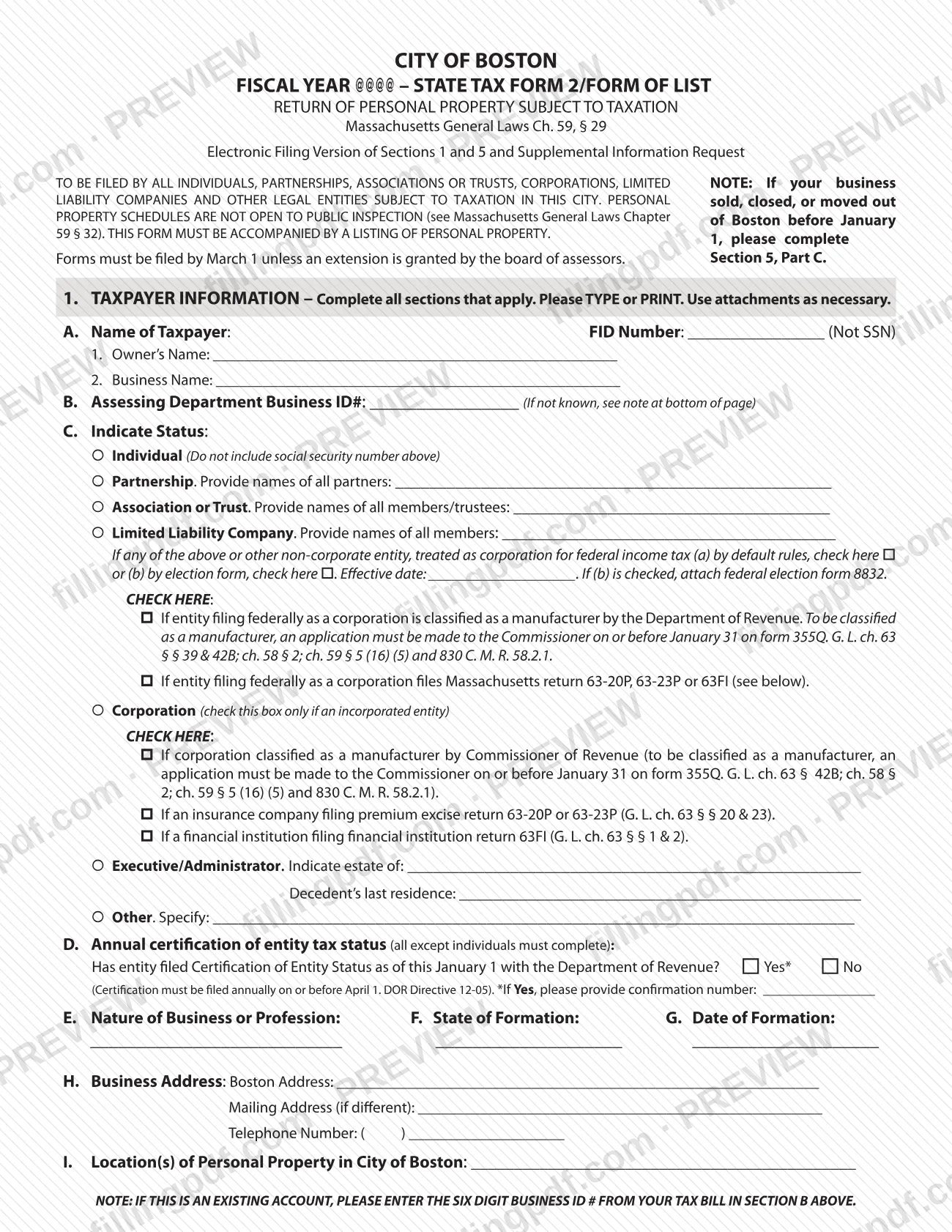
The Taxpayer Information Form is the City of Boston form that records who owns taxable personal property in the city and certifies the list. It is the electronic filing version of Sections 1 and 5 of State Tax Form 2/Form of List, Return of Personal Property Subject to Taxation, under Massachusetts General Laws Ch. 59, § 29, plus a Supplemental Information Request.
Section 1, Taxpayer Information, asks for the taxpayer's name and FID number (not a Social Security number), the Assessing Department Business ID#, the legal status of the taxpayer, the annual certification of entity tax status, the nature of the business, state and date of formation, the Boston and mailing addresses, and the location of personal property in the city.
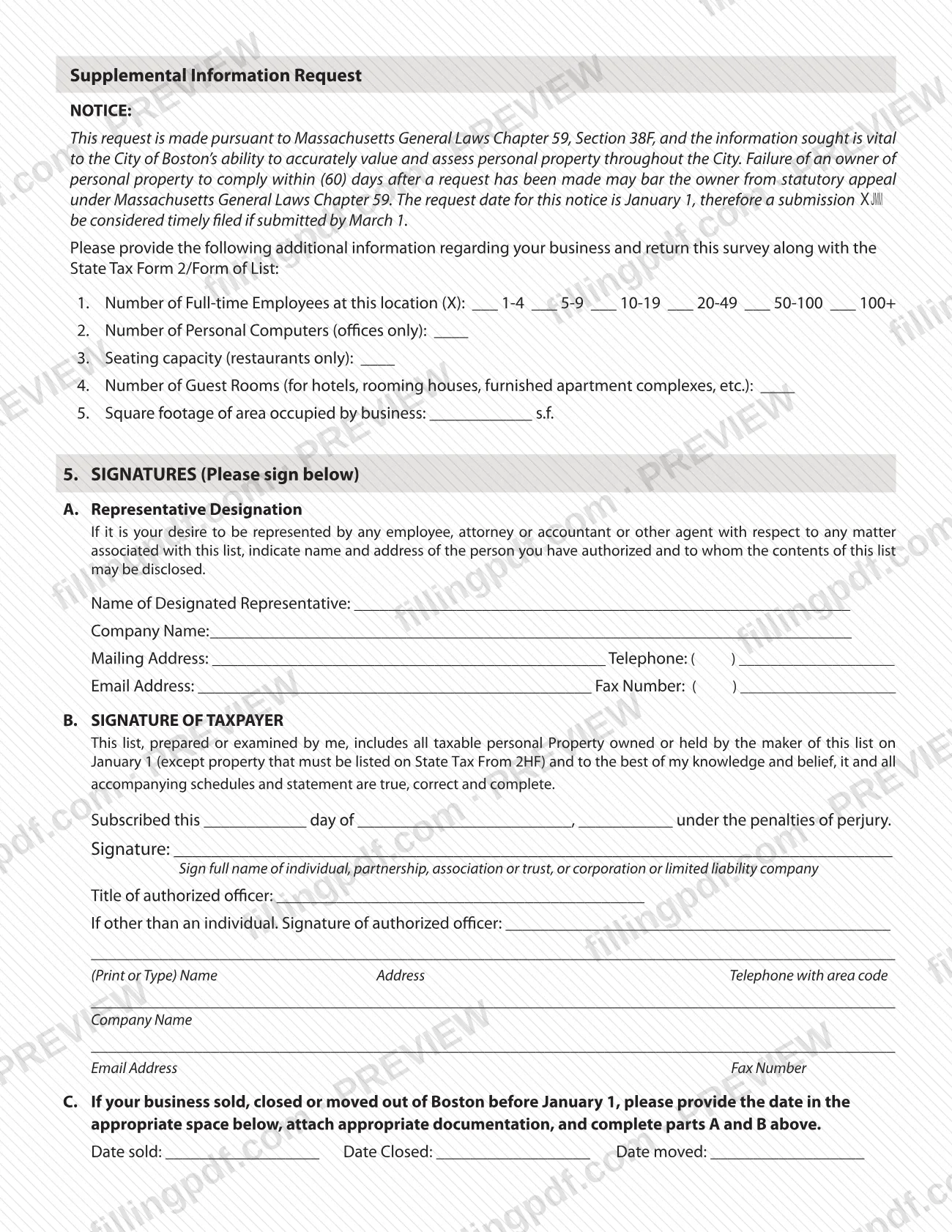
The Supplemental Information Request asks for employee counts, computers, seating capacity, guest rooms and square footage. It is made under Massachusetts General Laws Chapter 59, Section 38F. Section 5 holds the representative designation, the taxpayer's signature under the penalties of perjury and, in Part C, the dates a business sold, closed or moved.
The form must be accompanied by a listing of personal property. Personal property schedules are not open to public inspection (Massachusetts General Laws Chapter 59, § 32).
Who needs to file Taxpayer Information Form – Boston, MA?
The form is to be filed by all individuals, partnerships, associations or trusts, corporations, limited liability companies and other legal entities subject to taxation in Boston. The City of Boston says that if your business owns personal property, you file a State Tax Form 2/Form of List every year, and this form is part of that filing.
- Individuals complete the form but must not enter a Social Security number in the FID field.
- Partnerships, associations, trusts and LLCs list all partners, members or trustees.
- Corporations, including insurance companies and financial institutions, check the matching box in Section 1.C.
- Executors and administrators indicate the estate and the decedent's last residence.
- Businesses that sold, closed or moved out of Boston before January 1 complete Section 5, Part C, along with parts A and B.
The form covers property owned or held on January 1, except property that must be listed on State Tax Form 2HF. Anyone you authorize, such as an employee, attorney or accountant, can be named in Section 5.A as designated representative.
When to file Taxpayer Information Form – Boston, MA
File by March 1 each year, unless the board of assessors grants an extension. The form lists property owned or held on January 1, and the request date of the Supplemental Information Request is January 1, so a submission is timely if made by March 1.
An owner who does not comply within 60 days after the request has been made may be barred from statutory appeal under Massachusetts General Laws Chapter 59.
If your business sold, closed or moved out of Boston before January 1, complete Section 5, Part C with the date sold, closed or moved and attach documentation. The entity certification question in Section 1.D refers to a Certification of Entity Status that must be filed annually with the Department of Revenue on or before April 1.
Documents you need
- A listing of personal property: the form states that it must be accompanied by one.
- A completed Personal Property Asset Form in Excel, when you file by email.
- Copies of leases, exemption documents and other supporting documents, when they apply to your business and you file by email.
- Federal election form 8832, only if an entity treated as a corporation for federal income tax by election (box (b) in Section 1.C) is checked.
- Appropriate documentation of the sale, closing or move, when your business sold, closed or moved out of Boston before January 1 (Section 5, Part C).
How to fill out Taxpayer Information Form – Boston, MA
Enter taxpayer name and FID
In Section 1.A, enter the FID Number (not an SSN), the owner's name on line 1 and the business name on line 2.
Add your Business ID number
In Section B, enter the Assessing Department Business ID#. For an existing account, use the six-digit business ID number from your tax bill.
Indicate your status
In Section C, check Individual, Partnership, Association or Trust, Limited Liability Company, Corporation, Executor/Administrator or Other. List partners, members or trustees where asked, and for an estate give the decedent's last residence.
Mark corporate tax treatment
Check the boxes that apply for entities treated as corporations, manufacturer classification or Massachusetts returns 63-20P, 63-23P or 63FI. If you check the election box, enter the effective date and attach federal form 8832.
Answer the annual certification
In Section D, all entities except individuals state whether the Certification of Entity Status was filed as of this January 1. If Yes, give the confirmation number.
Describe the business and addresses
Complete Sections E through I: nature of business, state and date of formation, Boston address, mailing address if different, telephone number and the location(s) of personal property in Boston.
Complete the Supplemental Information Request
Answer items 1 through 5: full-time employees by range, personal computers (offices only), seating capacity (restaurants only), guest rooms (hotels and similar) and square footage occupied.
Name a representative if needed
In Section 5.A, enter the name, company, mailing address, telephone, email and fax of any employee, attorney, accountant or agent you authorize.
Sign and date the form
In Section 5.B, enter the day, month and year and sign under the penalties of perjury. If you are not an individual, add the title and the authorized officer's signature and contact details.
Report a sale, closing or move
If your business sold, closed or moved out of Boston before January 1, enter the dates in Section 5, Part C and attach documentation.
Review and download the PDF
Check every section that applies, then download or print the completed PDF from FillingPDF and assemble it with your personal property listing as described under How to submit.
How to submit Taxpayer Information Form – Boston, MA
The City of Boston asks all personal property owners to file electronically, either online or by email. A paper copy is available only to owners who show a hardship that prevents electronic filing.
- Online: file through the online form linked on the City of Boston page at https://www.boston.gov/node/716. If you filed online last year, your username and password are the same. First-time online filers get a username and password in the city's January mailing.
- By email: send a completed and signed Taxpayer Information Form, a completed Personal Property Asset Form in Excel and, where they apply, copies of leases, exemption documents and other supporting documents to the email address shown on the city's page. Put your business name in the subject line, for example ACME LLC.
- Paper copy: to request one, contact the Assessing Department's Business Personal Property Unit at [email protected] or 617-635-1165. The city page lists 1 City Hall Square, Room 301, Boston, MA 02201.
FillingPDF lets you fill out and download the PDF; submission follows the City of Boston channels above.
Common mistakes to avoid
- Entering a Social Security number in the FID Number field; the form says the FID is not an SSN, and individuals must not include one.
- Submitting the form without a listing of personal property, which the form says must accompany it.
- Leaving the six-digit Business ID# blank on an existing account instead of copying it from your tax bill into Section B.
- Checking the Corporation box for an unincorporated entity; it is for an incorporated entity only.
- Checking the election box for an entity treated as a corporation without attaching federal election form 8832.
- Missing the March 1 deadline when no extension was granted by the board of assessors.
- Signing without a title and an authorized officer's signature when the taxpayer is not an individual.
- Not completing Section 5, Part C when the business sold, closed or moved out of Boston before January 1.
Frequently asked questions
What is the Boston Taxpayer Information Form?
It is the City of Boston form identifying the owner of business personal property, filed with the State Tax Form 2/Form of List. It covers Sections 1 and 5 of that return plus a Supplemental Information Request, and must be accompanied by a listing of personal property.
When is the Boston personal property tax form due?
March 1, unless the board of assessors grants an extension. The form covers property owned or held on January 1, and a submission made by March 1 is considered timely.
Who has to file the Taxpayer Information Form in Boston?
All individuals, partnerships, associations or trusts, corporations, limited liability companies and other legal entities subject to taxation in Boston. The city says that if your business owns personal property, you file a State Tax Form 2/Form of List every year.
Can I file the Boston Taxpayer Information Form online?
Yes. The City of Boston accepts online filing with a username and password, which first-time filers receive in the January mailing. You can also email the signed form with supporting documents. Paper copies are only for owners with a hardship preventing electronic filing.
What do I send by email with the Taxpayer Information Form?
Send a completed, signed Taxpayer Information Form, a completed Personal Property Asset Form in Excel and, when they apply, copies of leases, exemption documents and other supporting documents. Put your business name in the email subject line.
Should I put my Social Security number on the form?
No. The FID Number field says it is not for an SSN, and individuals are told not to include a Social Security number there. Existing accounts enter the six-digit business ID from their tax bill in Section B.
What if my business closed or moved before January 1?
Complete Section 5, Part C with the date sold, closed or moved, attach appropriate documentation, and complete parts A and B of Section 5. The form's note at the top points to Part C for this situation.
Can I fill out the Taxpayer Information Form on FillingPDF?
Yes. On FillingPDF you can fill out the PDF online and download or print it. FillingPDF is independent of the City of Boston and does not file it; you submit through the city's online, email or hardship channels.
Ready to fill out Taxpayer Information Form – Boston, MA?
Fill out Taxpayer Information Form – Boston, MA now