
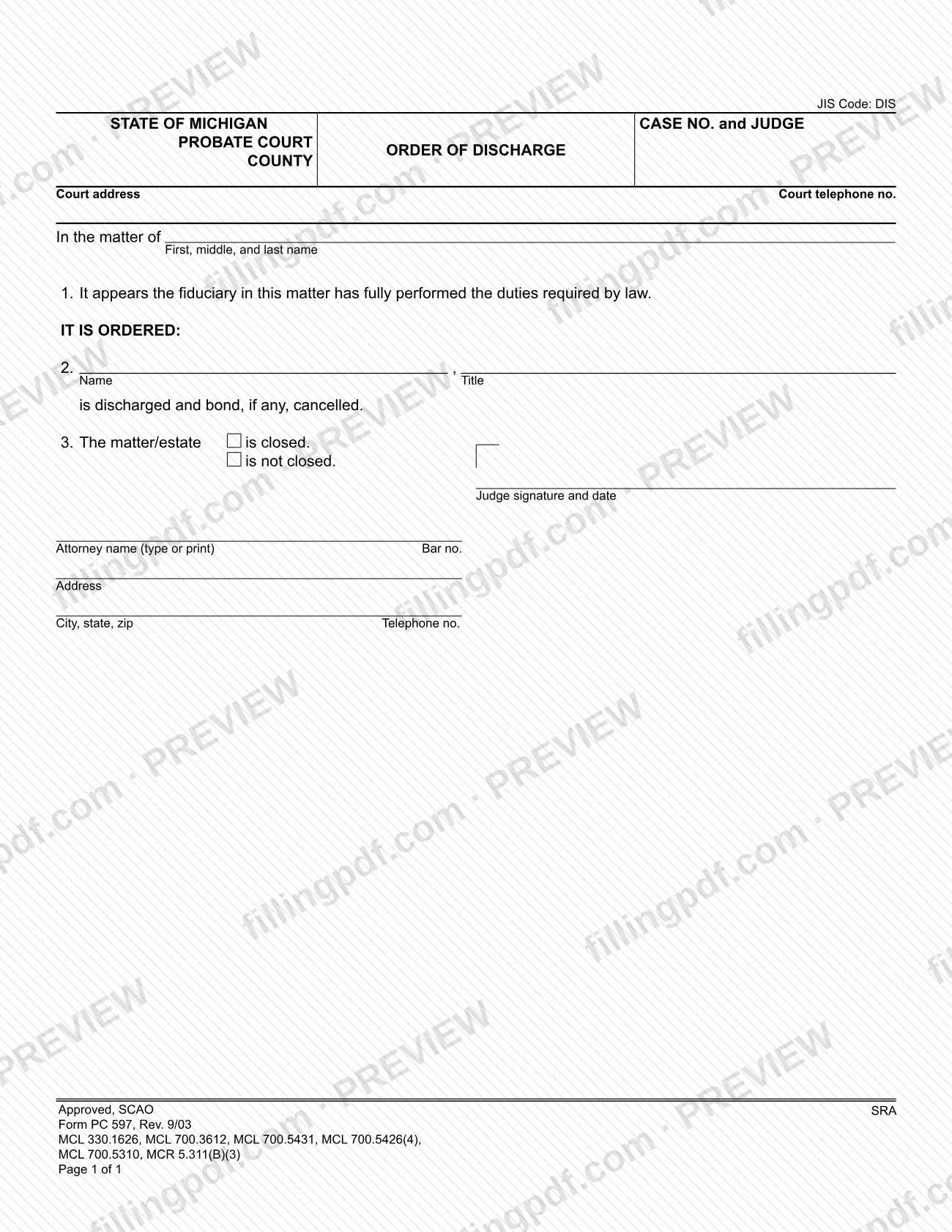
PC 597 is the Order of Discharge used in Michigan probate court, a form approved by the State Court Administrative Office (SCAO). It records the court's finding that a fiduciary has fully performed the duties required by law, discharges that fiduciary, cancels any bond and states whether the matter or estate is closed. On this page you can fill out the form online on FillingPDF and download or print the completed PDF. The official PDF is published by the Michigan courts at courts.michigan.gov.
Last updated
What is PC 597?
Form PC 597, Order of Discharge, is the Michigan probate court order that finds a fiduciary has fully performed the duties required by law, discharges that fiduciary, cancels any bond and records whether the matter or estate is closed.
The State Court Administrative Office (SCAO) approves the form for the State of Michigan Probate Court. It is a one-page court order, not an application: the judge signs it. The printed text has three numbered parts:
- Line 1 states that it appears the fiduciary in the matter has fully performed the duties required by law.
- Line 2 orders that the named person, with the title entered, is discharged and bond, if any, is cancelled.
- Line 3 states that the matter or estate either is closed or is not closed.
The top of the form carries the JIS Code (DIS), the case number and judge, the county, the court address and telephone number, and the name of the person in the matter. At the bottom is a block for the attorney's name, bar number, address and telephone number. The form lists these authorities as its basis: MCL 330.1626, MCL 700.3612, MCL 700.5431, MCL 700.5426(4), MCL 700.5310 and MCR 5.311(B)(3). The printed revision is Rev. 9/03.
Who needs to file PC 597?
The form is a judge's order in a Michigan probate court case, so the people who handle it are the fiduciary named in the order, the court, and the attorney who prepares it. The form does not say who must submit it or who may.
- The fiduciary. The person named on line 2, with the title entered next to the name, is the one discharged. The form refers to "the fiduciary in this matter" and to bond, if any, so it applies to a probate matter in which a fiduciary was appointed.
- The judge. The judge signs and dates the order. The form has a case number and judge line at the top.
- The attorney. The bottom block asks for the attorney's name, bar number, address, city, state, ZIP code and telephone number.
The form gives no rule on who may sign for someone else and lists no exclusions. For questions about whether the order fits a particular case, contact the probate court named in the case.
When to file PC 597
The trigger printed on the form is the court's finding on line 1: it appears the fiduciary has fully performed the duties required by law. The order is used once that point is reached in the case. The form sets no deadline and no filing window of its own.
The form also gives the court two outcomes on line 3: the matter or estate is closed, or it is not closed. If the matter stays open, the same order still discharges the fiduciary named on line 2 and cancels bond, if any. For timing questions in a specific case, check the statutes the form lists (MCL 330.1626, MCL 700.3612, MCL 700.5431, MCL 700.5426(4), MCL 700.5310 and MCR 5.311(B)(3)) or ask the probate court.
How to fill out PC 597
Enter the case number and judge
At the top right, write the CASE NO. and JUDGE exactly as they appear on the court's file for the matter.
Enter the county and court details
Fill in the COUNTY, the Court address and the Court telephone no. of the Michigan probate court handling the case.
Identify the matter
Under In the matter of, enter the first, middle and last name of the person or estate the case concerns.
Read the finding on line 1
Line 1 is preprinted: it appears the fiduciary in this matter has fully performed the duties required by law. Confirm it fits the case before the judge signs.
Enter the fiduciary on line 2
Under line 2, write the fiduciary's Name and Title. The printed order discharges that person and cancels bond, if any.
Mark the matter closed or not
On line 3, check is closed or is not closed for the matter or estate.
Leave the judge's signature to the court
The Judge signature and date block is completed by the judge when the order is entered.
Complete the attorney block
If an attorney prepares the order, enter the attorney name, Bar no., address, city, state, ZIP code and telephone number at the bottom.
Review and download the completed PDF
Check names, title, case number and the line 3 box, then download or print the completed PDF from FillingPDF and deliver it to the probate court as the court directs.
How to submit PC 597
The form names no submission channel, address or portal of its own. It identifies the probate court in the case by county, case number, judge and court address, so the order belongs with that court's file for the matter.
- Court copy: The order takes effect as a court order only once the judge signs and dates it in the Judge signature and date block.
- Court address and telephone: The form has spaces for both at the top. Use them to contact the court that holds the case.
- Attorney block: If an attorney prepared the order, the attorney's name, bar number, address and telephone number go at the bottom.
Ask the probate court clerk how the court wants the proposed order delivered, because the form does not say. FillingPDF lets you fill out and download the PDF; submission follows the court's channels.
Common mistakes to avoid
- Leaving the case number and judge boxes at the top blank, so the order cannot be matched to the probate case.
- Entering a name on line 2 without the title, when the form asks for both the name and the title of the person discharged.
- Marking neither is closed nor is not closed on line 3, or marking both.
- Choosing is closed on line 3 for a matter that remains open, or the reverse.
- Treating the order as complete without the judge's signature and date in the Judge signature and date block.
- Omitting the court address and telephone number, or the county, at the top of the form.
- Leaving out the attorney's bar number or contact details in the bottom block when an attorney prepared the order.
Frequently asked questions
What is PC 597?
PC 597 is the Michigan probate court Order of Discharge, approved by the State Court Administrative Office (SCAO). The judge uses it to find that a fiduciary has fully performed the duties required by law, discharge the fiduciary, cancel any bond and state whether the matter or estate is closed.
Who signs the Order of Discharge?
The judge signs and dates it in the Judge signature and date block. The form also has a block for the attorney's name, bar number, address and telephone number, but the signature that makes it a court order is the judge's.
Does PC 597 close the estate?
Only if line 3 is marked "is closed." The form gives two choices for the matter or estate: "is closed" or "is not closed." Either way, line 2 discharges the named fiduciary and cancels bond, if any.
Does the order cancel the bond?
Yes. Line 2 reads that the named fiduciary "is discharged and bond, if any, cancelled." If no bond was posted in the matter, nothing needs cancelling, and the discharge language still applies.
Can I fill out PC 597 online?
Yes. You can fill out the PDF online on FillingPDF and download or print it. FillingPDF does not file anything with the court: the completed order goes to the probate court through the channels that court uses.
Where do I file PC 597?
The form has no filing instructions of its own. It identifies the probate court by county, case number, judge and court address, so contact the clerk of the court that holds the case to learn how it accepts proposed orders.
Which laws does PC 597 cite?
The form lists MCL 330.1626, MCL 700.3612, MCL 700.5431, MCL 700.5426(4), MCL 700.5310 and MCR 5.311(B)(3). The form prints these citations without explanation, so read them or ask the court for how they apply to your case.
Ready to fill out PC 597?
Fill out PC 597 now