
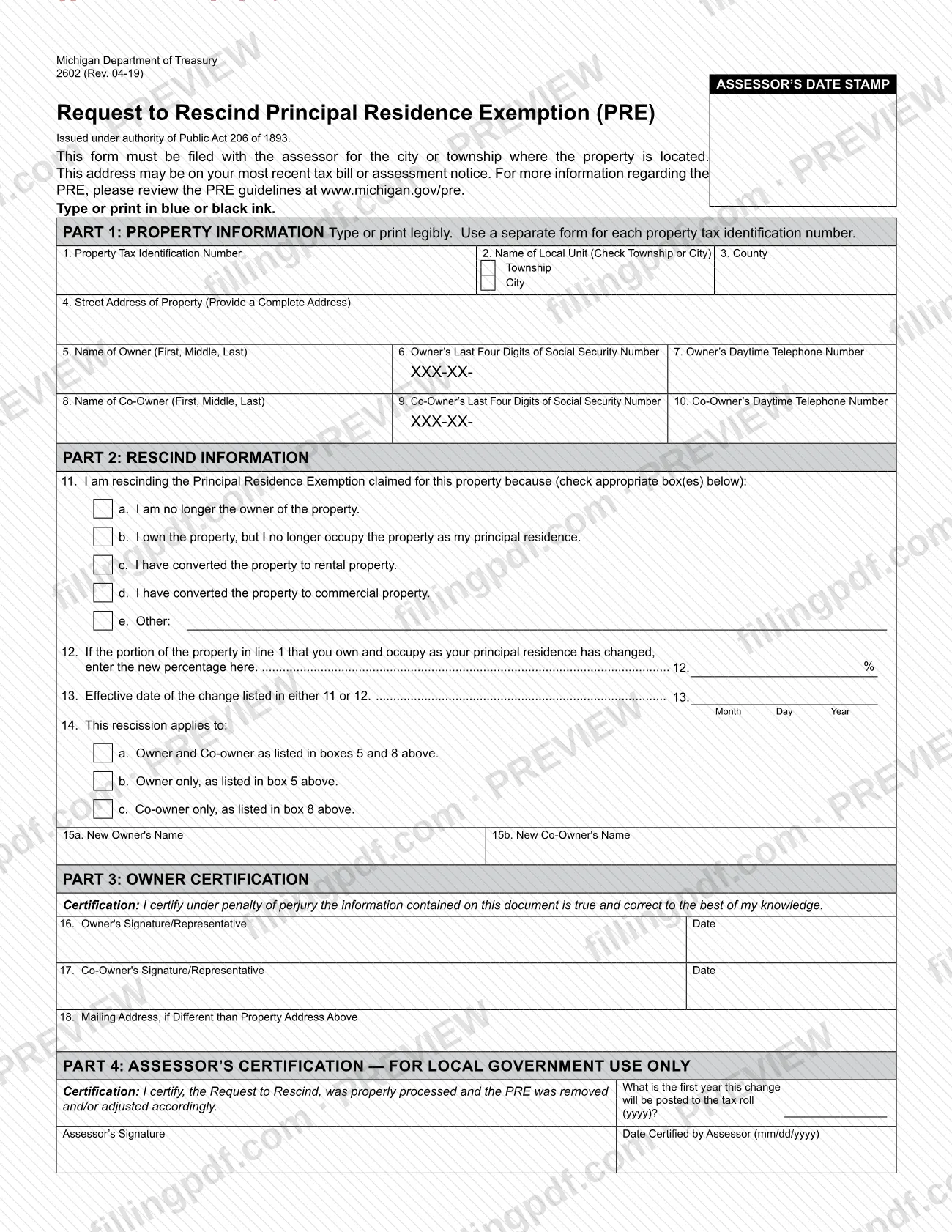
Request to Rescind Principal Residence Exemption (Form 2602) is the Michigan Department of Treasury form that an owner files with the local assessor to remove a Principal Residence Exemption (PRE) after selling a home, moving out or converting it to another use, or to change the percentage of the home that qualifies. The City of Wyoming lists it among its assessing forms, so it is one of the Wyoming property tax forms a homeowner in the city may need. On this page you can fill out the form online on FillingPDF and download or print the completed PDF; the completed form is mailed to the assessor, and the original PDF is published on the City of Wyoming website.
Last updated
What is 2602?
Request to Rescind Principal Residence Exemption (Form 2602) is the Michigan Department of Treasury form that an owner files with the local assessor to remove a Principal Residence Exemption (PRE) from a property or to change the percentage of the home that qualifies.
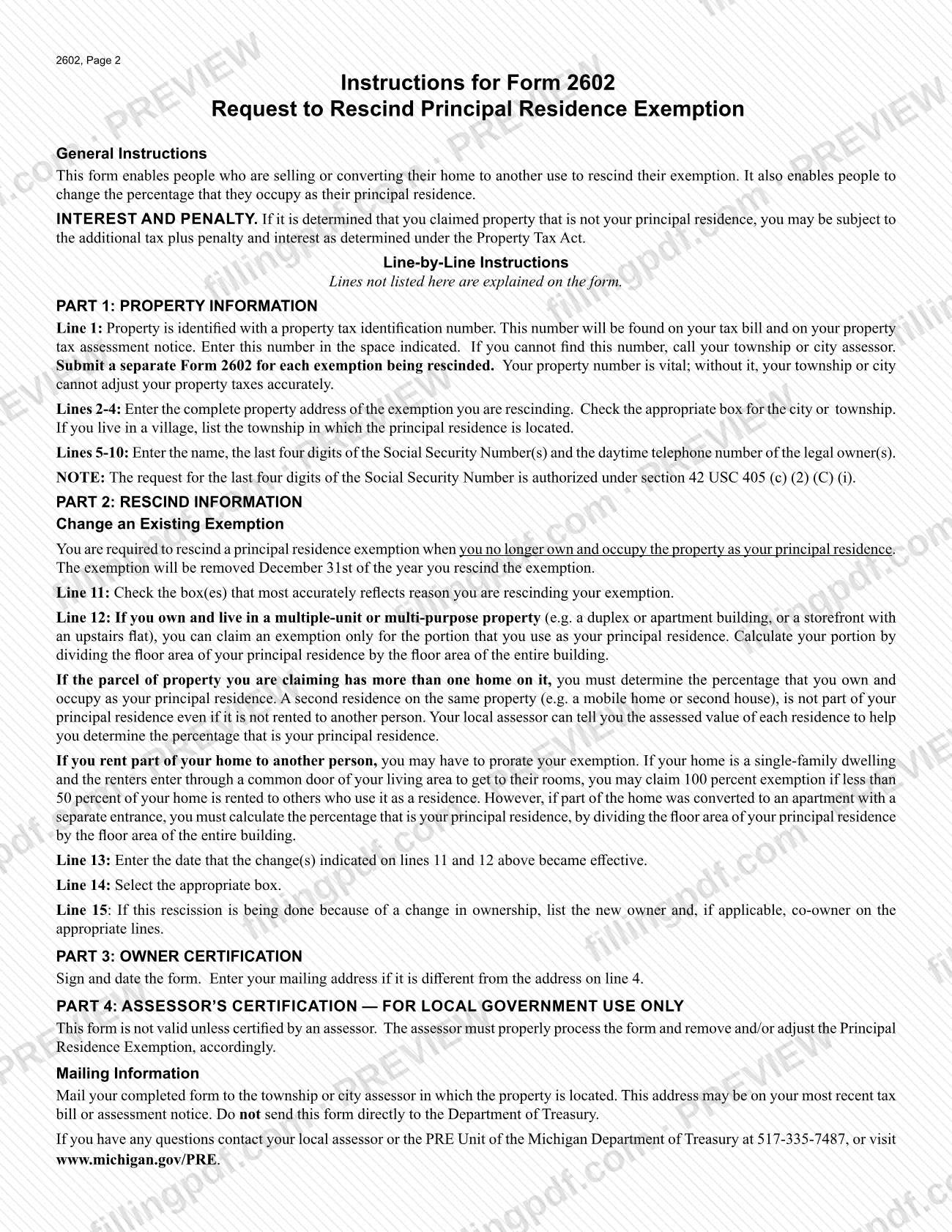
The form is issued under authority of Public Act 206 of 1893. According to its instructions, it enables people who are selling or converting their home to another use to rescind the exemption, and it also lets people change the percentage of the property they occupy as their principal residence.
The form has four parts: Part 1, Property Information; Part 2, Rescind Information; Part 3, Owner Certification, signed under penalty of perjury; and Part 4, Assessor's Certification, which is for local government use only. The form is not valid unless an assessor certifies it, and the assessor removes or adjusts the exemption accordingly.
The City of Wyoming Assessor/Treasurer publishes Form 2602 on its assessing forms page, next to related PRE documents such as the Principal Residence Exemption Affidavit (Form 2368) and the Conditional Rescission of Principal Residence Exemption (Form 4640). Form 2602 is the request to rescind or reduce an existing exemption.
The instructions warn that if it is determined you claimed property that is not your principal residence, you may be subject to additional tax plus penalty and interest as determined under the Property Tax Act.
Who needs to file 2602?
Owners who have claimed a Principal Residence Exemption on a Michigan property use Form 2602 when the exemption no longer applies in full. The instructions say you are required to rescind the exemption when you no longer own and occupy the property as your principal residence. The reasons printed on line 11 are:
- you are no longer the owner of the property;
- you still own the property but no longer occupy it as your principal residence;
- you have converted the property to rental property;
- you have converted the property to commercial property;
- another reason, written in next to Other.
You also use the form if the part of the property you own and occupy as your principal residence has changed. Enter the new percentage on line 12.
Line 14 shows who the rescission covers: the owner and co-owner, the owner only, or the co-owner only. If ownership changed, line 15 asks for the new owner and, if applicable, the new co-owner. The signature lines are labeled for the owner or a representative.
Use a separate form for each property tax identification number. Do not send the form to the Department of Treasury; it goes to the assessor.
When to file 2602
File Form 2602 when you no longer own and occupy the property as your principal residence, because the instructions say you are required to rescind the exemption at that point. The same form is used when the share of the property you occupy as your principal residence changes.
The exemption will be removed December 31st of the year you rescind it. Line 13 asks for the effective date of the change reported on line 11 or line 12, so have that date ready before you start. Part 4 of the form records the first year the change will be posted to the tax roll, which the assessor completes after processing.
The form prints no other deadline and no processing time. Delay carries a stated risk: if it is determined that you claimed property that is not your principal residence, you may be subject to additional tax plus penalty and interest as determined under the Property Tax Act.
How to fill out 2602
Enter the property tax ID number
Line 1: enter the property tax identification number shown on your tax bill and property tax assessment notice. If you cannot find it, call your township or city assessor.
Complete the local unit and address
Line 2: enter the name of the local unit and check Township or City. Line 3: county. Line 4: the complete street address of the property; if you live in a village, list the township where the residence is located.
Enter owner and co-owner details
Lines 5 to 7: owner's name (first, middle, last), the last four digits of the Social Security number and a daytime phone number. Lines 8 to 10: the same for any co-owner, using the legal owners' details.
Check the reason for rescinding
Line 11: check each box that fits, from a (no longer the owner) to e (Other). Choose the box or boxes that most accurately reflect your reason.
Enter a changed percentage if needed
Line 12: if the portion you own and occupy as your principal residence has changed, enter the new percentage. For a multiple-unit or multi-purpose property, divide the floor area of your principal residence by the floor area of the entire building.
Enter the effective date
Line 13: enter the month, day and year the change reported on line 11 or line 12 became effective.
Select who the rescission covers
Line 14: check owner and co-owner, owner only or co-owner only. If ownership changed, enter the new owner on line 15a and any new co-owner on line 15b.
Sign, date and add a mailing address
Line 16: owner's signature (or representative) and date. Line 17: co-owner's signature and date. Line 18: a mailing address, only if it differs from the property address on line 4.
Leave the assessor's section blank
Do not complete Part 4, Assessor's Certification. The assessor fills it in and certifies the form after processing.
Review and download the completed PDF
Check the property tax ID, the percentage and the effective date, then download or print the completed PDF from FillingPDF. Mail it to the assessor as described under How to submit.
How to submit 2602
Form 2602 is submitted by mail to the assessor of the township or city where the property is located. For a property in the City of Wyoming, that is the city's assessor.
- By mail: send the completed, signed form to the township or city assessor for the property. The address may be on your most recent tax bill or assessment notice; the form gives no street address of its own.
- Do not send it to the state: the instructions say not to send the form directly to the Michigan Department of Treasury.
The form is not valid unless the assessor certifies it in Part 4, so leave that part blank for the assessor. Questions can go to your local assessor or to the PRE Unit of the Michigan Department of Treasury at 517-335-7487, or you can visit www.michigan.gov/PRE. The City of Wyoming lists the form at https://www.wyomingmi.gov/assessing-forms. The form states no filing fee. FillingPDF lets you fill out and download the PDF; submission follows the channels above.
Common mistakes to avoid
- Mailing Form 2602 to the Michigan Department of Treasury; the instructions say to send it to the township or city assessor where the property is located.
- Using one form for several properties; a separate form is needed for each property tax identification number.
- Leaving line 1 blank; without the property tax identification number the city or township cannot adjust your property taxes accurately.
- Checking Township instead of City on line 2, or listing a village; if you live in a village, list the township where the principal residence is located.
- Counting a second house or mobile home on the same parcel as part of your principal residence on line 12, even if it is not rented to anyone.
- Entering 100 percent on line 12 after converting part of the home to an apartment with a separate entrance; the percentage must be calculated by floor area.
- Filling in Part 4; the assessor's certification is for local government use only, and the form is not valid without it.
- Signing without checking that the information is true; Part 3 is certified under penalty of perjury.
- Delaying the request after you stop using the home as your principal residence, which can lead to additional tax plus penalty and interest.
Frequently asked questions
What is Form 2602 used for?
Form 2602 is the Michigan Department of Treasury's Request to Rescind Principal Residence Exemption. You file it with the local assessor to remove the exemption when you sell or convert your home to another use, or to change the percentage of the home you occupy as your principal residence.
Do I have to rescind my principal residence exemption when I sell my home?
Yes. The instructions say you are required to rescind the exemption when you no longer own and occupy the property as your principal residence. Check box a on line 11, enter the effective date on line 13 and list the new owner on line 15a.
When is the exemption removed after I file Form 2602?
The exemption will be removed December 31st of the year you rescind it. Part 4 of the form records the first year the change will be posted to the tax roll, and the assessor fills that in after processing.
Where do I send Form 2602 in Wyoming, MI?
Mail it to the assessor for the city or township where the property is located; for a property in the City of Wyoming, that is the city's assessor. The address may be on your tax bill or assessment notice. Do not send it directly to the Michigan Department of Treasury.
How do I calculate the percentage on line 12?
Divide the floor area of your principal residence by the floor area of the entire building. A second residence on the same parcel, such as a mobile home or second house, is not part of your principal residence. Your local assessor can give the assessed value of each residence.
Can I fill out Form 2602 online?
Yes. You can fill out the PDF online on FillingPDF and download or print it. FillingPDF is an independent service, not connected to the City of Wyoming or the State of Michigan, and it does not file the form; you mail it to the assessor yourself.
What happens if I claimed an exemption I did not qualify for?
The instructions say that if it is determined you claimed property that is not your principal residence, you may be subject to the additional tax plus penalty and interest as determined under the Property Tax Act.
Do I need a separate Form 2602 for each property?
Yes. Part 1 says to use a separate form for each property tax identification number, and the instructions say to submit a separate Form 2602 for each exemption being rescinded.
Ready to fill out 2602?
Fill out 2602 now