
Schedule M1RENT, Renter’s Credit, is the Minnesota Department of Revenue schedule that works out how much renter’s credit you can claim for 2025. Full-year and part-year Minnesota residents who paid rent in a building with property taxes (or payments in lieu of them) payable in 2025 use it with Form M1 and Schedule M1REF. On this page you can fill out the form online on FillingPDF and download or print the completed PDF; the form and its instructions are published by the Department of Revenue.
Last updated
What is Schedule M1RENT?
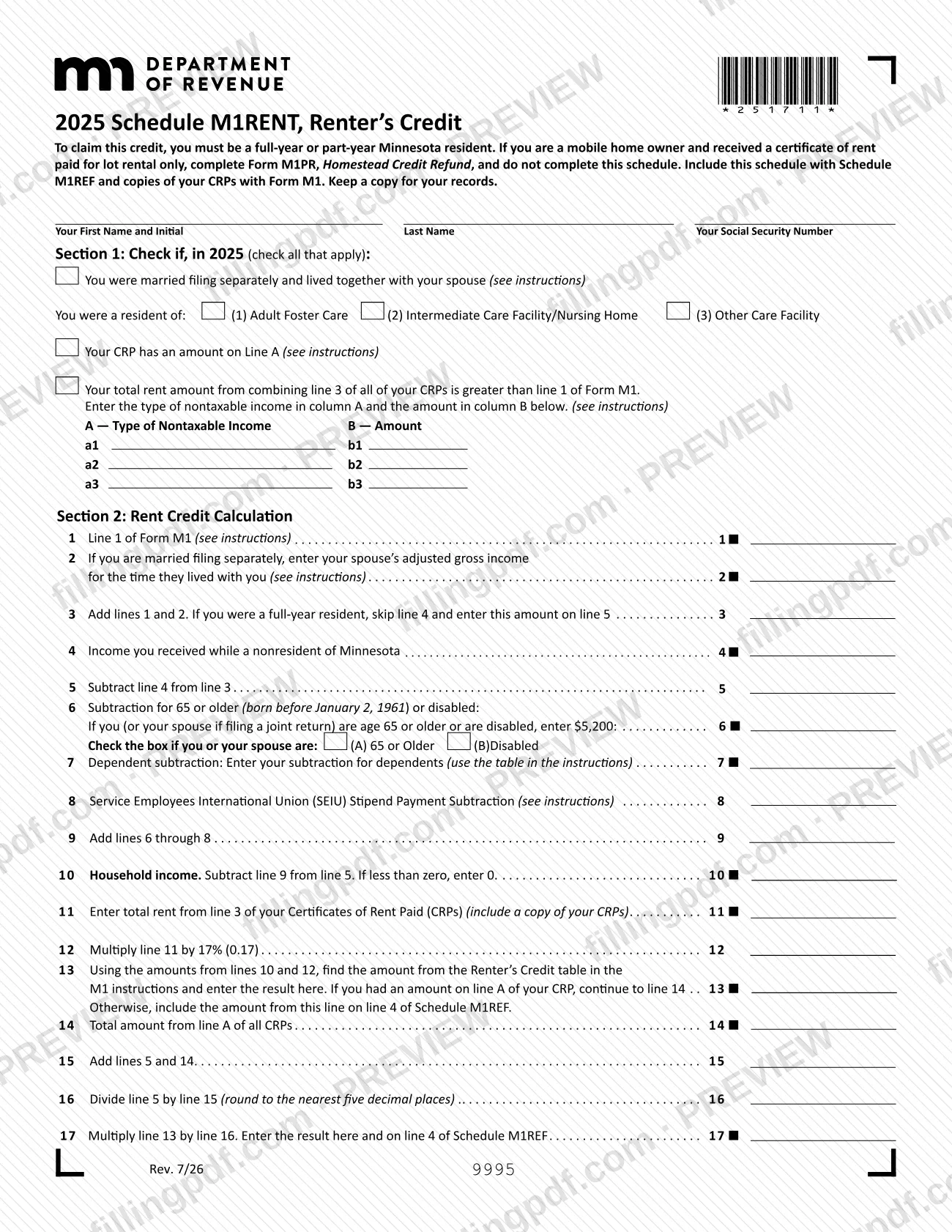
Schedule M1RENT, Renter’s Credit, is the Minnesota Department of Revenue schedule used to determine the amount of your renter’s credit for 2025; the result goes on line 4 of Schedule M1REF and is filed with Form M1.
The schedule has two parts. Section 1 collects information that helps the Department process your return: whether you were married filing separately and lived with your spouse, whether you lived in a care facility, whether your Certificate of Rent Paid (CRP) shows an amount on Line A, whether your rent is greater than your income, and the nontaxable income you received. The instructions say Section 1 is not used in the calculation. Section 2, lines 1 through 17, is the calculation itself.
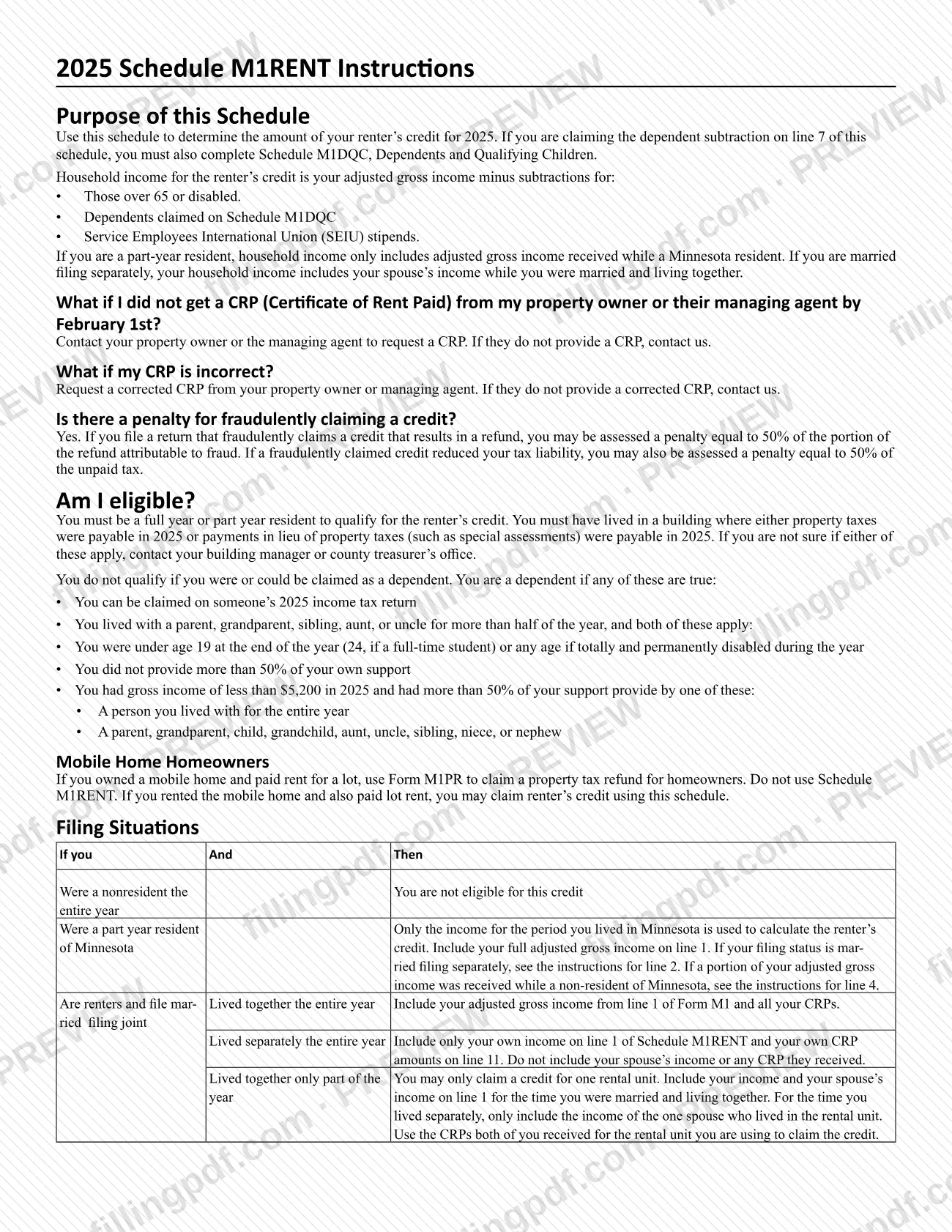
Household income for the renter’s credit is your adjusted gross income minus subtractions for people who are 65 or older (born before January 2, 1961) or disabled, dependents claimed on Schedule M1DQC, Dependents and Qualifying Children, and Service Employees International Union (SEIU) stipends. For a part-year resident, only income received while a Minnesota resident counts. The rent side comes from line 3 of your CRPs.
M1RENT is not the form for mobile home owners who received a certificate of rent paid for lot rental only. They complete Form M1PR, Homestead Credit Refund, instead.
Who needs to file Schedule M1RENT?
Full-year or part-year Minnesota residents who rented a home use Schedule M1RENT to claim the renter’s credit. You must have lived in a building where property taxes or payments in lieu of property taxes, such as special assessments, were payable in 2025. If you are unsure, ask your building manager or county treasurer’s office.
You do not qualify if:
- you were a nonresident for the entire year;
- you were or could be claimed as a dependent;
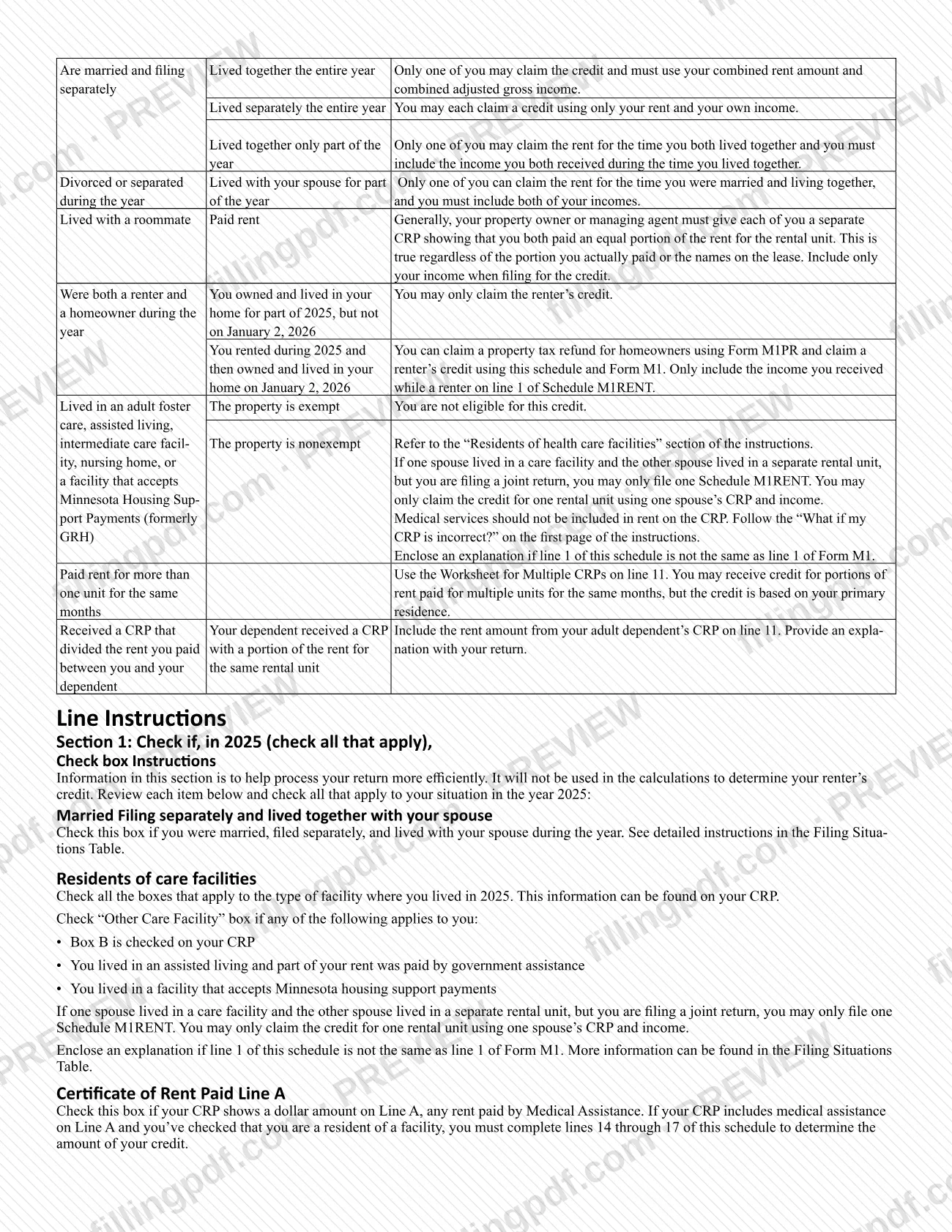
- all of your rent was paid by Medical Assistance (Medicaid), Supplemental Security Income, Minnesota Supplemental Aid or Minnesota Housing Support;
- the property is exempt from property taxes (for example, an exempt adult foster care, assisted living, intermediate care or nursing home property).
Mobile home owners who paid lot rent only use Form M1PR, not this schedule; if you rented the mobile home and also paid lot rent, you may use M1RENT. Married couples, divorced or separated people, roommates and people who rented more than one unit follow the Filing Situations table in the instructions. If you claim the dependent subtraction on line 7, you must also complete Schedule M1DQC.
When to file Schedule M1RENT
Complete Schedule M1RENT when you claim the 2025 renter’s credit, because it is included with Form M1 and Schedule M1REF. The schedule prints no due date of its own, so it is submitted when the return it accompanies is submitted.
Get your Certificate of Rent Paid (CRP) first. Your property owner or managing agent should provide it by February 1st. If you have not received one, ask them for it, and contact the Minnesota Department of Revenue if they do not provide it. If your CRP is incorrect, request a corrected CRP the same way.
Timing also matters for people who both rented and owned: if you rented during 2025 and then owned and lived in your home on January 2, 2026, you may claim the renter’s credit on this schedule and a homeowner’s property tax refund on Form M1PR, counting only the income you received while a renter on line 1.
Documents you need
- Copies of your Certificates of Rent Paid (CRPs): required with the schedule; line 11 comes from line 3 of your CRPs.
- Form M1 and Schedule M1REF: the schedule is included with them, and the credit is entered on line 4 of Schedule M1REF.
- Schedule M1DQC, Dependents and Qualifying Children: required only if you claim the dependent subtraction on line 7.
- An explanation: enclose one if line 1 of this schedule is not the same as line 1 of Form M1.
- A separate statement of nontaxable income types and amounts: only if the three lines in Section 1 are not enough.
- An explanation of the funds used, if your rent was paid with funds other than the nontaxable income types listed in the instructions.
- An explanation with your return, if your adult dependent received a CRP covering part of the rent you paid for the same rental unit.
How to fill out Schedule M1RENT
Enter your name and Social Security number
At the top, enter your first name and initial, last name and Social Security number.
Check the Section 1 boxes
Check all that apply: married filing separately and lived with your spouse; a resident of Adult Foster Care, Intermediate Care Facility/Nursing Home or Other Care Facility; a CRP with an amount on Line A; or total CRP rent greater than line 1 of Form M1. These boxes help process your return and are not used in the calculation.
List your nontaxable income
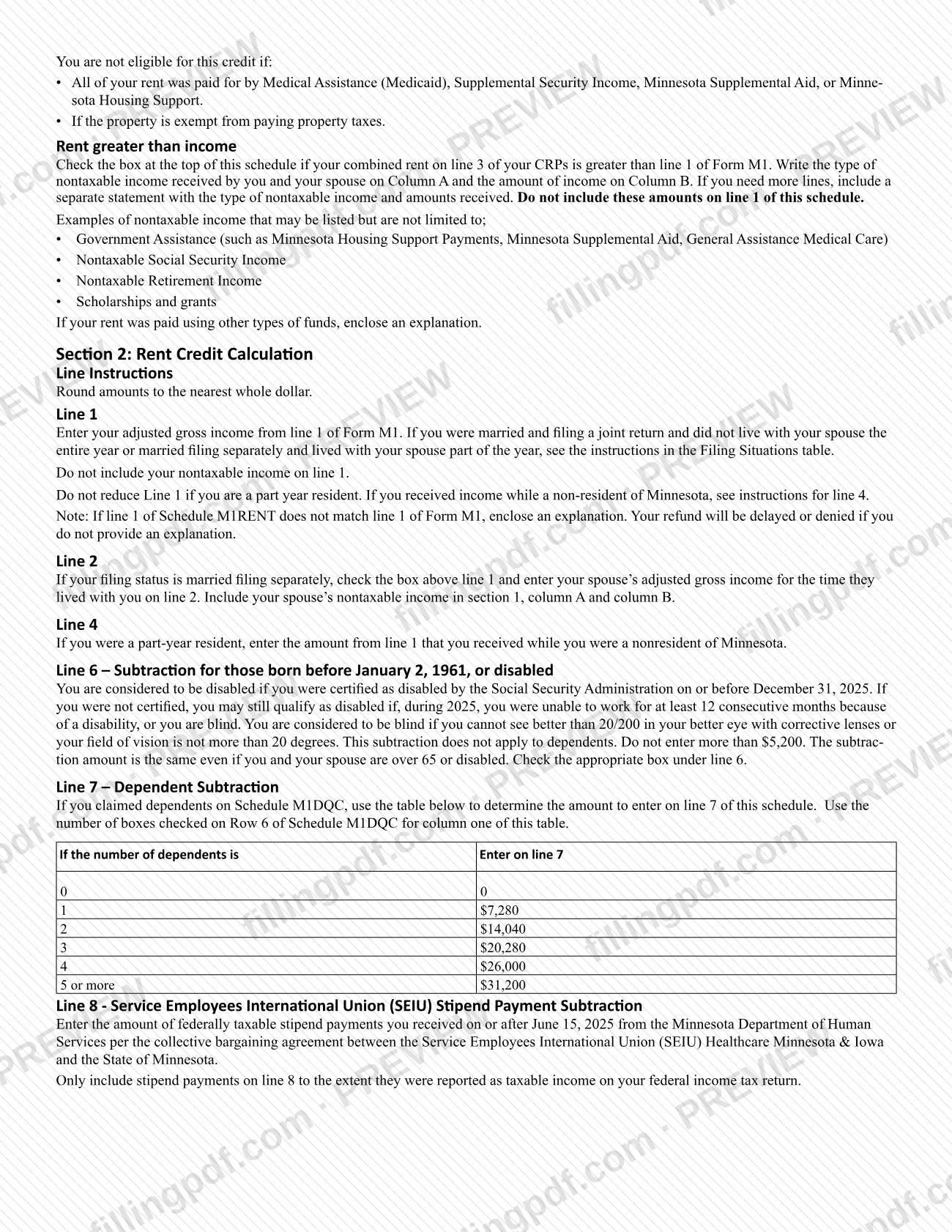
If rent is greater than income, enter each type of nontaxable income in column A (a1 to a3) and its amount in column B (b1 to b3). Attach a separate statement if you need more lines, and do not put these amounts on line 1.
Enter income on lines 1 and 2
Line 1: your adjusted gross income from line 1 of Form M1, without nontaxable income. Line 2: only if married filing separately, your spouse’s adjusted gross income for the time they lived with you.
Complete lines 3 through 5
Line 3: add lines 1 and 2; full-year residents skip line 4 and enter this amount on line 5. Line 4: income received while a nonresident of Minnesota. Line 5: subtract line 4 from line 3.
Enter your subtractions on lines 6 to 9
Line 6: the 65-or-older (born before January 2, 1961) or disabled subtraction, with box A or B checked. Line 7: the dependent subtraction from the instructions table, using the boxes checked on Row 6 of Schedule M1DQC. Line 8: SEIU stipend payments received on or after June 15, 2025 that were federally taxable. Line 9: add lines 6 through 8.
Figure household income on line 10
Subtract line 9 from line 5. If the result is less than zero, enter 0.
Enter your total rent on line 11
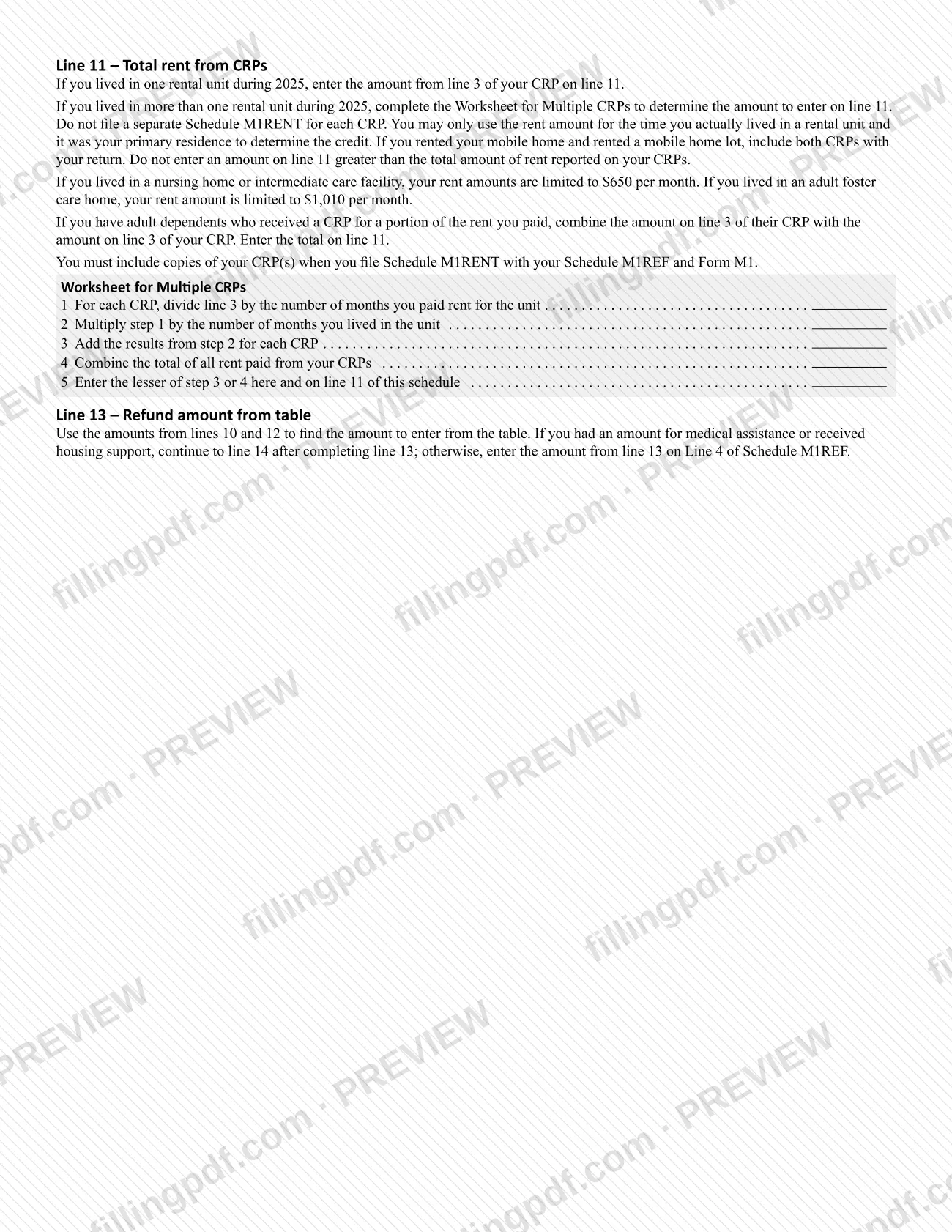
Enter the total from line 3 of your CRPs and include copies. If you lived in more than one unit, use the Worksheet for Multiple CRPs and enter the lesser of step 3 or step 4.
Calculate lines 12 and 13
Line 12: multiply line 11 by the percentage printed on the line. Line 13: use the amounts on lines 10 and 12 to find your result in the Renter’s Credit table in the M1 instructions.
Finish lines 14 to 17 if required
If your CRP has an amount on Line A, enter the total of Line A on line 14, add lines 5 and 14 on line 15, divide line 5 by line 15 on line 16 (five decimal places), and multiply line 13 by line 16 on line 17. Enter line 17 on line 4 of Schedule M1REF; otherwise enter line 13 there.
Review and download the completed PDF
Check every line, the Section 1 boxes and your attachments, then download or print the completed PDF from FillingPDF. Keep a copy and include the schedule with Form M1 as described under How to submit.
How to submit Schedule M1RENT
Schedule M1RENT is not sent on its own: you include it with your Minnesota income tax return. The form tells you to include this schedule with Schedule M1REF and copies of your CRPs with Form M1, and to keep a copy for your records. It prints no separate mailing address, portal or appointment rule.
What goes in the package:
- Form M1 and Schedule M1REF, which receives the result from line 17 (or from line 13 when line A of your CRP is blank) on line 4.
- Copies of your CRPs, as line 11 requires.
- Schedule M1DQC, if you claim the dependent subtraction on line 7.
- Explanations, where the instructions call for them, such as when line 1 differs from line 1 of Form M1. Without that explanation your refund will be delayed or denied.
For questions about a missing or incorrect CRP, contact the Minnesota Department of Revenue. FillingPDF lets you fill out and download the PDF; submission follows the Department of Revenue’s channels for Form M1.
Common mistakes to avoid
- Entering a line 1 amount that differs from line 1 of Form M1 without enclosing an explanation; the instructions say the refund will be delayed or denied.
- Including nontaxable income on line 1; it belongs in Section 1, columns A and B, and is not added to line 1.
- Reducing line 1 because you were a part-year resident; instead enter the income received as a nonresident on line 4.
- Filing a separate Schedule M1RENT for each CRP; use the Worksheet for Multiple CRPs and file one schedule.
- Entering more on line 11 than the total rent reported on your CRPs, or counting months you did not live in the unit as your primary residence.
- Claiming the dependent subtraction on line 7 without completing Schedule M1DQC.
- Stopping at line 13 when your CRP shows an amount on Line A; you must continue to lines 14 through 17.
- Using this schedule as a mobile home owner who received a certificate of rent paid for lot rental only; that situation calls for Form M1PR.
- Leaving out copies of your CRPs when you file the schedule with Schedule M1REF and Form M1.
Frequently asked questions
What is Schedule M1RENT used for?
Schedule M1RENT is the Minnesota Department of Revenue schedule for determining your renter’s credit for 2025. It compares your household income with the rent on your Certificate of Rent Paid, and the result goes on line 4 of Schedule M1REF.
Who is eligible for the Minnesota renter’s credit on M1RENT?
Full-year or part-year Minnesota residents who lived in a building where property taxes or payments in lieu of property taxes were payable in 2025. You do not qualify if you were a nonresident all year, were or could be claimed as a dependent, or had all your rent paid by certain public assistance.
What do I need to attach to Schedule M1RENT?
Include copies of your Certificates of Rent Paid, and file the schedule with Schedule M1REF and Form M1. Add Schedule M1DQC if you claim the dependent subtraction on line 7, and an explanation if line 1 differs from line 1 of Form M1.
What if my landlord did not give me a CRP by February 1st?
Contact your property owner or managing agent and request a CRP. If they do not provide one, contact the Minnesota Department of Revenue. The same steps apply if your CRP is incorrect and you need a corrected one.
Can I claim the credit if I lived in Minnesota for only part of 2025?
Yes, part-year residents can claim it. Enter your full adjusted gross income on line 1, then enter on line 4 the part you received while a nonresident, so only income from the time you lived in Minnesota counts toward household income.
How do I claim the dependent subtraction on line 7?
List your dependents on Schedule M1DQC, then use the table in the M1RENT instructions. The number of boxes checked on Row 6 of Schedule M1DQC tells you which amount to enter on line 7. Without a completed M1DQC you cannot claim it.
Can I fill out Schedule M1RENT online?
Yes. You can fill out the PDF online on FillingPDF and download or print it. FillingPDF is independent of the Minnesota Department of Revenue and does not file anything; you submit the schedule with Form M1 through the Department’s channels.
Is there a penalty for claiming the renter’s credit fraudulently?
Yes. The instructions say a return that fraudulently claims a credit resulting in a refund may be assessed a penalty on the portion of the refund attributable to fraud, and a fraudulently claimed credit that reduced your tax may carry a penalty on the unpaid tax.
Ready to fill out Schedule M1RENT?
Fill out Schedule M1RENT now