
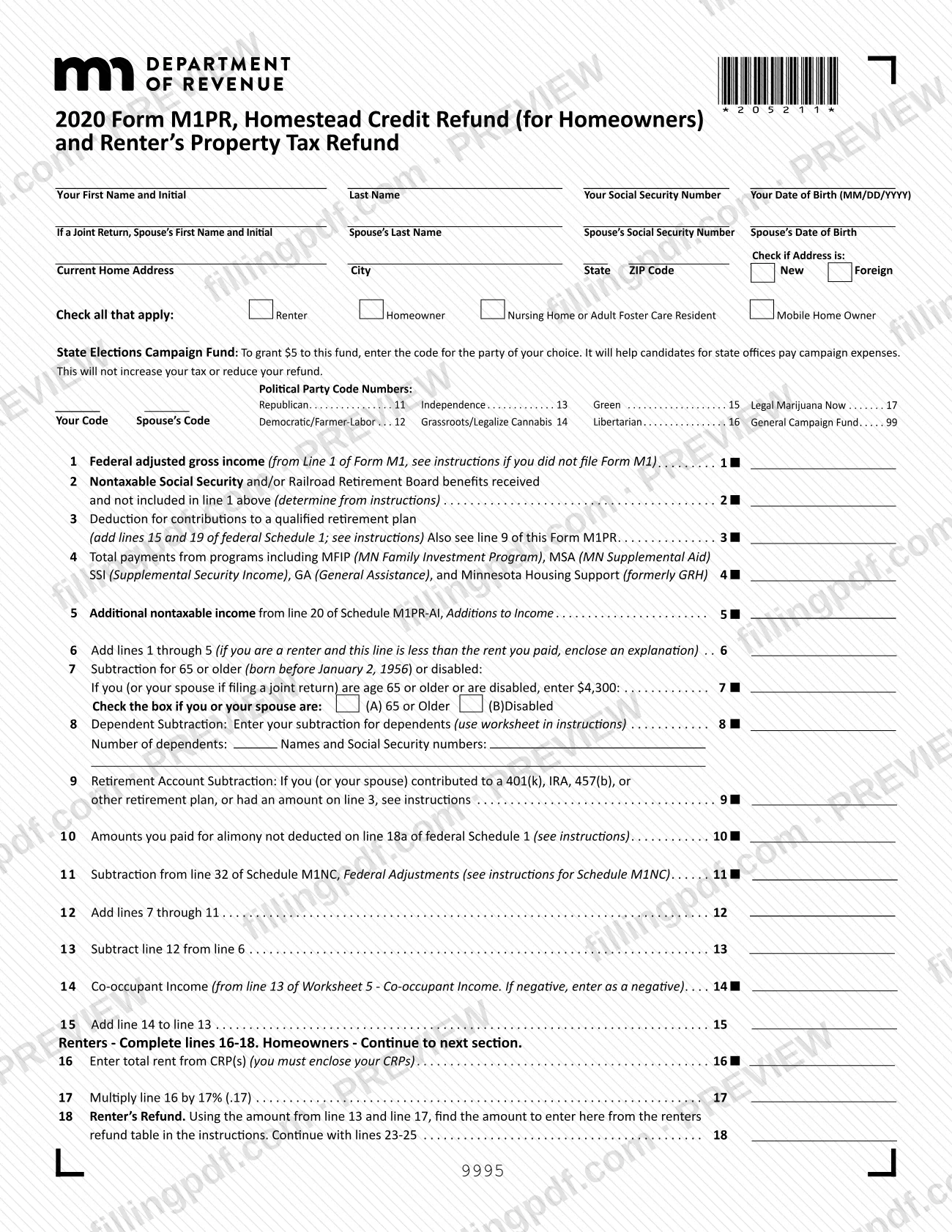
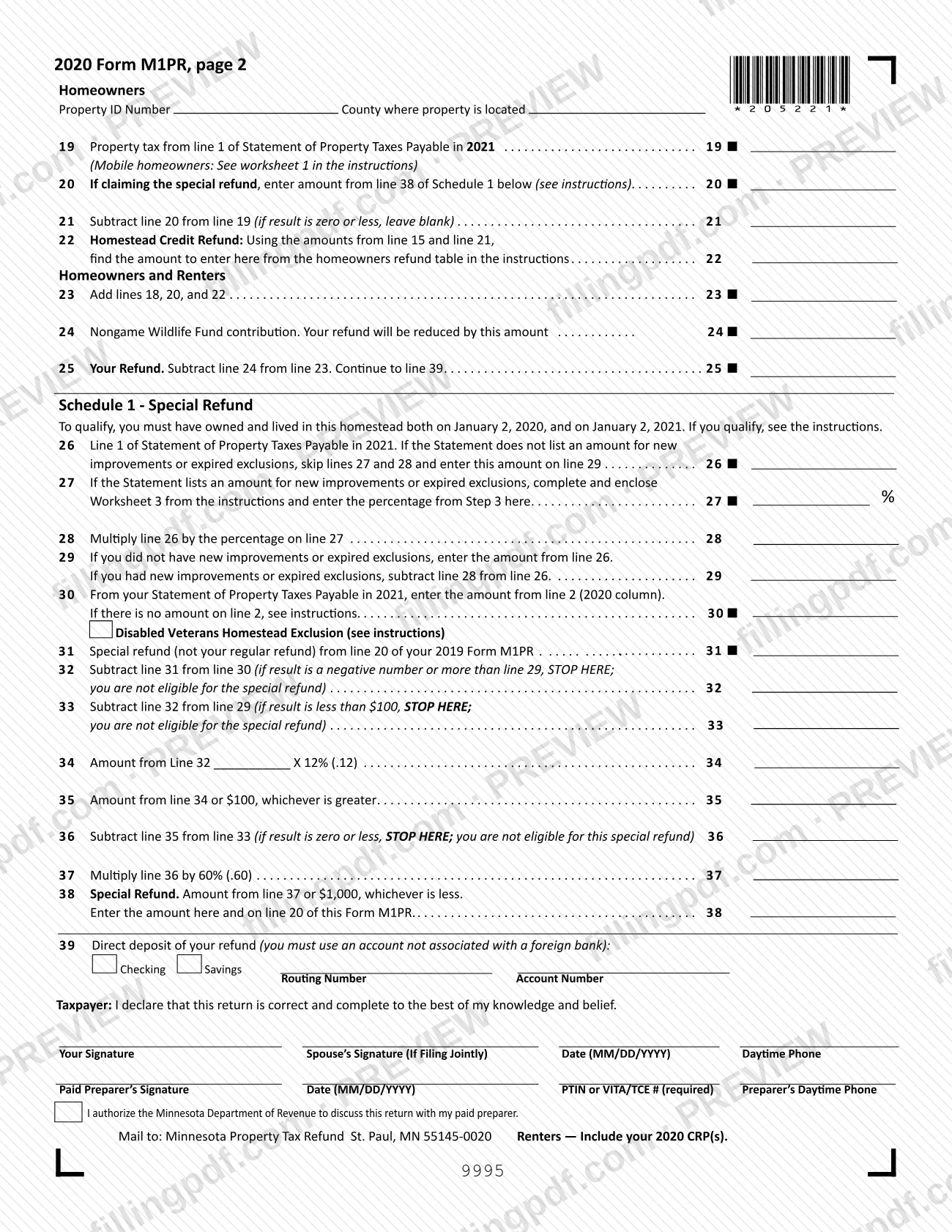
The M1PR form is the 2020 Homestead Credit Refund (for Homeowners) and Renter's Property Tax Refund claim that the Minnesota Department of Revenue uses to figure a property tax refund from your household income and the property tax or rent you paid. Renters, homeowners, mobile home owners and nursing home or adult foster care residents mark their status at the top of the form, and homeowners can also use Schedule 1 to claim a special refund. On FillingPDF you can fill out the form online and download or print the completed PDF; the official PDF is published by the Department of Revenue.
Last updated
What is M1PR?
Form M1PR, Homestead Credit Refund (for Homeowners) and Renter's Property Tax Refund, is the Minnesota Department of Revenue form on which renters and homeowners report household income and property tax or rent paid to claim a state property tax refund for 2020.
The form works in stages. Lines 1 through 15 build your total household income: federal adjusted gross income, nontaxable Social Security and Railroad Retirement benefits, program payments, additional nontaxable income from Schedule M1PR-AI, then subtractions for age or disability, dependents, retirement contributions and other items, plus any co-occupant income.
Renters then complete lines 16 through 18, using the total rent from their Certificate of Rent Paid (CRP) and the renters refund table in the instructions. Homeowners complete lines 19 through 22 with the property tax from their Statement of Property Taxes Payable in 2021 and the homeowners refund table. Both groups finish with lines 23 through 25, where a Nongame Wildlife Fund contribution reduces the refund.
Schedule 1 - Special Refund (lines 26 through 38) is for homeowners who owned and lived in the homestead on both January 2, 2020 and January 2, 2021. Its result carries to line 20. Line 39 asks for direct deposit details, and the form ends with taxpayer and paid preparer signature blocks.
An amended claim uses a different form, Form M1PRX, Amended Homestead Credit Refund (for Homeowners) and Renter's Property Tax Refund, which the Department's instructions name.
Who needs to file M1PR?
Minnesota renters and homeowners who want a refund based on household income and the property tax or rent paid on their primary residence use Form M1PR. At the top of the form you check all boxes that apply: Renter, Homeowner, Nursing Home or Adult Foster Care Resident, or Mobile Home Owner.
- Renters enclose their 2020 CRP(s) and complete lines 16 to 18.
- Homeowners complete lines 19 to 22 and give the property ID number and county.
- Homeowners who owned and lived in the home on both January 2, 2020 and January 2, 2021 may also claim the special refund on Schedule 1, even if they do not qualify for the regular refund.
- Spouses who lived together all year file one joint return and give both names, Social Security numbers and dates of birth.
The Department's instructions add further conditions (the booklet available covers the 2022 return, so confirm they match tax year 2020). They say you must be a Minnesota resident or part-year resident; you do not qualify if you are a dependent, a full-year resident of Michigan or North Dakota, or have a relative homestead; and a renter must have a Social Security number or ITIN. Only a surviving spouse or dependent can file for a deceased person.
When to file M1PR
File Form M1PR after the property tax year it covers: homeowners use the Statement of Property Taxes Payable in 2021, and renters enclose their 2020 CRP(s). The form prints no due date of its own.
The Department's instructions tie the filing window and the final claim deadline to each year's return, and the booklet available covers the 2022 return, so those dates do not apply to this 2020 form. Confirm the deadline for a 2020 claim with the Department of Revenue at 651-296-3781 or 1-800-652-9094.
For the special refund on Schedule 1, the homestead must have been owned and lived in on January 2, 2020 and January 2, 2021. If your income, CRP or property tax statement changes after you file, the instructions say to use Form M1PRX, Amended Homestead Credit Refund (for Homeowners) and Renter's Property Tax Refund.
Documents you need
- Certificate of Rent Paid (CRP) for each rental unit you lived in during 2020: renters must enclose their CRP(s); the form says so beside the mailing address and on line 16.
- Schedule M1PR-AI, Additions to Income: enclose it when you report additional nontaxable income on line 5.
- Written explanation: enclose one if line 6 is less than the rent you paid, if line 1 does not equal your federal adjusted gross income, or if you reported no income and must explain how you paid rent.
- Worksheet 5 - Co-occupant Income: enclose it, one per co-occupant, when you enter someone else's income on line 14.
- Worksheet 3: enclose it if you claim the special refund and your Statement of Property Taxes Payable in 2021 lists new improvements or expired exclusions (line 27).
- Worksheet 1 (mobile home owners who paid lot rent) or Worksheet 2 (home partly rented out or used for business): enclose the worksheet used to figure line 19.
- Worksheet for Line 18: enclose a copy if you live in a nursing home, adult foster care home, intermediate care facility or group home and received certain assistance payments.
- Homestead approval statement or receipt: if the property is not classified as homestead, or has delinquent taxes, the instructions call for a signed approval statement, a payment receipt or a signed confession of judgment.
- Death certificate: enclose a copy when filing for a person who died before applying; a dependent filing for a decedent with no surviving spouse also encloses Form M23, Claim for a Refund for a Deceased Taxpayer.
How to fill out M1PR
Enter names, Social Security numbers and birth dates
Fill in your first name and initial, last name, Social Security number and date of birth (MM/DD/YYYY). On a joint return, add your spouse's details. The instructions say to use capital letters and black ink.
Add your address and check your status
Enter your current home address, city, state and ZIP code, and check Current, New or Foreign. Then check all that apply: Renter, Homeowner, Nursing Home or Adult Foster Care Resident, or Mobile Home Owner.
Choose a State Elections Campaign Fund code
If you want to grant $5 to the State Elections Campaign Fund, enter the code number for your party in Your Code and, on a joint return, Spouse's Code. The form says this does not increase your tax or reduce your refund.
Report income on lines 1 to 6
Enter federal adjusted gross income on line 1, nontaxable Social Security and Railroad Retirement benefits on line 2, retirement plan deductions on line 3, program payments on line 4, and Schedule M1PR-AI income on line 5. Add lines 1 through 5 on line 6.
Claim subtractions on lines 7 to 12
Line 7: age 65 or older (born before January 2, 1956) or disabled; check box A or B. Line 8: dependent subtraction, with number of dependents, names and Social Security numbers. Lines 9 to 11: retirement account, unreimbursed alimony and Schedule M1NC subtractions. Add lines 7 through 11 on line 12.
Figure household income on lines 13 to 15
Subtract line 12 from line 6 on line 13. Homeowners enter co-occupant income from Worksheet 5 on line 14; renters leave it blank. Add line 14 to line 13 on line 15.
Complete the renter lines 16 to 18
Enter total rent from your CRP(s) on line 16 and multiply by the percentage printed on line 17. Use lines 13 and 17 with the renters refund table in the instructions to find line 18.
Complete the homeowner lines 19 to 22
Give the property ID number and county. Enter property tax from line 1 of your Statement of Property Taxes Payable in 2021 on line 19, any Schedule 1 special refund on line 20, subtract on line 21, and use the homeowners refund table for line 22.
Total your refund on lines 23 to 25
Add lines 18, 20 and 22 on line 23. Enter any Nongame Wildlife Fund contribution on line 24, which reduces your refund, and subtract it from line 23 on line 25.
Complete Schedule 1 for the special refund
Only if you owned and lived in the homestead on January 2, 2020 and January 2, 2021, complete lines 26 to 38. The form tells you where to stop if you are not eligible; enter the result on line 38 and on line 20.
Enter direct deposit details on line 39
Check Checking or Savings and enter the routing and account numbers, using an account not associated with a foreign bank. The instructions say the routing number has nine digits and to leave out hyphens, spaces and symbols.
Review, sign and download the PDF
Sign and date the return; a spouse also signs a joint return, and a paid preparer completes the preparer block with a PTIN or VITA/TCE number. Check the box to authorize the Department to discuss the return with your preparer if you wish, then download or print the completed PDF from FillingPDF and assemble your enclosures.
How to submit M1PR
Form M1PR is filed by mail with the Minnesota Department of Revenue; the instructions also list electronic filing as a way to get a refund faster.
- By mail: the form prints "Mail to: Minnesota Property Tax Refund, St. Paul, MN 55145-0020." The Department's instructions give the full address: Minnesota Property Tax Refund, Mail Station 0020, 600 N. Robert St., St. Paul, MN 55145-0020.
- Enclosures: renters include their 2020 CRP(s). Do not mail your property tax statement. Do not staple or tape enclosures; use a paperclip. Copy any enclosure smaller than three-fourths of a sheet onto a full sheet.
- Direct deposit: enter it on line 39 for faster payment; use an account not associated with a foreign bank.
- Status: the instructions say to go to www.revenue.state.mn.us after July 1 and enter Where's My Refund in the Search box. You will need your Social Security number or Taxpayer Identification Number, date of birth, return type, tax year and the exact refund amount.
- Questions: 651-296-3781 or 1-800-652-9094.
Keep copies of the return, CRP(s), schedules and worksheets. FillingPDF lets you fill out and download the PDF; submission follows the channels above.
Common mistakes to avoid
- Leaving line 25 blank: the instructions say the refund will be delayed or denied if line 25 is not completed.
- Mailing a renter's return without the 2020 CRP(s); the refund is delayed or denied without correct CRPs and needed enclosures.
- Using the wrong property tax statement: line 19 comes from the Statement of Property Taxes Payable in 2021, not a prior-year statement or a Notice of Proposed Taxes.
- Mailing the property tax statement with the return; the instructions say not to include it.
- Filing separately when you were married and lived together all year; a joint return is required, and a separate filing may be delayed or denied.
- Entering line 1 different from your federal adjusted gross income without an enclosed explanation.
- Writing cents, dollar signs, dashes or zeros in unused boxes; round to the nearest dollar and leave a line blank if it does not apply or is zero.
- Stapling or taping enclosures instead of using a paperclip, or enclosing pieces smaller than three-fourths of a sheet.
- Giving a direct deposit account associated with a foreign bank on line 39, or a routing or account number with hyphens or spaces.
- Filing as a renter for a mobile home you own on rented land; the instructions say to use Worksheet 1 for line 19 instead.
Frequently asked questions
What is the M1PR form?
The M1PR form is the Minnesota Department of Revenue's claim for the Homestead Credit Refund (for Homeowners) and the Renter's Property Tax Refund. It compares your household income with the property tax or rent paid on your primary residence to figure a refund; this page covers the 2020 form.
Do I need a CRP to file Form M1PR as a renter?
Yes. Renters must enclose their Certificate of Rent Paid for each rental unit they lived in. The form says to include your 2020 CRP(s), and line 16 uses the total rent from them. The instructions say a return without correct CRPs is delayed or denied.
Where do I mail Form M1PR?
Mail it to Minnesota Property Tax Refund, Mail Station 0020, 600 N. Robert St., St. Paul, MN 55145-0020. The form itself prints "Minnesota Property Tax Refund, St. Paul, MN 55145-0020." Renters include their CRP(s); do not staple enclosures.
Can I fill out Form M1PR online?
You can fill out the M1PR PDF online on FillingPDF and download or print it. FillingPDF is an independent service and does not file the form with the Department of Revenue; you send it through the channels the Department lists.
What is the special refund on Schedule 1 of Form M1PR?
It is a separate homeowner refund figured on lines 26 to 38 of Schedule 1, and the result carries to line 20. To qualify, you must have owned and lived in the homestead on both January 2, 2020 and January 2, 2021.
How do I check the status of my Minnesota property tax refund?
Go to www.revenue.state.mn.us after July 1 and enter Where's My Refund in the Search box. The Department asks for your Social Security or Taxpayer Identification Number, date of birth, return type, tax year and exact refund amount.
What if my income or CRP changes after I file Form M1PR?
File Form M1PRX, Amended Homestead Credit Refund (for Homeowners) and Renter's Property Tax Refund. The instructions list a change in household income, a corrected CRP, a corrected county statement or a mistake on the original return as reasons to amend.
Does the Nongame Wildlife Fund donation change my refund?
Yes. Any amount you enter on line 24 reduces your refund, because line 25 is line 23 minus line 24. The $5 State Elections Campaign Fund choice at the top of the form does not reduce your refund.
Ready to fill out M1PR?
Fill out M1PR now