
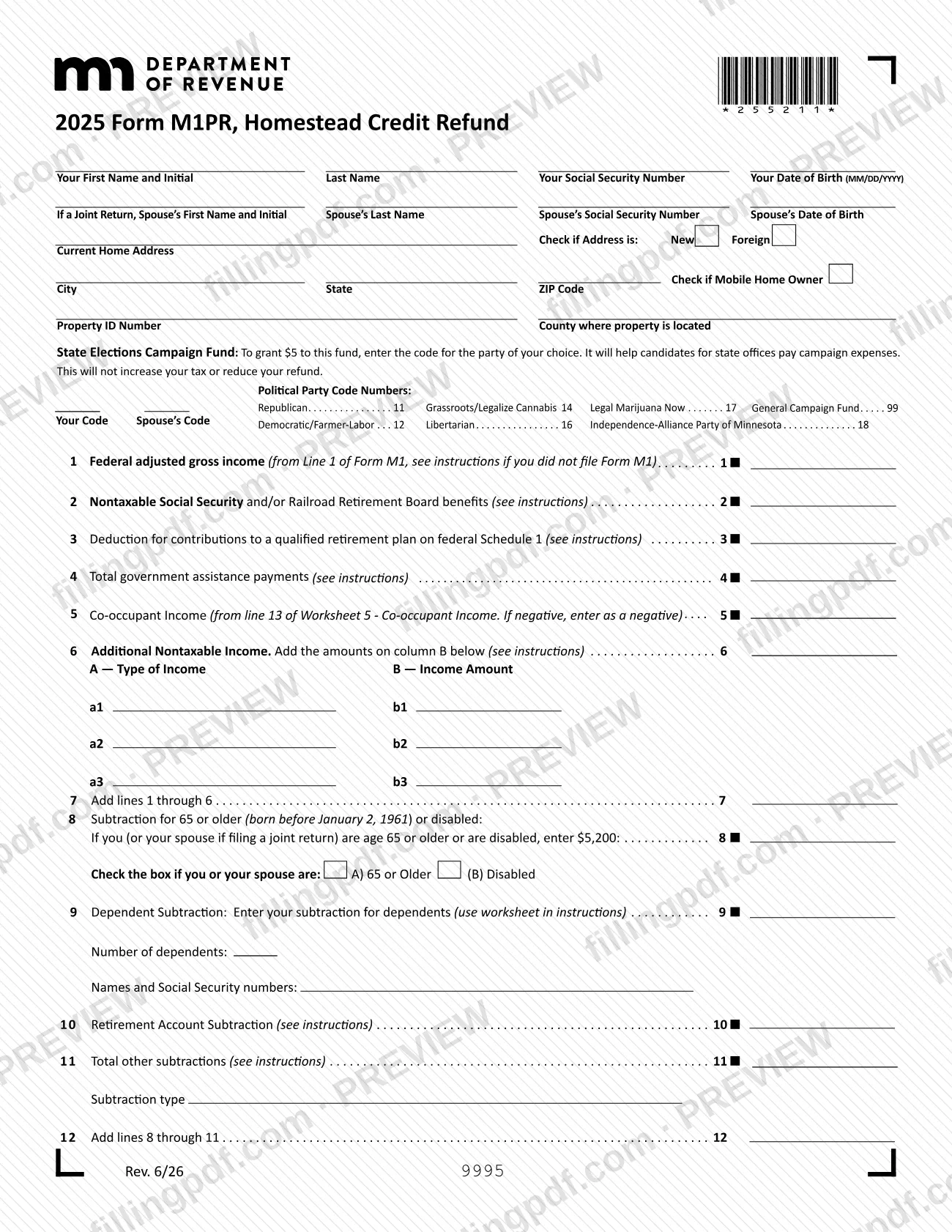
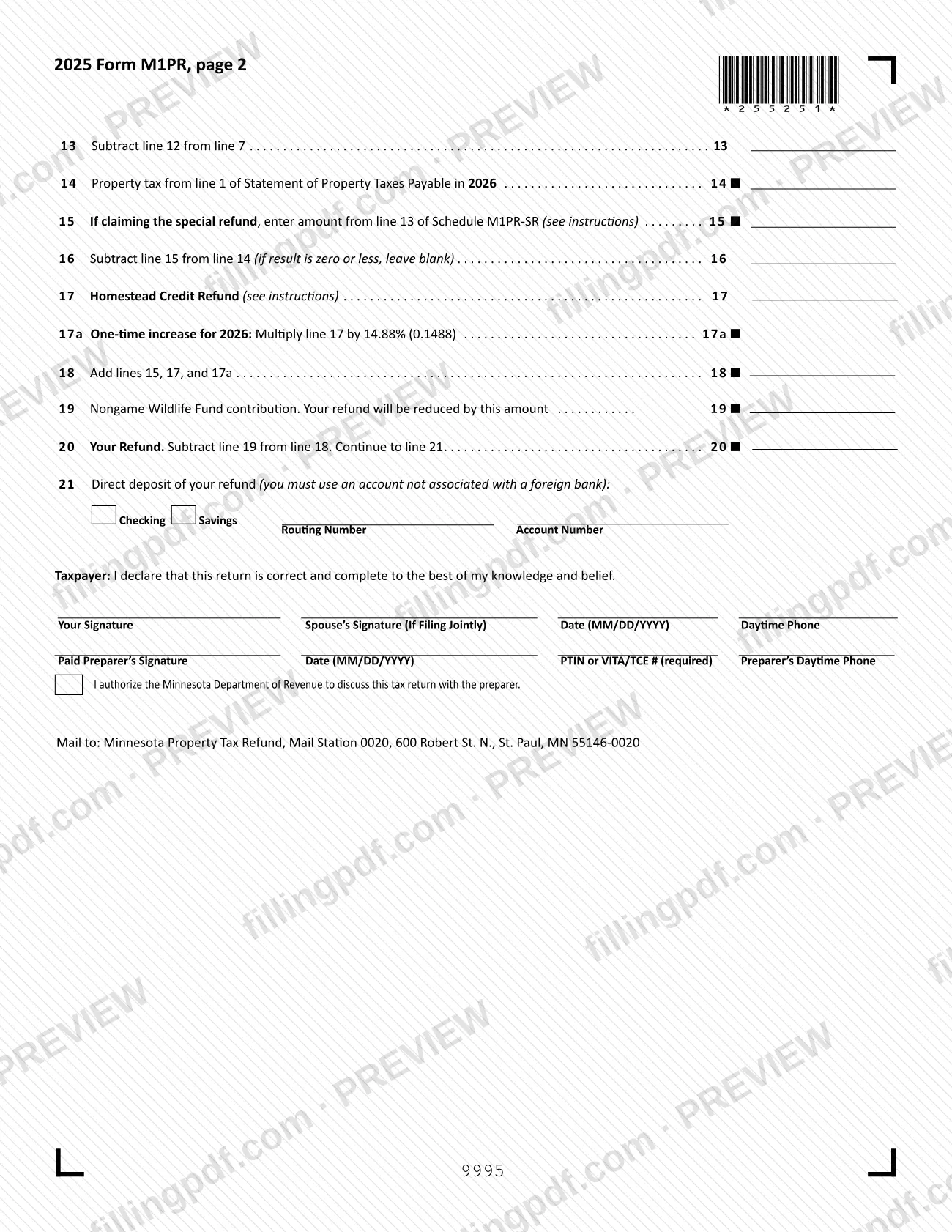
The M1PR form, Homestead Credit Refund, is the Minnesota Department of Revenue return for claiming a property tax refund based on your household income and the property taxes on your primary residence in Minnesota. Homeowners file it; renters claim their credit on Schedule M1RENT with the Minnesota income tax return instead. On this page you can fill out the form online on FillingPDF and download or print the completed PDF. The official PDF and the instructions are published by the Minnesota Department of Revenue.
Last updated
What is M1PR?
Form M1PR, Homestead Credit Refund, is the Minnesota Department of Revenue form that homeowners use to claim a 2025 property tax refund, figured from total household income and the property tax on the Minnesota home they own and occupy.
Lines 1 through 13 build your total household income: federal adjusted gross income, nontaxable Social Security and Railroad Retirement benefits, government assistance payments, co-occupant income and other nontaxable income, less the subtractions for age or disability, dependents, retirement contributions and other eligible items. Line 14 takes the property tax from line 1 of your Statement of Property Taxes Payable in 2026. Line 17 then comes from the Homestead Credit Refund Table in the instructions, and line 17a adds a one-time increase for 2026 that the Minnesota Legislature enacted in its 2026 session.
The form also carries the special property tax refund for homeowners. If you claim it, you complete Schedule M1PR-SR, Special Refund, and enter the result on line 15.
Since 2024 the renter's credit is no longer claimed here: Form M1PR is only for the homestead credit or the homestead special refund. If your property tax or income changes after you file, you correct the return on Form M1PRX, Amended Homestead Credit Refund (for Homeowners).
Who needs to file M1PR?
Minnesota residents and part-year residents who owned and occupied their home on January 2, 2026, and whose total household income is under the limit stated in the instructions, file Form M1PR. The property must be classified as your homestead, or you must have applied for homestead classification and had it approved, and it must have no delinquent property taxes.
The department's table of living situations says:
- Owned and lived in a home on January 2, 2026: file Form M1PR.
- Rented during 2025, then owned and lived in your home on January 2, 2026: file both Form M1PR and Schedule M1RENT.
- Rented all of 2025, or received a certificate of rent paid (CRP) from a care facility: file Schedule M1RENT, not Form M1PR.
- Owned and lived in a mobile home and paid lot rent: Form M1PR with Worksheet 1.
You do not qualify if you are a dependent, have no Social Security Number or Individual Taxpayer Identification Number, are a full-year resident of Michigan or North Dakota, or have a relative homestead. Certain nonresident aliens with low gross income supported by a relative are also excluded.
Married couples who lived together all year file a joint form. Only a surviving spouse or a dependent can file for a person who has died. Co-owners: only one may apply.
When to file M1PR
The instructions say your 2025 return should be electronically filed, postmarked or dropped off by August 17, 2026. The final deadline to claim the 2025 refund is August 16, 2027.
Other dates tied to this form:
- If your property is not classified as homestead, or you bought it in 2025, apply for homestead status with your county assessor's office on or before December 31, 2026.
- If you have delinquent property taxes, you cannot file unless you pay or make arrangements with the county by August 16, 2027.
- To change a filed return, file Form M1PRX. Generally you have until February 15, 2030 to amend a 2025 return.
Processing time varies by return. Check your refund status after July 1 with Where's My Refund at www.revenue.state.mn.us. The department pays interest on refunds not issued within the later of 60 days after you file or September 30.
Documents you need
- A written explanation, if line 1 does not equal the federal adjusted gross income on line 1 of Form M1; the refund will be delayed or denied without it.
- A written explanation, if you reported no income on lines 1-6.
- A written explanation, if you received a recalculation of your prior year's taxes based on the current year's classification.
- Schedule M1PR-SR, Special Refund, attached to Form M1PR if you claim the special refund on line 15.
- Worksheet 5, Co-occupant Income, one per co-occupant, if you include someone else's income on line 5.
- Worksheet 1 if you own a mobile home and paid lot rent; Worksheet 2 if you rented out part of your home or claimed a federal deduction for business use of it.
- Worksheet 3, if applying for the special refund and your Statement of Property Taxes Payable in 2026 lists new improvements or expired exclusions.
- A signed statement from your county that your homestead application was approved, if the property was nonhomestead or you bought it in 2025.
- A copy of your receipt or a signed confession of judgment from your county auditor or treasurer, if you had delinquent property taxes.
- A copy of the death certificate, if filing for a person who died in 2026 before applying; also Form M23 when a dependent files with no surviving spouse.
How to fill out M1PR
Enter your name and identifying details
Print your legal name, Social Security Number and date of birth (MM/DD/YYYY) at the top. On a joint return, add your spouse's name, Social Security Number and date of birth.
Add address and property details
Enter one address: your current home address or post office box. Check New or Foreign if the address is new or foreign, check Mobile Home Owner if it applies, and enter the Property ID Number and the county where the property is located.
Choose a campaign fund code
If you want to direct a contribution to the State Elections Campaign Fund and did not do so on your income tax return, enter the party code in Your Code. A spouse filing jointly may enter a code in Spouse's Code; it does not reduce your refund.
Report income on lines 1 through 4
Line 1 is federal adjusted gross income from line 1 of Form M1. Line 2 is nontaxable Social Security and Railroad Retirement benefits, line 3 the retirement plan deduction from federal Schedule 1, and line 4 total government assistance payments.
Add co-occupant and other nontaxable income
Line 5 comes from line 13 of Worksheet 5, entered as negative if it is negative. For line 6, list each type of nontaxable income in column A and its amount in column B (rows a1-b3), then total column B.
Total your income on line 7
Add lines 1 through 6 to get your total household income.
Enter your subtractions on lines 8 to 12
Line 8 is the 65-or-older or disabled subtraction; check box A or B. Line 9 is the dependent subtraction (enter the number of dependents and their names and numbers), line 10 the retirement account subtraction and line 11 other subtractions, listed below the line. Line 12 adds lines 8 through 11.
Figure household income on line 13
Subtract line 12 from line 7 and enter the result on line 13.
Enter property tax on lines 14 to 16
Line 14 is the property tax from line 1 of your Statement of Property Taxes Payable in 2026; use the worksheets if you rented part of your home or own a mobile home. Enter the Schedule M1PR-SR amount on line 15 if claiming the special refund. Line 16 is line 14 minus line 15; leave it blank if zero or less.
Find your refund on lines 17 to 18
Use lines 13 and 16 with the Homestead Credit Refund Table and enter the result on line 17. Multiply line 17 by the factor printed on line 17a, then add lines 15, 17 and 17a on line 18.
Complete the refund and direct deposit
On line 19, enter any Nongame Wildlife Fund contribution, which reduces your refund. Line 20 is line 18 minus line 19. For line 21, choose Checking or Savings and enter a nine-digit routing number and the account number without hyphens or spaces.
Review, sign and download the PDF
Sign and date the return; your spouse signs too on a joint return, and a paid preparer adds a signature and PTIN or VITA/TCE number. Check the box authorizing the department to discuss the return with the preparer if you wish, then download or print the completed PDF from FillingPDF and attach any required enclosures.
How to submit M1PR
You can submit Form M1PR electronically or on paper, as the instructions allow; the instructions also say that electronic filing gets your refund faster.
- Electronically: the instructions say a 2025 return should be electronically filed by the due date; go to www.revenue.state.mn.us for details.
- By mail: send the completed, signed form and any required enclosures to Minnesota Property Tax Refund, Mail Station 0020, 600 Robert St. N., St. Paul, MN 55146-0020. The instructions print the street as 600 N. Robert St.
- Dropped off: the instructions list drop-off as an accepted way to meet the deadline.
Do not include your property tax statement. Do not staple or tape enclosures; use a paperclip. Copy any enclosure smaller than three-fourths of a sheet onto a full sheet, and keep copies of everything for your records.
Questions: 651-296-3781 or 1-800-652-9094, or [email protected]. To change your address after filing, use the same email or phone numbers.
FillingPDF lets you fill out and download the PDF; submission follows the channels above.
Common mistakes to avoid
- Completing line 14 from your 2025 tax statement or Notice of Proposed Taxes instead of the Statement of Property Taxes Payable in 2026; the refund is delayed.
- Mailing your property tax statement with the return; the instructions say not to include it.
- Entering line 1 differently from your federal adjusted gross income on Form M1 without enclosing an explanation.
- Writing cents, dollar signs, dashes or decimal points in the amount boxes, or entering zeros, instead of rounding to the nearest dollar and leaving zero lines blank.
- Leaving line 20 blank; the refund will be delayed or denied.
- Filing separate returns when you were married and lived with your spouse all year; a joint Form M1PR is required, or the refund may be delayed or denied.
- Using Form M1PR to claim the renter's credit, which belongs on Schedule M1RENT.
- Claiming a subtraction on line 11 without listing the subtractions in the space below the line; it may be denied.
- Entering direct deposit details for an account tied to a foreign bank, or one you plan to close; the refund is issued as a paper check.
- Stapling or taping enclosures to the return, or enclosing pieces smaller than three-fourths of a sheet.
Frequently asked questions
What is the M1PR form used for?
The M1PR form, Homestead Credit Refund, is the Minnesota Department of Revenue return that homeowners use to claim a property tax refund for 2025. The refund is based on household income and the property tax on your homestead; it also carries the special refund through Schedule M1PR-SR.
Who qualifies for the Minnesota homestead credit refund?
You must be a Minnesota resident or part-year resident who owned and occupied your home on January 2, 2026, with homestead classification, no delinquent property taxes and household income under the instructions' limit. Dependents and some other groups do not qualify; see the instructions.
What is the deadline to file Form M1PR for 2025?
Your 2025 return should be electronically filed, postmarked or dropped off by August 17, 2026. The final deadline to claim the 2025 refund is August 16, 2027, according to the department's instructions.
Do renters file Form M1PR?
No. Since 2024, renters claim the renter's credit on Schedule M1RENT with their Minnesota income tax return. If you rented in 2025 and then owned and lived in your home on January 2, 2026, you file both Form M1PR and Schedule M1RENT.
Where do I mail Form M1PR?
Mail it to Minnesota Property Tax Refund, Mail Station 0020, 600 Robert St. N., St. Paul, MN 55146-0020, as printed on the form. Do not include your property tax statement with it, and use a paperclip rather than staples for enclosures.
How do I check the status of my property tax refund?
Use Where's My Refund at www.revenue.state.mn.us after July 1. It asks for your Social Security or Taxpayer Identification Number, date of birth, return type, tax year and the exact refund amount. Electronic filing and direct deposit can speed up your refund.
What if I need to correct Form M1PR after filing?
File Form M1PRX, Amended Homestead Credit Refund (for Homeowners), if your household income changes, you get a corrected county statement or you find a mistake. Generally you have until February 15, 2030 to amend a 2025 return.
What is line 15 and the special refund?
Line 15 is for the special property tax refund for homeowners. You may qualify if your net property tax on your homestead rose by more than a set percentage from 2025 to 2026 and the increase met the minimum; complete Schedule M1PR-SR and attach it.
Can I fill out Form M1PR online on FillingPDF?
Yes, you can fill out the fillable PDF online on FillingPDF and download or print it. FillingPDF is an independent service and does not file the return; you submit it to the Minnesota Department of Revenue through its channels.
Ready to fill out M1PR?
Fill out M1PR now