
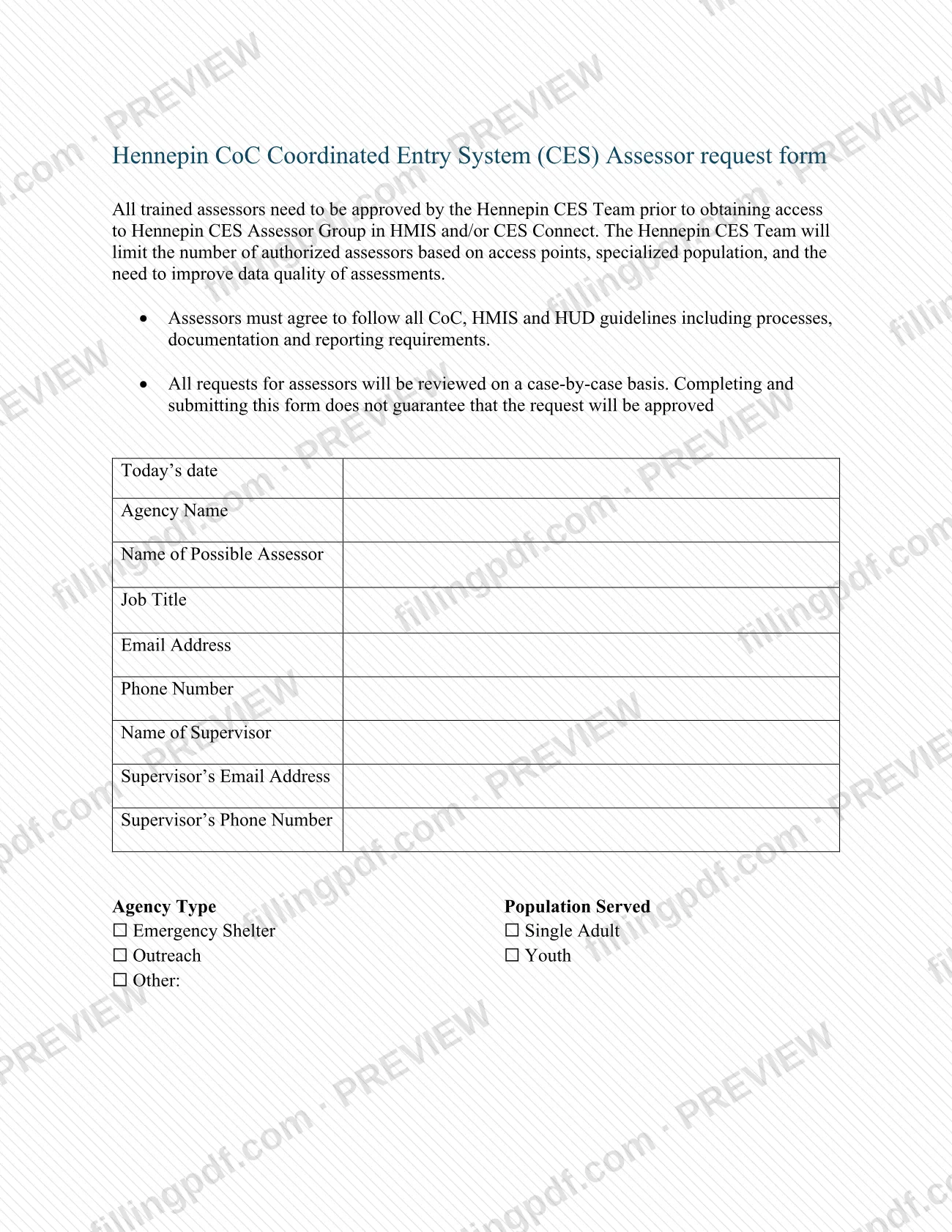

The Hennepin CoC Coordinated Entry System (CES) Assessor request form is the form an agency completes to ask the Hennepin CES Team to approve a person as an assessor with access to HMIS and/or CES Connect. Despite the name, it has nothing to do with the Hennepin County assessor's property valuation work: it concerns assessors in the homeless assistance system. Agency staff and their supervisors use it. On FillingPDF you can fill out the form online and download or print the completed PDF; Hennepin County publishes the original, and the finished form is emailed to the CES Team.
Last updated
What is Hennepin CoC Coordinated Entry System (CES) Assessor request form?
The Hennepin CoC Coordinated Entry System (CES) Assessor request form is the form an agency uses to ask the Hennepin CES Team to approve a trained assessor for access to the Hennepin CES Assessor Group in HMIS and/or CES Connect.
The form states the rule behind it: all trained assessors must be approved by the Hennepin CES Team before they obtain that access. The team limits the number of authorized assessors based on access points, specialized population, and the need to improve data quality of assessments. Each request is reviewed case by case, and completing and submitting the form does not guarantee approval.
Assessors must agree to follow all CoC, HMIS and HUD guidelines, including processes, documentation and reporting requirements.
The form collects the date, the agency name, the possible assessor's name, job title, email and phone, and the supervisor's name, email and phone. It also asks for the agency type, the population served, the system access needed (HMIS, CES Connect or both), whether the person replaces a past assessor, the agency's location, other services the agency provides, and anything else the CES Team should know.
It is not a property tax or property valuation document. It is a request for assessor access in the Hennepin CES.
Who needs to file Hennepin CoC Coordinated Entry System (CES) Assessor request form?
Agencies that want one of their staff members approved as an assessor in the Hennepin CES use this form. A supervisor's name, email and phone number are part of the request, so the agency names both the possible assessor and the person who oversees that work.
The form's options show the agencies it expects:
- Agency types: Emergency Shelter, Outreach, or Other (with a space to describe it).
- Populations served: Single Adult and Youth.
- Access to HMIS, which also asks whether the possible assessor is already an HMIS user.
- Access to CES Connect, which the form says is reserved for agencies that primarily work with people fleeing domestic violence or minor youth.
Use it as well when a new person is replacing a past assessor; the form asks for the past assessor's name.
Because the CES Team limits the number of authorized assessors, submitting the form does not mean the person will be approved. The form does not list other eligibility rules or who may sign on an agency's behalf.
When to file Hennepin CoC Coordinated Entry System (CES) Assessor request form
Submit the form before the possible assessor needs access: the form states that all trained assessors must be approved by the Hennepin CES Team prior to obtaining access to the Hennepin CES Assessor Group in HMIS and/or CES Connect. No separate due date is printed on it.
Submit a new form when a person is replacing a past assessor, giving the past assessor's name in the replacement section. Requests are reviewed case by case, and the form states no review time, so ask the CES Team at [email protected] if you need to know where a request stands.
How to fill out Hennepin CoC Coordinated Entry System (CES) Assessor request form
Enter today's date and agency name
In Today's date, write the date you complete the request. In Agency Name, enter the name of the agency that wants the assessor approved.
Enter the possible assessor's details
Fill in Name of Possible Assessor, Job Title, Email Address and Phone Number for the person who would become the assessor.
Enter the supervisor's details
Complete Name of Supervisor, Supervisor's Email Address and Supervisor's Phone Number.
Select agency type and population
Under Agency Type, check Emergency Shelter, Outreach or Other, and describe it next to Other: if you choose it. Under Population Served, check Single Adult or Youth.
Choose the system access needed
Check HMIS and answer Yes or No to whether the possible assessor is already an HMIS user. Check CES Connect only if your agency primarily works with people fleeing domestic violence or minor youth.
Say whether this replaces an assessor
Answer Is this person replacing a past assessor? If you check Yes, write the past assessor's name; otherwise check No.
Describe your agency and add notes
Enter Location of Agency and answer What other services does your agency provide? Use the last question for anything else the CES Team should know about the request.
Review and download the completed PDF
Check that every contact detail and checked box is correct. Download or print the completed PDF from FillingPDF and email it to the address under How to submit.
How to submit Hennepin CoC Coordinated Entry System (CES) Assessor request form
The form names one channel: email.
- Email: send the completed form to [email protected]. The form asks you to send it there and gives no mailing address, portal or fax number.
Before sending, confirm that the possible assessor's and the supervisor's contact details are complete and that the system access you need (HMIS, CES Connect or both) is marked. The Hennepin CES Team reviews each request case by case; the form does not state a decision date or how you will be told. The form mentions no fee.
FillingPDF lets you fill out and download the PDF; submission follows the channel above.
Common mistakes to avoid
- Requesting CES Connect access for an agency that does not primarily work with people fleeing domestic violence or minor youth; the form reserves it for those agencies.
- Treating submission as approval; the form says completing and submitting it does not guarantee the request will be approved.
- Allowing the possible assessor to use HMIS or CES Connect before the Hennepin CES Team approves the request.
- Checking HMIS but leaving the question about whether the possible assessor is already an HMIS user unanswered.
- Leaving out the past assessor's name when marking Yes for replacing a past assessor.
- Omitting the supervisor's name, email address or phone number, which the form asks for in addition to the assessor's details.
- Sending the completed form anywhere other than [email protected], the only address the form gives.
- Mixing this form up with a property tax document from the county assessor; it is a request for assessor access in the Hennepin CES.
Frequently asked questions
What is the Hennepin CES Assessor request form?
It is the form an agency uses to ask the Hennepin CES Team to approve a trained assessor for access to the Hennepin CES Assessor Group in HMIS and/or CES Connect. All trained assessors must be approved before they obtain that access.
Is this the Hennepin County assessor's property tax form?
No. Although the title uses the word assessor, this form requests access for an assessor in the Hennepin Coordinated Entry System, which serves homeless assistance. It asks about HMIS, CES Connect, agency type and population served, not property values or taxes.
Where do I send the completed assessor request form?
Email it to [email protected]. The form says to send the completed request to that address and does not list a mailing address, portal or in-person option.
Does submitting the form guarantee my assessor is approved?
No. The form says requests are reviewed case by case and that completing and submitting it does not guarantee approval. The CES Team limits the number of authorized assessors based on access points, specialized population, and the need to improve data quality of assessments.
Who can request CES Connect access?
The form reserves CES Connect access for agencies that primarily work with people fleeing domestic violence or minor youth. Other agencies request HMIS access instead, and the form asks whether the possible assessor is already an HMIS user.
What if I am replacing a past assessor?
Answer Yes to "Is this person replacing a past assessor?" and write the past assessor's name in the space provided. If the person is not a replacement, check No.
Can I fill out the Hennepin CES Assessor request form online?
You can fill out the PDF online on FillingPDF and download or print it. FillingPDF is independent, is not affiliated with Hennepin County, and does not send the form to the CES Team; you email it yourself.
Ready to fill out Hennepin CoC Coordinated Entry System (CES) Assessor request form?
Fill out Hennepin CoC Coordinated Entry System (CES) Assessor request form now