
The notary application is the form the Minnesota Secretary of State uses to commission notaries public. The printed title is Notary Commission Application, and one form covers a new appointment, a reappointment, a renewal, an address change and a name change. Applicants who answer YES to any of four screening questions also send a Criminal Background Check Form. On this page you can fill out the form online on FillingPDF and download or print the completed PDF; the form itself is published by the Minnesota Secretary of State.
Last updated
What is Notary Application – Minnesota?
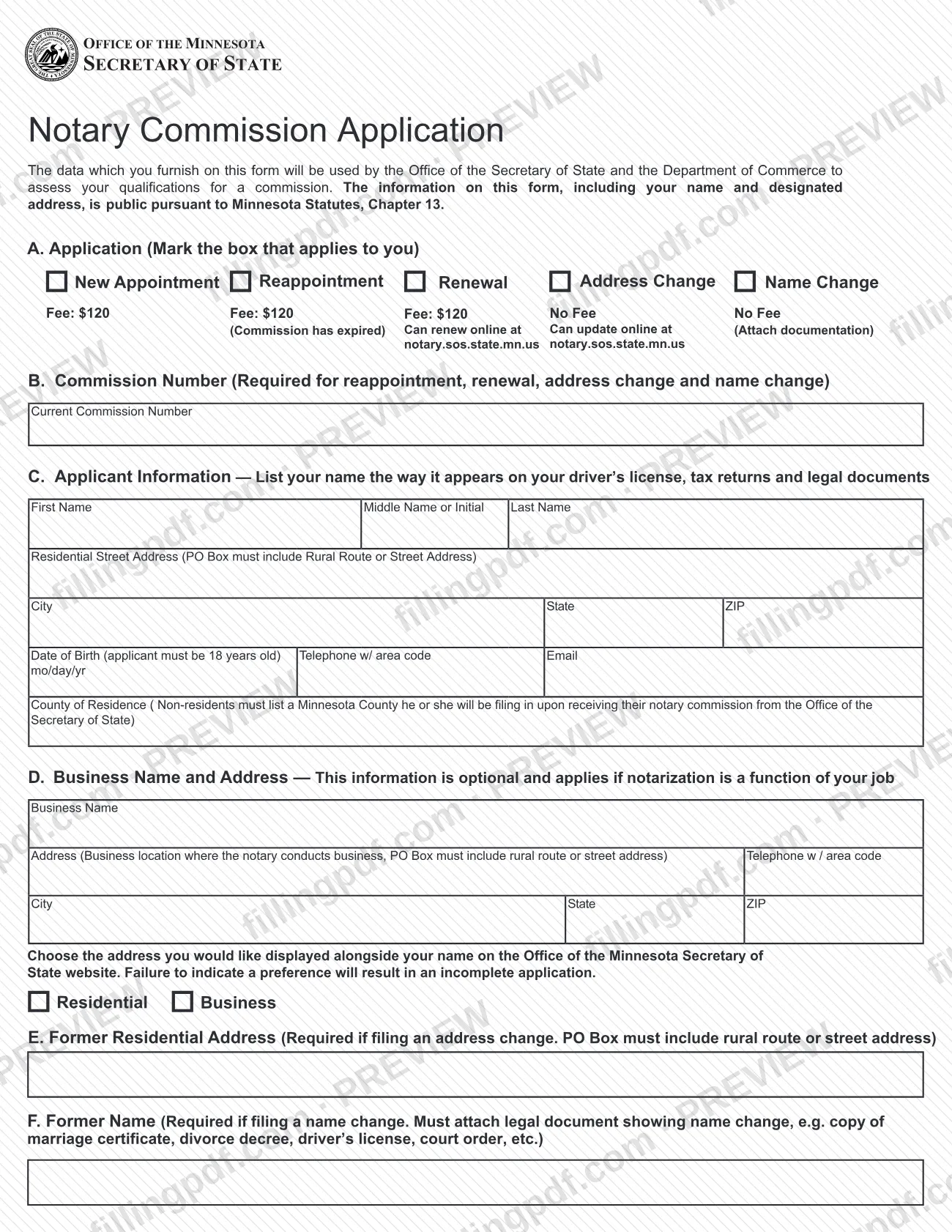
The Notary Application, printed on the form as Notary Commission Application, is the Office of the Minnesota Secretary of State form used to apply for a notary public commission, or to reappoint, renew or update an existing commission after an address or name change.
In Part A you mark one of five application types: New Appointment, Reappointment, Renewal, Address Change or Name Change. The Office of the Secretary of State and the Department of Commerce use the data to assess your qualifications for a commission. The information on the form, including your name and designated address, is public under Minnesota Statutes, Chapter 13.
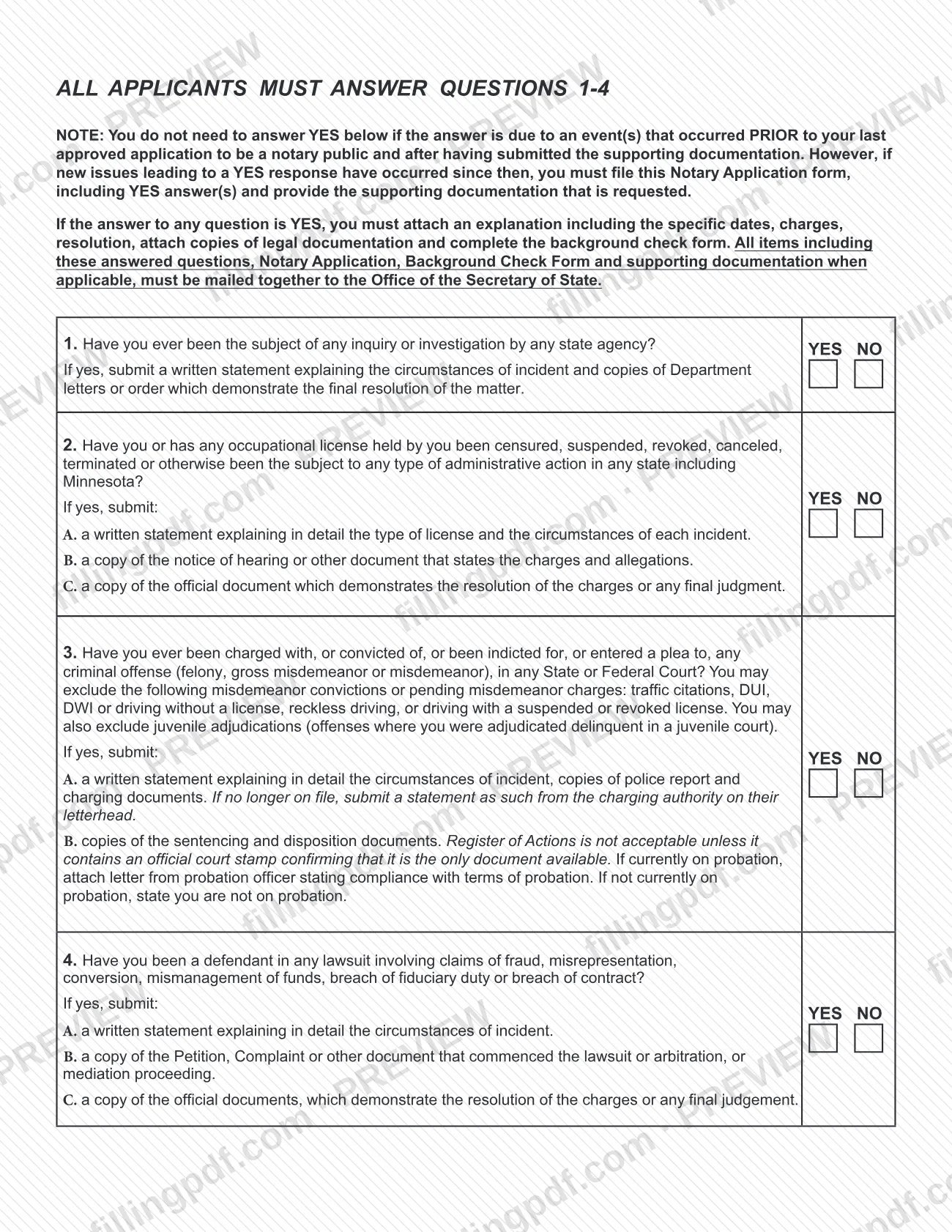
The form also holds four screening questions about state inquiries, license actions, criminal charges and lawsuits, and an oath and certification that you sign. An applicant who is a nonresident also signs the appointment of the Secretary of State as agent for service of process.
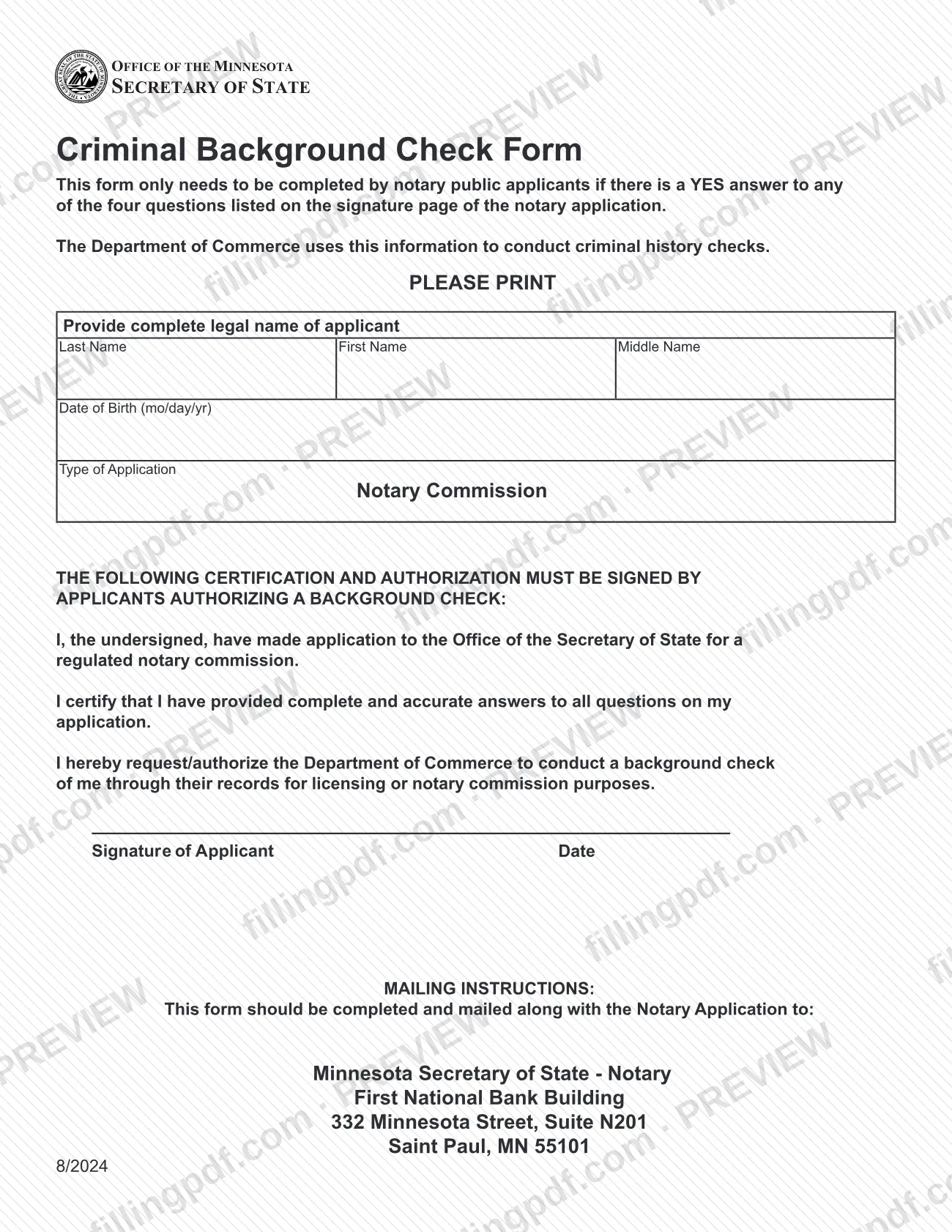
A second document, the Criminal Background Check Form, is printed after the application. It is completed only when you answer YES to any of the four questions, and it is mailed together with the application. The form's instructions point to Minnesota Statutes, Chapters 357, 358 and 359 as the laws that govern notaries and notarial acts.
Who needs to file Notary Application – Minnesota?
You use this form if you want a Minnesota notary commission, or you already hold one and need to reappoint, renew or report a change.
- Age. The applicant must be at least 18 years old.
- Residency. You must be a Minnesota resident, or a resident of a county in IA, ND, SD or WI. Nonresidents list the Minnesota county where they will file upon receiving the commission and designate the Secretary of State as their agent for service of process.
- Existing notaries. Use the form for a reappointment (commission expired), a renewal, an address change or a name change, and enter your current commission number in Part B.
- Applicants answering YES to questions 1-4. You also complete the Criminal Background Check Form and attach the supporting documents the questions list.
You do not need to answer YES to a question when the answer is due to events that occurred before your last approved notary application and after you submitted the supporting documentation then. New events since then must be reported. The form also marks Part D, the business name and address, as optional and relevant only if notarization is part of your job.
When to file Notary Application – Minnesota
Timing depends on the application type. Notary commissions expire on January 31 of the fifth year following the year of issue. Applications for renewal may be submitted 6 months before the expiration date of your current commission. A reappointment can be made any time after the commission has expired.
Address changes and name changes must be reported to the Secretary of State within 30 days. A new appointment has no deadline printed on the form.
After you receive a commission, the instructions say to register it with your county and to buy a notary stamp that matches the name on the certificate. A county-level fee applies; contact the county for where to register.
Documents you need
- Check or money order payable to the OFFICE OF THE SECRETARY OF STATE, for a new appointment, reappointment or renewal. Address and name changes carry no fee. Cash is not accepted by mail.
- Former commission and a copy of a legal document showing the name change (marriage certificate, divorce decree, driver's license, court order or similar), for a name change.
- Criminal Background Check Form, signed and dated, only if you answered YES to any of questions 1-4.
- For YES on question 1: a written statement explaining the incident and copies of department letters or orders showing the final resolution.
- For YES on question 2: a written statement on the license and each incident, the notice of hearing or charging document, and the official document showing the resolution or final judgment.
- For YES on question 3: a statement, police report and charging documents, plus sentencing and disposition documents. If on probation, add a letter from your probation officer on compliance.
- For YES on question 4: a written statement, the petition, complaint or other document that started the lawsuit, arbitration or mediation, and the document showing the resolution or final judgment.
How to fill out Notary Application – Minnesota
Mark your application type
In Part A, mark the one box that applies: New Appointment, Reappointment, Renewal, Address Change or Name Change. Reappointment is for a commission that has expired.
Enter your commission number
In Part B, enter your Current Commission Number. It is required for a reappointment, renewal, address change or name change.
Complete applicant information
In Part C, enter your first name, middle name or initial and last name as on your driver's license, tax returns and legal documents. Add residential street address, city, state, ZIP, date of birth (mo/day/yr), telephone with area code, email and county of residence.
List a Minnesota county if nonresident
If you live outside Minnesota, enter the Minnesota county you will be filing in after you receive your commission. Only residents of a county in IA, ND, SD or WI may apply as nonresidents.
Add business details if you wish
Part D is optional and applies if notarization is part of your job. Enter the business name, address and telephone, then mark Residential or Business for the address shown next to your name on the Secretary of State website.
Enter former address or name
In Part E, enter your former residential address if you are filing an address change. In Part F, enter your former name if you are filing a name change, and attach the legal document showing the change.
Answer questions 1 through 4
Mark YES or NO for every question. If any answer is YES, prepare the explanation and documents each question lists, and complete the Criminal Background Check Form.
Read the agent appointment and oath
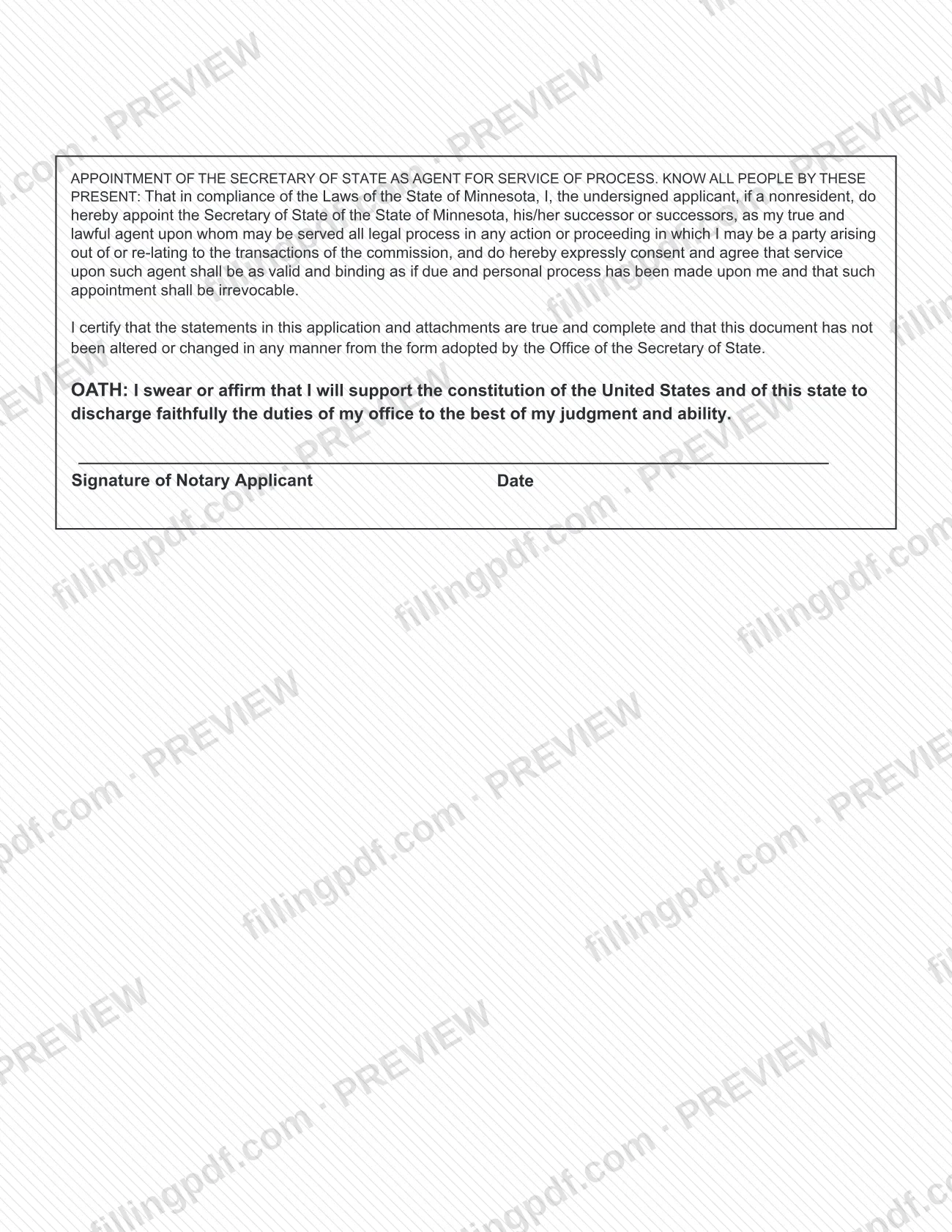
Nonresident applicants appoint the Secretary of State as agent for service of process through the printed statement. The certification and oath apply to every applicant.
Sign and date the application
Sign and date at the bottom of the signature page, under the certification and oath.
Complete the background check form
If you answered YES to any question, enter your last, first and middle name and date of birth. Sign and date the certification authorizing the background check.
Review and download the completed PDF
Check that Parts A through F and all four answers are complete and consistent with your documents. Download or print the completed PDF from FillingPDF, sign it and assemble the package described under How to submit.
How to submit Notary Application – Minnesota
You submit the completed application by mail to the Secretary of State, and the form says renewals and address updates can also be done online.
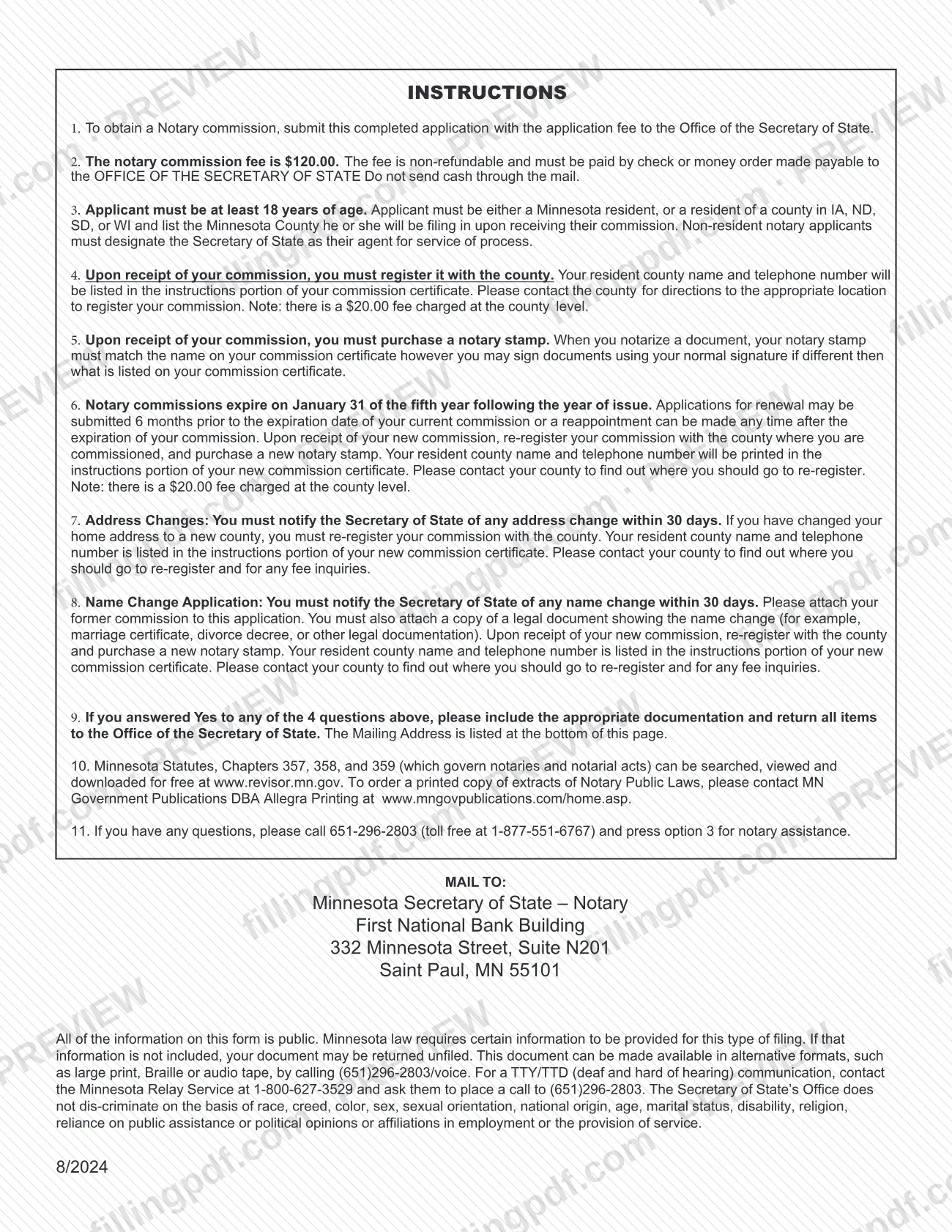
- By mail: Minnesota Secretary of State – Notary, First National Bank Building, 332 Minnesota Street, Suite N201, Saint Paul, MN 55101. Send the signed application and any required attachments together, including the Criminal Background Check Form and explanations if you answered YES to any question.
- Online: the form states that renewals and address updates can be made at notary.sos.state.mn.us.
- Payment: a non-refundable fee applies to new appointments, reappointments and renewals; address and name changes carry no fee. Pay by check or money order payable to the OFFICE OF THE SECRETARY OF STATE. Do not send cash. The form prints the amount.
- Questions: call 651-296-2803 (toll free 1-877-551-6767) and press option 3 for notary assistance.
The form warns that if required information is missing, your document may be returned unfiled. FillingPDF lets you fill out and download the PDF; submission follows the channels above.
Common mistakes to avoid
- Not marking Residential or Business as the address to display on the Secretary of State website; the form says failure to choose makes the application incomplete.
- Omitting the current commission number in Part B for a reappointment, renewal, address change or name change.
- Listing a PO Box without a Rural Route or street address as your residential, business or former address.
- Filing a name change without attaching the former commission and a legal document showing the change, such as a marriage certificate or court order.
- Answering YES to a question and mailing the application without the explanation, legal documents and Criminal Background Check Form; all items must be mailed together.
- Submitting a Register of Actions for question 3 when it lacks an official court stamp confirming it is the only document available.
- Sending cash through the mail instead of a check or money order payable to the OFFICE OF THE SECRETARY OF STATE.
- Entering your name differently from your driver's license, tax returns and legal documents.
- Sending the form unsigned or altered from the version the Secretary of State adopted, which the certification says it must not be.
Frequently asked questions
What is the notary application in Minnesota?
It is the Minnesota Secretary of State's Notary Commission Application. One form is used for a new appointment, a reappointment, a renewal, an address change or a name change; you mark the type that applies in Part A.
Is there a fee for the Minnesota notary application?
A non-refundable fee applies to new appointments, reappointments and renewals, while address changes and name changes carry no fee. Pay by check or money order payable to the OFFICE OF THE SECRETARY OF STATE, not cash. The amount is printed on the form. The county also charges its own fee when you register.
Who can apply to be a notary in Minnesota?
You must be at least 18 and either a Minnesota resident or a resident of a county in IA, ND, SD or WI. Nonresidents list the Minnesota county they will file in and designate the Secretary of State as their agent for service of process.
When does a Minnesota notary commission expire?
On January 31 of the fifth year following the year of issue. You can submit a renewal up to 6 months before expiration, or make a reappointment any time after the commission expires.
Do I need the Criminal Background Check Form?
Only if you answer YES to any of the four screening questions. In that case you attach written explanations and legal documents, and mail the application, the Criminal Background Check Form and the documents together. If every answer is NO, you do not need it.
Which offenses can I leave out on question 3?
You may exclude misdemeanor convictions or pending misdemeanor charges for traffic citations, DUI, DWI or driving without a license, reckless driving, and driving with a suspended or revoked license. Juvenile adjudications may also be excluded.
How soon must I report a change of address or name?
Within 30 days, by filing this form. For a name change, attach your former commission and a copy of a legal document showing the change, such as a marriage certificate or divorce decree. Address changes can also be updated online, as the form states.
Can I fill out the notary application online?
Yes. You can fill out the PDF online on FillingPDF and download or print it. FillingPDF does not submit the application: you sign it and send it to the Secretary of State by mail with the fee, or use the online options the form names.
Where do I mail the notary application?
Mail it to Minnesota Secretary of State – Notary, First National Bank Building, 332 Minnesota Street, Suite N201, Saint Paul, MN 55101. For questions, call 651-296-2803 or toll free 1-877-551-6767 and press option 3.
Ready to fill out Notary Application – Minnesota?
Fill out Notary Application – Minnesota now