
The Building Valuation Worksheet is the Wright County Office of Planning and Zoning worksheet for totaling the valuation of a construction project and working out the building permit fee that follows from it. It is not a tax bill: if you found this page while searching for Wright County property tax, note that the worksheet only figures the valuation of building work used for permit fees. On this page you can fill out the worksheet online on FillingPDF and download or print the completed PDF; the original is published by the county at wrightcountymn.gov.
Last updated
What is Building Valuation Worksheet – Wright County, MN?
The Building Valuation Worksheet is the Wright County Office of Planning and Zoning worksheet for adding up the valuation of residential, accessory-structure and miscellaneous construction work and for working out the building permit fee that follows from the total valuation.
The worksheet is built in blocks. Each block asks for length and width measurements of an area, a TOTAL of the square footage, and a multiplication by the rate printed beside it, which gives the valuation for that item:
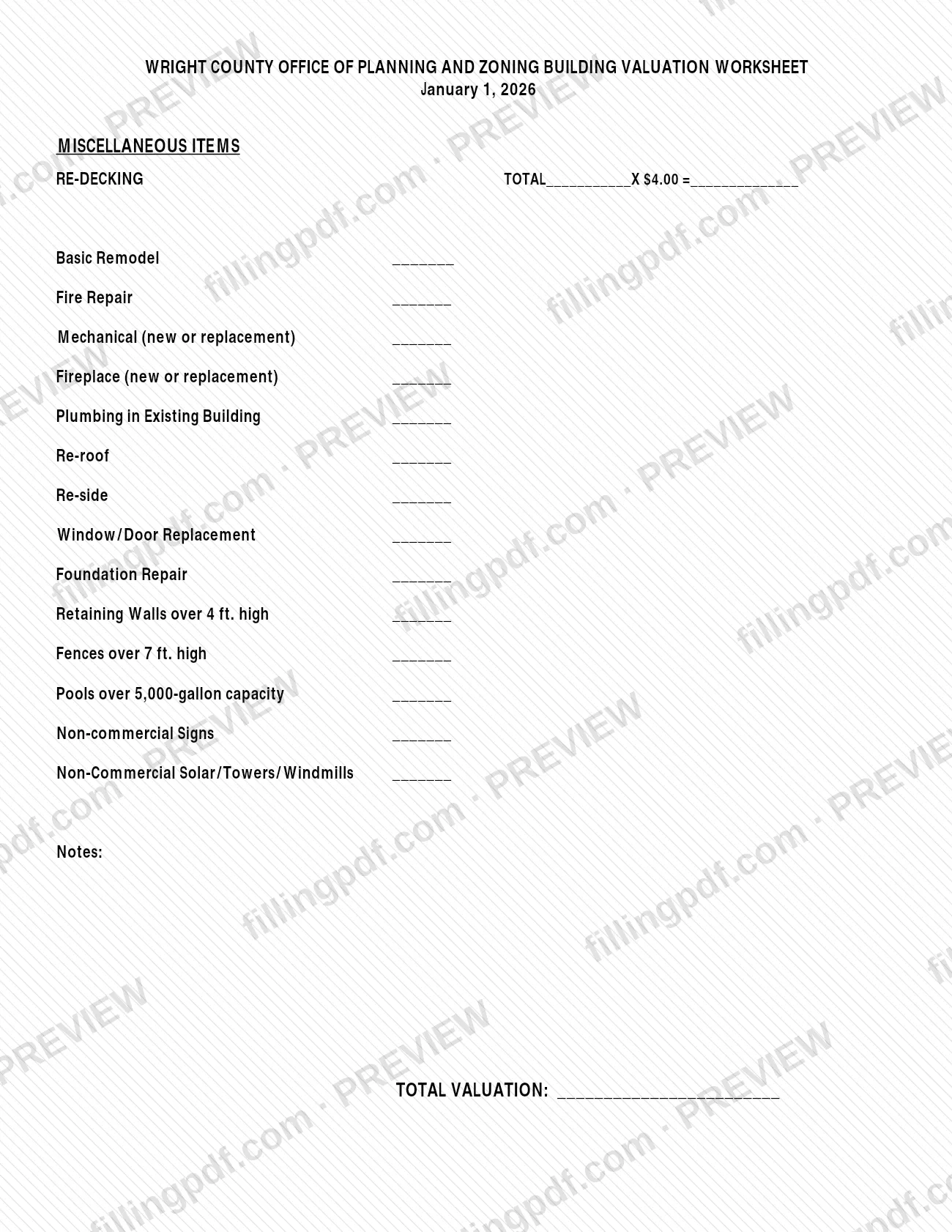
- Miscellaneous items: re-decking, basic remodel, fire repair, mechanical, fireplace, plumbing in an existing building, re-roof, re-side, window/door replacement, foundation repair, retaining walls over 4 ft. high, fences over 7 ft. high, pools over 5,000-gallon capacity, non-commercial signs, and non-commercial solar, towers and windmills.
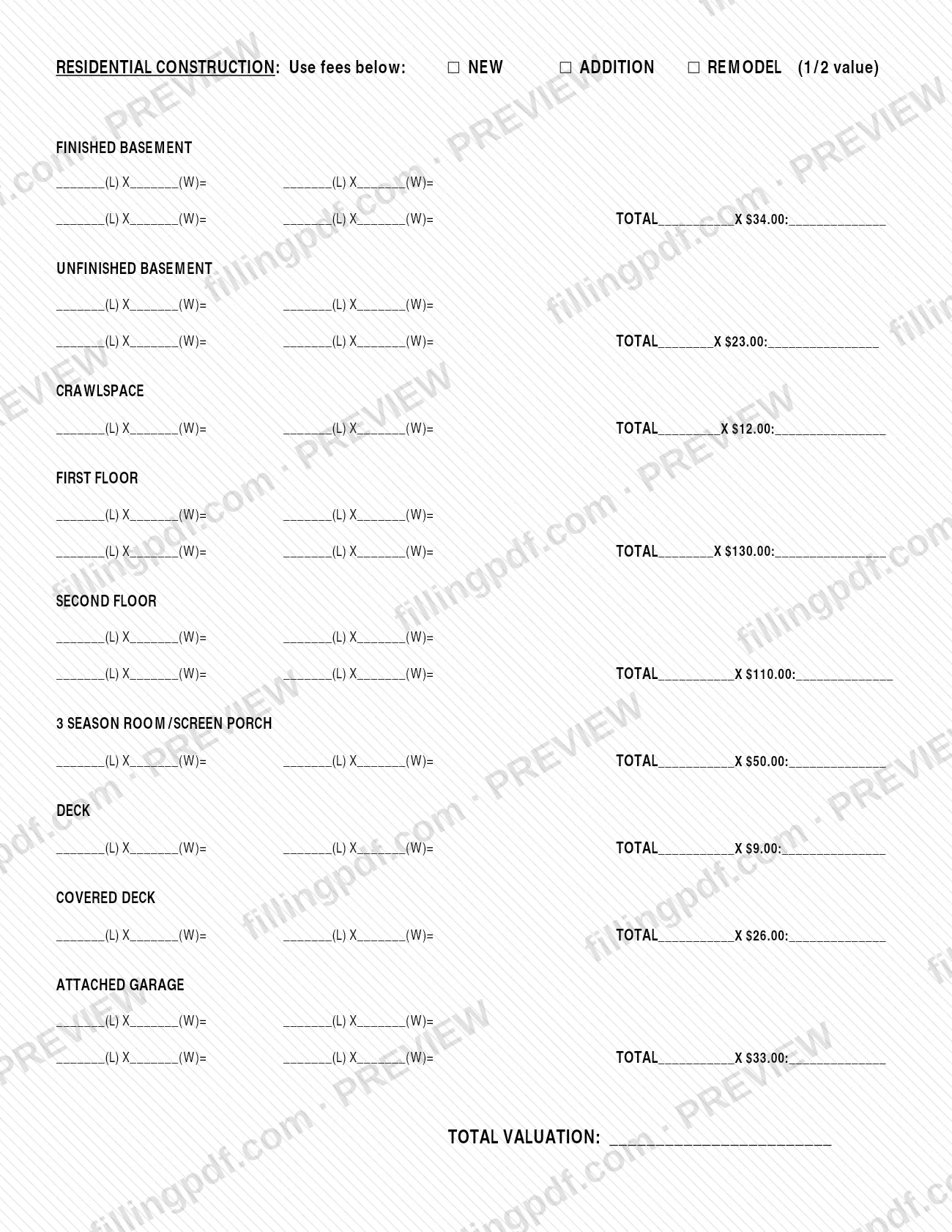
- Residential construction: finished and unfinished basement, crawlspace, first and second floor, 3 season room/screen porch, deck, covered deck and attached garage, with boxes for NEW, ADDITION or REMODEL (1/2 value).
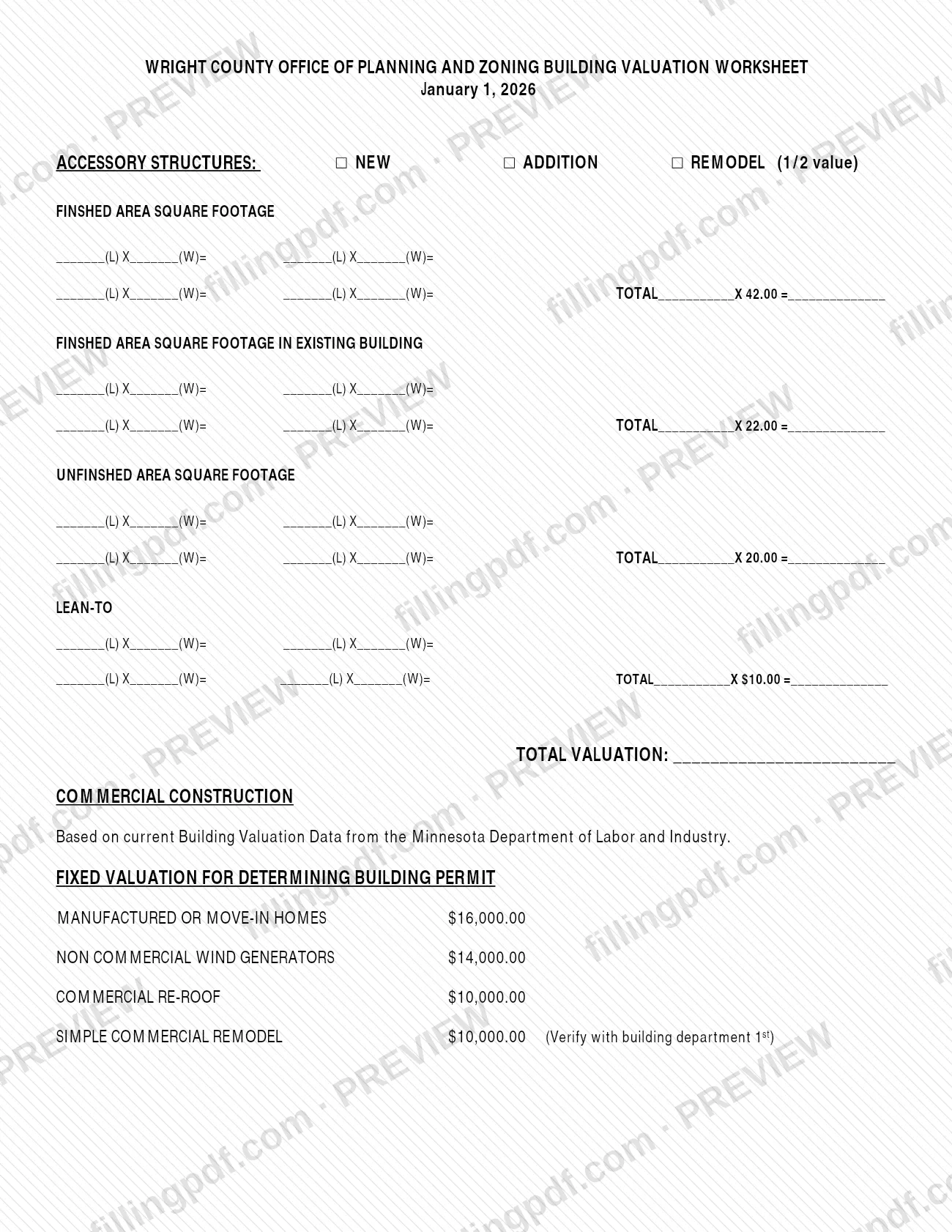
- Accessory structures: finished area, finished area in an existing building, unfinished area and lean-to, with the same three boxes.
- Commercial construction: based on current Building Valuation Data from the Minnesota Department of Labor and Industry, plus fixed valuations for manufactured or move-in homes, non-commercial wind generators, commercial re-roof and simple commercial remodel.
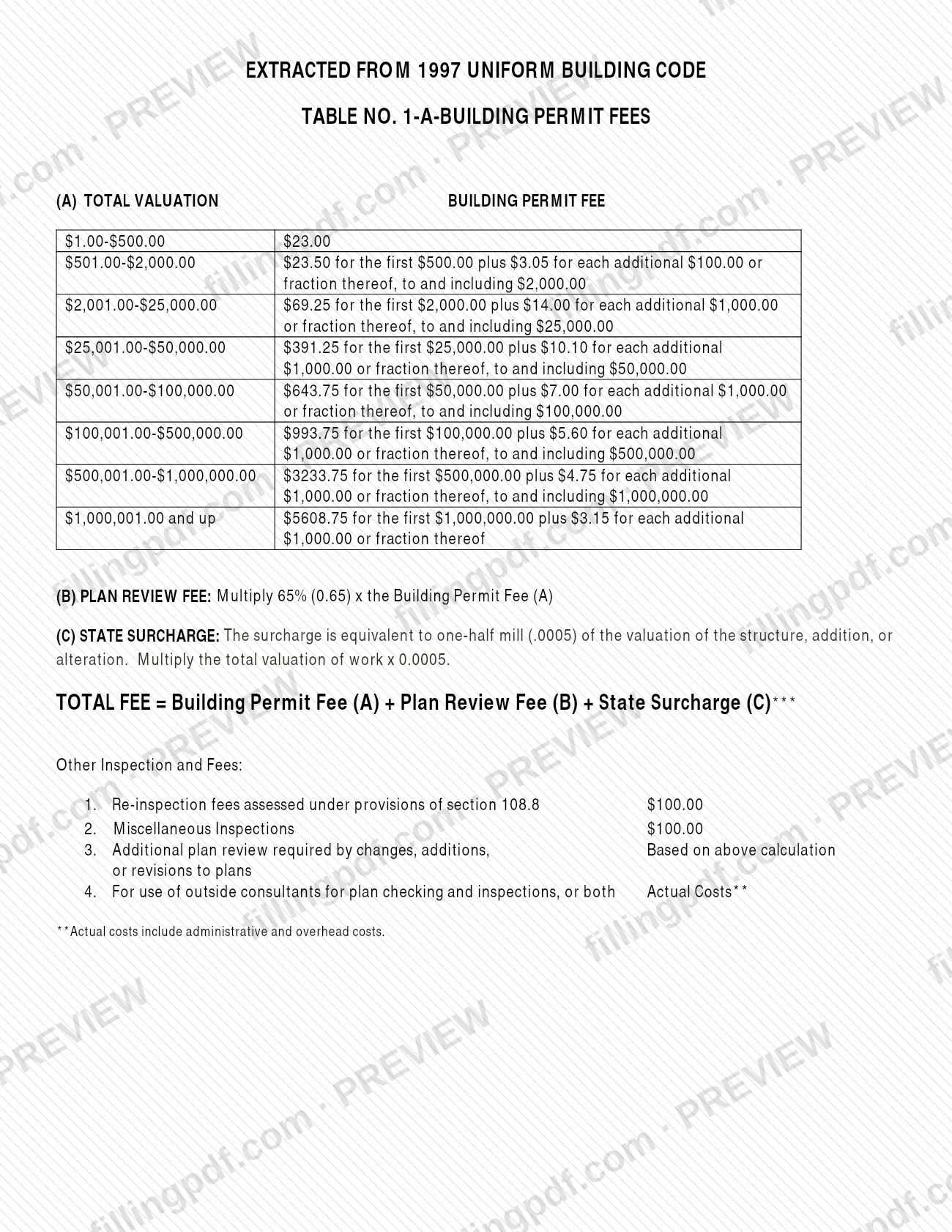
The second part of the worksheet reproduces Table No. 1-A, Building Permit Fees, extracted from the 1997 Uniform Building Code. It converts the total valuation into the building permit fee (A), then adds a plan review fee (B) and a state surcharge (C) to reach the total fee. The worksheet also lists other inspection fees. It is dated January 1, 2026.
Who needs to file Building Valuation Worksheet – Wright County, MN?
The main users are owners and contractors who are preparing a building permit in Wright County and need the valuation of the work to find the permit fee. The worksheet is organized by type of work, so each user completes only the blocks that match the project.
- Residential projects: new construction, additions and remodels, using the residential construction block and the NEW, ADDITION or REMODEL (1/2 value) boxes.
- Accessory structures: new buildings, additions and remodels, using the accessory structures block.
- Smaller jobs listed under miscellaneous items, such as re-roofing, re-siding, window or door replacement, foundation repair, fireplaces, mechanical or plumbing work in an existing building, tall fences or retaining walls, large pools, non-commercial signs and non-commercial solar, towers or windmills.
- Commercial projects: the worksheet bases commercial valuation on Minnesota Department of Labor and Industry data and gives fixed valuations for a commercial re-roof and a simple commercial remodel. For a simple commercial remodel it says to verify with the building department first.
The worksheet does not say who may sign or complete it on someone else's behalf.
When to file Building Valuation Worksheet – Wright County, MN
Use the worksheet when you prepare a building permit, because its result is the total valuation on which the permit fee is calculated. No separate due date is printed on it, so any timing follows the permit it supports. The sheet carries the date January 1, 2026, so check that the version you use matches the one the county currently publishes. For a simple commercial remodel, verify the fixed valuation with the building department before you rely on it.
How to fill out Building Valuation Worksheet – Wright County, MN
Confirm the worksheet date
Check the date printed under the title (January 1, 2026) and make sure the PDF you complete is the version the county currently publishes.
Enter miscellaneous items
For re-decking, enter the TOTAL and multiply it by the printed rate. For basic remodel, fire repair, mechanical, fireplace, plumbing, re-roof, re-side, window/door, foundation repair, tall retaining walls and fences, large pools, signs and solar/towers/windmills, enter the valuation on the matching line and add comments under Notes.
Total the miscellaneous valuation
Add the miscellaneous lines and enter the result on TOTAL VALUATION at the end of that block.
Mark the residential project type
Under RESIDENTIAL CONSTRUCTION, check NEW, ADDITION or REMODEL (1/2 value) to show how the work is classified.
Measure basements and crawlspace
For Finished Basement, Unfinished Basement and Crawlspace, enter each area's length (L) and width (W), write the combined TOTAL square footage and multiply by the rate printed on that line.
Measure floors and enclosed rooms
Complete First Floor, Second Floor and 3 Season Room/Screen Porch the same way: L × W for each area, the TOTAL, then the extension at the printed rate.
Measure decks and garage
Complete Deck, Covered Deck and Attached Garage with L × W measurements, TOTAL square footage and the printed rate, then add all residential lines into TOTAL VALUATION.
Complete accessory structures
On page 2, check NEW, ADDITION or REMODEL (1/2 value), then fill the finished area, finished area in an existing building, unfinished area and lean-to lines and enter the block's TOTAL VALUATION.
Apply commercial or fixed valuations
For commercial work use the Minnesota Department of Labor and Industry building valuation data the worksheet refers to. If your project is a manufactured or move-in home, non-commercial wind generator, commercial re-roof or simple commercial remodel, use the fixed valuation listed, verifying a simple commercial remodel with the building department first.
Figure the permit fee components
Find your total valuation in Table No. 1-A for the Building Permit Fee (A). Compute the Plan Review Fee (B) from fee (A) and the State Surcharge (C) from the total valuation, as the worksheet describes.
Add up the total fee
Enter TOTAL FEE as Building Permit Fee (A) + Plan Review Fee (B) + State Surcharge (C). Check the other inspection and fee items listed at the bottom for any that apply.
Review and download the completed PDF
Check each L × W line, TOTAL and extension, then download or print the completed PDF from FillingPDF and keep it with your permit paperwork.
How to submit Building Valuation Worksheet – Wright County, MN
The worksheet prints no mailing address, portal or appointment rule of its own. It is published by the Wright County Office of Planning and Zoning at https://www.wrightcountymn.gov/DocumentCenter/View/207/Building-Valuation-Worksheet. For a simple commercial remodel, the worksheet tells you to verify with the building department first. Fees apply to the permit, and the worksheet shows how they are calculated; the building department can confirm the amounts. FillingPDF lets you fill out and download the PDF; submission follows the county's channels.
Common mistakes to avoid
- Checking none of the NEW, ADDITION or REMODEL (1/2 value) boxes, or counting a remodel at full value when the worksheet provides a half-value option for it.
- Using the residential construction block for a detached accessory structure instead of the separate Accessory Structures block.
- Rounding down the fee table's steps: each additional $1,000.00 (or $100.00 in the lower bracket) is counted "or fraction thereof".
- Figuring the plan review fee on the total valuation instead of on the Building Permit Fee (A).
- Multiplying the permit fee instead of the total valuation of work by the state surcharge factor.
- Stopping at the Building Permit Fee (A) and leaving out the plan review fee (B) and state surcharge (C) when stating the TOTAL FEE.
- Applying the fixed valuation for a simple commercial remodel without first verifying it with the building department.
- Entering an area as one figure without the length and width lines, so the TOTAL square footage does not match the measurements.
Frequently asked questions
What is the Building Valuation Worksheet?
It is a Wright County Office of Planning and Zoning worksheet that adds up the valuation of construction work, such as floors, basements, decks, garages, accessory structures and miscellaneous projects, and then shows how the building permit fee is calculated from that total valuation.
Is this a Wright County property tax form?
No. The worksheet figures the valuation of building work for the building permit fee, plan review fee and state surcharge. It does not calculate a property tax bill. It is issued by the Wright County Office of Planning and Zoning.
How is the total building permit fee calculated?
TOTAL FEE equals the Building Permit Fee (A) from Table No. 1-A, plus the Plan Review Fee (B) and the State Surcharge (C). The plan review fee is figured from fee (A); the surcharge is figured from the total valuation of work.
How are remodels valued on the worksheet?
The residential and accessory structure blocks each have a NEW, ADDITION or REMODEL (1/2 value) box. Check the one that fits your project; the REMODEL box is labeled as half value, so confirm with the building department how it applies to your project.
Are there fixed valuations for some projects?
Yes. The commercial section lists fixed valuations for manufactured or move-in homes, non-commercial wind generators, commercial re-roofs and simple commercial remodels. For a simple commercial remodel the worksheet says to verify with the building department first.
Are there fees besides the building permit fee?
Yes. The worksheet lists re-inspection fees under section 108.8, miscellaneous inspections, additional plan review for changes to plans, and outside consultants for plan checking or inspections, charged at actual costs including administrative and overhead costs. Ask the county for current amounts.
Can I fill out the Building Valuation Worksheet online?
Yes. You can fill out the PDF online on FillingPDF and download or print it. FillingPDF is an independent service, not connected to Wright County, and does not file the worksheet or any permit application.
Ready to fill out Building Valuation Worksheet – Wright County, MN?
Fill out Building Valuation Worksheet – Wright County, MN now