
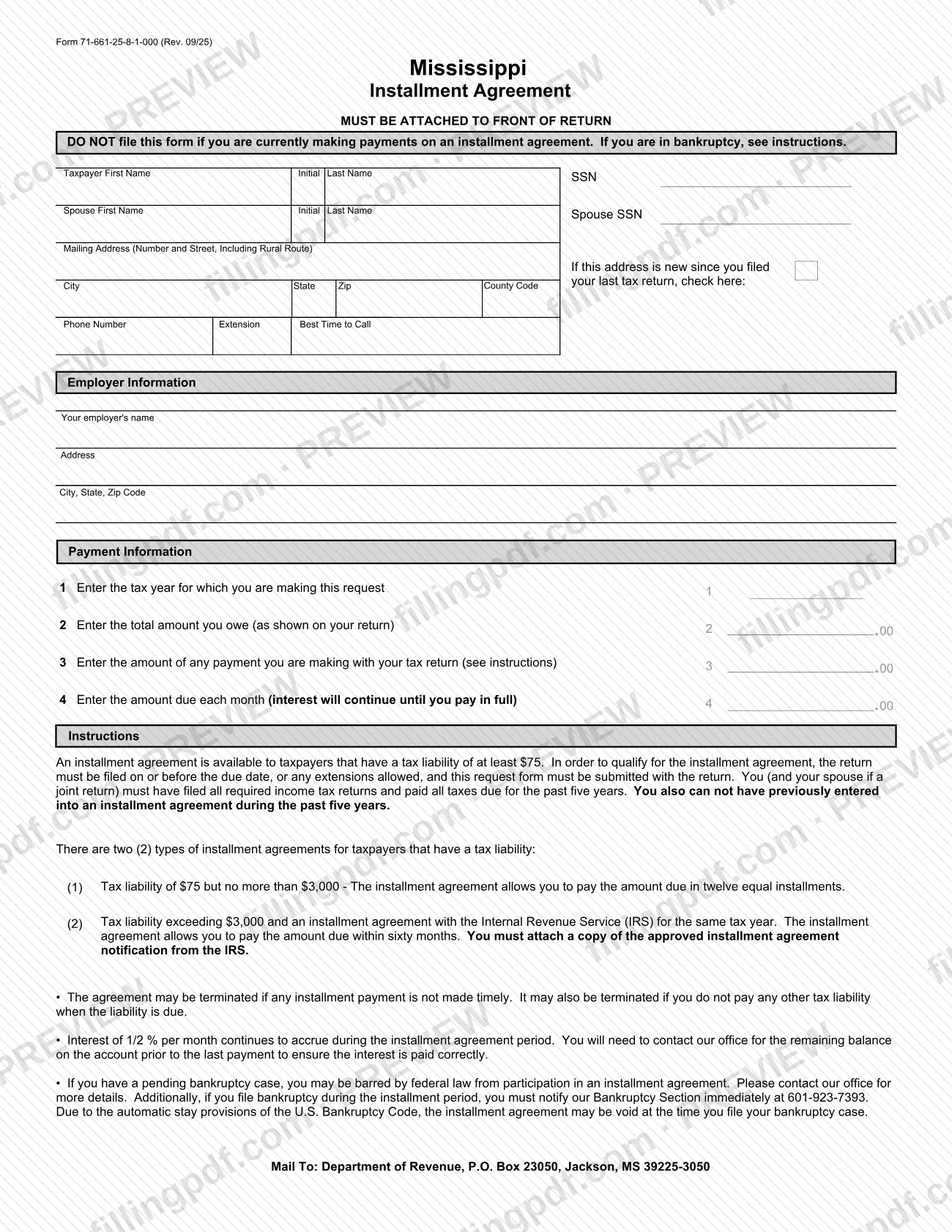
Form 71-661, Installment Agreement, is the request the Mississippi Department of Revenue (DOR) uses to let an individual taxpayer pay the tax shown on a return in monthly installments instead of one payment. Use this installment agreement only when you file your return on time and meet the conditions printed on the form. On FillingPDF you can fill out the form online and download or print the completed PDF; the DOR publishes the original form at dor.ms.gov, and it must be attached to the front of your return.
Last updated
What is 71-661?
Form 71-661, Installment Agreement, is the Mississippi Department of Revenue form on which an individual taxpayer asks to pay the income tax owed on a return in installments, stating the tax year, the total owed, any payment sent with the return and the amount due each month.
The form is printed as Form 71-661-25-8-1-000 (Rev. 09/25) and the DOR lists it among its Individual Income Tax Forms for 2025, with an earlier 2024 edition under the same number. It is not a separate filing: the form says it must be attached to the front of the return.
The form describes two types of agreement:
- A smaller tax liability, at or above the minimum printed on the form and up to the cap printed on it, is paid in twelve equal installments.
- A larger liability, for a taxpayer who also has an installment agreement with the Internal Revenue Service (IRS) for the same tax year, is paid within sixty months. A copy of the approved IRS installment agreement notification must be attached.
Interest continues to accrue during the agreement period, and the agreement may be terminated if an installment is not paid on time or if another tax liability is not paid when due. The form also carries a bankruptcy warning: a pending bankruptcy case may bar participation under federal law.
Who needs to file 71-661?
Individual taxpayers in Mississippi who owe tax on their return and want to pay it in installments use Form 71-661. The form sets the conditions:
- The tax liability must reach the minimum printed on the form.
- The return must be filed on or before the due date, or any extension allowed, and this form must be submitted with the return.
- You, and your spouse if the return is joint, must have filed all required income tax returns and paid all taxes due for the past five years.
- You cannot have entered into an installment agreement during the past five years.
- For a liability above the cap printed on the form, you must also have an installment agreement with the IRS for the same tax year.
Do not file the form if you are currently making payments on an installment agreement. If you are in bankruptcy, see the instructions on the form: a pending bankruptcy case may bar you from an installment agreement under federal law, and the DOR asks you to contact its office for details.
A spouse is listed on the form for joint returns. The form prints no rule about representatives signing for the taxpayer.
When to file 71-661
Submit Form 71-661 together with your Mississippi income tax return, on or before the return's due date or any extension allowed. The form says the return itself must be filed on time to qualify and that the request must be submitted with the return, so it has no separate due date.
After the agreement starts, each installment must be paid on time. The form warns that the agreement may be terminated if an installment is missed. Because interest keeps accruing, it tells you to contact the DOR for the remaining balance before your last payment so that the interest is paid correctly.
If you file for bankruptcy during the installment period, notify the DOR Bankruptcy Section immediately at 601-923-7393.
Documents you need
- A copy of the approved IRS installment agreement notification, only if your tax liability exceeds the cap printed on the form and you have an installment agreement with the IRS for the same tax year.
- Your Mississippi income tax return: the form must be attached to the front of it and submitted with it.
How to fill out 71-661
Enter your name and SSN
Write the taxpayer's first name, middle initial, last name and Social Security number (SSN) in the top block.
Add your spouse's details
If the return is joint, enter the spouse's first name, initial, last name and Spouse SSN.
Enter your mailing address
Give the number and street, including rural route, then city, state, ZIP code and county code. Check the box if the address is new since your last tax return.
Provide phone contact details
Enter your phone number, extension if any, and the best time to call.
Complete the employer information
Enter your employer's name, address, city, state and ZIP code in the Employer Information block.
Enter the tax year on line 1
On line 1, write the tax year for which you are making the request.
Enter the amount owed on line 2
On line 2, enter the total amount you owe as shown on your return.
Enter any payment on line 3
On line 3, enter the amount of any payment you are making with your tax return; see the form's instructions for this line.
Enter the monthly amount on line 4
On line 4, enter the amount due each month. Interest continues until you pay in full.
Review and download the PDF
Check the eligibility conditions printed on the form and confirm the entries match your return. Download or print the completed PDF from FillingPDF, attach it to the front of your return and submit it as described under How to submit.
How to submit 71-661
The form is submitted by mail, attached to the front of your return. It prints one address and names no other channel.
- By mail: Department of Revenue, P.O. Box 23050, Jackson, MS 39225-3050.
Place the completed Form 71-661 on top of the return, and attach a copy of the approved IRS installment agreement notification if your liability falls in the larger tier. Include any payment you are making with the return as entered on line 3; see the instructions on the form for how that line works. The form does not state a payment method or the processing time for the agreement. Bankruptcy-related questions go to the DOR Bankruptcy Section at 601-923-7393.
FillingPDF lets you fill out and download the PDF; submission follows the channels above.
Common mistakes to avoid
- Filing Form 71-661 while you are already making payments on an installment agreement; the form says not to.
- Mailing the form separately instead of attaching it to the front of the return.
- Filing the return after the due date or any allowed extension and still expecting the agreement to apply.
- Requesting an agreement when all required returns for the past five years have not been filed or all taxes due have not been paid.
- Requesting an agreement after entering into another installment agreement during the past five years.
- Omitting the copy of the approved IRS installment agreement notification when the liability is in the larger tier.
- Assuming interest stops during the agreement; it continues until you pay in full, so confirm the remaining balance with the DOR before the last payment.
- Missing an installment or another tax payment, which may terminate the agreement.
- Ignoring a pending bankruptcy, which may bar participation, or not notifying the DOR Bankruptcy Section if you file during the agreement.
Frequently asked questions
What is Mississippi Form 71-661?
Form 71-661, Installment Agreement, is the Mississippi Department of Revenue form used to request payment of the income tax shown on your return in installments. It must be attached to the front of the return and sets out the tax year, total owed, any payment made with the return and the monthly amount.
Who qualifies for a Mississippi installment agreement?
You qualify if your liability reaches the minimum on the form, your return is filed on time with this request, you have filed all returns and paid all taxes due for the past five years, and you have had no installment agreement in the past five years. A spouse must meet this too on a joint return.
How long do I have to pay under Form 71-661?
A smaller liability is paid in twelve equal installments. A larger liability, for which you also have an IRS installment agreement for the same tax year, is paid within sixty months, with a copy of the approved IRS notification attached. The form shows the dollar limits for each tier.
Where do I mail Form 71-661?
Attach it to the front of your return and mail it to Department of Revenue, P.O. Box 23050, Jackson, MS 39225-3050. The form prints no other submission channel.
Does interest stop during the installment agreement?
No. Interest continues to accrue during the agreement period until you pay in full. The form tells you to contact the DOR for the remaining balance before your last payment so the interest is paid correctly.
What happens if I miss a payment or file for bankruptcy?
The agreement may be terminated if an installment is not paid on time or if you do not pay another tax liability when due. If you file bankruptcy during the installment period, notify the DOR Bankruptcy Section immediately at 601-923-7393; the agreement may be void.
Can I fill out Form 71-661 online?
You can fill out the PDF online on FillingPDF and download or print it. FillingPDF is an independent service and does not submit the form to the DOR; you attach it to your return and mail it as the form directs.
Ready to fill out 71-661?
Fill out 71-661 now