
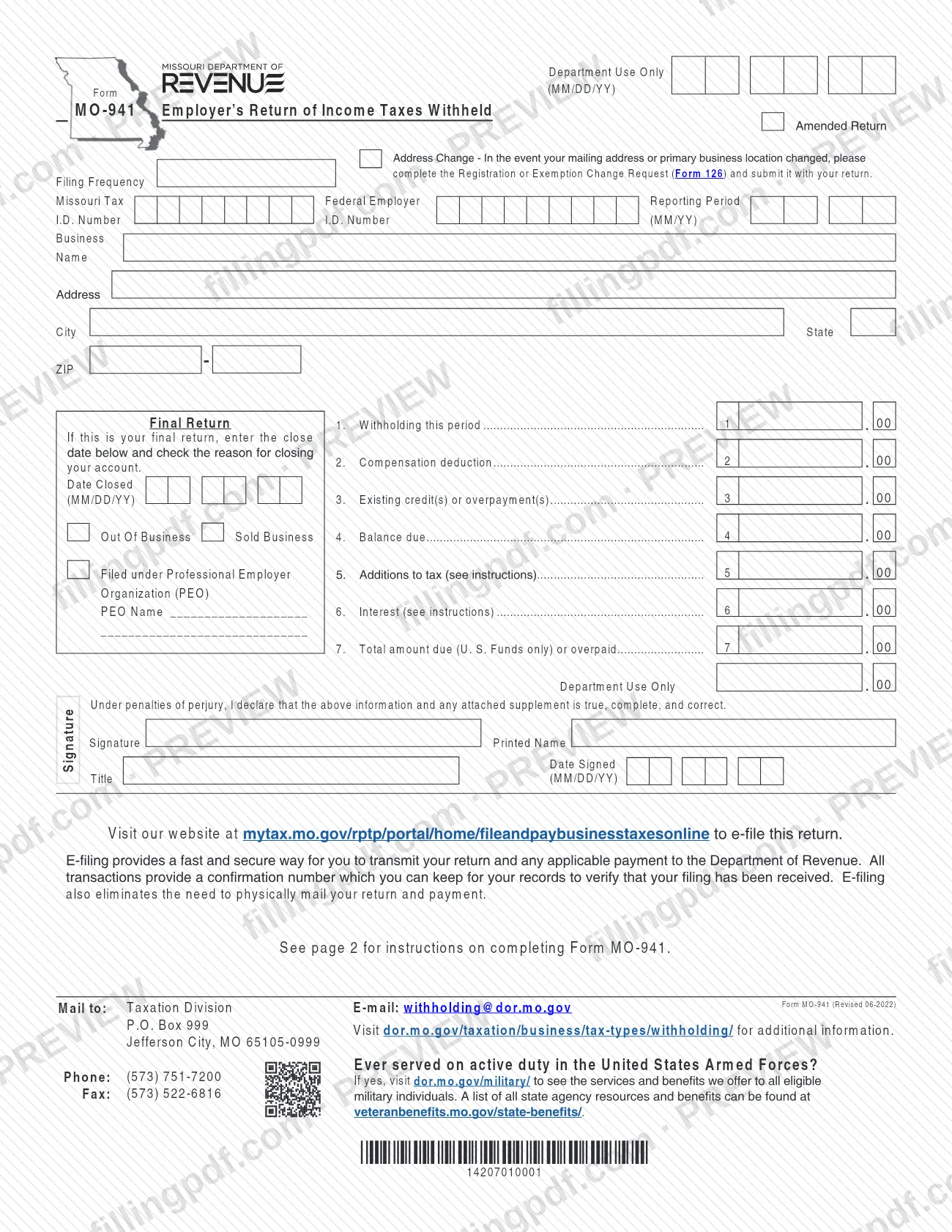
Form MO-941, Employer's Return of Income Taxes Withheld, is the return an employer files with the Missouri Department of Revenue to report the state income tax it withheld during a reporting period. It also carries any compensation deduction, existing credits, additions to tax and interest, and ends in the total amount due or overpaid. On this page you can fill out the form online on FillingPDF and download or print the completed PDF; the form and its instructions are published by the Department at dor.mo.gov, and the return is filed through the Department's own channels.
Last updated
What is MO-941?
Form MO-941, Employer's Return of Income Taxes Withheld, is the Missouri Department of Revenue return on which an employer reports the state withholding tax it withheld for a reporting period and works out the balance due or the overpayment.\n\nThe return is a single page with a short set of instructions on page 2. It identifies the business by Missouri Tax I.D. Number and Federal Employer I.D. Number, states the filing frequency and reporting period (MM/YY), and then runs through seven lines: withholding this period, compensation deduction, existing credit(s) or overpayment(s), balance due, additions to tax, interest and total amount due or overpaid. A signature block under penalties of perjury closes the form.\n\nThe same form covers several situations through check boxes: an Amended Return to increase or decrease tax liability, an Address Change, a Final Return when an account is closed (Out Of Business or Sold Business) and a return Filed under Professional Employer Organization (PEO).\n\nIt is not a refund request and not an address-change form. A refund of an overpayment is requested with the Employer's Refund Request (Form 4854), and a changed mailing address or primary business location is reported on the Registration or Exemption Change Request (Form 126). The Department's Employer's Withholding Tax Guide (Form 4282) explains the compensation deduction in detail.
Who needs to file MO-941?
Employers that withhold Missouri income tax from pay and are required to file withholding returns with the Missouri Department of Revenue use Form MO-941. The form's Filing Frequency box states how often your business must file.\n\n- Employers amending a previously filed return, to increase or decrease tax liability, use a new MO-941 with the Amended Return box selected.\n- Employers closing their withholding account file a final return, with the close date and the reason (Out Of Business or Sold Business).\n- Employers filing under a Professional Employer Organization check the PEO box and give the PEO's name.\n- Employers with no withholding in a period still report it: the instructions for line 1 say to enter zero.\n\nA business that has no Missouri Tax I.D. Number must register first, at dor.mo.gov/register-business/ or with the Missouri Tax Registration Application (Form 2643). Do not use this form to request a refund (use Form 4854) or only to change your address (use Form 126, submitted with your return).
When to file MO-941
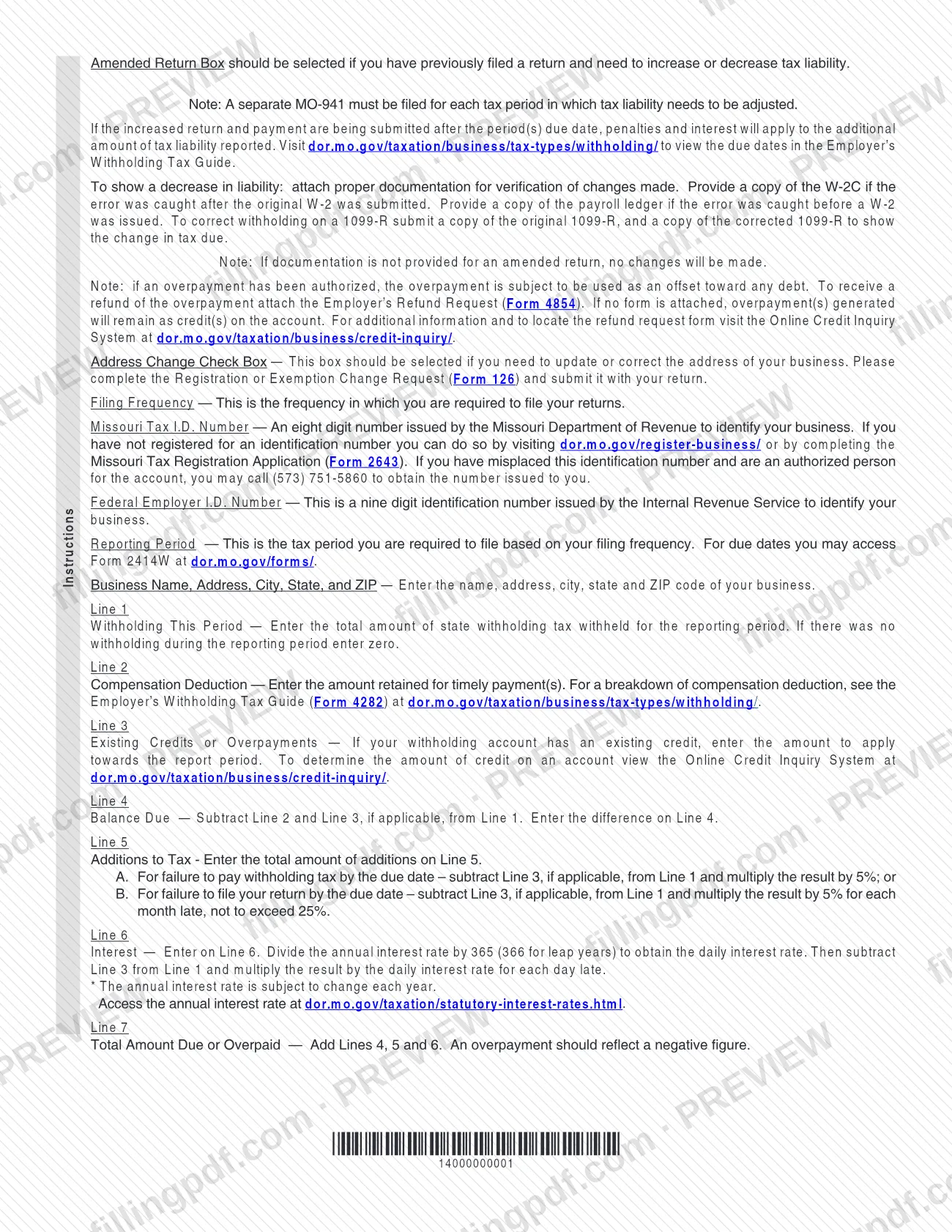
File a Form MO-941 for each reporting period that your filing frequency requires. The form defines the Reporting Period as the tax period you must file based on that frequency, and it points to Form 2414W (Withholding Tax E-File Due Dates) at dor.mo.gov/forms/ for the due dates. The Employer's Withholding Tax Guide, available at dor.mo.gov/taxation/business/tax-types/withholding/, also shows them.\n\nFiling or paying after the due date brings additions to tax (line 5) and interest (line 6). An amended return filed after the due date also carries penalties and interest on the additional tax reported. A separate MO-941 must be filed for each tax period whose liability needs adjusting.\n\nWhen you close your account, file a final return and enter the close date (MM/DD/YY) with the reason for closing.
Documents you need
- For an amended return that decreases liability: a copy of the W-2C, if the error was caught after the original W-2 was submitted.
- For an amended return that decreases liability: a copy of the payroll ledger, if the error was caught before a W-2 was issued.
- To correct withholding on a 1099-R: a copy of the original 1099-R and a copy of the corrected 1099-R showing the change in tax due.
- Registration or Exemption Change Request (Form 126), submitted with the return, only if your mailing address or primary business location changed.
- Employer's Refund Request (Form 4854), only if you want an overpayment refunded instead of left as a credit on the account.
How to fill out MO-941
Mark the return type boxes
Select Amended Return if you filed before and need to increase or decrease tax liability. Select Address Change if your mailing address or primary business location changed, and submit Form 126 with the return.
Enter filing frequency and period
Enter your Filing Frequency as assigned to your account, and the Reporting Period in MM/YY format. Due dates are in Form 2414W.
Enter your two identification numbers
Write the eight-digit Missouri Tax I.D. Number issued by the Department of Revenue and the nine-digit Federal Employer I.D. Number issued by the IRS.
Enter business name and address
Fill in the business name, address, city, state and ZIP code.
Complete final return and PEO boxes
For a Final Return, enter the Date Closed (MM/DD/YY) and check Out Of Business or Sold Business. If filing under a Professional Employer Organization, check that box and enter the PEO Name.
Enter withholding on line 1
Line 1, Withholding this period: enter the total state withholding tax withheld for the reporting period, or zero if none.
Enter lines 2 and 3
Line 2: the compensation deduction, meaning the amount retained for timely payment(s). Line 3: any existing credit or overpayment you apply to this period, checked in the Online Credit Inquiry System.
Figure the balance due on line 4
Subtract line 2 and line 3, if applicable, from line 1, and enter the difference on line 4.
Calculate additions to tax and interest
Line 5: enter the total additions for failure to pay or failure to file by the due date, as the instructions explain. Line 6: apply the daily interest rate to line 1 minus line 3 for each day late.
Total the return on line 7
Add lines 4, 5 and 6 to get the total amount due in U.S. funds. An overpayment shows as a negative figure.
Review, sign and download the PDF
Enter the signature, printed name, title and date signed (MM/DD/YY) under the penalties-of-perjury statement. Then download or print the completed PDF from FillingPDF and file it as described under How to submit.
How to submit MO-941
You can file Form MO-941 electronically or by mail to the Missouri Department of Revenue.\n\n- E-file: go to mytax.mo.gov/rptp/portal/home/fileandpaybusinesstaxesonline. The form says e-filing transmits both the return and any payment, gives a confirmation number you can keep to verify receipt, and removes the need to mail anything.\n- By mail: Taxation Division, P.O. Box 999, Jefferson City, MO 65105-0999.\n\nThe form lists the Taxation Division's contacts: e-mail [email protected], phone (573) 751-7200 and fax (573) 522-6816. Payment is in U.S. funds only.\n\nAttach what your situation requires: supporting documents for an amended return that decreases liability, Form 126 with an address change, and Form 4854 if you want an overpayment refunded rather than left as a credit. FillingPDF lets you fill out and download the PDF; submission follows the channels above.
Common mistakes to avoid
- Combining several periods on one amended return; a separate MO-941 must be filed for each tax period whose liability needs adjusting.
- Amending to decrease tax without documentation; the form says that if documentation is not provided, no changes will be made.
- Leaving line 1 blank when nothing was withheld; the instructions say to enter zero.
- Expecting a refund of an overpayment without attaching Form 4854; with no form attached, the overpayment stays as a credit on the account.
- Checking the Address Change box without submitting Form 126 with the return.
- Showing an overpayment on line 7 as a positive number; the instructions say an overpayment should be a negative figure.
- Figuring interest on line 6 from line 1 alone; the instructions subtract line 3 from line 1 before applying the daily rate.
- Mixing up the two ID numbers: the Missouri Tax I.D. Number has eight digits, and the Federal Employer I.D. Number has nine.
- Paying in anything other than U.S. funds; line 7 is for U.S. funds only.
Frequently asked questions
What is Form MO-941 used for?
Form MO-941 is the Missouri Department of Revenue's Employer's Return of Income Taxes Withheld. Employers use it to report state income tax withheld in a reporting period, apply the compensation deduction and credits, and calculate the balance due, additions to tax, interest and total amount due or overpaid.
Can I e-file Form MO-941?
Yes. The form directs you to mytax.mo.gov/rptp/portal/home/fileandpaybusinesstaxesonline. E-filing transmits the return and any payment, gives you a confirmation number to verify receipt, and means you do not have to mail the return or payment.
Where do I mail Form MO-941?
Mail it to the Taxation Division, P.O. Box 999, Jefferson City, MO 65105-0999. The form also lists the Taxation Division's phone, (573) 751-7200, and e-mail, [email protected], for questions.
How do I amend a Form MO-941?
Complete a new MO-941 for the affected period and select the Amended Return box. File a separate form for each period you adjust. To decrease liability, attach proof: a W-2C, a payroll ledger or the original and corrected 1099-R. Without documentation, no changes are made.
What do I enter on line 1 if I withheld nothing?
Enter zero. The instructions for line 1 say that if there was no withholding during the reporting period, you enter zero. Line 1 is otherwise the total state withholding tax withheld for the period.
How do I get a refund if I overpaid on Form MO-941?
Attach the Employer's Refund Request (Form 4854). If no form is attached, the overpayment stays as a credit on your account. An authorized overpayment can also be used to offset any debt you owe.
When is Form MO-941 due?
The due date depends on your filing frequency and reporting period. Check Form 2414W (Withholding Tax E-File Due Dates) at dor.mo.gov/forms/ or the Employer's Withholding Tax Guide. Late filing or payment adds additions to tax on line 5 and interest on line 6.
What if I don't know my Missouri Tax I.D. Number?
If you are an authorized person on the account, call (573) 751-5860 to get the eight-digit number. If your business is not registered, register at dor.mo.gov/register-business/ or use the Missouri Tax Registration Application (Form 2643).
Can I fill out Form MO-941 online on FillingPDF?
Yes. You can fill out the PDF online on FillingPDF and download or print it. FillingPDF is an independent service, not the Missouri Department of Revenue, and it does not file the return; you file it through the Department's e-file site or by mail.
Ready to fill out MO-941?
Fill out MO-941 now