
The Change Form is the form the Montana Department of Labor and Industry's Business Standards Division uses for the Board of Realty Regulation to record changes to a licensee: a change of status to active or inactive, a transfer to a new supervising broker, a change of licensee name, or the release of supervision. Brokers and salespersons licensed by the Board use it when a change is not made through the online licensing platform. On this page you can fill out the change form online on FillingPDF and download or print the completed PDF; the form itself and its instructions are published by the Board at boards.bsd.dli.mt.gov.
Last updated
What is Change Form – Montana?
The Change Form is the Montana Board of Realty Regulation form on which a licensee or supervising broker records a change of license status, a transfer to a new supervising broker, a change of licensee name, or the release of a licensee from supervision.
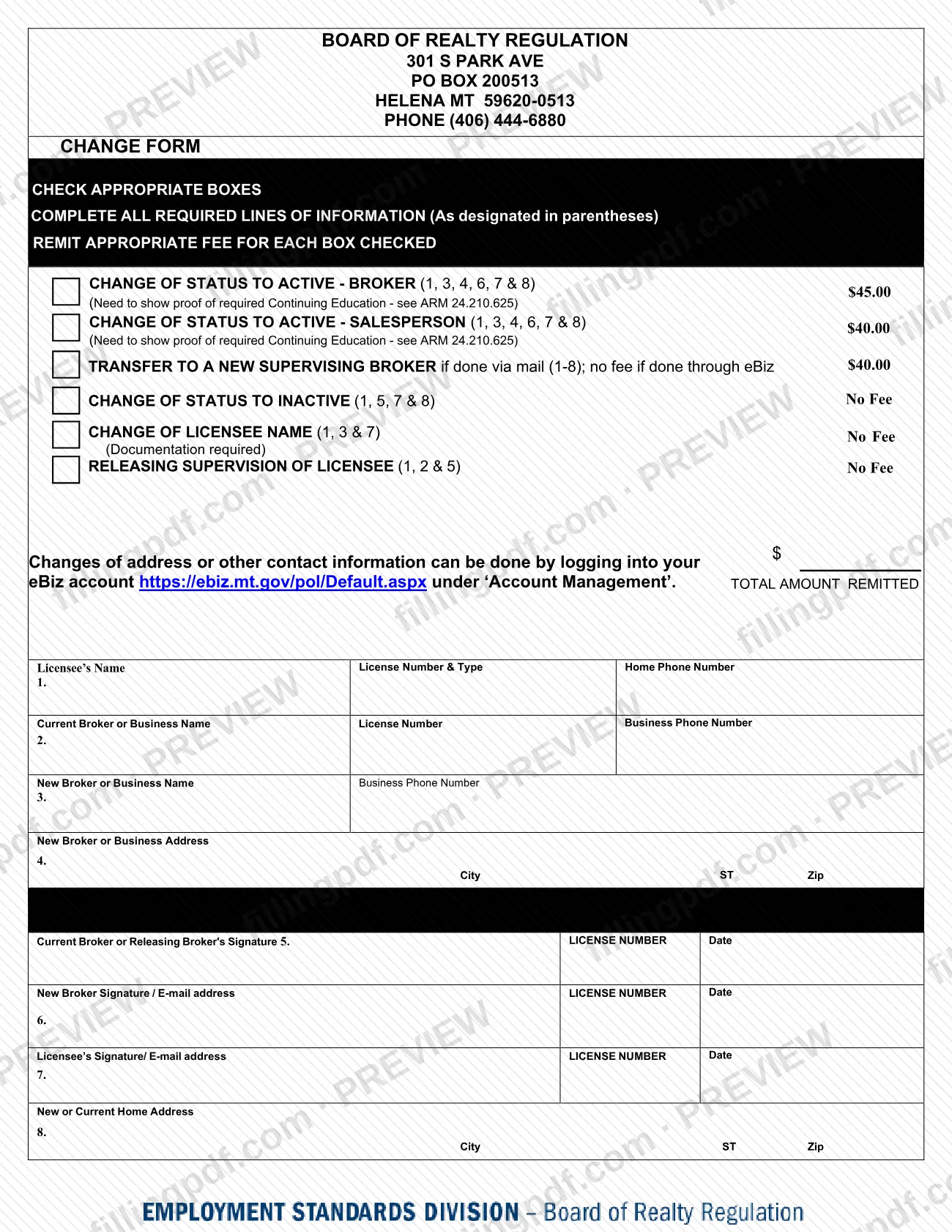
The form lists six boxes, and you check the one that matches your change:
- Change of status to active – broker
- Change of status to active – salesperson
- Transfer to a new supervising broker, when done by mail
- Change of status to inactive
- Change of licensee name
- Releasing supervision of licensee
Each box names the numbered lines (1 through 8) you must complete for it. Some boxes carry a fee and some say "No Fee"; the form tells you to remit the appropriate fee for each box checked and to enter the total amount remitted. A change to active status requires proof of the continuing education set out in ARM 24.210.625, and a name change requires documentation.
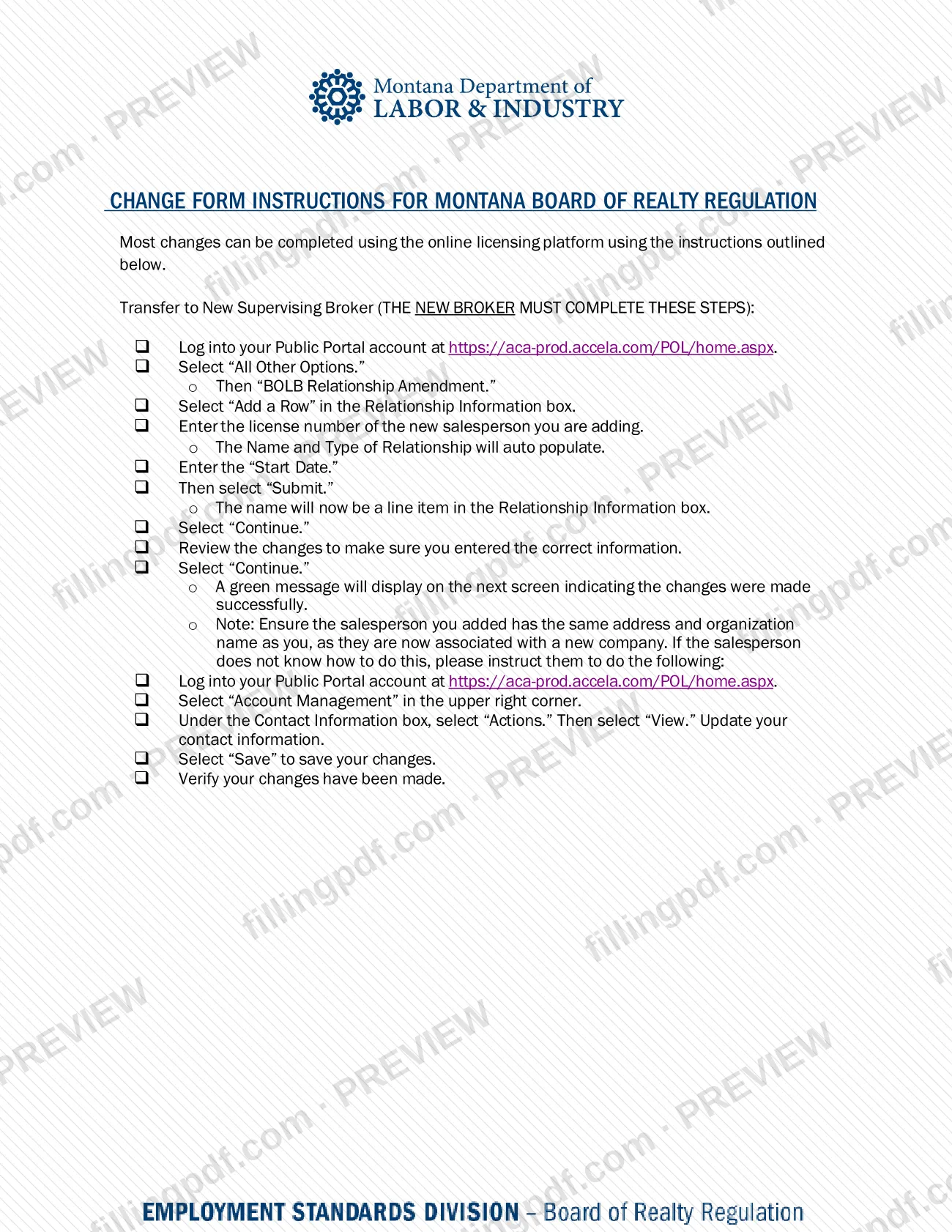
The form's instruction page adds that most changes can be completed on the Board's online licensing platform, and that changes of address or other contact information are made in your eBiz account under Account Management rather than on this form. The Change Form is therefore the paper route for the status, transfer, name and supervision changes listed above.
Who needs to file Change Form – Montana?
Licensees of the Montana Board of Realty Regulation, and the brokers who supervise them, use the Change Form when one of the six changes printed on it applies.
- Brokers and salespersons returning to active status check the matching "change of status to active" box and show proof of the required continuing education.
- A salesperson moving to a new supervising broker is covered by the transfer box. The form's instructions say the new broker completes the online transfer steps, and the form's signature lines include the current broker, the new broker and the licensee.
- A licensee going inactive checks the inactive box.
- A licensee who changed their name checks the name-change box and provides documentation.
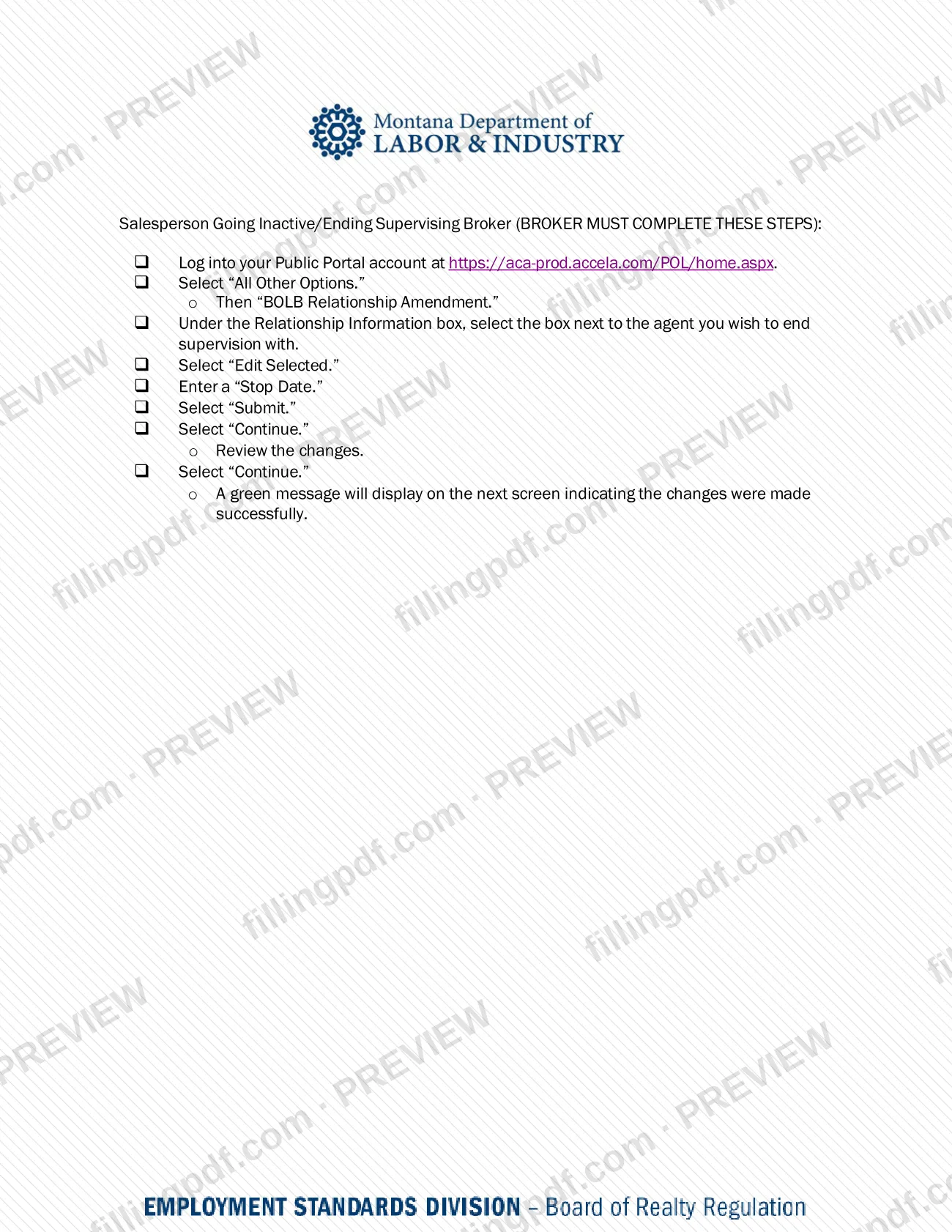
- A supervising broker ending supervision checks the releasing-supervision box; the instructions say the broker completes the online steps for a salesperson going inactive or ending supervision.
Do not use this form to change an address or other contact information. The form directs those changes to your eBiz account under Account Management. It also states that most changes can be made online instead of on paper.
When to file Change Form – Montana
Submit the Change Form when the change it records takes place or is needed: you are returning to active status, moving to a new supervising broker, going inactive, changing your licensee name, or a broker is releasing supervision of a licensee. The form prints no separate due date and no processing time.
For a transfer to a new supervising broker, the form's instructions describe an online alternative in which the new broker enters a "Start Date" for the relationship. For a salesperson going inactive or ending a supervising broker relationship, the broker enters a "Stop Date" online. The form does not say that these dates must fall within a set number of days. For deadlines tied to continuing education for active status, see ARM 24.210.625, which the form cites, or ask the Board at (406) 444-6880.
Documents you need
- Proof of required continuing education, when you check either "change of status to active" box (broker or salesperson); the form cites ARM 24.210.625.
- Documentation supporting the change, when you check the "change of licensee name" box; the form says documentation is required.
How to fill out Change Form – Montana
Check the box for your change
Under CHECK APPROPRIATE BOXES, mark the change you are making: active as broker, active as salesperson, transfer to a new supervising broker, inactive, change of licensee name, or releasing supervision. The numbers in parentheses show which lines to complete.
Enter the licensee's details on line 1
Write the licensee's name, license number and type, and home phone number. Every box requires line 1.
Enter the current broker on line 2
Give the current broker or business name, license number and business phone number. This line applies to a transfer (lines 1-8) and to releasing supervision of a licensee (lines 1, 2 and 5).
Enter the new broker on lines 3 and 4
On line 3 enter the new broker or business name and business phone number. On line 4 enter the new broker or business address, with city, state and ZIP. Use these for active status and transfer boxes, and line 3 also for a name change.
Complete the current broker's signature line
On line 5, the current broker or releasing broker signs and adds the license number and date. Line 5 applies to inactive status, releasing supervision and transfer.
Complete the new broker's signature line
On line 6, the new broker signs and provides an e-mail address, license number and date. Line 6 applies to active status and transfer boxes.
Complete the licensee's signature line
On line 7, the licensee signs and provides an e-mail address, license number and date. Line 7 applies to every box except releasing supervision.
Enter the home address on line 8
Write the new or current home address, with city, state and ZIP. Line 8 applies to active status, inactive status and transfer.
Enter the fee total
Check the fee printed beside each box you marked, then write the sum on the TOTAL AMOUNT REMITTED line. Boxes marked "No Fee" add nothing. Ask the Board at (406) 444-6880 if you need to confirm an amount.
Review, sign and download the PDF
Check that every line your box designates is complete and signed, and gather any continuing education proof or name-change documentation. Download or print the completed PDF from FillingPDF and submit it through the channels under How to submit.
How to submit Change Form – Montana
The Change Form can be handled through the Board's online licensing platform, through eBiz for contact changes, or by mail on paper.
- Online licensing platform (Public Portal): the form's instructions say most changes can be completed at https://aca-prod.accela.com/POL/home.aspx by selecting "All Other Options," then "BOLB Relationship Amendment." The new broker completes a transfer; the broker completes the steps to end supervision of a salesperson going inactive.
- eBiz: changes of address or other contact information are made at https://ebiz.mt.gov/pol/Default.aspx under "Account Management." The form also says a transfer to a new supervising broker carries no fee if done through eBiz.
- By mail: the form prints the Board's address: Board of Realty Regulation, 301 S Park Ave, PO Box 200513, Helena MT 59620-0513. It names no other mailing address. Include the fee for each box checked where one applies, the total amount remitted, and any required proof of continuing education or name-change documentation.
For the current fee amounts or questions, call the Board at (406) 444-6880. FillingPDF lets you fill out and download the PDF; submission follows the channels above.
Common mistakes to avoid
- Checking a box but leaving blank one of the numbered lines the box designates, such as lines 1, 3, 4, 6, 7 and 8 for a change of status to active.
- Sending the form for a change to active status without proof of the continuing education required under ARM 24.210.625.
- Submitting a name change without the documentation the form requires.
- Omitting the fee for each box checked where the form shows a fee, or leaving out the total amount remitted.
- Mailing a transfer to a new supervising broker on paper when it can be done through eBiz, where the form says no fee applies.
- Using this form to change an address or other contact information; the form directs those changes to Account Management in your eBiz account.
- Having the salesperson or the former broker complete the online transfer; the instructions say the new broker must complete those steps.
- Adding a salesperson to a new broker without making sure the salesperson's address and organization name match the broker's, as the instructions require.
Frequently asked questions
What is the Montana Change Form used for?
The Change Form records changes to a licensee with the Montana Board of Realty Regulation: change of status to active (broker or salesperson), transfer to a new supervising broker, change of status to inactive, change of licensee name, and releasing supervision of a licensee.
Can I make these changes online instead of using the paper form?
Yes, for most changes. The form's instructions say most changes can be completed on the online licensing platform, using "All Other Options" and then "BOLB Relationship Amendment" in your Public Portal account. Address and contact changes are made in eBiz under Account Management.
Who completes a transfer to a new supervising broker online?
The new broker. The instructions tell the new broker to log into the Public Portal, add the salesperson's license number in Relationship Information, enter a Start Date and submit. The salesperson's address and organization name should then match the new broker's.
How does a broker end supervision of a salesperson?
Online, the broker selects "BOLB Relationship Amendment," selects the agent in the Relationship Information box, chooses "Edit Selected," enters a Stop Date and submits. On paper, the broker checks the box for releasing supervision of licensee and completes lines 1, 2 and 5.
Is there a fee for the Change Form?
It depends on the box. The form shows a fee beside the active-status boxes and the transfer-by-mail box, and says no fee for inactive status, name change or releasing supervision. A transfer done through eBiz has no fee. Call (406) 444-6880 for current amounts.
What do I need to attach to change to active status?
Proof of the required continuing education. Each "change of status to active" box (broker or salesperson) says you need to show it and cites ARM 24.210.625. A change of licensee name requires documentation instead.
Where do I mail the Change Form?
The form prints the Board's address as Board of Realty Regulation, 301 S Park Ave, PO Box 200513, Helena MT 59620-0513, with phone (406) 444-6880. Include the fee for each box checked where one applies, and the total amount remitted.
Can I fill out the Change Form online on FillingPDF?
You can fill out the PDF online on FillingPDF and download or print it. FillingPDF is an independent service and does not submit the form to the Board; you send it through the Board's channels, such as by mail, or use the online platform instead.
Ready to fill out Change Form – Montana?
Fill out Change Form – Montana now