
Form ADD-CH is the change of address form of the Montana Department of Revenue, used to update the home mailing address the department has on file for your individual income tax account. It is for people who filed their Montana individual income tax return on Form 2 and have since moved. On FillingPDF you can fill out Form ADD-CH online and download or print the completed PDF. The department publishes the form and its instructions; you send the signed form to the department yourself.
Last updated
What is ADD-CH?
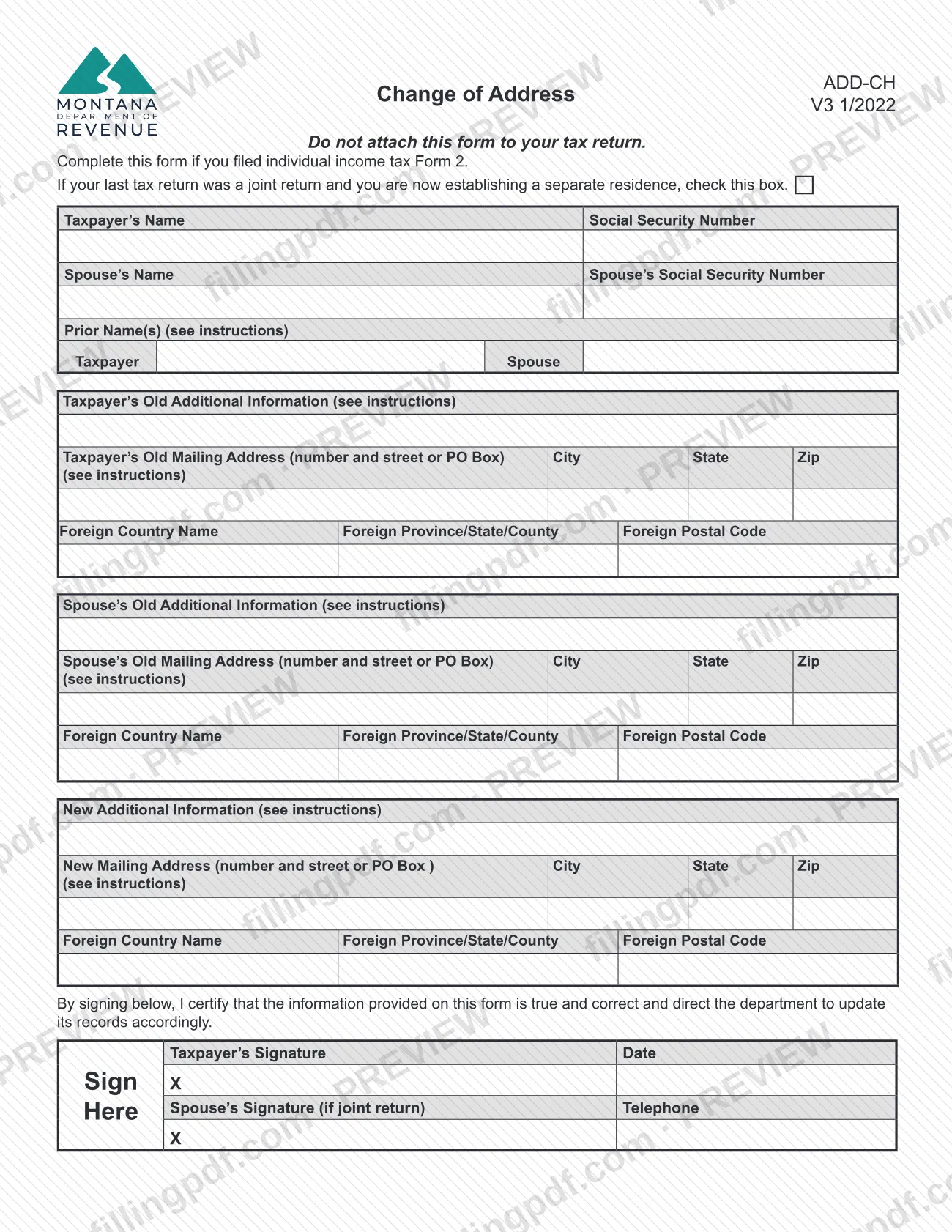
Change of Address (Form ADD-CH) is the Montana Department of Revenue form that changes your home mailing address in the department's records when you filed your individual income tax return on Form 2 and have moved.
Once the department processes it, the form permanently changes your mailing address. The department states that it will use only the new mailing address for future correspondence. If your address changes again, you complete the form again or give the new address on your next tax return.
The form collects the taxpayer's name and Social Security Number, the spouse's name and Social Security Number when there is one, any prior last name, the old mailing address for the taxpayer and the spouse, and the new mailing address. Each address can carry an Additional Information line and has separate boxes for a foreign country, province, state or county, and postal code. By signing, you certify that the information is true and correct and direct the department to update its records.
Form ADD-CH is optional and is not part of your tax return. The form itself says not to attach it to your tax return. It also has a box for a joint filer who is now establishing a separate residence.
Who needs to file ADD-CH?
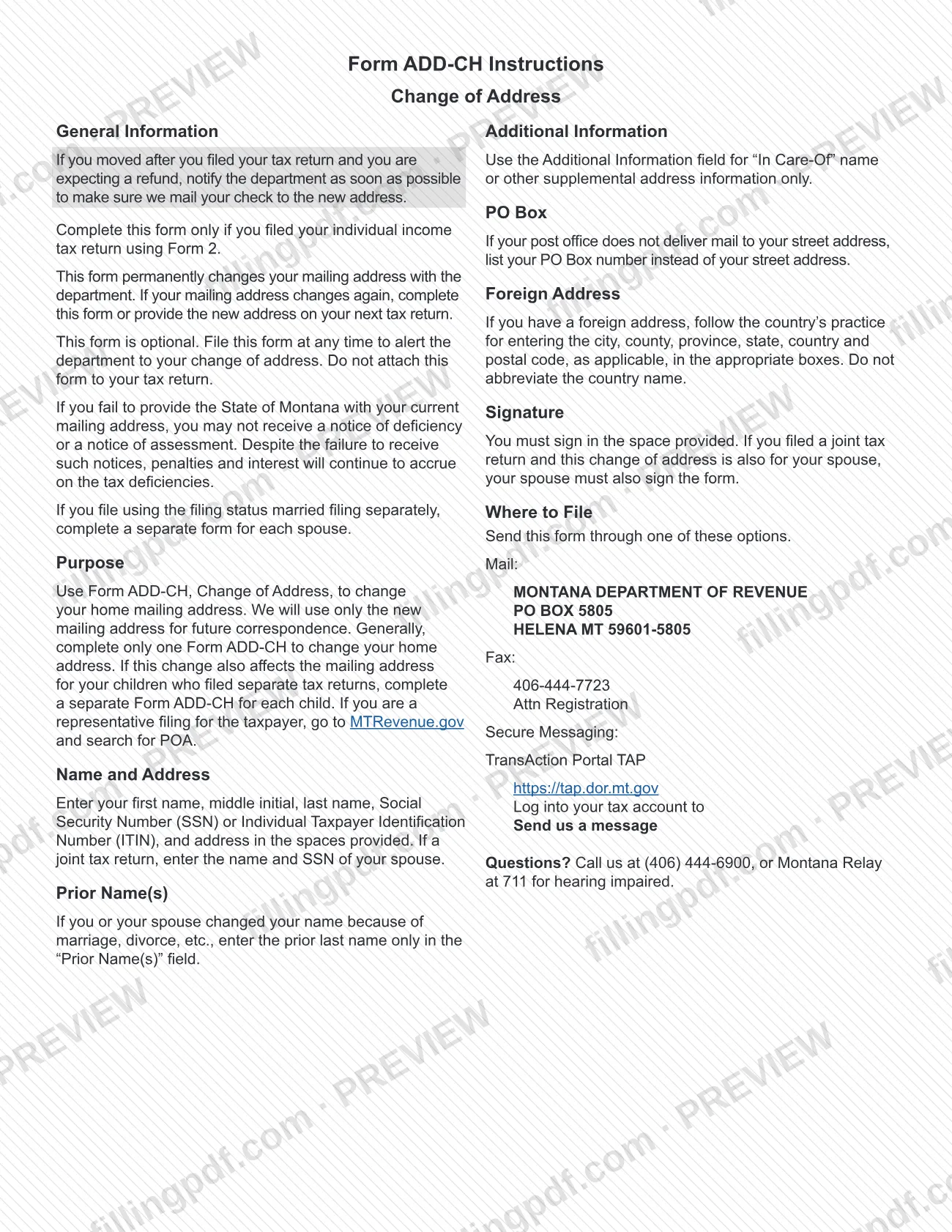
Use Form ADD-CH if you filed your Montana individual income tax return on Form 2 and your mailing address has changed. The instructions say to complete the form only if you filed using Form 2.
- Joint filers: if your last return was joint and you are now establishing a separate residence, check the box at the top of the form. If the change also covers your spouse, your spouse must sign too.
- Married filing separately: complete a separate form for each spouse.
- Children who filed their own returns: if the move also changes their mailing address, complete a separate Form ADD-CH for each child. Generally you complete only one form to change your home address.
- Representatives: if you are filing for the taxpayer, the instructions send you to MTRevenue.gov, where you search for POA.
If you moved after filing and expect a refund, the department asks you to notify it as soon as possible so the check goes to the new address.
When to file ADD-CH
You can file Form ADD-CH at any time; the form is optional and the instructions set no due date. If you moved after you filed your tax return and you are expecting a refund, notify the department as soon as possible so it mails your check to the new address.
Timing matters because of what happens if the department has an outdated address. The instructions warn that if you fail to provide the State of Montana with your current mailing address, you may not receive a notice of deficiency or a notice of assessment. Penalties and interest continue to accrue on tax deficiencies even when you do not receive those notices.
Do not wait for your next return and do not attach the form to it: Form ADD-CH is sent separately, although you may also simply provide the new address on your next tax return.
How to fill out ADD-CH
Check the separate residence box
At the top, check the box only if your last tax return was a joint return and you are now establishing a separate residence. Otherwise leave it blank.
Enter taxpayer and spouse names
Write the taxpayer's name and Social Security Number (SSN) or Individual Taxpayer Identification Number (ITIN). If the return was joint, add your spouse's name and SSN.
Add any prior last name
In Prior Name(s), enter the prior last name only if you or your spouse changed names because of marriage, divorce or similar. The form has Taxpayer and Spouse boxes beside this entry.
Enter your old mailing address
Fill in the taxpayer's old additional information, mailing address (number and street or PO Box), city, state and ZIP. Repeat for the spouse's old address if it applies.
Enter your new mailing address
Complete New Additional Information, then the new mailing address, city, state and ZIP. This is the only address the department will use for future correspondence.
Use Additional Information correctly
Use this field for an In Care-Of name or other supplemental address information only. If your post office does not deliver to your street address, list your PO Box number instead.
Complete foreign address boxes if needed
For a foreign address, follow that country's practice in the Foreign Country Name, Province/State/County and Postal Code boxes. Do not abbreviate the country name.
Sign, date and add a phone number
Sign and date the form and enter your telephone number. If you filed a joint return and the change is also for your spouse, your spouse signs too.
Review and download the completed PDF
Check names, SSNs and both addresses, then download or print the completed PDF from FillingPDF. Send it to the department through one of the channels described under How to submit, not with your tax return.
How to submit ADD-CH
Send Form ADD-CH to the Montana Department of Revenue by mail, by fax or through secure messaging in the TransAction Portal (TAP). Do not attach it to your tax return.
- Mail: Montana Department of Revenue, PO Box 5805, Helena MT 59601-5805.
- Fax: 406-444-7723, Attn Registration.
- Secure Messaging: log into your tax account at https://tap.dor.mt.gov and send the department a message.
The form must be signed. If a joint return was filed and the change is also for your spouse, your spouse must sign as well. For questions, call the department at (406) 444-6900, or use Montana Relay at 711 if you are hearing impaired. FillingPDF lets you fill out and download the PDF; submission follows the channels above.
Common mistakes to avoid
- Attaching Form ADD-CH to your tax return; the form says not to attach it and to send it separately.
- Using the form when you did not file your individual income tax return on Form 2, which is the only filer the instructions cover.
- Filing one form for both spouses when you use the filing status married filing separately; each spouse completes a separate form.
- Leaving off your spouse's signature when you filed a joint return and the change is also for your spouse.
- Putting anything other than an in-care-of name or supplemental address information in the Additional Information field.
- Abbreviating the country name on a foreign address instead of writing it out in full.
- Entering a street address when your post office does not deliver there, instead of your PO Box number.
- Entering more than the prior last name in the Prior Name(s) field after a name change.
Frequently asked questions
What is Form ADD-CH?
Form ADD-CH, Change of Address, is the Montana Department of Revenue form that changes your home mailing address in the department's records. It is for people who filed their individual income tax return on Form 2, and it permanently changes the address the department uses.
Is a change of address required after I move in Montana?
No. The instructions say Form ADD-CH is optional and can be filed at any time. Still, if you do not give the state your current address, you may not receive a notice of deficiency or assessment, and penalties and interest keep accruing on any deficiency.
Do I attach Form ADD-CH to my tax return?
No. The form states not to attach it to your tax return. Send it separately by mail, fax or secure messaging in TAP, or simply provide your new address on your next tax return.
Where do I send Form ADD-CH?
Mail it to Montana Department of Revenue, PO Box 5805, Helena MT 59601-5805; fax it to 406-444-7723, Attn Registration; or send a secure message after logging into your tax account at https://tap.dor.mt.gov. For questions, call (406) 444-6900.
Do both spouses have to sign Form ADD-CH?
If you filed a joint return and the change of address is also for your spouse, your spouse must sign as well. If you file married filing separately, each spouse completes a separate form.
Can I fill out Form ADD-CH online?
Yes. You can fill out the PDF online on FillingPDF and download or print it. FillingPDF is an independent service and does not send the form to the department; you submit it through the department's mail, fax or TAP channels.
Can someone file Form ADD-CH for me?
Yes, a representative can file for the taxpayer. The instructions tell a representative to go to MTRevenue.gov and search for POA. The signature line on the form is for the taxpayer, and for the spouse on a joint return.
I moved and expect a refund. What should I do?
Notify the department as soon as possible so it mails your refund check to your new address. Submit Form ADD-CH by mail, fax or TAP secure messaging rather than waiting for your next return.
Ready to fill out ADD-CH?
Fill out ADD-CH now