
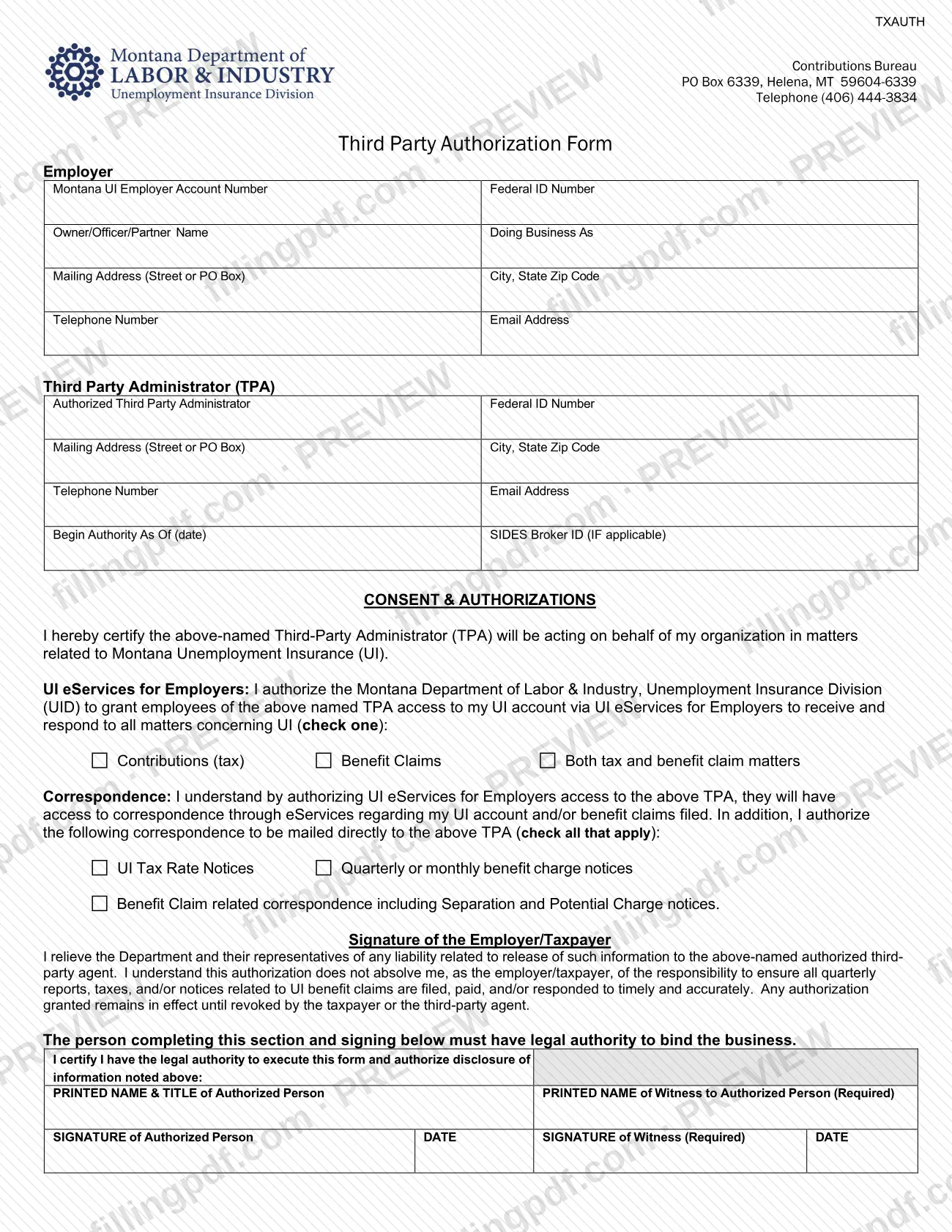

The Third Party Authorization Form (TXAUTH) is the document a Montana employer signs to let an outside third-party administrator (TPA) act for it in Montana Unemployment Insurance (UI) matters. The Contributions Bureau of the Montana Department of Labor and Industry publishes it. Use it when a payroll firm, accounting agency or similar agent needs access to your UI account. On this page you can fill out the third party authorization form online on FillingPDF and download or print the completed PDF; the agency receives it only through the channels described below.
Last updated
What is TXAUTH?
The Third Party Authorization Form is the Montana Unemployment Insurance (UI) form, coded TXAUTH, in which an employer certifies that a named third-party administrator (TPA) will act on its behalf in matters related to Montana UI and authorizes the agency to give that TPA access to the employer's UI account.
The Contributions Bureau of the Montana Department of Labor and Industry (DLI), Unemployment Insurance Division (UID), uses the form. The Montana UI page on printable forms explains that written authorization must be provided before the agency will give access to someone outside the organization, such as a payroll firm or accounting agency.
On the form, the employer identifies itself and the TPA, gives a date on which the authority begins and, if applicable, a SIDES Broker ID. The employer then chooses what the TPA's employees may see and answer in UI eServices for Employers: contributions (tax) matters, benefit claims, or both. The employer also chooses which correspondence is mailed directly to the TPA: UI tax rate notices, quarterly or monthly benefit charge notices, and benefit claim related correspondence including separation and potential charge notices.
The authorization does not remove the employer's own duties. The form states that the employer is still responsible for making sure quarterly reports, taxes and notices on benefit claims are filed, paid or answered on time and accurately.
Who needs to file TXAUTH?
Employers with a Montana UI account who want a third-party administrator or agent, such as a payroll firm or accounting agency, to receive and respond to UI matters for them complete this form. The TPA does not complete it on its own: the authorization comes from the employer.
- Signer: a person with legal authority to bind the business must sign. The form lists an owner, corporate officer, partner, managing member, Chief Financial Officer, Chief Executive Officer, or a fiduciary of a trust or estate as possible authorized signers.
- Witness: a witness to that signature must also print their name, sign and date the form. The form marks the witness as required.
- Several agents: if more than one third-party agent performs UI services for you, you need a separate authorization form for each of them.
Employers who do not use an outside agent for UI matters have no use for this form.
When to file TXAUTH
Complete the form when you need to give a third-party administrator or agent access to your Montana UI account information, because the agency requires written authorization before it provides that access. The form prints no filing deadline.
You choose the date the TPA's authority starts in the Begin Authority As Of (date) box. Once granted, the authorization stays in effect until the taxpayer or the third-party agent revokes it. If you add another agent later, complete a separate form for that agent.
How to fill out TXAUTH
Enter the employer's identifying details
In the Employer section, enter the Montana UI Employer Account Number and Federal ID Number, the owner, officer or partner name, and the Doing Business As name.
Add the employer's contact information
Enter the mailing address (street or PO Box), city, state and ZIP code, telephone number and email address of the employer.
Complete the Third Party Administrator section
Enter the authorized Third Party Administrator's name and Federal ID Number, its mailing address, city, state and ZIP code, telephone number and email address.
Set the start date and SIDES ID
Enter the date in Begin Authority As Of (date). Enter the SIDES Broker ID only if it applies.
Choose the UI eServices access
Under UI eServices for Employers, check one: Contributions (tax), Benefit Claims or Both tax and benefit claim matters.
Select the mailed correspondence
Under Correspondence, check all that apply: UI Tax Rate Notices, Quarterly or monthly benefit charge notices, and Benefit Claim related correspondence including Separation and Potential Charge notices.
Certify legal authority and print names
Check the certification that you have legal authority to execute the form and authorize disclosure. Enter the printed name and title of the authorized person and the printed name of the witness.
Sign, date and have it witnessed
The authorized person signs and dates the form, and the witness signs and dates it. The form requires both signatures.
Review, download and submit the PDF
Check that both the Employer and TPA sections are complete, then download or print the completed PDF from FillingPDF and return it as described under How to submit.
How to submit TXAUTH
The form instructions say to return it to UI Contributions electronically by uploading it into UI eServices for Employers (uieservices.mt.gov). The Montana UI printable forms page also says you can return it to the UI Contributions Bureau.
- Upload: sign the form, have your witness sign it, and upload it in UI eServices for Employers at uieservices.mt.gov.
- Contributions Bureau: the form header gives the Contributions Bureau address as PO Box 6339, Helena, MT 59604-6339, and the telephone number as (406) 444-3834.
Both signatures and dates must be on the form before it is returned. FillingPDF lets you fill out and download the PDF; submission follows the agency's channels above.
Common mistakes to avoid
- Leaving out the witness name, signature or date; the form marks the witness as required.
- Having someone sign who lacks legal authority to bind the business, instead of an owner, officer, partner, managing member, CFO, CEO or fiduciary.
- Listing several third-party agents on one form; each agent needs its own separate authorization form.
- Completing only the Employer section or only the Third Party Administrator section; both must be completed.
- Skipping the check-one choice for contributions (tax), benefit claims, or both, which sets what the TPA can access in UI eServices.
- Assuming the authorization ends the employer's own duties; you remain responsible for timely and accurate reports, taxes and notice responses.
- Omitting the Begin Authority As Of date, which states when the TPA's authority starts.
- Leaving the correspondence boxes unchecked when you want notices mailed directly to the TPA.
Frequently asked questions
What is the Montana Third Party Authorization Form used for?
It lets a Montana employer authorize a third-party administrator, such as a payroll firm or accounting agency, to act for it in Unemployment Insurance matters. The Department of Labor and Industry requires this written authorization before it gives the third party access to the employer's UI account.
Who has to sign the third party authorization form?
A person with legal authority to bind the business signs it. The form names an owner, corporate officer, partner, managing member, CFO, CEO, or a fiduciary of a trust or estate. A witness must also sign and date the form.
Is a witness required on this form?
Yes. The form labels the witness name and signature as required. The witness prints their name, signs and dates next to the authorized person's signature, and the instructions say the witness must sign and date the form.
Can I use one form for more than one third-party agent?
No. If several third-party agents perform UI services for you, complete a separate authorization form for each of them. Each form names one Third Party Administrator.
Where do I send the Third Party Authorization Form?
Upload it in UI eServices for Employers at uieservices.mt.gov, as the form instructions say. The agency's forms page also lets you return it to the UI Contributions Bureau, PO Box 6339, Helena, MT 59604-6339; the telephone number is (406) 444-3834.
How long does the authorization last?
It remains in effect until the taxpayer or the third-party agent revokes it. The form prints no expiration date, though you set the starting date in the Begin Authority As Of (date) box.
Does the authorization relieve me of my UI responsibilities?
No. The form states that it does not absolve the employer of the responsibility to ensure quarterly reports, taxes and notices on UI benefit claims are filed, paid or answered timely and accurately.
Can I fill out the third party authorization form online?
You can fill out the PDF online on FillingPDF and download or print it. FillingPDF is independent of the Montana Department of Labor and Industry and does not submit the form; you return it through UI eServices for Employers or to the Contributions Bureau.
Ready to fill out TXAUTH?
Fill out TXAUTH now