
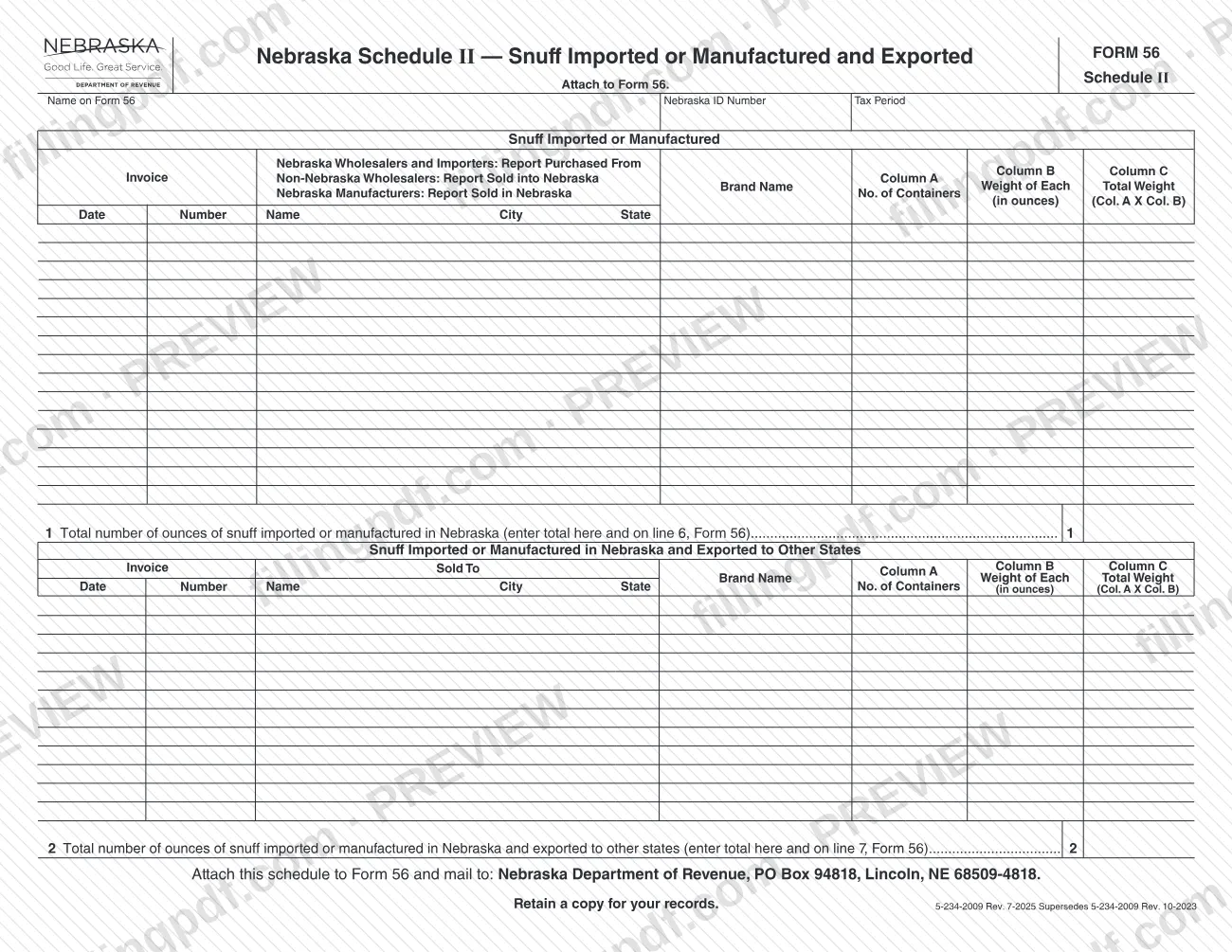
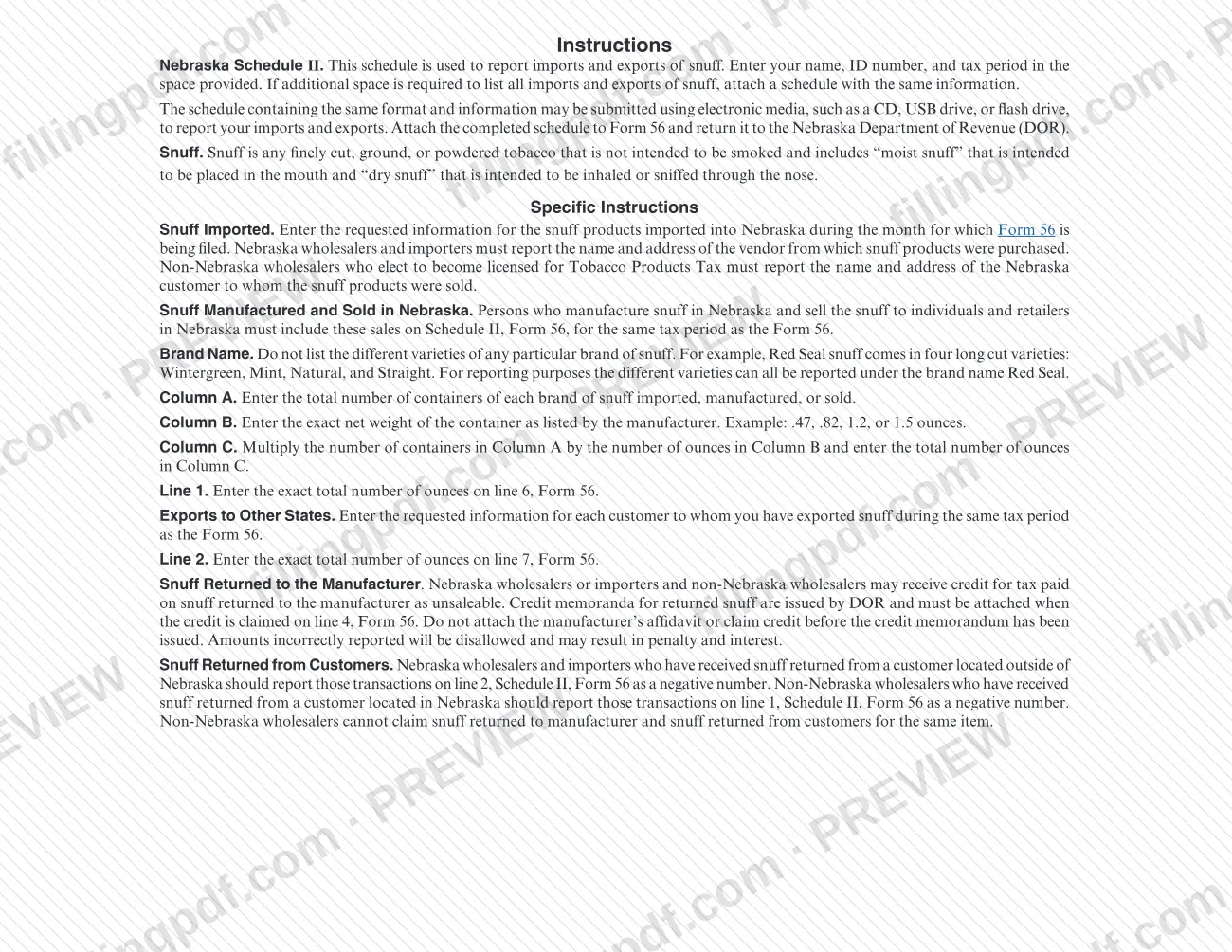
Nebraska Schedule II (Form 56) is the schedule the Nebraska Department of Revenue (DOR) uses to collect the details of snuff that was imported or manufactured in Nebraska and snuff that was exported to other states. Nebraska wholesalers, importers, manufacturers and licensed non-Nebraska wholesalers list each brand, container count and weight, then carry two ounce totals to Form 56. On FillingPDF you can fill out the form online and download or print the completed PDF; the schedule is attached to Form 56 and mailed to the DOR as described below.
Last updated
What is Schedule II (Form 56)?
Nebraska Schedule II — Snuff Imported or Manufactured and Exported is the Nebraska Department of Revenue (DOR) schedule, attached to Form 56, on which you list snuff imported into or manufactured in Nebraska and snuff exported to other states, with the ounces totaled brand by brand.
The schedule is not filed on its own. It is part of Form 56, and its two totals feed that form: line 1 (total ounces of snuff imported or manufactured in Nebraska) goes on line 6 of Form 56, and line 2 (total ounces of snuff imported or manufactured in Nebraska and exported to other states) goes on line 7 of Form 56.
The page has two tables. The first covers snuff imported or manufactured. It records, for each invoice, the date, invoice number, and the name, city and state of the vendor or customer, followed by the brand name and three columns: number of containers (Column A), weight of each container in ounces (Column B) and total weight, which is Column A multiplied by Column B (Column C). The second table covers snuff exported to other states, with the same columns and a "Sold To" party.
The DOR instructions define snuff as any finely cut, ground or powdered tobacco not intended to be smoked. That includes "moist snuff" placed in the mouth and "dry snuff" inhaled through the nose. The form is printed as 5-234-2009 Rev. 7-2025 and supersedes Rev. 10-2023.
Who needs to file Schedule II (Form 56)?
Persons who file Form 56 and handle snuff in the ways the DOR instructions describe attach Schedule II to it:
- Nebraska wholesalers and importers report snuff imported into Nebraska, with the name and address of the vendor from which it was purchased.
- Non-Nebraska wholesalers who elect to become licensed for Tobacco Products Tax report snuff sold into Nebraska, with the name and address of the Nebraska customer.
- Nebraska manufacturers who make snuff in Nebraska and sell it to individuals and retailers in Nebraska report those sales on Schedule II for the same tax period as Form 56.
- Anyone who exported snuff to customers in other states during the tax period lists those customers in the export section.
Wholesalers who received snuff back from a customer also use the schedule to report the return as a negative number. Nebraska wholesalers and importers do this on line 2 for a customer outside Nebraska, and non-Nebraska wholesalers do it on line 1 for a customer in Nebraska. The instructions name no other filers and no one exempt from the schedule.
When to file Schedule II (Form 56)
Schedule II is filed with Form 56 for the same tax period, so it is due whenever that Form 56 is due; the schedule prints no separate due date. The DOR instructions tie the reporting to the month for which Form 56 is filed: imported snuff is the snuff brought into Nebraska during that month, manufacturer sales are reported for the same tax period as the Form 56, and exports are those made during the same tax period.
Enter the tax period in the header of the schedule. For timing and penalty questions about Form 56 itself, contact the DOR.
Credit for snuff returned to the manufacturer is tied to timing as well: do not claim it until the DOR has issued the credit memorandum.
Documents you need
- Credit memorandum issued by the Nebraska DOR, attached to Form 56 only when a Nebraska wholesaler, importer or non-Nebraska wholesaler claims credit on line 4 for snuff returned to the manufacturer as unsaleable.
- An additional schedule with the same information, only if the lines on Schedule II do not leave enough space to list all imports and exports of snuff.
How to fill out Schedule II (Form 56)
Enter name, ID number and tax period
At the top, write the name as it appears on Form 56, your Nebraska ID Number and the Tax Period. Use the same tax period as the Form 56 this schedule accompanies.
Identify the vendor or customer
In the first table, enter the invoice date, invoice number, and the name, city and state of the other party. Nebraska wholesalers and importers give the vendor they purchased from; non-Nebraska wholesalers give the Nebraska customer; Nebraska manufacturers give the Nebraska buyer.
Enter the brand name
Write one brand name per entry and do not list the varieties of a brand separately. Different varieties are all reported under the same brand name.
Enter containers in Column A
In Column A, enter the total number of containers of each brand of snuff imported, manufactured or sold.
Enter container weight in Column B
In Column B, enter the exact net weight of one container in ounces, as listed by the manufacturer, for example .47, .82, 1.2 or 1.5.
Multiply to fill Column C
Multiply Column A by Column B and enter the total ounces in Column C for each row.
Total the imports on line 1
Enter the exact total ounces of snuff imported or manufactured in Nebraska on line 1, then enter the same figure on line 6 of Form 56.
List exports to other states
In the second table, enter the invoice date, invoice number and the name, city and state of each customer you exported snuff to during the tax period. Complete the brand name and Columns A, B and C the same way.
Total the exports on line 2
Enter the exact total ounces of snuff exported on line 2, then enter the same figure on line 7 of Form 56.
Report returned snuff correctly
Enter snuff returned from customers as a negative number: on line 2 for a Nebraska wholesaler or importer with a customer outside Nebraska, or on line 1 for a non-Nebraska wholesaler with a customer in Nebraska. If you need more space for any list, attach a schedule with the same information.
Review and download the completed PDF
Check the totals and the carry-over amounts on lines 6 and 7 of Form 56. Download or print the completed PDF from FillingPDF, attach it to Form 56 and keep a copy for your records.
How to submit Schedule II (Form 56)
Attach Schedule II to Form 56 and mail both to the DOR; the form names no other channel.
- By mail: Nebraska Department of Revenue, PO Box 94818, Lincoln, NE 68509-4818.
- Electronic media: the instructions say a schedule with the same format and information may be submitted on a CD, USB drive or flash drive to report your imports and exports. Attach the completed schedule to Form 56 and return it to the DOR.
- Extra pages: if you need more room to list all imports and exports, attach a schedule with the same information.
- Credit memorandum: if you claim credit on line 4 of Form 56 for snuff returned to the manufacturer, attach the credit memorandum issued by the DOR.
Retain a copy for your records. FillingPDF lets you fill out and download the PDF; submission follows the channels above.
Common mistakes to avoid
- Listing each variety of a brand separately; the instructions say to report all varieties under one brand name, such as Red Seal for Wintergreen, Mint, Natural and Straight.
- Estimating the container weight in Column B instead of entering the exact net weight listed by the manufacturer, such as .47, .82, 1.2 or 1.5 ounces.
- Entering the container count in Column C instead of multiplying Column A by Column B to get total ounces.
- Not carrying the line 1 total to line 6 of Form 56, or the line 2 total to line 7 of Form 56.
- Claiming credit for snuff returned to the manufacturer, or attaching the manufacturer's affidavit, before the DOR has issued the credit memorandum; wrongly reported amounts are disallowed and may bring penalty and interest.
- Reporting snuff returned from customers as a positive number; it must be a negative number, on line 2 for Nebraska wholesalers and importers or line 1 for non-Nebraska wholesalers.
- Claiming both snuff returned to manufacturer and snuff returned from customers for the same item, which non-Nebraska wholesalers cannot do.
- Mailing the schedule without keeping a copy; the form says to retain a copy for your records.
Frequently asked questions
What is Nebraska Schedule II (Form 56)?
Nebraska Schedule II is a Nebraska Department of Revenue schedule attached to Form 56. It reports snuff imported or manufactured in Nebraska and snuff exported to other states, by brand, in ounces. Its line 1 and line 2 totals carry to lines 6 and 7 of Form 56.
Is Schedule II filed by itself?
No. The form says to attach it to Form 56 and mail it to the Nebraska Department of Revenue, PO Box 94818, Lincoln, NE 68509-4818. It has no separate due date: it is submitted for the same tax period as the Form 56 it supports.
How do I figure the total ounces on Schedule II?
Multiply the number of containers in Column A by the exact net weight of one container in Column B, and enter the result in Column C. Add the Column C amounts for line 1 (imports) or line 2 (exports), using the exact ounces.
How do I report snuff returned by a customer?
Report it as a negative number. A Nebraska wholesaler or importer with a customer outside Nebraska uses line 2; a non-Nebraska wholesaler with a customer in Nebraska uses line 1. These returns are reported on Schedule II, Form 56.
Can I submit Schedule II on a USB drive?
Yes, in the same format. The instructions allow a schedule with the same format and information to be submitted on electronic media, such as a CD, USB drive or flash drive. You still attach the completed schedule to Form 56 and return it to the DOR.
Do I list each snuff variety on its own line?
No. Report all varieties of a brand under the single brand name. For example, the instructions say Red Seal's four long cut varieties (Wintergreen, Mint, Natural and Straight) are all reported as Red Seal.
Can I fill out Nebraska Schedule II online on FillingPDF?
Yes. You can fill out the PDF online on FillingPDF and download or print it. FillingPDF is an independent service and does not file the schedule: you attach it to Form 56 and send it to the Nebraska Department of Revenue yourself.
Ready to fill out Schedule II (Form 56)?
Fill out Schedule II (Form 56) now