
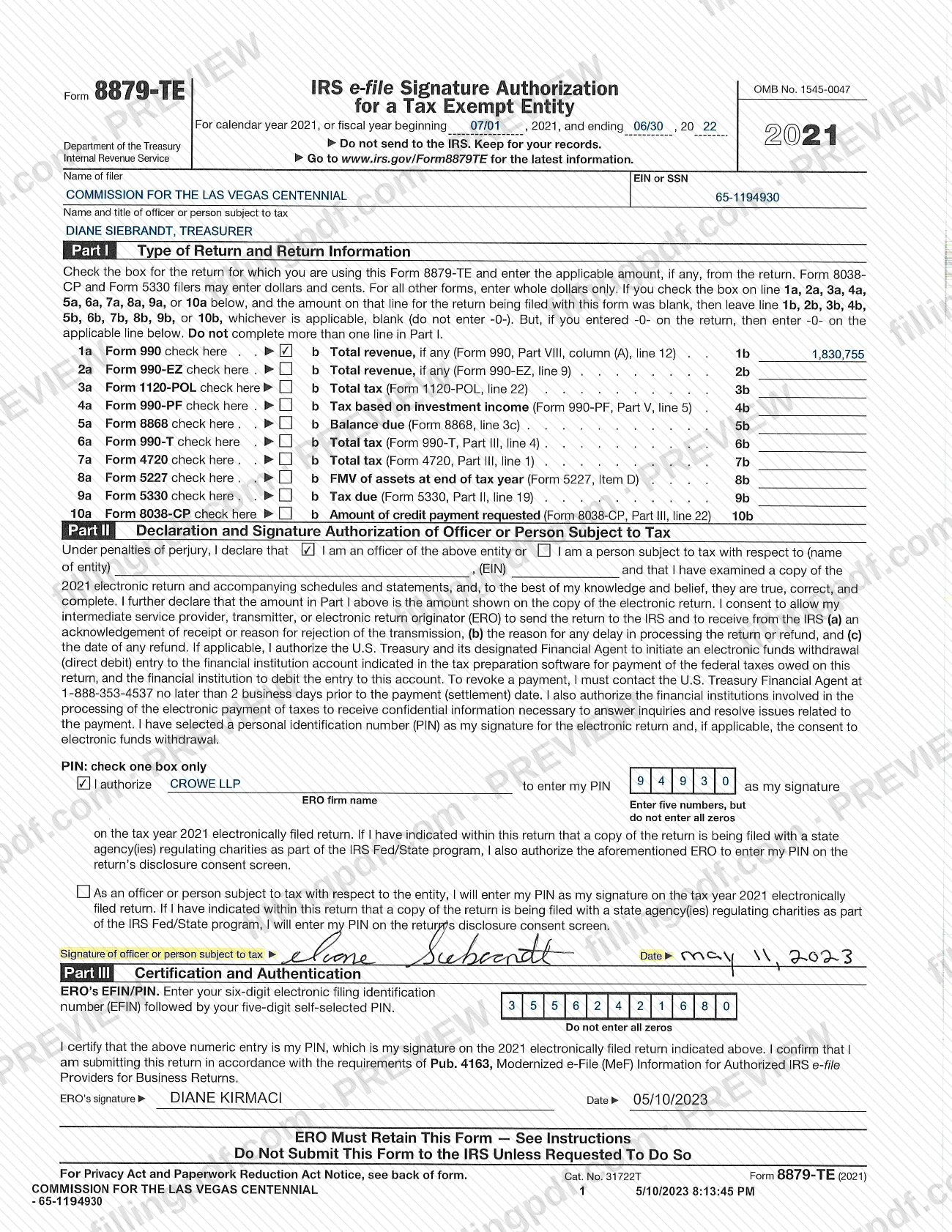
Form 8879-TE, IRS e-file Signature Authorization for a Tax Exempt Entity, is an Internal Revenue Service (IRS) form that an officer of a tax exempt entity, or a person subject to tax, signs to authorize an electronically filed return. The copy on this page is the 2021 version hosted on the City of Las Vegas website with Commission for the Las Vegas Centennial materials; it is a federal IRS form, not a local tax document. On this page you can fill out the form online on FillingPDF and download or print the completed PDF. The form itself says not to send it to the IRS.
Last updated
What is 8879-TE?
Form 8879-TE, IRS e-file Signature Authorization for a Tax Exempt Entity, is the Internal Revenue Service (IRS) form on which an officer of a tax exempt entity, or a person subject to tax, authorizes an electronic return and selects a PIN as the signature.
The form is printed under OMB No. 1545-0047 for calendar year 2021, or for a fiscal year beginning in 2021, and it works as a signature page for a return that is filed electronically. In Part I the filer checks the box for the return being filed and, where the form asks, repeats one amount from that return. The declaration section then states, under penalties of perjury, that the signer has examined a copy of the electronic return and that it is true, correct and complete.
The signer also consents to let an intermediate service provider, transmitter or electronic return originator (ERO) send the return to the IRS and receive acknowledgements from it. If tax is owed, the signer authorizes an electronic funds withdrawal (direct debit) for payment. The PIN entered on the form serves as the signature for the electronic return.
The return types listed on the form are Form 990, 990-EZ, 1120-POL, 990-PF, 8868, 990-T, 4720, 5227, 5330 and 8038-CP. The form is not a return and does not report tax on its own: it travels with the electronic return and is kept by the ERO.
Who needs to file 8879-TE?
An officer of a tax exempt entity, or a person subject to tax with respect to the entity, uses Form 8879-TE when the entity's return is filed electronically and a PIN is used as the signature.
- The form covers only the returns listed in Part I: Form 990, 990-EZ, 1120-POL, 990-PF, 8868, 990-T, 4720, 5227, 5330 and 8038-CP. Check the box for one return only; the form says not to complete more than one line in Part I.
- The signer states on the form whether they are an officer of the entity or a person subject to tax with respect to the named entity.
- The signer chooses between authorizing the ERO firm to enter the PIN and entering the PIN personally on the electronic return.
- The ERO completes the certification section with an EFIN and PIN, signs and dates it, and must retain the form.
The form is not for sending to the IRS: it says not to submit it unless the IRS requests it. It is also not a property tax document of any kind; it relates to federal electronic filing for tax exempt entities.
When to file 8879-TE
Form 8879-TE is completed for a specific electronic return, once the officer or person subject to tax has examined a copy of that return and is ready to authorize the ERO to transmit it. The form covers calendar year 2021, or a fiscal year beginning in 2021 (the copy here shows a fiscal year beginning 07/01 and ending 06/30). It prints no filing deadline of its own: timing follows the return it accompanies.
After signing, the ERO keeps the form. The IRS does not receive it unless it asks for it. A payment authorization on the form can be revoked by contacting the U.S. Treasury Financial Agent at 1-888-353-4537 no later than 2 business days before the payment (settlement) date.
How to fill out 8879-TE
Enter the tax period
At the top, confirm the calendar year, or enter the fiscal year beginning and ending dates (for example 07/01 and 06/30) when the return is for a fiscal year.
Enter the filer's name and number
Enter the Name of filer and its EIN or SSN.
Enter the officer's name and title
In Name and title of officer or person subject to tax, enter the person who will sign and that person's title.
Check one return in Part I
Check the box on line 1a through 10a for the return being filed. Complete only one line.
Enter the return amount
On the matching line b, enter the amount from the return in whole dollars (cents only for Form 8038-CP and Form 5330). If the return amount was blank, leave it blank; if it was -0-, enter -0-.
Complete the declaration
Check whether you are an officer of the entity or a person subject to tax, and enter the entity name and EIN where the declaration asks for them.
Choose how the PIN is entered
Check one box: authorize the ERO firm to enter your PIN, naming the firm, or state that you will enter your PIN yourself. Enter five numbers, not all zeros.
Complete the ERO certification
The ERO enters the six-digit EFIN followed by the five-digit self-selected PIN (not all zeros), then signs and dates the form.
Review and download the completed PDF
Check that only one return is marked, the amounts match the return and the PIN section is complete. Download or print the completed PDF from FillingPDF and give it to the ERO to retain.
How to submit 8879-TE
Form 8879-TE is not submitted to the IRS: the form states "Do not send to the IRS. Keep for your records" and "Do Not Submit This Form to the IRS Unless Requested To Do So."
- Keep it with the ERO: the form is marked "ERO Must Retain This Form." The electronic return itself is sent to the IRS by your intermediate service provider, transmitter or ERO, whom you authorize on the form to do so.
- Provide it to the ERO: the signer completes Part I and the declaration and returns the form to the ERO, who completes the certification and signs it.
- If the IRS asks for it: send it only on request.
The form lists no mailing address, portal or fee. The ERO certifies on the form that the return is submitted in accordance with Pub. 4163, Modernized e-File (MeF) Information for Authorized IRS e-file Providers for Business Returns. FillingPDF lets you fill out and download the PDF; handling of the form follows the instructions above.
Common mistakes to avoid
- Mailing Form 8879-TE to the IRS; the form says not to send it and to keep it for your records unless the IRS requests it.
- Checking the box on more than one line in Part I; the form says not to complete more than one line.
- Entering -0- on a return amount line when the amount on the return was blank; the form says to leave line b blank in that case.
- Entering cents on a line where whole dollars are required; only Form 8038-CP and Form 5330 filers may enter dollars and cents.
- Choosing a PIN of all zeros; the form says to enter five numbers but not all zeros.
- Checking both PIN options; the form says to check one box only.
- Leaving the ERO's EFIN/PIN, signature or date blank, or using an EFIN that is not six digits followed by a five-digit PIN.
- Leaving another filer's name, EIN, officer or amounts on the form when using this hosted copy for a different entity.
Frequently asked questions
Is Form 8879-TE a Las Vegas property tax form?
No. Form 8879-TE is an IRS form, even though this copy sits on the City of Las Vegas website. It authorizes the electronic filing of a tax exempt entity's federal return and carries no property tax information.
What is Form 8879-TE used for?
It is the IRS e-file signature authorization for a tax exempt entity. An officer or person subject to tax declares the electronic return is true, correct and complete, consents to its transmission by the ERO, and selects a PIN as the signature.
Do I send Form 8879-TE to the IRS?
No. The form says to keep it for your records and not to submit it to the IRS unless the IRS requests it. The ERO must retain it, while the electronic return itself is transmitted to the IRS by the provider.
Which returns does Form 8879-TE cover?
Form 990, 990-EZ, 1120-POL, 990-PF, 8868, 990-T, 4720, 5227, 5330 and 8038-CP. You check the box for one return only and, where the line asks, enter the amount from that return.
Who can enter my PIN on Form 8879-TE?
You choose one of two options: authorize the named ERO firm to enter your PIN as your signature, or enter the PIN yourself on the electronic return. The PIN is five numbers and cannot be all zeros.
Can I fill out Form 8879-TE online?
Yes. You can fill out the PDF online on FillingPDF and download or print it. FillingPDF is an independent service and does not file the form or the return; the ERO keeps the form and transmits the return.
How do I revoke a payment authorized on Form 8879-TE?
Contact the U.S. Treasury Financial Agent at 1-888-353-4537 no later than 2 business days before the payment (settlement) date. The form states this deadline in the declaration about electronic funds withdrawal.
Ready to fill out 8879-TE?
Fill out 8879-TE now