
Record Request Instructions is the City of Las Vegas Department of Building & Safety sheet that explains how to request Building records through the city's online records request page at www.LasVegasNevada.gov/recordsrequest. It serves anyone who needs records tied to a specific address handled by Building & Safety. On FillingPDF you can fill out the form online and download or print the completed PDF; the request itself is made on the city's page, and the city publishes the PDF at the official link. For questions, the Department lists the phone number (702) 229-6251.
Last updated
What is Record Request Instructions – Las Vegas, NV?
Record Request Instructions is the City of Las Vegas Department of Building & Safety sheet that walks a requester through the city's online records request: open the records request page, select Building, sign in with an account, and fill in the request with the address of the records.
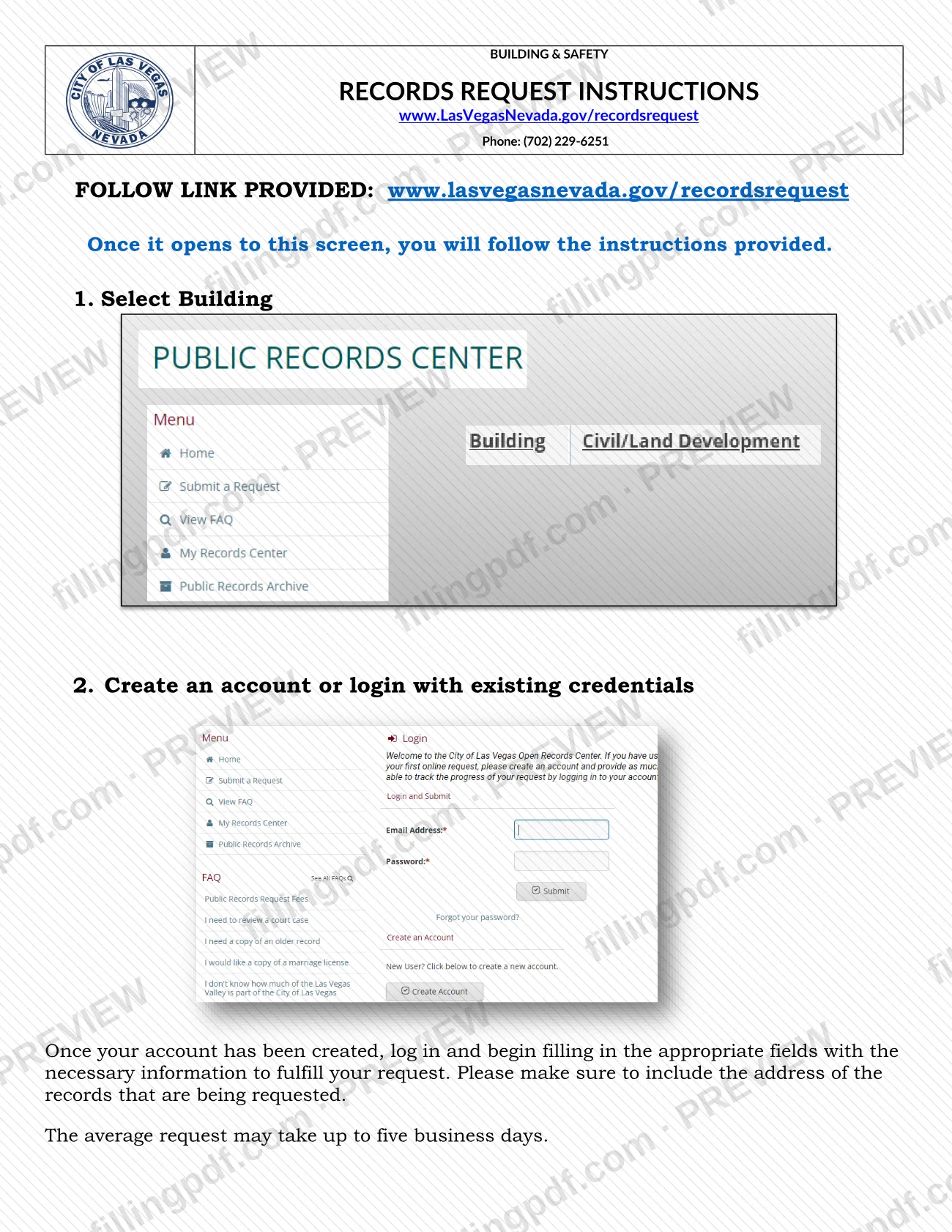
The sheet is printed under the heading "Building & Safety, Records Request Instructions" and points to the web address www.LasVegasNevada.gov/recordsrequest. It lists two numbered steps, 1. Select Building and 2. Create an account or login with existing credentials, and then explains what to do once the account exists: log in and fill in the appropriate fields with the information needed to fulfill the request, making sure to include the address of the records being requested.
It also states the expected turnaround: the average request may take up to five business days. The Department's phone number printed on the sheet is (702) 229-6251.
This document is an instruction sheet for Building records. It is not a tax document and says nothing about property tax, assessments or tax bills, so it should not be confused with the property tax forms of the Las Vegas area.
Who needs to file Record Request Instructions – Las Vegas, NV?
The main audience is anyone who needs records from the City of Las Vegas Department of Building & Safety for a particular address and wants to request them through the city's online records request page.
Points the sheet attaches to the request:
- You choose the Building option on the records request page, so the instructions apply to Building records.
- You need an account: either create one or log in with credentials you already have.
- You must include the address of the records you are requesting.
The sheet names no other eligibility conditions and does not say whether someone may submit a request for another person. Its only exclusions follow from its content: it covers the Building option of the records request page and does not deal with property tax or other city services. If your question is not about Building & Safety records, contact the Department at (702) 229-6251 to find out where to direct it.
When to file Record Request Instructions – Las Vegas, NV
Use these instructions whenever you need Building & Safety records for an address and are ready to start a request on the city's records request page. The sheet sets no calendar deadline and no filing season.
Plan for the stated processing time: the average request may take up to five business days. That figure is an average and a ceiling for the typical case, not a guarantee for every request, so allow for it before you need the records in hand.
If this is your first request, create your account before anything else, since the request fields appear only after you log in. Have the address of the records ready so you can enter it when you fill in the request.
How to fill out Record Request Instructions – Las Vegas, NV
Open the records request page
Go to www.LasVegasNevada.gov/recordsrequest, the link printed on the sheet. Once the page opens, follow the instructions it provides.
Select the Building option
Step 1 on the sheet is to select Building. This routes your request to the Department of Building & Safety records.
Create an account or log in
Step 2 is to create an account or log in with existing credentials. The request fields are available once you are logged in.
Fill in the request fields
Enter the information the page asks for so the Department can fulfill your request.
Include the address of the records
Make sure the address of the records being requested appears in your request, as the sheet specifically instructs.
Review and download the PDF
Check the steps against your request, then download or print the PDF from FillingPDF for reference. Allow up to five business days for the average request, and call (702) 229-6251 with questions.
How to submit Record Request Instructions – Las Vegas, NV
The request is made online through the City of Las Vegas records request page, with a phone number for questions.
- Online: go to www.LasVegasNevada.gov/recordsrequest. When the page opens, follow the on-screen instructions: select Building, then create an account or log in with existing credentials. After logging in, fill in the fields needed to fulfill your request and include the address of the records you want.
- Phone: the Department of Building & Safety lists (702) 229-6251 on the sheet for questions.
The sheet describes no mailing address, in-person counter or other channel, and it states no fee. The average request may take up to five business days. FillingPDF lets you fill out and download the PDF; submission follows the channels above.
Common mistakes to avoid
- Leaving out the address of the records being requested; the instructions say to make sure it is included.
- Skipping the Select Building step on the records request page, which is the first step the sheet lists.
- Trying to fill in the request before creating an account or logging in; the fields are completed after you log in.
- Treating five business days as a guaranteed turnaround; the sheet says the average request may take up to five business days.
- Looking for a mailing address or counter for this request; the sheet directs you to the online page and lists only a phone number for questions.
- Using these instructions for a property tax question; the sheet covers Building records only.
Frequently asked questions
What are the Record Request Instructions in Las Vegas?
They are a Department of Building & Safety sheet from the City of Las Vegas explaining how to request Building records online. You open www.LasVegasNevada.gov/recordsrequest, select Building, create an account or log in, and fill in the request, including the address of the records.
Is this the Las Vegas property tax form?
No. These instructions cover requests for Building & Safety records and do not mention property tax, assessments or tax bills. If you searched for Las Vegas property tax, this sheet will not answer that question; use it only for a Building records request.
How do I submit a Building records request in Las Vegas?
Use the city's online records request page at www.LasVegasNevada.gov/recordsrequest. Select Building, create an account or log in with existing credentials, then fill in the fields with the information needed to fulfill your request. The sheet lists no mailing or in-person channel.
How long does a Las Vegas Building records request take?
The sheet says the average request may take up to five business days. That is an average rather than a promise, so a particular request may differ. For questions about a pending request, call the Department at (702) 229-6251.
Do I need an account to request records from Building & Safety?
Yes, according to the instructions. Step 2 is to create an account or log in with existing credentials. After your account exists, you log in and fill in the appropriate fields with the information needed for your request.
What information do I need to include in the request?
The sheet specifically says to include the address of the records being requested, along with the information needed in the appropriate fields on the request page. Have the address ready before you log in and start the request.
What is the phone number for Las Vegas Building & Safety records?
The sheet prints (702) 229-6251 for the Building & Safety Department. Use it for questions about the records request process. The request itself is made online at www.LasVegasNevada.gov/recordsrequest.
Can I fill out the Record Request Instructions on FillingPDF?
You can fill out the PDF online on FillingPDF and download or print it. FillingPDF is an independent service and is not connected to the City of Las Vegas; it does not submit your request. The request is made on the city's records request page.
Ready to fill out Record Request Instructions – Las Vegas, NV?
Fill out Record Request Instructions – Las Vegas, NV now