
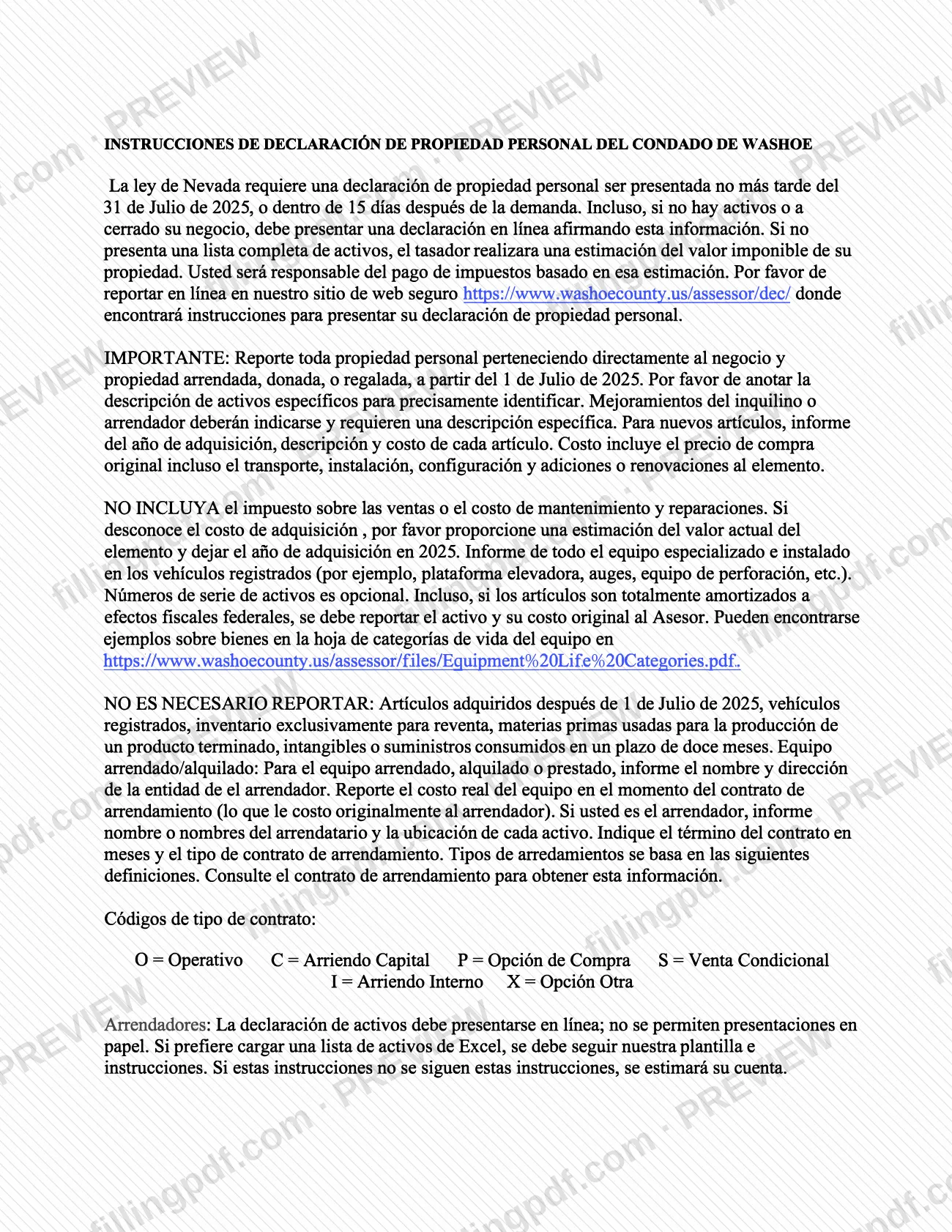
The eDec Instructions Spanish are the Washoe County Assessor's Spanish-language instructions for the personal property declaration that Nevada requires from businesses. They belong to the Washoe County property tax process: the Assessor uses the declaration to value business personal property. You use them to learn what to report as of July 1, 2025, how to value each asset and how to report leased equipment. On this page you can fill out the form online on FillingPDF and download or print the completed PDF; the declaration itself is reported online on the Assessor's website.
Last updated
What is eDec Instructions Spanish – Washoe County, NV?
The eDec Instructions Spanish (Instrucciones de Declaración de Propiedad Personal del Condado de Washoe) are the Washoe County Assessor's Spanish-language instructions for the business personal property declaration that Nevada law requires, filed online through the Assessor's secure website.
The instructions tell you which property to report and how. You report personal property that belongs directly to the business, plus property that is leased, donated or gifted, as of July 1, 2025. Each asset needs a specific description so the Assessor can identify it. For new items you give the year acquired, a description and the cost. Cost is the original purchase price, including transportation, installation, setup and additions or renovations to the item. It does not include sales tax or the cost of maintenance and repairs.
The instructions also cover specialized equipment installed on registered vehicles, fully depreciated assets, leased equipment and the lease type codes. Serial numbers are optional.
If you do not submit a complete list of assets, the Assessor estimates the taxable value of your property, and you are responsible for paying taxes based on that estimate. This page is about the Spanish version of the instructions.
Who needs to file eDec Instructions Spanish – Washoe County, NV?
Businesses in Washoe County that own, lease or hold personal property must file the declaration these instructions describe, because Nevada law requires it. The instructions say this applies even if you have no assets or have closed your business: you must still file an online declaration stating that.
Lessors have their own rule: if you are the lessor, you report the name or names of each lessee and the location of each asset, and you must file the asset declaration online. Paper filings are not permitted.
Lessees (those who rent, lease or borrow equipment) report the name and address of the lessor entity and the actual cost of the equipment when the lease was made, meaning what it originally cost the lessor.
You do not need to report these items:
- items acquired after July 1, 2025;
- registered vehicles (but specialized equipment installed on them is reported);
- inventory held only for resale;
- raw materials used to make a finished product;
- intangibles;
- supplies consumed within twelve months.
When to file eDec Instructions Spanish – Washoe County, NV
Nevada law requires the personal property declaration to be filed no later than July 31, 2025, or within 15 days after the Assessor's demand. The property to report is what you owned, leased, were donated or were gifted as of July 1, 2025; items acquired after that date are not reported.
Filing is required even if you have no assets or have closed your business. If you do not submit a complete list of assets, the Assessor estimates the taxable value of your property and you owe taxes based on that estimate. The instructions give no separate processing time.
Documents you need
- Excel asset list built on the Assessor's template, only if you choose to upload a list instead of entering assets online; the template and instructions must be followed.
- The lease agreement, when you report leased, rented or borrowed equipment: the instructions say to consult it for the lease term and the lease type.
How to fill out eDec Instructions Spanish – Washoe County, NV
Check the filing deadline
Confirm you file no later than July 31, 2025, or within 15 days after the Assessor's demand. File even if you have no assets or closed your business.
Gather property as of July 1, 2025
List personal property that belongs directly to the business, plus leased, donated or gifted property, as of July 1, 2025. Leave out items acquired after that date.
Describe each asset precisely
Give a specific description so the Assessor can identify each item. Tenant or landlord improvements must be indicated and need their own specific description.
Enter year, description and cost
For new items, report the year acquired, the description and the cost. Cost is the original purchase price including transportation, installation, setup and additions or renovations; do not include sales tax or maintenance and repairs.
Estimate unknown acquisition costs
If you do not know the acquisition cost, give an estimate of the item's current value and leave the year of acquisition as 2025.
Add vehicle equipment and depreciated assets
Report specialized equipment installed on registered vehicles, such as lift platforms, booms or drilling equipment. Report fully depreciated assets with their original cost; serial numbers are optional.
Report leased equipment
If you lease, rent or borrow equipment, enter the lessor's name and address and the actual cost to the lessor at the time of the lease. If you are the lessor, enter each lessee's name and each asset's location.
Enter lease term and type code
Enter the lease term in months and the lease type from the contract: O = Operating, C = Capital lease, P = Purchase option, S = Conditional sale, I = Internal lease, X = Other option.
Review, download and file online
Check every entry against the instructions, then download or print the completed PDF from FillingPDF. Report the declaration online through the Assessor's website as described under How to submit.
How to submit eDec Instructions Spanish – Washoe County, NV
The declaration is reported online; the instructions point you to the Washoe County Assessor's secure website, where the filing instructions are posted.
- Online: go to https://www.washoecounty.us/assessor/dec/ and report your personal property there. This applies to businesses with no assets or that have closed, who must file an online declaration saying so.
- Lessors: the asset declaration must be filed online; paper submissions are not permitted.
- Excel upload: if you prefer to upload an Excel asset list, you must follow the Assessor's template and instructions. If you do not, the Assessor will estimate your account.
For examples of property by category, see the equipment life categories sheet at https://www.washoecounty.us/assessor/files/Equipment%20Life%20Categories.pdf. The instructions state no fee. FillingPDF lets you fill out and download the PDF; submission follows the channels above.
Common mistakes to avoid
- Skipping the declaration because you have no assets or closed your business; the instructions say you must still file online and state that.
- Including sales tax or maintenance and repair costs in an item's cost; the instructions say not to include them.
- Leaving out fully depreciated assets; they must still be reported to the Assessor with their original cost.
- Omitting specialized equipment installed on registered vehicles, such as lift platforms, booms or drilling equipment, even though the vehicles themselves are not reported.
- Reporting leased equipment at your own payments instead of the actual cost to the lessor when the lease was made.
- Lessors sending a paper declaration; asset declarations from lessors must be filed online.
- Uploading an Excel list that does not follow the Assessor's template and instructions, which leads the Assessor to estimate the account.
- Reporting items acquired after July 1, 2025, registered vehicles, resale-only inventory or intangibles, which are not required.
Frequently asked questions
What are the eDec instructions in Spanish for Washoe County?
They are the Washoe County Assessor's Spanish-language instructions for the Nevada personal property declaration. They explain what to report as of July 1, 2025, how to state costs, how to report leased equipment and how to file online.
When is the Washoe County personal property declaration due?
No later than July 31, 2025, or within 15 days after the Assessor's demand, according to the instructions. Nevada law requires it. Filing is required even if you have no assets or closed your business.
Do I have to file if I have no assets or closed my business?
Yes. The instructions say you must still file an online declaration stating that you have no assets or have closed the business. Without a complete list, the Assessor estimates the taxable value and you owe taxes on that estimate.
Which property do I not need to report in Washoe County?
Items acquired after July 1, 2025, registered vehicles, inventory held only for resale, raw materials used to make a finished product, intangibles, and supplies consumed within twelve months. Specialized equipment installed on registered vehicles is still reported.
What do the lease type codes O, C, P, S, I and X mean?
O is Operating, C is Capital lease, P is Purchase option, S is Conditional sale, I is Internal lease and X is Other option. Check your lease contract for the type and for the term in months, which you also report.
Can lessors send a paper declaration to the Washoe County Assessor?
No. The instructions say lessors must file their asset declaration online and paper submissions are not permitted. An Excel asset list is accepted only if it follows the Assessor's template and instructions.
Where can I find Washoe County property tax declaration instructions online?
The Assessor publishes these Spanish instructions as a PDF and directs you to report at https://www.washoecounty.us/assessor/dec/. FillingPDF is independent and does not file anything with the county; it only lets you fill out and download the PDF.
Ready to fill out eDec Instructions Spanish – Washoe County, NV?
Fill out eDec Instructions Spanish – Washoe County, NV now