
Form NJ-1040 is the 2025 New Jersey Resident Income Tax Return, issued by the NJ Division of Taxation. Residents use it to report income, claim exemptions, deductions and credits, and work out the tax due or the refund for 2025; part-year residents give their months and days of New Jersey residence on page 1. On this page you can fill out the form online on FillingPDF and download or print the completed PDF. The form itself is published by the Division of Taxation at nj.gov/treasury/taxation.
Last updated
What is NJ-1040?
Form NJ-1040, the 2025 New Jersey Resident Income Tax Return, is the NJ Division of Taxation form on which a resident reports income for 2025, subtracts exclusions, exemptions and deductions, figures New Jersey tax and credits, and ends with a balance due or a refund.
The form runs four pages:
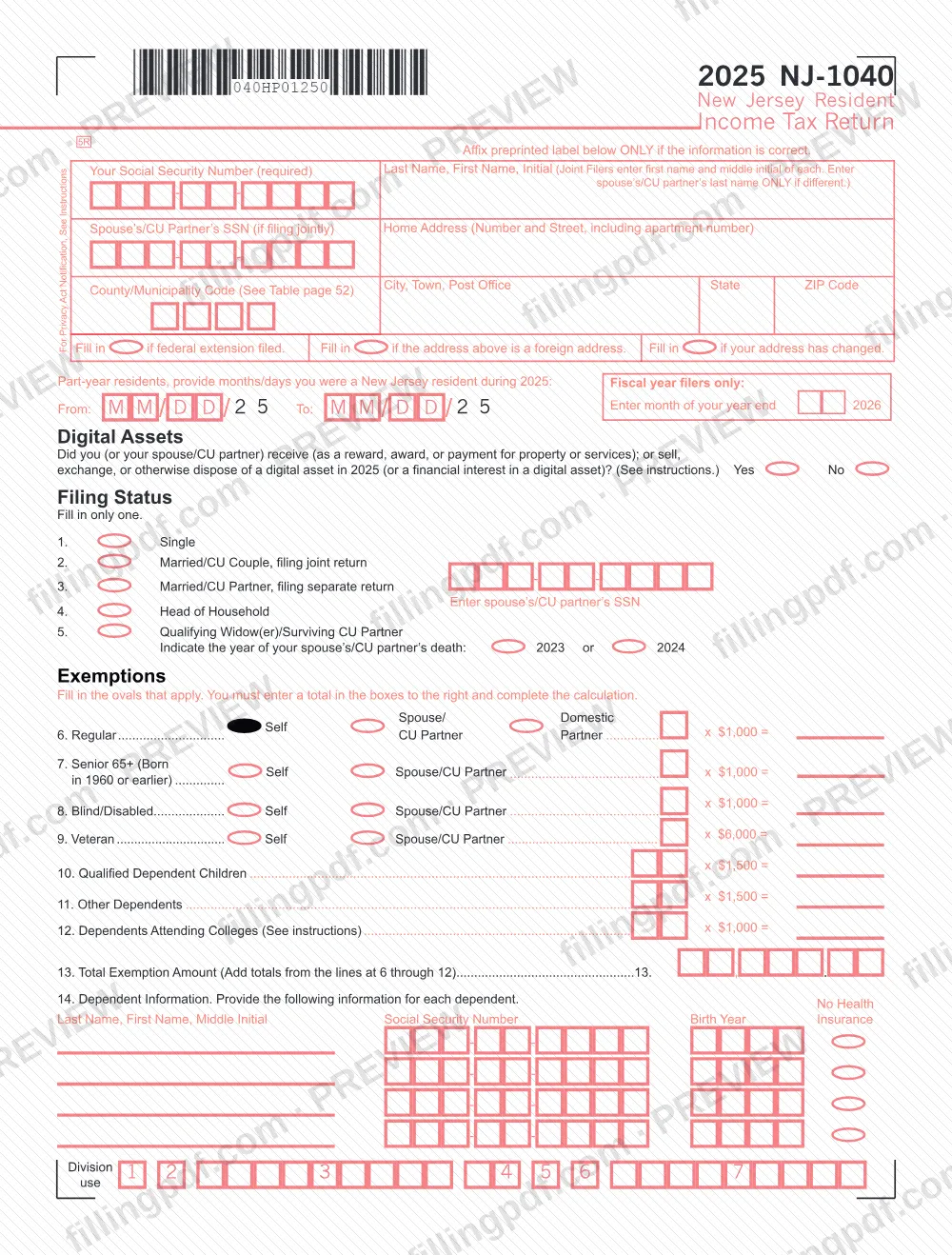
- Page 1: identifying information, the digital assets question, filing status (lines 1 to 5), exemptions (lines 6 to 13) and dependent information (line 14).
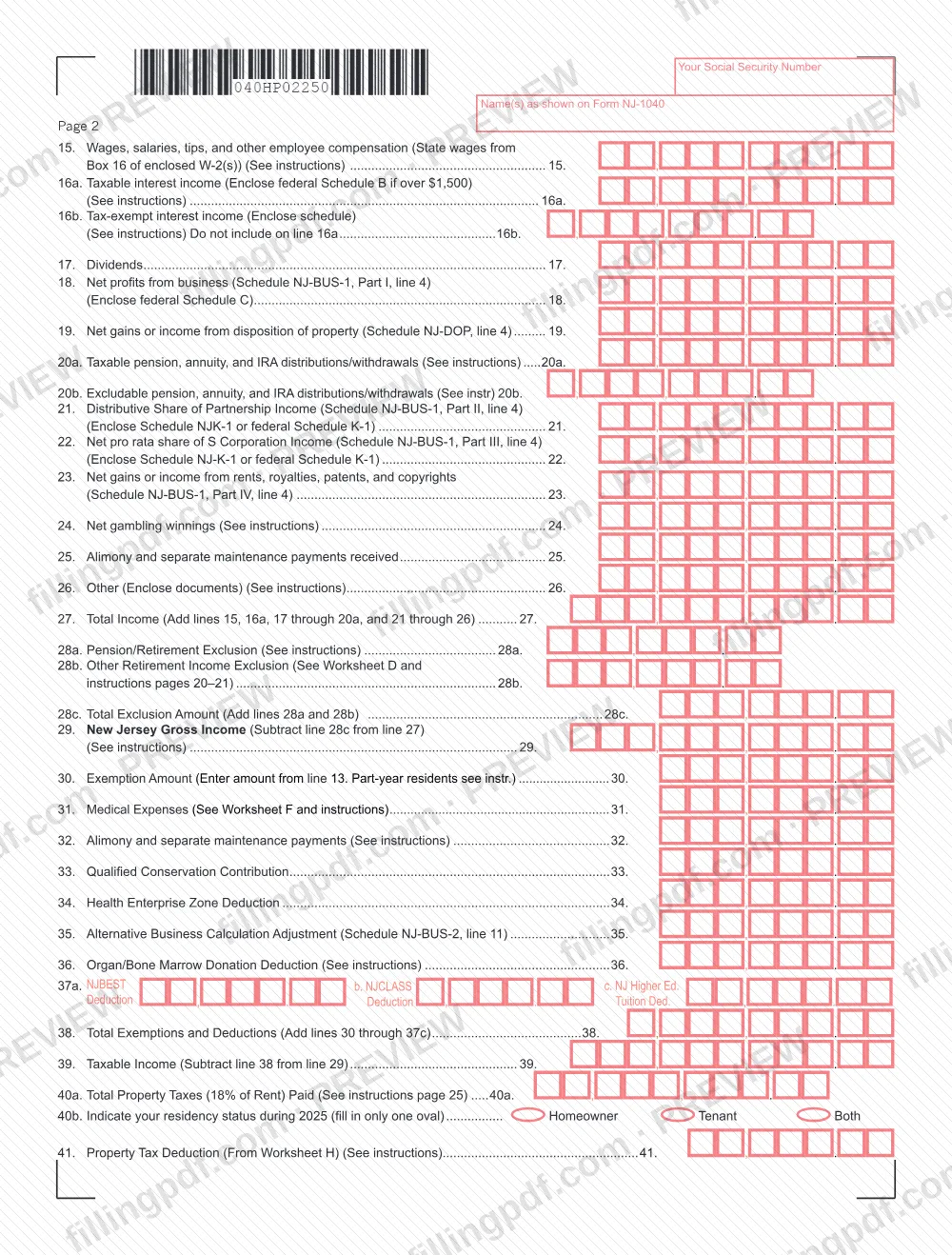
- Page 2: income (lines 15 to 27), exclusions (lines 28a to 28c), New Jersey gross income (line 29), exemptions and deductions (lines 30 to 38), taxable income (line 39) and the property tax deduction (lines 40a to 42).
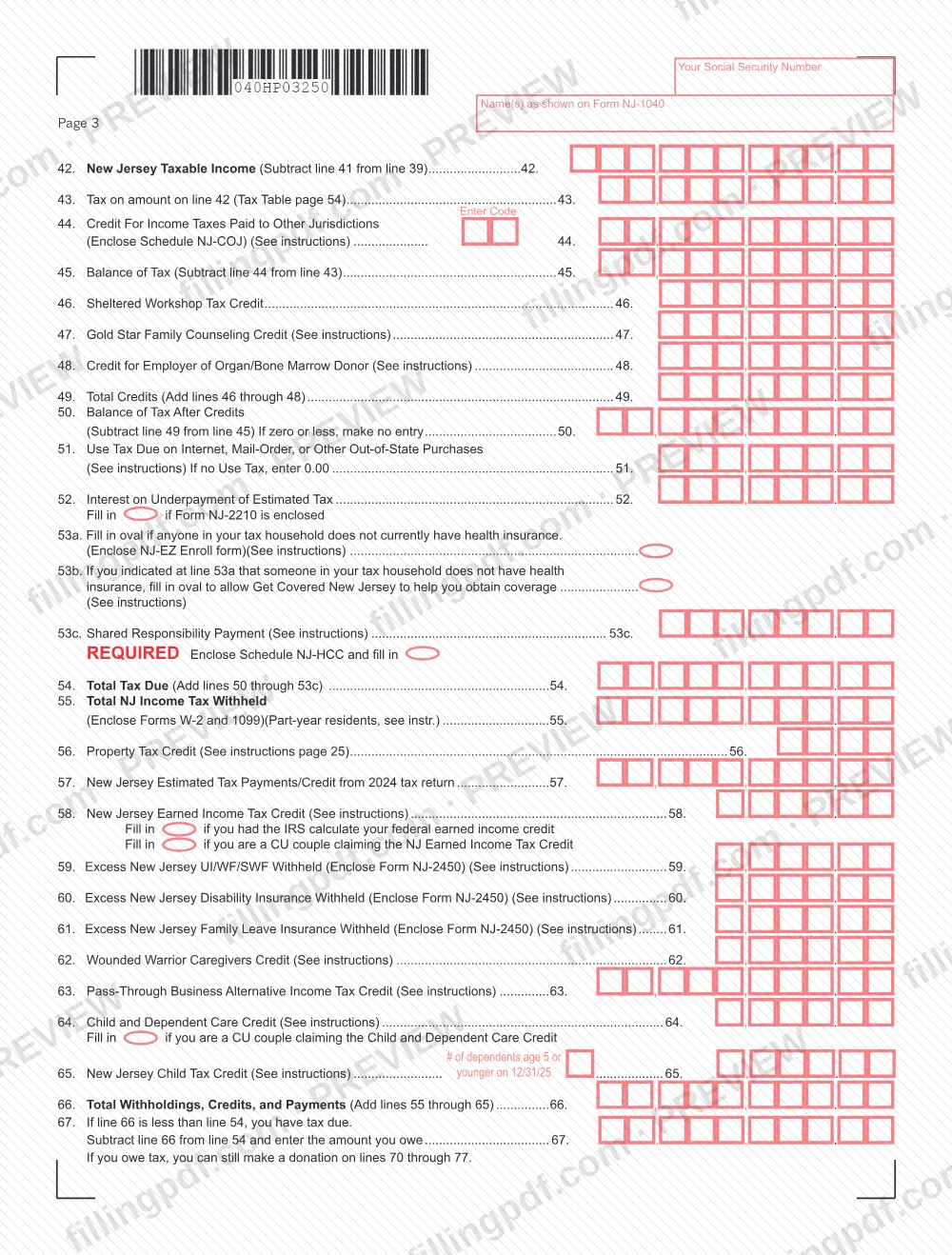
- Page 3: tax (line 43), credits (lines 44 to 50), use tax, estimated-tax interest and health coverage items (lines 51 to 53c), total tax due (line 54), and withholdings, credits and payments (lines 55 to 66).
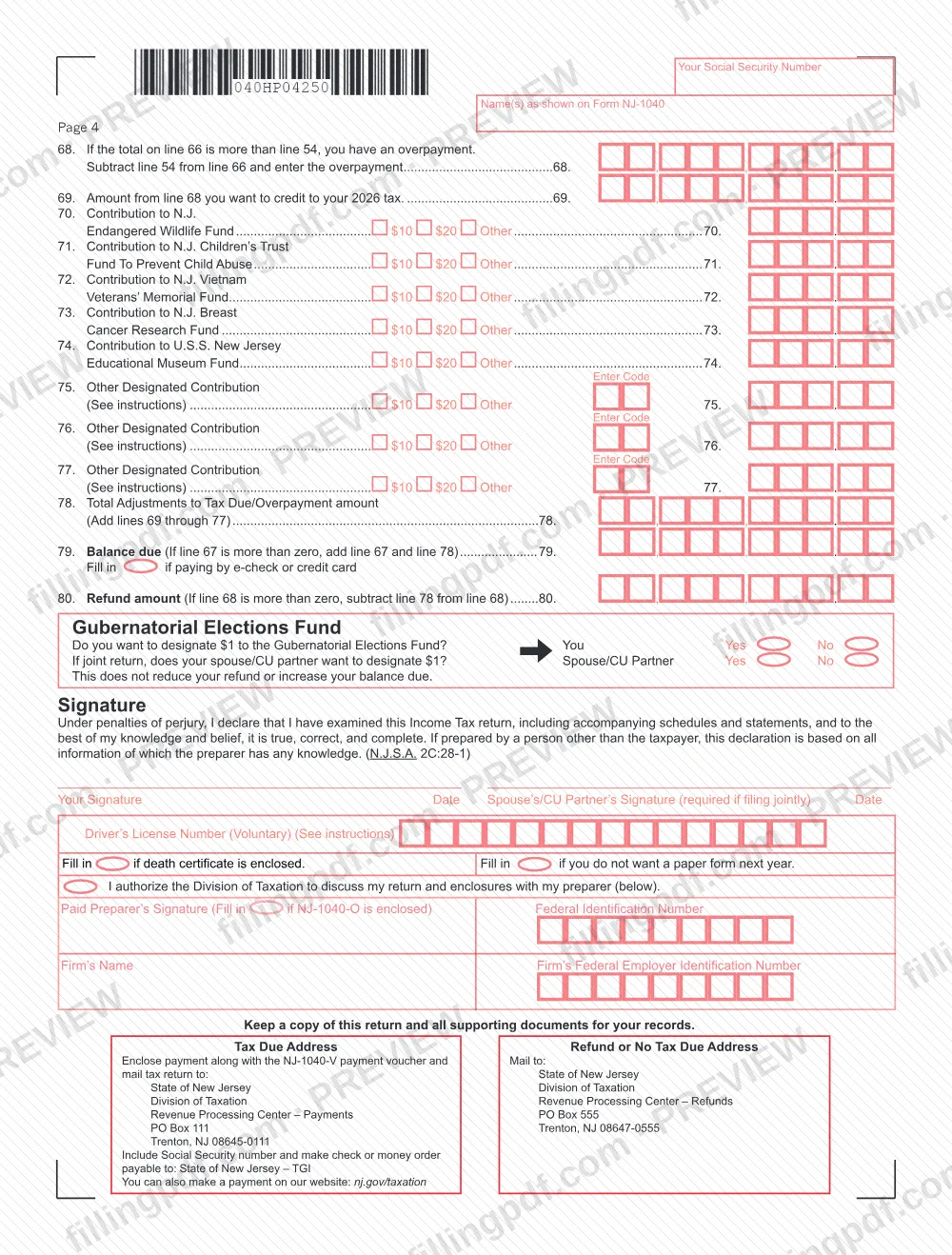
- Page 4: amount owed or overpayment (lines 67 to 69), optional contributions (lines 70 to 77), balance due or refund (lines 79 and 80), the Gubernatorial Elections Fund question, the signature block and the mailing addresses.
Several lines pull figures from schedules, such as Schedule NJ-BUS-1 for business, partnership, S corporation and rental income, Schedule NJ-DOP for gains from the disposition of property, and Schedule NJ-COJ for the credit for income taxes paid to other jurisdictions. The form also points to worksheets D, F and H and to the Division's instructions.
Who needs to file NJ-1040?
Residents of New Jersey file Form NJ-1040 to report their 2025 income to the Division of Taxation. The form is set up for these situations:
- Full-year residents: complete the form without the part-year dates.
- Part-year residents: enter the months and days you were a New Jersey resident during 2025 in the From and To boxes at the top of page 1.
- Fiscal year filers: enter the month your year ends, in 2026, in the box provided.
- Any filing status on the form: Single, Married/CU Couple filing a joint return, Married/CU Partner filing a separate return, Head of Household, or Qualifying Widow(er)/Surviving CU Partner (with the year of the spouse's or CU partner's death, 2023 or 2024). Fill in only one.
On a joint return, both spouses or CU partners sign; the spouse's or CU partner's signature is marked as required if filing jointly. A paid preparer signs in the preparer block, and you can authorize the Division of Taxation to discuss the return and enclosures with that preparer. The form prints no exclusions of its own; the Division's instructions explain eligibility questions.
When to file NJ-1040
You file Form NJ-1040 for tax year 2025, which covers income received in 2025; fiscal year filers enter the month their year ends in 2026. The form prints no due date of its own, so check the Division of Taxation's forms and instructions page at https://www.nj.gov/treasury/taxation/forms/ for the filing deadline.
If you filed a federal extension, fill in the oval at the top of page 1 that reads Fill in if federal extension filed. Part-year residents give their New Jersey residency dates at the top of page 1 and follow the instructions referenced on lines 30 and 55. Line 69 lets you credit part of an overpayment to your 2026 tax.
Documents you need
- Forms W-2 and 1099: enclose them to support the New Jersey income tax withheld on line 55; line 15 takes state wages from Box 16 of the enclosed W-2(s).
- Federal Schedule B: enclose it if taxable interest income on line 16a is over the limit printed on that line.
- A schedule listing tax-exempt interest income: enclose it with line 16b.
- Schedule NJ-BUS-1, with federal Schedule C, for net profits from business on line 18.
- Schedule NJ-DOP for net gains or income from the disposition of property on line 19.
- Schedule NJ-K-1 or federal Schedule K-1 for partnership income (line 21) and S Corporation income (line 22).
- Documents supporting any amount on line 26, Other.
- Schedule NJ-COJ for the credit for income taxes paid to other jurisdictions on line 44.
- Form NJ-2210 if you enclose it for interest on underpayment of estimated tax on line 52.
- NJ-EZ Enroll form if someone in your tax household does not currently have health insurance (line 53a); Schedule NJ-HCC is marked as required with line 53c.
- Form NJ-2450 for excess New Jersey UI/WF/SWF, Disability Insurance or Family Leave Insurance withheld (lines 59 to 61).
- Payment voucher NJ-1040-V, enclosed with payment when you owe tax.
- Form NJ-1040-O, only if it is enclosed with a paid preparer's signature block, and a death certificate if you fill in that oval.
How to fill out NJ-1040
Enter your identifying information
Enter your Social Security Number, last name, first name and initial, the spouse's/CU partner's SSN if filing jointly, your home address and the county/municipality code. Fill in the ovals for a federal extension, a foreign address or a changed address where they apply.
Add residency dates and the digital assets answer
Part-year residents enter the months and days of New Jersey residence in the From and To boxes (MM/DD/25); fiscal year filers enter the month of year end. Then answer the Digital Assets question with Yes or No.
Choose one filing status
Fill in only one of lines 1 to 5. For line 3 enter your spouse's/CU partner's SSN, and for line 5 indicate the year of death, 2023 or 2024.
Complete exemptions and dependents
Fill in the ovals that apply on lines 6 to 12, enter the number claimed and the calculated amount for each, and total them on line 13. On line 14 list each dependent's name, Social Security number and birth year, and mark the No Health Insurance column where it applies.
Report your income
Enter wages on line 15, interest on lines 16a and 16b, dividends on line 17, and business, property, pension, partnership, S corporation, rental, gambling, alimony and other income on lines 18 to 26. Add them on line 27 as the line instructs.
Subtract exclusions to find gross income
Enter the pension/retirement exclusion on line 28a and any other retirement income exclusion on line 28b, add them on line 28c, and subtract line 28c from line 27 on line 29.
Enter exemptions and deductions
Copy line 13 to line 30, then complete lines 31 to 37c (medical expenses, alimony, conservation contribution, Health Enterprise Zone, business adjustment, organ/bone marrow donation, NJBEST, NJCLASS and higher education tuition). Add lines 30 through 37c on line 38 and subtract from line 29 for taxable income on line 39.
Calculate property tax deduction
On line 40a enter total property taxes paid (18% of rent for tenants) and on line 40b fill in Homeowner, Tenant or Both. Enter the deduction from Worksheet H on line 41 and subtract it from line 39 to get New Jersey Taxable Income on line 42.
Figure tax and credits
Enter tax from the Tax Table on line 43 and the credit for taxes paid to other jurisdictions on line 44, with the code. Subtract to get line 45, add credits on lines 46 to 48 into line 49, and subtract line 49 from line 45 on line 50.
Add use tax and health coverage items
Enter use tax on line 51 (0.00 if none) and underpayment interest on line 52, filling in the oval if Form NJ-2210 is enclosed. Answer lines 53a and 53b if they apply, enter any amount on 53c, and add lines 50 through 53c on line 54.
Enter withholdings, credits and payments
Enter tax withheld (line 55), the Property Tax Credit (56), estimated payments (57), and the credits on lines 58 to 65. Add lines 55 through 65 on line 66.
Find the amount owed or overpaid
If line 66 is less than line 54, subtract and enter the amount owed on line 67. If line 66 is more, enter the overpayment on line 68 and the amount to credit to 2026 tax on line 69.
Complete contributions, balance due or refund
Enter any voluntary contributions on lines 70 to 77 and total lines 69 through 77 on line 78. Then complete line 79 (balance due) or line 80 (refund), and answer the Gubernatorial Elections Fund question.
Review, sign and download the PDF
Both spouses/CU partners sign a joint return; a paid preparer completes the preparer block. Check every line, then download or print the completed PDF from FillingPDF and assemble the enclosures described under How to submit.
How to submit NJ-1040
You submit Form NJ-1040 by mail to the Division of Taxation; the form prints one address for returns with tax due and another for returns with a refund or no tax due. Payment can also be made on the Division's website.
- Tax due: enclose your payment with the NJ-1040-V payment voucher and mail the return to State of New Jersey, Division of Taxation, Revenue Processing Center – Payments, PO Box 111, Trenton, NJ 08645-0111. Write your Social Security number on the check or money order and make it payable to State of New Jersey – TGI.
- Refund or no tax due: mail the return to State of New Jersey, Division of Taxation, Revenue Processing Center – Refunds, PO Box 555, Trenton, NJ 08647-0555.
- Online payment: the form says you can also pay at nj.gov/taxation, and an oval on the form is filled in if you pay by e-check or credit card.
Enclose the forms and schedules the lines call for (see the list of enclosures) and keep a copy of the return and supporting documents for your records. FillingPDF lets you fill out and download the PDF; submission follows the channels above.
Common mistakes to avoid
- Using the preprinted label when its information is not correct; the form says to affix it only if the information is correct.
- Filling in more than one filing status oval; the form says to fill in only one.
- Entering exemption totals without completing the multiplication; the form says you must enter a total in the boxes and complete the calculation.
- Leaving off your Social Security number, which the form marks as required, or omitting it from the check or money order.
- Filing a joint return without the spouse's or CU partner's signature, which the form requires if filing jointly.
- Mailing a return with a balance due to the Refunds address (PO Box 555) or a refund return to the Payments address (PO Box 111).
- Sending payment without the NJ-1040-V payment voucher, or writing the check to anyone other than State of New Jersey – TGI.
- Leaving line 51 blank when you have no use tax; the form says to enter 0.00.
- Entering a negative figure on line 50; the form says to make no entry if the result is zero or less.
- Claiming withholding on line 55 without enclosing your Forms W-2 and 1099.
Frequently asked questions
What is the NJ-1040?
The NJ-1040 is the New Jersey Resident Income Tax Return issued by the NJ Division of Taxation. The 2025 edition is used to report 2025 income, claim exemptions, deductions and credits, and figure whether you owe tax or are due a refund.
Can I fill out the NJ-1040 form online?
Yes, you can fill out the NJ-1040 PDF online on FillingPDF and download or print it. FillingPDF is an independent service and does not file the return with the Division of Taxation; you mail it to the addresses printed on the form.
Where do I mail the NJ-1040?
It depends on your result. With tax due, mail the return and payment with Form NJ-1040-V to Division of Taxation, Revenue Processing Center – Payments, PO Box 111, Trenton, NJ 08645-0111. For a refund or no tax due, use Revenue Processing Center – Refunds, PO Box 555, Trenton, NJ 08647-0555.
How do I pay the tax I owe on the NJ-1040?
Enclose a check or money order payable to State of New Jersey – TGI with the NJ-1040-V voucher, and write your Social Security number on it. The form also says you can pay on the Division's website at nj.gov/taxation, and an oval marks e-check or credit card payment.
What do I attach to the NJ-1040?
Enclose your Forms W-2 and 1099 for withholding, plus the schedules each line names, such as Schedule NJ-BUS-1, NJ-DOP, NJ-COJ or NJ-K-1, federal Schedules B, C and K-1 where indicated, and Form NJ-2450 for excess withholding. The full list is under required documents.
Can part-year residents use the NJ-1040?
Yes. The form asks part-year residents to enter the months and days they were New Jersey residents during 2025 in the From and To boxes on page 1 (MM/DD/25), and refers to the instructions for lines 30 and 55.
Do both spouses have to sign a joint NJ-1040?
Yes. The signature block marks the spouse's or CU partner's signature as required if filing jointly, and both signatures are made under penalties of perjury. A paid preparer signs separately in the preparer block.
Can I apply my refund to next year's taxes?
Yes. If line 66 is more than line 54, enter the overpayment on line 68 and the portion you want credited to your 2026 tax on line 69. Line 80 then shows the refund after your line 78 adjustments.
Ready to fill out NJ-1040?
Fill out NJ-1040 now