
The NJ-EZ Enroll Form Easy Enrollment Health Insurance (2024) is a New Jersey Division of Taxation form that lets a filer allow Get Covered New Jersey (GetCoveredNJ), the state's Official Health Insurance Marketplace, to check whether the household qualifies for affordable health coverage. It is tied to the state tax return: its waiver applies to a shared responsibility payment assessed on your 2024 NJ-1040. On this page you can fill out the form online on FillingPDF and download or print the completed PDF; the official PDF is published by the NJ Division of Taxation at nj.gov.
Last updated
What is NJ-EZ Enroll?
NJ-EZ Enroll Form Easy Enrollment Health Insurance (2024) is a New Jersey Division of Taxation form on which a filer gives Get Covered New Jersey permission to check whether the household qualifies for affordable health coverage.
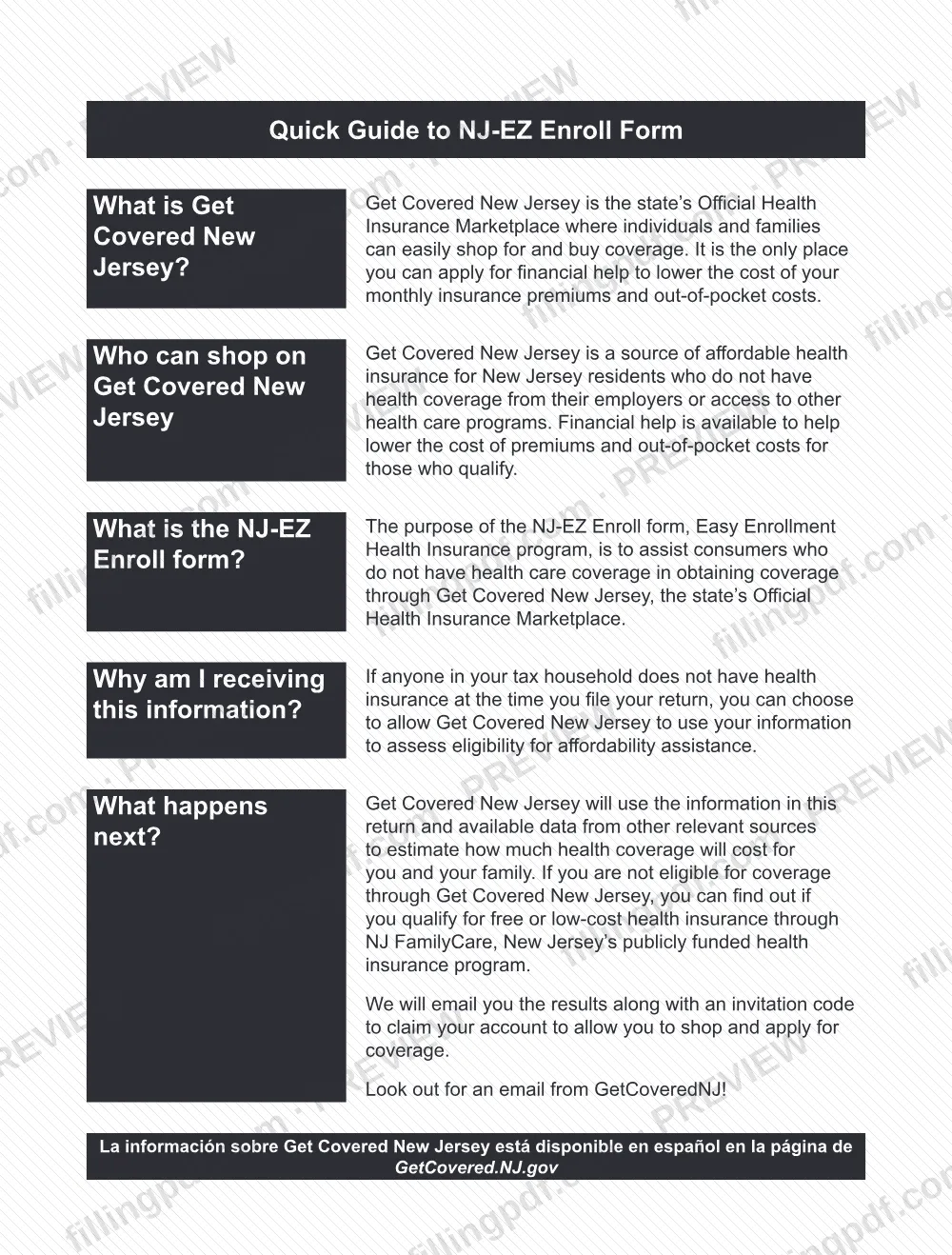
The form belongs to the Easy Enrollment Health Insurance program. Its purpose, as the form's Quick Guide states, is to help people who do not have health care coverage get it through Get Covered New Jersey (GetCoveredNJ), the state's Official Health Insurance Marketplace and the only place to apply for financial help with monthly premiums and out-of-pocket costs.
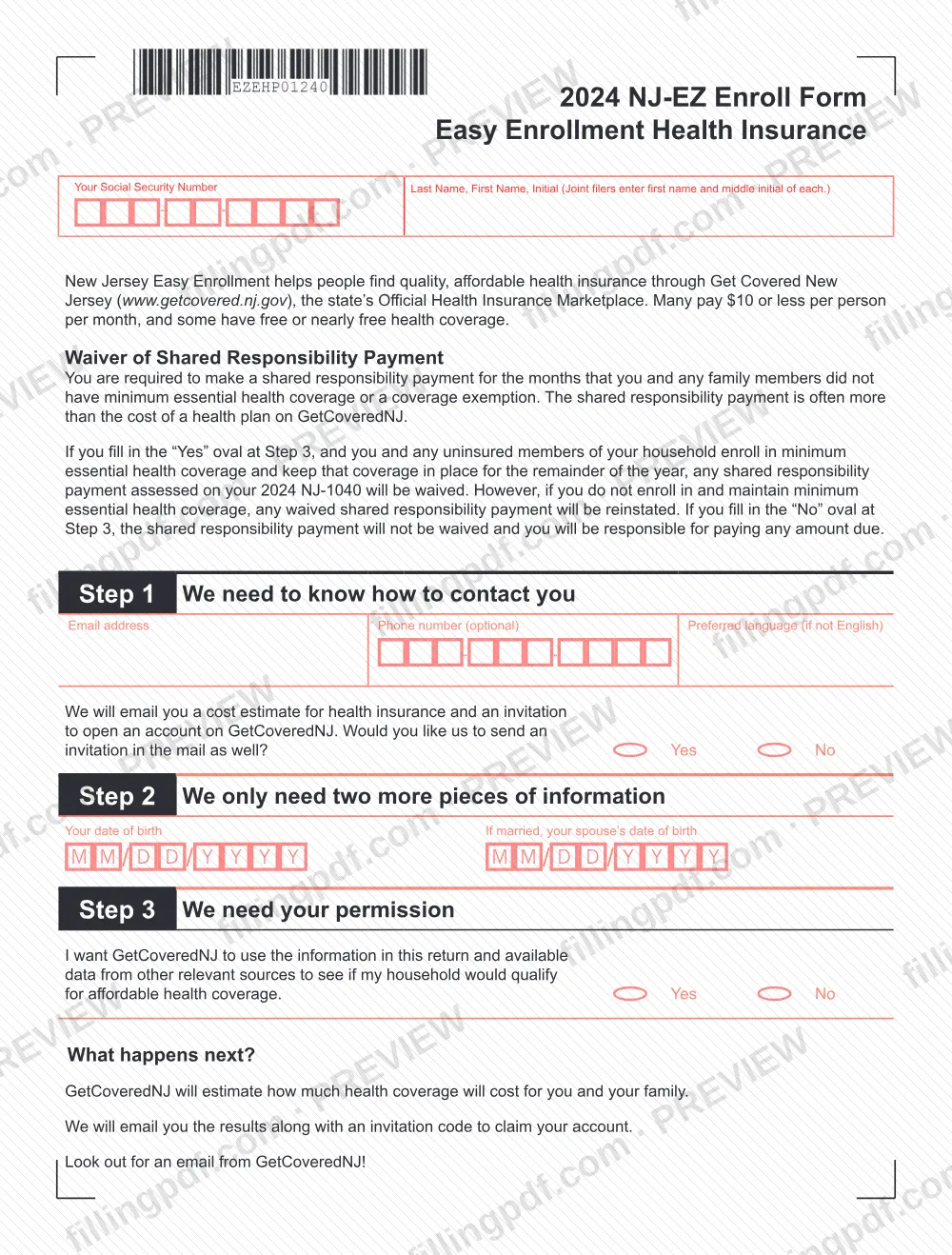
It has three steps: contact details (Step 1), the date of birth of the filer and, if married, the spouse (Step 2), and a Yes or No permission oval (Step 3). With permission, GetCoveredNJ uses the information in the return and available data from other relevant sources to estimate what coverage would cost, then emails the results with an invitation code to claim an account. A household that is not eligible through GetCoveredNJ can find out whether it qualifies for NJ FamilyCare, the state's publicly funded health insurance program.
The form also carries a Waiver of Shared Responsibility Payment notice. It is not the income tax return: the NJ-1040 is the return, and this form refers to it. Information about GetCoveredNJ is available in Spanish at GetCovered.NJ.gov.
Who needs to file NJ-EZ Enroll?
The main group is New Jersey tax filers in whose tax household anyone does not have health insurance at the time the return is filed. The form says these filers can choose to allow GetCoveredNJ to use their information to assess eligibility for affordability assistance. Using the form is a choice: Step 3 lets you answer Yes or No.
Other points the form states:
- GetCoveredNJ is described as a source of affordable health insurance for New Jersey residents who do not have coverage from their employers or access to other health care programs.
- Joint filers enter the first name and middle initial of each spouse at the top, and a married filer gives the spouse's date of birth in Step 2.
- Anyone who owes a shared responsibility payment for months without minimum essential health coverage or a coverage exemption may want the waiver described on the form, which depends on answering Yes at Step 3 and then enrolling and staying covered.
The form names no one else who may sign or complete it for you and lists no exclusions.
When to file NJ-EZ Enroll
Complete the form when you file your return and anyone in your tax household has no health insurance at that time; that is the situation the form says it is meant for. It prints no separate due date.
The waiver of a shared responsibility payment assessed on your 2024 NJ-1040 depends on what you do afterward. If you fill in the Yes oval at Step 3, and you and any uninsured household members enroll in minimum essential health coverage and keep it in place for the remainder of the year, the payment is waived. If you do not enroll in and maintain that coverage, the waived payment is reinstated. After you give permission, GetCoveredNJ emails the cost estimate and an invitation code; the form states no processing time.
How to fill out NJ-EZ Enroll
Enter your Social Security number
At the top, enter your Social Security Number in the boxes provided.
Write your name
Enter your last name, first name and middle initial. On a joint return, enter the first name and middle initial of each spouse.
Give your email address
In Step 1, enter the email address where GetCoveredNJ will send your cost estimate and the invitation to open an account.
Add phone and preferred language
In Step 1, enter a phone number if you wish (it is optional) and your preferred language if it is not English.
Choose a mailed invitation
Still in Step 1, fill in Yes or No to say whether you also want an invitation sent in the mail.
Enter dates of birth
In Step 2, write your date of birth and, if you are married, your spouse's date of birth, in the M M/D D/Y Y Y Y boxes.
Give or withhold permission
In Step 3, fill in Yes if you want GetCoveredNJ to use the information in the return and other relevant data to check your household's eligibility. Yes is also the answer that makes the shared responsibility payment waiver possible.
Review and download the PDF
Check the name, Social Security number, email address and Step 3 answer. Download or print the completed PDF from FillingPDF and submit it with your return as described under How to submit.
How to submit NJ-EZ Enroll
The NJ-EZ Enroll Form names no separate mailing address, portal or appointment process. It refers to the information "in this return," so it goes with your New Jersey return through the filing channels the NJ Division of Taxation provides for that return. Forms and instructions are listed at https://www.nj.gov/treasury/taxation/forms/.
What happens after you answer Yes at Step 3:
- GetCoveredNJ estimates the cost of coverage for you and your family.
- It emails you the results with an invitation code to claim your account.
- If you check Yes on the mail question in Step 1, an invitation is also sent by mail.
Watch for an email from GetCoveredNJ, so enter an email address you check. FillingPDF lets you fill out and download the PDF; submission follows the agency's channels above.
Common mistakes to avoid
- Filling in the No oval at Step 3 and expecting a waiver; the form says the shared responsibility payment is then not waived and you must pay any amount due.
- Answering Yes at Step 3 but not enrolling in minimum essential health coverage, or not keeping it for the rest of the year; the waived payment is reinstated.
- Leaving out the email address in Step 1, which is how GetCoveredNJ sends the cost estimate and invitation code.
- Leaving out your spouse's date of birth in Step 2 when you are married.
- Entering only one spouse's name on a joint return; joint filers enter the first name and middle initial of each.
- Writing dates of birth in a layout other than the printed M M/D D/Y Y Y Y boxes.
- Treating the form as the tax return; it refers to the NJ-1040 but does not replace it.
- Skipping the Preferred language box when you want contact in a language other than English.
Frequently asked questions
What is the NJ-EZ Enroll Form?
The NJ-EZ Enroll Form is the NJ Division of Taxation's Easy Enrollment Health Insurance form. On it a filer gives Get Covered New Jersey permission to use the return's information to check whether the household qualifies for affordable health coverage.
Is the NJ-EZ Enroll Form the same as the NJ-1040?
No. The NJ-1040 is the New Jersey income tax return. The NJ-EZ Enroll Form is a separate form that refers to it: a shared responsibility payment assessed on the 2024 NJ-1040 can be waived if you answer Yes at Step 3 and then enroll in and keep coverage.
Do I have to complete the NJ-EZ Enroll Form?
No. The form says that if anyone in your tax household has no health insurance when you file, you can choose to let GetCoveredNJ use your information. Step 3 offers Yes and No ovals, and No means the payment is not waived.
Will filling in Yes at Step 3 waive my shared responsibility payment?
Only if you also act. Any payment assessed on your 2024 NJ-1040 is waived if you and any uninsured household members enroll in minimum essential health coverage and keep it for the rest of the year. Without that coverage, the waived payment is reinstated.
What happens after I give permission on the NJ-EZ Enroll Form?
GetCoveredNJ estimates what coverage will cost for you and your family and emails you the results with an invitation code to claim your account. Step 1 also asks whether you want an invitation by mail. If you are not eligible there, you can check NJ FamilyCare.
Can I fill out the NJ-EZ Enroll Form online?
You can fill out the PDF online on FillingPDF and download or print it. FillingPDF is an independent service and does not file the form or send it to the state; it goes with your return through the NJ Division of Taxation's channels.
Is the phone number required on the NJ-EZ Enroll Form?
No. The form marks the phone number in Step 1 as optional. The email address is the contact detail GetCoveredNJ uses to send your cost estimate and invitation code, so give one you check.
Is Get Covered New Jersey information available in Spanish?
Yes. The form states that information about Get Covered New Jersey is available in Spanish at GetCovered.NJ.gov. In Step 1 you can also enter a preferred language if it is not English.
Ready to fill out NJ-EZ Enroll?
Fill out NJ-EZ Enroll now